











 Obkio Blog


 Subscribe
Table of Contents
Table of Contents
Your phone rings. A user is complaining that “the network was slow" or "had issues around 3pm." You run a speed test. Green across the board. No active alerts. Everything looks fine.
So what do you tell them?
If you don't have a continuous, time-stamped record of what your network was doing at 3pm, you can't tell them anything, not with confidence. You're stuck choosing between "I didn't see anything" and "I'll keep an eye on it," neither of which fixes the problem or satisfies the user.
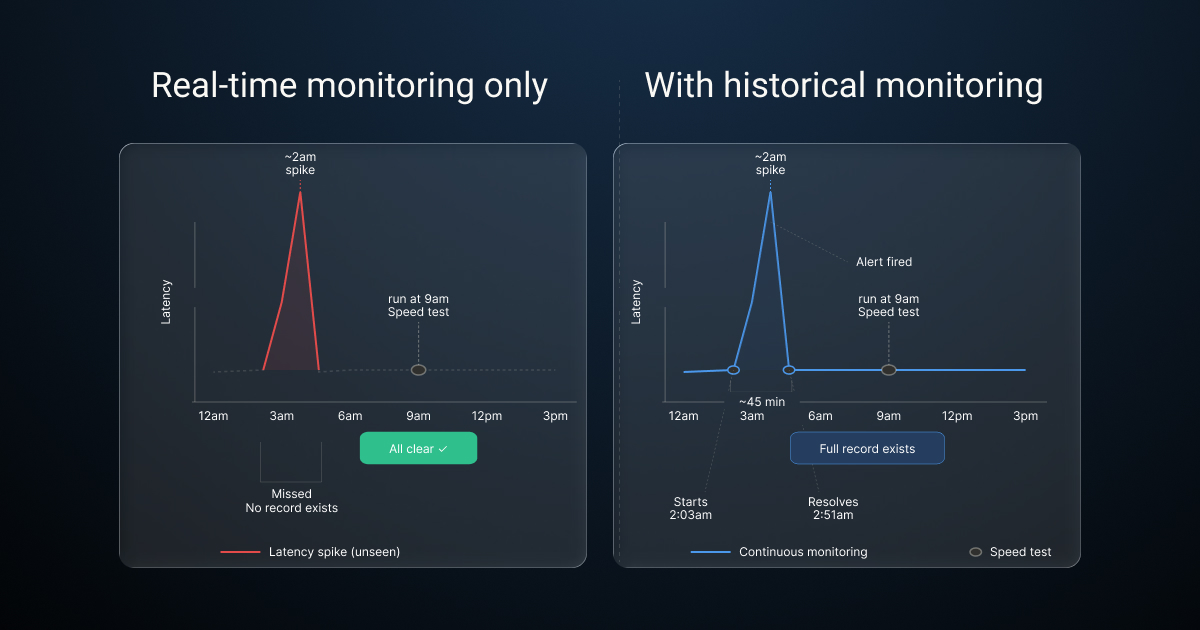
This is the core limitation of point-in-time testing. Speed tests and manual pings only show you what your network looks like right now. Most network problems, like packet loss, latency spikes, and jitter, are intermittent. They spike during peak hours, specific workloads, or overnight maintenance windows. If your test doesn't overlap with the problem window, you get a false "all clear."
Without a continuous, time-stamped record of network performance, you're troubleshooting blindfolded, relying on user complaints and guesswork instead of data.
That's exactly why historical network monitoring data isn't a nice-to-have. It's the foundation of effective network monitoring.
What Is Historical Network Data? 
Historical network data is a continuous, time-stamped record of network performance metrics (latency, packet loss, jitter, bandwidth utilization, throughput and more) collected at regular intervals across all monitored network paths and devices.
It's not the same as real-time monitoring. Real-time monitoring tells you what's happening right now. Historical data tells you what happened, when it happened, and how often, giving you the full picture instead of just the current frame.
Some of the key network metrics you should be collecting historical data for include:
- Latency — round-trip time per hop across monitored paths
- Packet loss — percentage of probes lost per segment
- Jitter — variance in latency over time (especially relevant for VoIP and video)
- Bandwidth utilization — throughput on key interfaces via SNMP polling
- Speed test results — upstream/downstream measurements at scheduled intervals
- Traceroute paths — hop-by-hop path data over time, including route changes
- Application performance metrics — including VoIP MOS scores and Microsoft Teams call quality
- Device health metrics — CPU load, memory, and interface errors via SNMP agents
The distinction matters. Real-time monitoring catches active incidents. Historical data is what you use to understand patterns, prove problems, and find root causes after the fact. You need both.

Why Interval and One-Time Tests Aren't Enough for Network Monitoring
One-time speed tests, manual pings, and interval-based checks can't give you a complete picture of network performance, because most real-world network problems don't happen on cue. They're intermittent problems, time-bound, and often tied to the specific conditions of your business environment. If your test doesn't land in the right window, you get a clean result and a frustrated user.
The Problem with Point-in-Time Network Testing
Speed tests, one-off pings, and manual traceroutes are episodic. They capture a single moment in time.
In a business network, the conditions that cause performance problems are rarely present around the clock. Latency spikes during peak hours when everyone is on a video call. Packet loss appears during scheduled backup windows. ISP congestion hits at end-of-business when upstream traffic is heaviest. Remote users experience degraded VoIP quality during their morning standup, and it's gone by the time they raise a ticket.
If your test doesn't land inside that window, you get a clean result and zero insight into what your users actually experienced.
That's the problem with running a speed test after a complaint. By the time you get to it, the problem is usually gone. Point-in-time testing doesn't give you a record. It gives you a snapshot of a moment that may have nothing to do with the moment that caused the issue. For distributed business networks with multiple sites, remote workers, and cloud dependencies, that gap is even wider — there are simply too many paths and too many variables to catch intermittent issues manually.
The Problem with Alert-Only Network Monitoring
Alerts tell you that something broke. Most network performance monitoring tools stop there: they fire a notification, log the event, and leave the investigation entirely to you. They won't tell you why it happened, how long it lasted, which segment was responsible, or whether this is the third time it's occurred this month. That context lives in historical data, and most tools either don't collect it at a useful resolution or don't surface it alongside the alert.
In practice, this creates a familiar problem: your alert fires, the issue resolves itself, and by morning, you have an incident log with no root cause. Your users know something happened. You don't know if it was the ISP, a specific network segment, a device, or a one-off anomaly. Without the performance data surrounding the alert (the before, the during, and the after), you're still guessing.
Some tools do handle this better, pairing alerts with historical context so you can see exactly what the network was doing before and after the threshold was crossed. We'll cover how that works in practice later in the article. For MSPs managing multiple client networks, that distinction matters significantly. Alert-only monitoring across dozens of sites means constantly reacting to notifications without the historical context to determine whether a client's recurring complaint is a real pattern or a coincidence. You can't triage effectively, and you can't report meaningfully on what happened and why.
What Continuous Network Monitoring Changes
Continuous network monitoring (probing every few seconds, around the clock) builds a complete, queryable performance record across every monitored path. Every metric. Every segment. Every minute of the day.
That applies whether you're monitoring a single HQ-to-branch connection, tracking remote user network performance across a distributed workforce, or managing dozens of client sites as an MSP. Continuous monitoring doesn't miss windows. It doesn't need someone to run a test. It's always collecting, so when a user reports a problem, the data is already there.
That record is what historical network data is made of. And it's what makes the difference between reactive firefighting and proactive network management.
Learn how to troubleshoot intermittent Internet connection issues with Network Monitoring. Find & fix the cause of intermittent Internet issues.
Learn more

The Key Benefits of Historical Network Monitoring Data
Here's what that looks like in practice and why each of these benefits matters for the teams managing modern business networks.
Historical Data Benefit #1: Establish a Network Performance Baseline
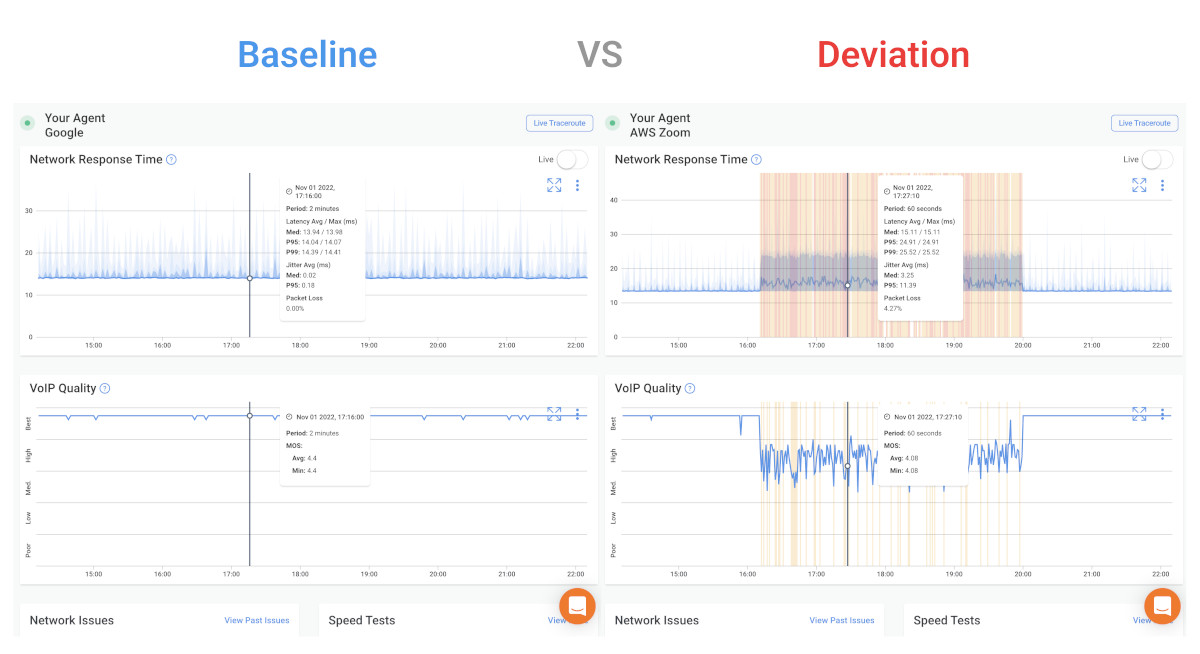
You can't know if something is wrong unless you know what normal looks like.
Historical data lets you define a network baseline for latency, packet loss, jitter, and bandwidth on each network segment. Once you have a baseline, anomaly detection becomes meaningful. A 5ms latency increase might be noise on one link and a significant degradation signal on another.nd without a baseline, you can't tell the difference.
Baselines also give you something concrete to present to stakeholders. "Our average latency on this path is 12ms, and it spiked to 90ms for three hours on Tuesday" is a far more useful statement than "the network was slow."

Learn what a network baseline is, why it’s essential for monitoring and optimizing performance, and easy steps to establish your baseline.
Learn more
With Obkio, monitoring agents begin collecting data as soon as they're deployed by exchanging synthetic traffic at 500ms intervals across every configured monitoring session. From day one, you're building a baseline. Obkio's goal is precisely this: to perform continuous performance tests to establish a historical baseline and identify events that exceed acceptable thresholds, so you have the data when you need it.
Historical Data Benefit #2: Identify Patterns and Recurring Network Issues
Some network problems aren't one-off events. They're patterns.
- Daily congestion at 5pm.
- Packet loss that only appears on Monday mornings.
- Bandwidth spikes every Tuesday night during backup windows.
Without historical data, each incident looks like a new problem, so you start from scratch every time. With historical data, you can see the pattern and fix the underlying cause instead of treating the symptom.
This is also where capacity planning shifts from reactive to data-driven. If bandwidth utilization has been climbing 8% month over month, you can see it in your historical data before it becomes an outage. You can plan ahead instead of scrambling after the fact.
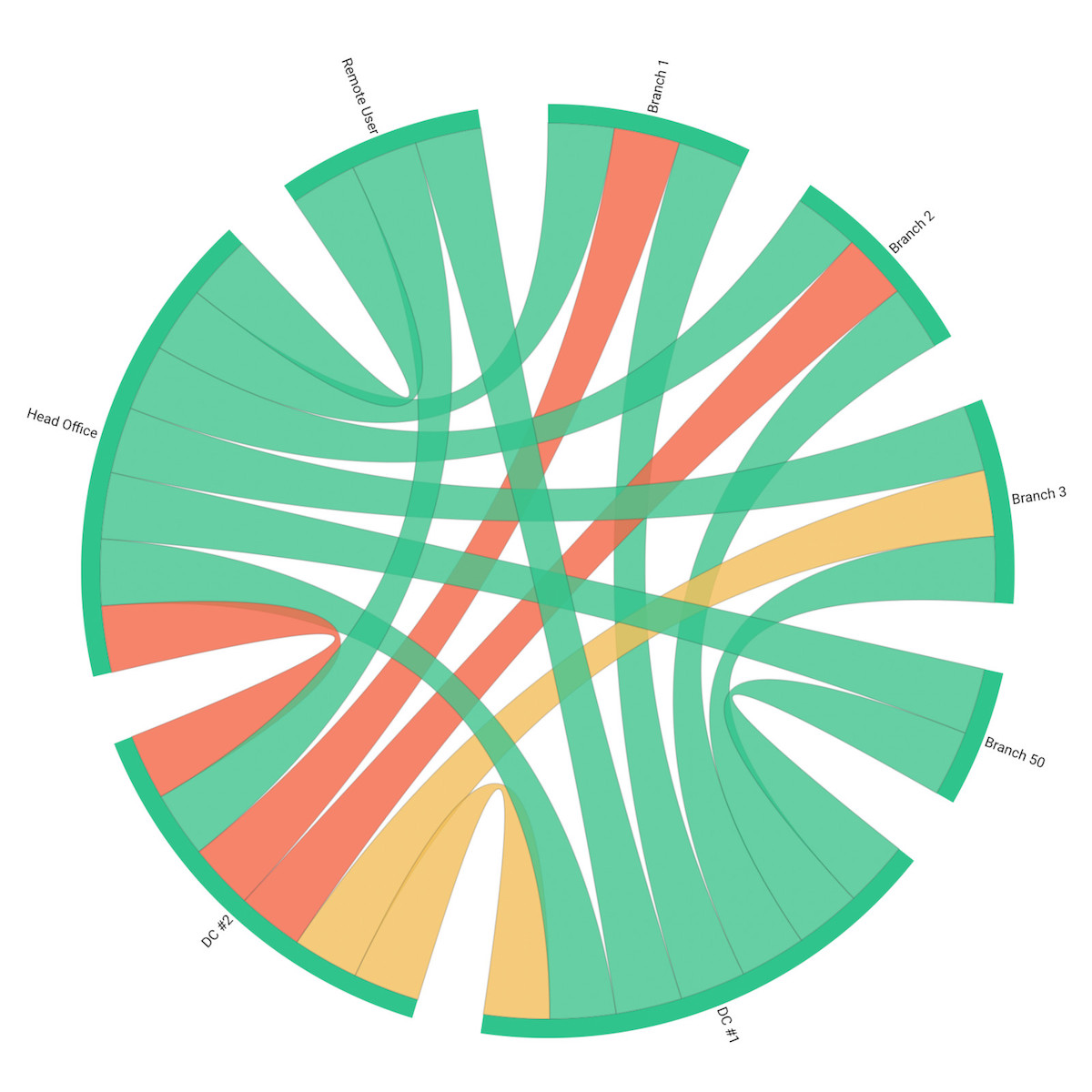
Obkio's Chord Diagram gives you a real-time visual overview of all network paths. From there, you can drill down into historical performance details to validate whether you're looking at a one-time event or a recurring problem. That context matters. It changes how you respond.
Historical Data Benefit #3: Accelerate Root Cause Analysis of Network Issues
When something goes wrong, the first question is: what changed?
Historical network data lets you scroll back to when the problem started and trace the sequence of events.
- Did latency spike before packet loss appeared, or after?
- Did the issue start at the first hop or deep in the network path?
- Was it isolated to one site or affecting multiple locations simultaneously?
That sequence is often the difference between finding the actual root cause and spending hours chasing symptoms.
Obkio's Visual Traceroute tool runs continuously in the background — no manual triggers required. With up to six months of traceroute history at one-minute granularity, you can look back in time, correlate path changes with performance degradation, and see exactly where and when an issue occurred.
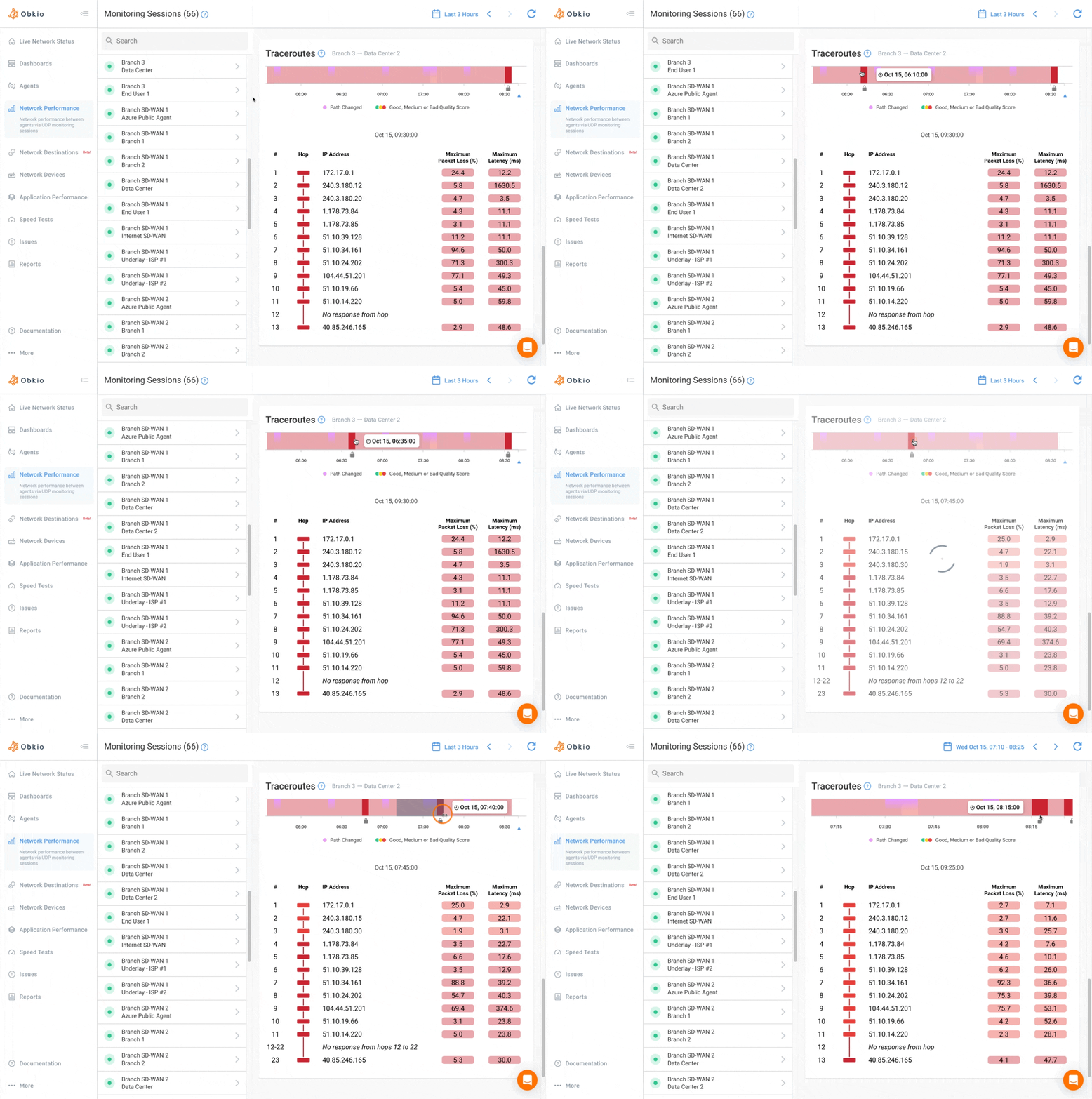
And with Obkio Insight (Obkio's automatic diagnostics platform) that correlation will happen automatically. Instead of manually cross-referencing monitoring sessions, traceroutes, SNMP data, and speed test results, Insight will surface probable causes for you. That's the direction the platform is heading: from visibility to automated diagnosis.
Historical Data Benefit #4: Prove Network Issues to ISPs, Vendors, and Stakeholders
"The network was slow" is not a convincing argument when you're talking to an ISP or justifying infrastructure spend.
Time-stamped performance records with affected metrics, duration, and network path data are. Historical data turns a complaint into a case, one that ISPs and vendors can't easily dismiss.
Obkio's reporting features let you generate shareable reports covering network metrics, performance degradation events, and specific incidents — for any period from a few hours to a full month. Reports can be exported as PDF, Excel, or JSON, shared via public URL (no Obkio account required for recipients), sent directly by email, or scheduled to run automatically on a daily, weekly, or monthly basis. When you need to escalate to your ISP, you're not sending screenshots, you're sending data.

Discover the art of crafting dynamic and intuitive network assessment reports with real-time dashboards and graphs using Network Monitoring tools.
Learn more
Historical Data Benefit #5: Support SLA Monitoring and Compliance
For businesses managing SLAs, whether you're an enterprise holding a provider accountable or an MSP delivering services to clients, historical data is the audit trail.
It enables uptime calculations, performance reporting, and SLA breach documentation based on actual measured data, not best-effort estimates. Without it, SLA disputes come down to "he said, she said." With it, you have timestamps, metrics, and duration.
For MSPs managing multiple client sites, this is especially valuable. Obkio's multi-tenant architecture lets MSPs monitor every client network from a single platform, with historical data per site. SLA reporting becomes scalable, you're not manually pulling data from different tools; you're generating reports per client on demand.

How Long Should You Retain Historical Network Monitoring Data?
There's no universal answer. Data retention needs depend on your use case, your compliance requirements, and how far back you typically need to go.
As a general framework for most enterprise networks:
- 24–72 hours — sufficient for active troubleshooting of current or recent incidents
- 30–90 days — practical minimum for pattern identification and capacity planning
- 6–12 months — typically required for SLA documentation and compliance reporting
- 1–2+ years — long-term trend analysis and infrastructure planning; reveals growth patterns that shorter windows miss
Obkio retains up to 36 months of historical data (6 months on Starter and Basic plans, and up to 36 months on Premium), stored securely in the cloud — with no local storage limitations. You access your data from anywhere, without worrying about retention gaps costing you visibility when you need it most.

What Metrics Should Be Stored in Historical Network Monitoring Data?
A well-structured historical network dataset goes well beyond uptime and availability. It should capture every metric that affects end-user experience (continuously, across every monitored path) so that when something goes wrong, you have the full picture, not just a fragment of it.
Not all monitoring tools store the same data, at the same resolution, for the same duration. Some only retain summary-level averages, which smooth out the spikes you actually need to see. Others silo data per tool or per feature, forcing you to manually correlate information across dashboards when you're trying to troubleshoot under pressure. What you need is granular, continuous, unified data, that’s stored long enough to be useful.
At a minimum, your historical dataset should include:
1. Latency for Historical Data Network Troubleshooting
Averages aren't enough; you need per-minute granularity to catch spikes that get buried in hourly rollups. In historical data, latency is your timeline anchor abd it's usually the first metric to show a deviation. When troubleshooting, look at when latency started climbing and on which hop. If it spiked at a specific time and returned to baseline, that window is where you start correlating with other metrics and events.
2. Packet Loss for Historical Data Network Troubleshooting
Even 1–2% sustained packet loss can devastate VoIP call quality and application performance in ways users notice immediately. Historically, packet loss is one of the clearest indicators of a real problem versus normal variance.
During troubleshooting, compare when loss appeared against your latency timeline, if loss follows a latency spike at the same hop, you've narrowed the segment. If loss appears without a latency change, you may be looking at a device or interface issue rather than congestion.
3. Jitter for Historical Data Network Troubleshooting
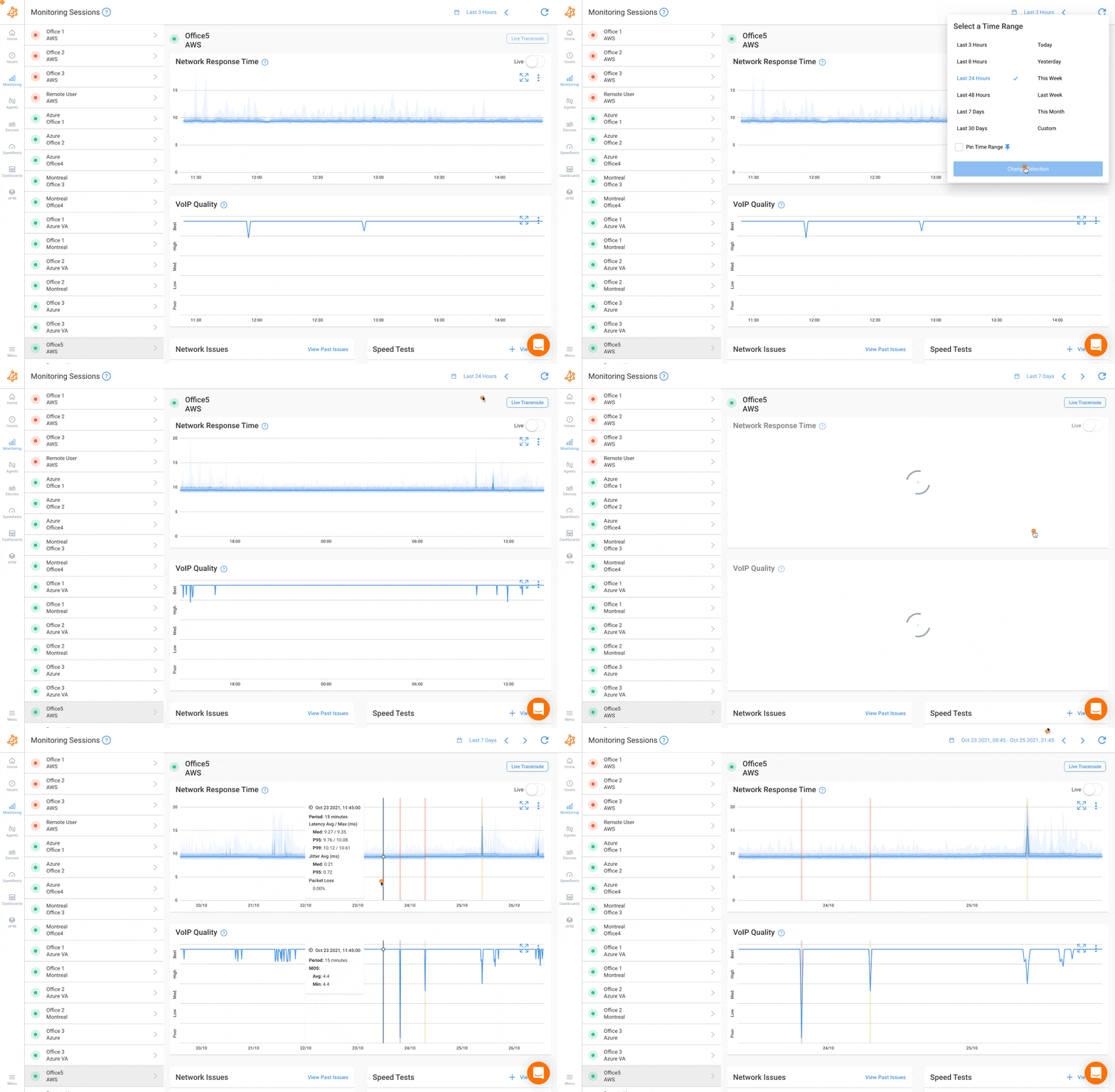
Jitter is often overlooked until VoIP calls start breaking up or video freezes. It's one of the first metrics to degrade before users start complaining. In historical data, jitter tells you how stable a path was during a given window — not just whether it was fast. When troubleshooting audio or video quality complaints, pull jitter history for the session window and correlate it against MOS score. You'll often see jitter increase before call quality drops below acceptable thresholds.
4. Bandwidth Utilization for Historical Data Network Troubleshooting
Measuring bandwidth utilization is essential for identifying congestion, bottlenecks, and whether a link is being consistently pushed toward capacity. Historically, bandwidth data reveals whether your infrastructure is trending toward saturation; a gradual month-over-month climb is a capacity planning signal that wouldn't be visible from any single data point. During troubleshooting, bandwidth history can confirm whether a latency spike coincided with a utilization peak, which points to congestion rather than a device or routing issue.
5. Speed Test Results for Historical Data Network Troubleshooting
Speed Tests are useful for validating ISP-delivered bandwidth against contracted SLAs and catching gradual degradation over time. In a historical context, scheduled speed tests are your ISP accountability layer. They show you whether the bandwidth you're paying for is actually being delivered, consistently, across different times of day. During troubleshooting, a speed test result that drops well below baseline during the problem window is one of the cleanest pieces of evidence you can bring to an ISP conversation.
6. Traceroutes for Historical Data Network Troubleshooting
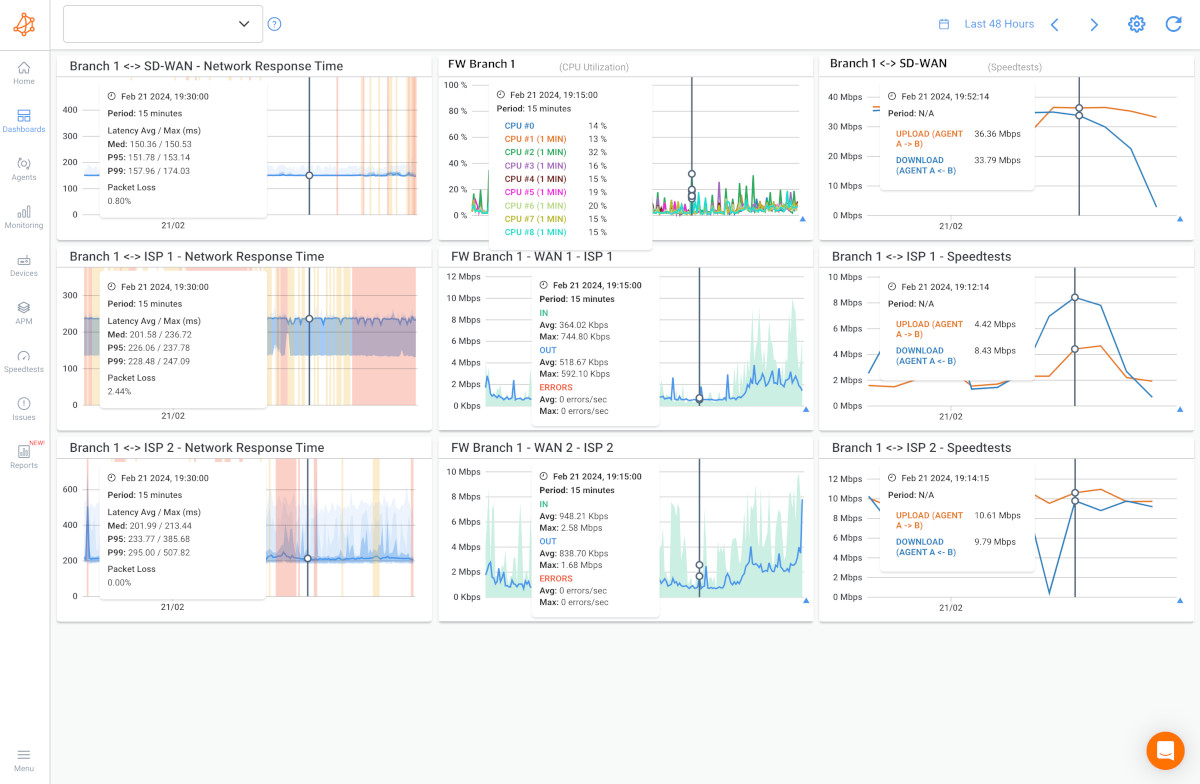
Traceroutes are critical for identifying whether an issue is in your network or your provider's, and for catching ISP path changes that silently affect performance. In historical data, traceroutes let you see not just where traffic went, but when the path changed. During troubleshooting, comparing traceroutes from before and during an incident immediately tells you whether the problem is on a consistent hop or whether traffic was rerouted, which is often the cause of sudden, unexplained latency increases.
7. Application Performance Metrics for Historical Data Network Troubleshooting
Network metrics like VoIP MOS scores, Microsoft Teams call quality, APM HTTP response times, and web application test results tell you what the infrastructure is doing; application metrics tell you what users are experiencing.
Historically, application performance data bridges the gap between "the network looks fine" and "users are still complaining." During troubleshooting, correlating a MOS score drop against latency and jitter history on the same path tells you whether the call quality issue is network-driven or whether you need to look at the application layer instead.
8. Device Health Metrics for Historical Data Network Troubleshooting
A router running at 95% CPU during a congestion event tells a very different story than one running at 20%. Historically, device metrics reveal whether hardware is consistently under stress during peak periods, a pattern that points to capacity or configuration issues rather than transient network problems. During troubleshooting, cross-referencing a network event with a simultaneous CPU spike on a specific device can cut hours off your investigation.
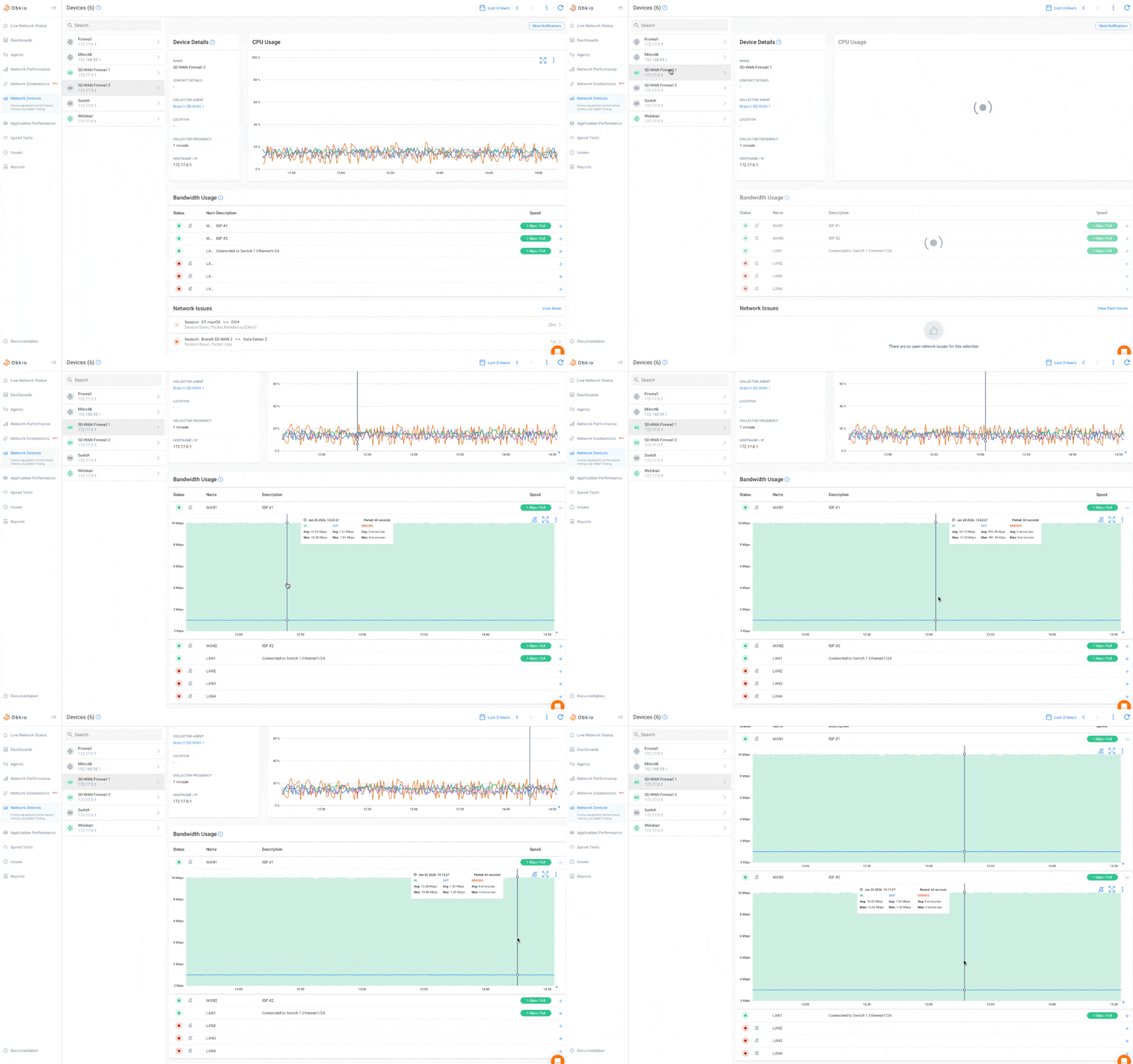
The critical factor isn't just what you store, it's how it's stored. Siloed, per-tool data forces manual correlation across dashboards when you're already under pressure to find the problem fast. When all of this lives in a unified timeline, tied to the same monitoring sessions, the same agents, the same timestamps, cross-metric correlation happens in seconds, not hours.
That's the architecture Obkio is built around. All metrics, all paths, all in one place — so when you need to answer "what happened and why," the data is already there, organized and ready.
How to Get Started with Historical Network Monitoring
Getting started with historical network monitoring doesn't require a major deployment project or weeks of configuration. The goal is simple: get continuous monitoring running across your key network locations as fast as possible, because you can only build a history from the moment you start collecting. Every day without monitoring is a day of data you'll never get back.
The sooner you deploy, the sooner you have a baseline. The sooner you have a baseline, the sooner you can detect anomalies, identify patterns, and troubleshoot with data instead of guesswork. Here's the practical path to get there.
Step 1: Deploy Monitoring Agents at Key Network Locations
The foundation of historical network monitoring is agent placement. Your agents determine which paths get monitored and which blind spots remain. For most business networks, that means covering:
- HQ and branch offices — to monitor site-to-site performance across your WAN and catch inter-branch issues before users report them
- Data centers — to track performance between core infrastructure and the rest of your network
- Cloud environments — AWS, Azure, and Google Cloud agents are pre-deployed by Obkio, so you can monitor performance to and from your cloud infrastructure without additional setup
- Remote users — deploy lightweight software agents on remote worker machines to monitor their connection quality end-to-end, not just the tunnel
Obkio’s monitoring agents are available as software (Windows, Linux, macOS, Docker), virtual appliances (Hyper-V, VMware), plug-and-play hardware devices (no configuration required), and public cloud agents. One agent per location is all you need to start monitoring performance.

For MSPs, Obkio's multi-tenant architecture lets you deploy agents across all client sites from a single platform. Configure separate dashboards per client and a centralized view across your entire portfolio.


Step 2: Configure Monitoring Sessions Between Locations
Once agents are deployed, you define monitoring sessions between them, which determine the specific paths you want to measure. Sessions can be configured between any two agents: HQ to branch, branch to data center, remote user to cloud, agent to public internet destination.
Obkio agents exchange synthetic UDP traffic between sessions at 500ms intervals and immediately begin building your performance record. No real user traffic is captured. Everything is synthetic, so there are no privacy or security concerns with data collection. From the moment a session is active, your historical dataset starts accumulating.
Learn how to use synthetic monitoring to monitor network performance & identify network issues, and the benefits of synthetic traffic over packet capture.
Learn more
Step 3: Define Baseline Thresholds for Each Path
Before alerts mean anything, you need to define what normal looks like on each monitored path. Obkio's dynamic monitoring thresholds let you set acceptable limits for latency, jitter, packet loss, MOS score, packet reordering, and packet duplication, per session, not just globally.
Getting this right matters. A latency threshold that makes sense for a WAN link between two branches won't be appropriate for a cloud-to-HQ session. Set thresholds per path, review them after your first 2–4 weeks of data collection, and adjust based on what your baseline actually shows. The historical data will tell you what normal looks like to inform your thresholds rather than setting them arbitrarily on day one.
Step 4: Align Data Retention with Your Network’s Requirements
Different use cases require different retention windows. Configure your retention policy based on what you actually need:
- Active troubleshooting — 24–72 hours covers most immediate investigations
- Pattern analysis and capacity planning — 30–90 days minimum
- SLA documentation — 6–12 months depending on contractual obligations
- Long-term trend analysis — 12–36 months for infrastructure planning
Obkio retains up to 36 months of historical data. All data is stored in the cloud: no local storage to manage, accessible from anywhere, from any device.
Step 5: Set Up Automated Reporting for Regular Reviews
Alerts catch active incidents. Scheduled reports are how you catch slow-burning problems; gradual utilization climbs, recurring degradation windows, performance trends that don't cross alert thresholds but are heading in the wrong direction.
Obkio's report scheduling lets you generate and distribute performance summaries automatically (daily, weekly, or monthly) in PDF, Excel, or JSON format. Reports can be sent directly to stakeholders by email, even if they don't have an Obkio account. For MSPs, per-client scheduled reports make SLA reviews a hands-off process rather than a manual data pull before every client call.

Learn to enhance your network with expert tips on setting up effective Network Monitoring alerts. Ensure optimal performance and quick issue resolution.
Learn more
Obkio's onboarding wizard walks you through agent deployment and your first monitoring sessions in approximately 10 minutes. From that point, you're collecting historical network data across your entire infrastructure — and building the baseline you'll rely on the next time a user says "the network was slow last night."
Frequently Asked Questions About Historical Network Monitoring Data
Q: What is historical data in network monitoring?
A: Historical network data is a continuous, time-stamped record of network performance metrics (including latency, packet loss, jitter, and bandwidth) collected at regular intervals over time. It allows IT teams to review past network performance, identify recurring patterns, and diagnose issues that are no longer actively occurring.
Q: Why is historical network monitoring data important?
A: Real-time monitoring only shows the current state of your network. Historical data is essential for troubleshooting intermittent issues (which are often gone by the time you check), identifying recurring patterns, establishing performance baselines, proving problems to ISPs and vendors, and supporting SLA documentation and compliance reporting.
Q: How long should network monitoring data be retained?
A: It depends on your use case. Active troubleshooting typically requires 24–72 hours. Pattern analysis and capacity planning benefit from 30–90 days. SLA compliance often requires 6–12 months. Long-term infrastructure planning benefits from 1–2+ years of data. Obkio retains up to 36 months of historical data depending on your subscription plan.
Q: Can a speed test replace continuous network monitoring?
A: No. Speed tests are point-in-time measurements that only reflect conditions at the moment of the test. Most network issues are intermittent — they may only appear during specific hours, specific workloads, or off-hours windows. Continuous monitoring captures the full performance timeline, including issues that have already resolved by the time you investigate.
Q: What metrics should be included in historical network monitoring data?
A: Key metrics include latency, packet loss, jitter, bandwidth utilization, speed test results, traceroute path data, application performance metrics (VoIP MOS scores, Microsoft Teams quality), and device health metrics (CPU, memory, interface errors via SNMP). Storing all of this in a unified timeline — rather than siloed per tool — is what makes cross-metric correlation and root cause analysis effective.
Q: How does historical data help with root cause analysis?
A: By showing the full sequence of events leading up to a network incident, historical data lets you identify which metric degraded first, which segment was affected, and whether the issue was isolated or widespread — turning guesswork into a traceable timeline. Tools like Obkio Vision run continuous traceroutes in the background so the path history is always there when you need it.
Q: Does Obkio limit how long it stores historical network data?
A: Obkio stores up to 36 months of historical data, with the exact retention period depending on your subscription plan (6 months on Starter and Basic plans, up to 36 months on Premium). All data is stored in the cloud — no local storage limitations, accessible from anywhere.
Stop Troubleshooting Blind: Why Historical Network Data Is the Foundation of Effective Network Monitoring
If your network monitoring only shows you what's happening right now, you're flying blind on everything that happened before you looked.
Historical network data transforms monitoring from a reactive alarm system into a proactive visibility layer, one that lets you find patterns, prove problems to ISPs and stakeholders, accelerate root cause analysis, and plan infrastructure changes based on actual trend data rather than gut feel.
The next time someone calls to say the network was slow, you'll have the data to show them exactly what happened, when it started, where it was, and why.
Start a free 14-day trial of Obkio (no credit card required) and begin collecting historical network data across your infrastructure today.
- 14-day free trial of all premium features
- Deploy in just 10 minutes
- Monitor performance in all key network locations
- Measure real-time network metrics
- Identify and troubleshoot live network problems


