




 Obkio Blog


 Subscribe
Table of Contents
Table of Contents
ISP network monitoring means continuously measuring performance across your own network: your backbone and PoPs, your upstream transit and peering, and the experience of the customers connected to it. Done well, it shows you where an issue sits, whether in your core, at your edge or on the customer’s LAN, before the support tickets pile up.
When something breaks, customers call you first, no matter where the problem actually is. Without data from both sides, support turns into a back-and-forth over who’s responsible, while the customer waits. This article walks through how to set up ISP network monitoring in nine steps, from placing Monitoring Agents in each PoP to scheduling the reports you share with business customers.
What is ISP Network Monitoring? 
ISP network monitoring refers to the practice of monitoring and managing the performance, availability, and security of an ISP's network infrastructure. This practice allows Internet providers to gather real-time information, offering insights into the optimal performance of their network. Specifically, it enables the definition of service quality from an end-user perspective, ensuring a seamless Internet experience. Efficient ISP network monitoring is crucial for ISPs to deliver a reliable and high-quality Internet experience to their customers, as well as to maintain the security and integrity of their network infrastructure.
To achieve this, businesses leverage specialized ISP network monitoring tools and software for a comprehensive understanding of the network’s health, encompassing:
- Continuous assessment of the operational status of network devices, including routers, switches, servers, and endpoints, ensuring their optimal functionality.
- Ongoing tracking of bandwidth utilization across the network to pinpoint congestion issues or potential bottlenecks affecting performance.
- A thorough examination of network traffic, identifying irregular patterns or potential security breaches that demand immediate attention.
- Evaluation of the responsiveness and effectiveness of applications operating on the network, prioritizing an optimal user experience.
- Active monitoring for any signs of unauthorized access attempts, malware, viruses, and other security threats that could jeopardize the integrity of the network.
- Continuous monitoring of network availability (uptime) to minimize disruptions (downtime), ensuring a reliable and uninterrupted service.
- Implementation of alerts and notifications that are triggered when predefined thresholds or anomalies are detected.


The Primary Goals of ISP Network Monitoring
Delving into the intricacies of an internal network, the goal is to ensure optimal performance. ISP Network Monitoring becomes the vigilant eye that scrutinizes network metrics, seeking any deviations from the expected standards. By constantly measuring and analyzing, ISPs can pinpoint and troubleshoot potential issues before they escalate, maintaining a robust internal network that forms the backbone of reliable Internet services.
Beyond the internal network, the focus extends to fostering a seamless connection between the Internet provider and its customers. ISP Network Monitoring acts as the bridge that provides complete visibility, ensuring that the connection is not only established but consistently optimized for an uninterrupted, high-quality user experience.
By zeroing in on these two objectives, ISPs embark on a journey to not only meet but exceed the expectations of their diverse user base. Residential subscribers seeking flawless streaming experiences and businesses reliant on stable application functioning.
The Benefits of ISP Network Monitoring for ISPs & Customers
ISPs frequently find themselves at the forefront of customer complaints when problems occur on either the client network or the ISP network. Customers, network service providers and ISPs themselves engage in a complex communication game of ping-pong as they attempt to determine the underlying problem, assign blame, and determine who is responsible for actually troubleshooting the issue
Nevertheless, the introduction of Network Monitoring for ISPs successfully tackles this issue and offers a number of advantages:
- Proactively Identify Internet Issues: Internet service provider network monitoring makes it possible to detect possible problems with the network early on, such as hardware malfunctions, software bugs, and security breaches. By taking a proactive approach, you can prevent downtime and interruptions before they have an impact on important business activities.
- Enhancing ISP Network Reliability: ISPs may drastically reduce network downtime by quickly detecting and fixing problems. This results in higher customer satisfaction, reduced revenue loss, and increased productivity, establishing ISPs as dependable partners dedicated to seamless service delivery.
- Optimizing Network Efficiency: By closely examining traffic patterns and network performance, ISPs are able to spot bottlenecks, allocate resources more efficiently, and guarantee that services and applications run smoothly. Clients are guaranteed a better user experience thanks to this enhancement.
- Tailored Network Monitoring: ISPs are able to alter their monitoring plans to meet the particular requirements of every customer. This customized method supports a more individualized and efficient monitoring system by aligning with certain corporate goals and requirements.
- Efficient Resource Allocation: ISP performance monitoring keeps tabs on how much bandwidth, server space, and storage are being used. This realization makes it easier to allocate resources effectively and scale at a reasonable cost as needed.
- Instant Network Alerts: When predetermined thresholds are exceeded or anomalies are detected, ISP Network Monitoring tools immediately send out alerts and messages. This capacity guarantees timely action and effective problem-solving.
- Informed Decision-Making: The information and understanding obtained from monitoring are priceless resources that guide tactical choices about network enhancements, improvements, and IT expenditures.
- Ensuring Service Compliance: Different sectors have different laws and standards to follow when it comes to network administration and data security. ISP Network Monitoring software helps companies maintain compliance by ensuring that data handling protocols and security measures adhere to industry norms.
- Comprehensive Reporting: ISPs can give their customers comprehensive dashboards and reports highlighting security, network performance, and other crucial data. The partnership between ISPs and their clients is strengthened by this transparency, which also promotes confidence.
- Empowering Customers: ISP Network Monitoring allows customers to assertively prove the occurrence of problems within the ISP's network. Armed with tangible data and real-time insights, customers can elevate their cases with confidence. This not only prompts ISPs to take them seriously but also expedites the escalation of their cases, fostering a relationship built on trust and responsiveness.
ISP Network Monitoring Software helps Internet providers to work with dependable, secure, and efficient networks. They can confidently navigate the complexity of the digital realm thanks to it, which opens up possibilities for development and innovation.

Learn to elevate MSP network monitoring with Obkio's versatile monitoring tool. Proactively optimize performance, troubleshoot efficiently, and exceed SLAs.
Learn more

Addressing The Challenges of Monitoring ISP Network Performance
Imagine this scene: Some glitch pops up miles away from your home base. But guess what? You as an ISP suddenly become the main star in the troubleshooting saga. Why? Well, if a glitch shows up anywhere – in your ISP zone, a client's turf, or even beyond – customers turn to you first.
Now, cue in the never-ending game of message ping-pong. It's a back-and-forth chatter between customers and their Internet provider. So you have all the fingers pointing your way, everyone wants answers, and everyone wants things fixed, but the network’s crazy twists and turns make it a tough quest in a maze.
Before moving forward, let's talk about the real deal when it comes to providing Internet services – there's a world of difference between handling businesses and residential customers. It's not just about size, it's about diving into the maze of business network setups, demanding ISPs to up their game in pinpointing and fixing issues.
ISP Network Monitoring for Business Customers
Downtime for businesses isn't just an inconvenience – it's a wallet-drainer. Just one hour of no connectivity costs more than $100,000 for 98% of companies that need that link working to sell their stuff. And you know what comes next if you can't keep that link solid – your reputation hits the floor.
Messing up with business network reliability isn't just about annoying your customers, it's a full-on crisis. You're looking at high churn rates, revenue slipping away, and a chorus of complaints heading your way. In the game of connectivity, reputation isn't just a buzzword – it's everything.
Handling business Internet services isn't just about ticking a service box, it's about being the guardian of their operations, their rep, and, guess what, your business stability. So, in this fast-paced world, being precise, reliable, and lightning-quick in fixing issues isn't just a smart move – it's the only move for the win.

ISP Network Monitoring for Residential Customers
On the other hand, residential users, often facing a lack of technical expertise, find themselves grappling with Internet problems without a clear understanding of the root cause.
In their research, Lifemote delved into the realms of twelve ISPs spread across five countries, reaching out to around 8.3 million users. The research cast a spotlight on the prevailing challenges faced by customers concerning in-home Wi-Fi. Let's break them down:
Coverage Issues: Illustrating the most common Wi-Fi complaint, coverage problems, which are the enemy of about one-third of households with a standard subscription base. Emphasizing the critical necessity for expansive and dependable coverage across premises to ensure an uninterrupted Wi-Fi experience.
2.4 GHz Congestion: 2.4 GHz congestion emerges as the second most common issue, impacting the Quality of Experience (QoE) for one in every five households. Addressing congestion becomes paramount to optimize network performance and guarantee consistent connectivity for users.
Client-Related Issues: Client-related problems, encompassing legacy Wi-Fi technology and data-hungry clients causing network bottlenecks, emerge as the least common but not to be overlooked. Addressing these client-related issues holds importance in optimizing the overall Wi-Fi experience for all users.
These issues and the low technical expertise of customers lead to extended support calls, leaving customer care representatives unable to provide quick solutions. The consequence?
A substantial spike in operational costs was primarily triggered by the frequent necessity of dispatching ISP technicians for on-site visits related to Wi-Fi support calls. The prolonged duration for issue resolution not only strains customer service but also becomes a contributing factor to growing churn rates.

In this context, the inefficiency in swiftly resolving Wi-Fi issues not only impacts the customer experience negatively but also poses a significant financial burden on ISPs. It's a cycle that adversely affects both operational efficiency and customer satisfaction, creating a pressing need for streamlined ISP Network Monitoring Software to break free from this loop.
Analysys Mason delves into the profound impact of remote network monitoring and automation in bolstering services for residential consumers. This comprehensive research draws insights from interviews with ISP operators, serving an initial subscriber base of 3 million users across both emerging and developed markets over a span of three years.
This study showcases the transformative potential of remote device monitoring and network troubleshooting, bringing forth substantial cost efficiencies. The integration of automation in customer support and ISP network monitoring emerges as a game-changer, offering a remarkable 20% reduction in costs in the long term. This journey includes the deployment of automated remote device monitoring tools and proactive troubleshooting for Tier 1 customer care representatives.
This strategic approach not only enables local ISPs to deliver high-quality services at affordable prices, attracting a broader customer base and ensuring long-term business success but also positions local providers to differentiate themselves from larger telcos (characterized by extended waiting times for clients at call centers). Moreover, the substantial cost savings generated by these automation strategies empower ISPs to redirect resources to pivotal business activities, such as robust marketing initiatives.
In essence, the adoption of ISP Network Monitoring Software becomes a catalyst for reshaping the landscape of home broadband, fostering efficiency, competitiveness, and sustained growth for your business.
ISP Network Monitoring Tools
Many local providers initially opt for multiple open-source ISP Network Monitoring solutions in a bid to economize and avoid complicated deployments. However, the cost savings come at a significant price. The limited features, complex workflows, and minimal integrations of these solutions result in subpar network performance and monitoring capabilities. This, in turn, directly impacts network performance and customer service, leading to a cascade of challenges.
In light of these challenges, the imperative becomes clear – you need to choose robust and integrated solution that not only provides comprehensive visibility into ISP network monitoring but delves into network performance, which streamlines workflows for efficient issue resolution.

Join the growing number of fellow ISPs who choose Obkio’s Network Performance Monitoring tool and easily navigate the twists, turns, and loops of network challenges. Start to monitor ISP performance, and suddenly, clarity becomes king, operations run smooth, and everyone enjoys a drama-free internet experience.
- 14-day free trial of all premium features
- Monitor performance in all key network locations
- Measure real-time network metrics
- Identify and troubleshoot live network problems


That's the name of the game, keeping it real and simple. What's even simpler?
The deployment process of Obkio, taking just 10 minutes, allowing you to start monitoring ISP network performance instantly!

Deploying ISP Network Monitoring: A Guided Journey
When it comes to optimizing network performance, ISPs face unique challenges. They not only need to ensure the seamless operation of their internal networks but also guarantee an uninterrupted connection between their network and their clients. In this intricate landscape, the deployment of tailored monitoring solutions is paramount, and Obkio's ISP Network Monitoring Solution stands out for swift network issues identifying and solving.
Step 1. Deploy Obkio’s ISP Network Monitoring Tool
Obkio is an end-to-end Network Monitoring SaaS solution that allows ISPs to monitor their own network performance, as well as the performance between themselves and their customers. Using synthetic traffic and distributed Monitoring Agents, ISPs can gain real-time insights into both their own network's performance and the individual network performance of each client.
Say farewell to finger-pointing and taking guesses in a new era of effective problem-solving with Obkio. Effortlessly detect and address issues, empowering your clients to take control of their network troubleshooting.
ISP Network Monitoring Advantages:
- Improved Relations with Users: Foster client trust with transparent, real-time visibility into both your ISP network and individual client networks.
- Proactive Problem Solving: Monitor ISP performance, and address network issues before they impact your clients, preventing downtime and disruptions.
- Personalized Insights: Showcase your commitment to your client's success by customizing monitoring reports to meet their specific needs.
- Do Less, Save More: Optimize resource allocation, minimize manual interventions, and streamline network management.
- Market Traction: Present yourself as a progressive ISP that stays ahead of technological advancements and prioritizes user experience.
Step 2. Deploy ISP Network Monitoring Agents
Monitoring Agents are a special kind of software that is used in Obkio's network performance monitoring system that continuously monitors network and Internet performance throughout your network. By carefully placing these Agents at different locations around your dispersed network, you can identify network problems in each place, application, and online.
Every 500 ms, these agents simulate traffic exchanges while keeping an eye on performance across branch offices, corporate headquarters, data centers, clouds, and the Internet. This distributed network monitoring approach is perfect for ISPs managing several network locations since it provides extensive knowledge, particularly in the context of client networks.
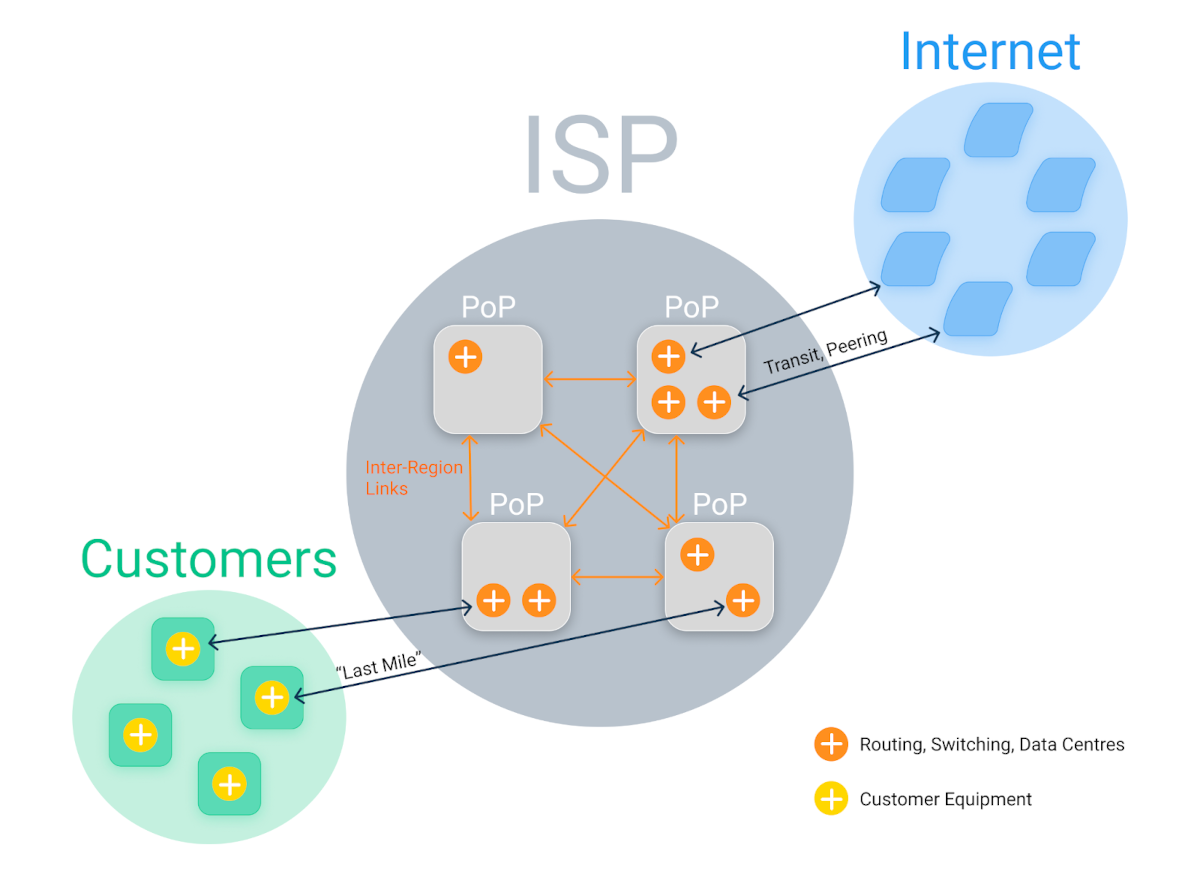
ISPs begin by installing Monitoring Agents in their local network architecture to fully utilize Obkio's Network Monitoring solution.
- To monitor performance, local agents (Windows, MacOS, Linux, and Hardware) are placed at critical network locations, including data centers, branch offices, and remote locations.
- Agents established in service provider networks, such as AWS, Google, and Azure, are known as public monitoring agents. Any branch's external performance toward the Internet can be observed with them (without passing through the central office).
- Additionally, some ISPs decide to host their own Public Monitoring Agents, which enable their clients to use pre-deployed Agents to monitor network performance up to the ISP network infrastructure.

Where to Place Agents in an ISP Network
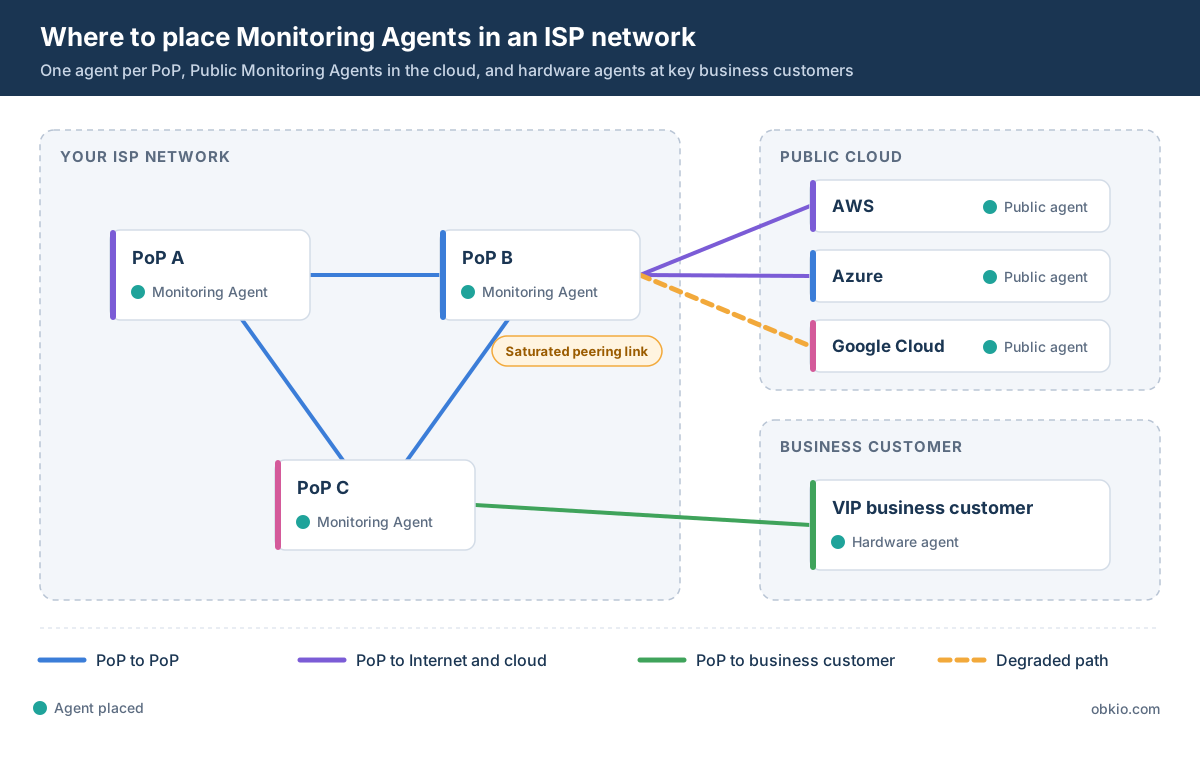
Start with one Monitoring Agent in each Point of Presence (PoP). If you can’t cover every PoP right away, prioritize by the number of customers each one serves and the revenue behind them. Then pair your PoP agents with Public Monitoring Agents in AWS, Azure and Google Cloud. This shows you when a peering link toward a cloud provider is saturated, which is one of the most common causes of “the cloud app is slow” tickets from business customers.
Plan agent placement with your roadmap in mind. If you’re adding PoPs or changing the network architecture, deploy agents where the changes will happen, so you have a baseline before the work starts.
Step 3. Monitor ISP Client Networks
As an ISP, your responsibilities extend beyond managing your network, you need visibility into your clients' networks. To navigate the complexities of client networks, deploy Monitoring Agents across all client networks, ensuring a proactive stance toward enhancing performance and troubleshooting capabilities.
LAN and wireless problems on the part of the internet providers account for 80% of customer support calls to them. Put an end to the back-and-forth blame game between customer care teams by using Obkio to demonstrate that the network is not the issue so that clients can investigate the matter on their own without jeopardizing your standing as a service provider.
Gain a Complete Understanding of the Network:
- Partnering with your clients to incorporate Obkio's Monitoring Agents into their networks is an easy and quick way to optimize network performance and troubleshoot issues proactively.
- Using a similar strategy to your infrastructure, strategically place Monitoring Agents within each client's network. These agents will keep an eye on ISP network performance from the networks of your clients, providing insight and visibility into the many facets of their business operations.
- The Monitoring Agents collect priceless information about latency, packet loss and other key network metrics related to the performance of customer networks. After that, this data is transformed into in-depth reports and visualizations that provide you and your clients with decision-making capability.
- You can track down the source of network problems with complete network visibility that extends from your clients' networks to your own. Through the elimination of guesswork and the acceleration of issue resolution, this collaborative troubleshooting technique strengthens the bond between you and your clients.

Top Client Service as a Competitive Advantage:
Prompt Problem Solving: Monitor ISP performance from your client's point of view to quickly identify and resolve problems, preventing disruptions and increasing customer satisfaction.
Accurate Troubleshooting: By identifying the root cause of network issues, you may improve the precision of your troubleshooting, which will result in faster fixes and more effective use of resources.
Client Endorsement: Give your clients access to concrete information about the state of their networks so they may work together more successfully to preserve peak performance by taking preventative action.
Reliable Partner: By installing Monitoring Agents in your clients' networks, you present yourself as a technologically advanced and forward-thinking partner who cares about their success.
As Monitoring Agents are easily integrated into your network and the networks of your clients, you take a revolutionary step toward gaining a thorough understanding of networks. With the help of Obkio's Network Monitoring tool, ISPs can go beyond traditional boundaries and provide a quality of service that is based on data-driven insights, strategic collaboration, and an uncompromising commitment to network excellence.
Step 4. Collect ISP Network Monitoring Data Between Networks
Although installing Monitoring Agents on your network and the networks of your clients is a significant first step toward complete network management, the process doesn't end there. It develops into an ongoing interchange with synthetic traffic, enhancing your ability to optimize network performance throughout all ecosystems.
Comprehensive Performance Analysis:
- A comprehensive view of network performance is provided by synthetic monitoring, which does not affect actual user traffic.
- Establishing a performance baseline through proactive issue detection sets up network monitoring alerts that facilitate quick issue identification and remediation.
- In addition to fostering effective problem-solving, collaborative troubleshooting lowers blame.
Making Well-Informed Decisions:
- The abundance of information gathered from synthetic traffic facilitates well-informed choices on resource allocation, network upgrades, and enhancements.
- Gain optimal resource usage by comprehending the network traffic flows that occur between the networks of your clients and your own.
Obkio's Network Monitoring solution provides ISPs with the necessary tools for thorough and efficient network performance management through this continuous exchange of synthetic traffic.
Step 5. Run Network Performance Tests Between PoPs, the Internet and Key Customers
Test performance continuously between your PoPs, from each PoP to the Internet, and from your PoPs to your most important business customers. These three test paths show whether an issue is in your backbone, at your edge or on the customer’s side.
PoP to PoP: Run continuous tests between every pair of PoPs to measure latency, jitter and packet loss across your backbone. This gives you a baseline for each path, so a degraded link stands out right away.
QoS between PoPs: Check that DSCP markings are preserved from one PoP to the next. A single misconfigured transport or backbone link can re-mark all traffic to DSCP 0, which silently disables QoS across the entire network. For business customers, make sure real-time traffic like Microsoft Teams and VoIP is prioritized above streaming services.
PoP to Internet: Use Public Monitoring Agents to test from each PoP toward the Internet. This shows how your upstream transit and peering perform from your customers’ point of view.
PoP to VIP customers: For business customers who bring in significant revenue, deploy hardware Monitoring Agents at their sites. You’ll see performance from their network to yours, and you can show quickly whether an issue is on their LAN or in your network.
Keep these tests running continuously, and review the results before and after any migration, new link, new service or equipment change.
Step 6. Monitor Core Equipment with SNMP
Enable SNMP on the core routers, switches and firewalls in each PoP, and poll them through the Monitoring Agent in that PoP. Device data explains why performance drops, not just when.
Network Device Monitoring polls devices every 30 or 60 seconds for CPU, memory, interface bandwidth and errors. Focus on the equipment that carries the most traffic in each PoP, keeping in mind that one device often handles several roles, such as routing, firewalling and aggregation.
The value comes from correlation. When the performance tests from Step 5 show packet loss between two PoPs, SNMP data tells you whether an interface on that path was saturated or a router’s CPU was maxed out at the same moment.

Tip: Track bandwidth on the links that matter most, including IP transit, peering, CDN and inter-region links. Combine it with packet loss, latency and jitter from every PoP toward other PoPs, the Internet and your VIP customers.
Step 7. Build Dashboards for Each PoP and Each Business Customer
Build one network-wide dashboard, then a dedicated dashboard for each PoP and each corporate customer. Your NOC sees the whole network at a glance, and support teams can open the customer’s view during a call.
Use the network-wide dashboard to spot which part of the network is degrading. The per-PoP dashboards narrow it down to a location, and the per-customer dashboards show exactly what one client is experiencing. When a business customer calls in, your support team can check their dashboard while still on the line instead of opening a ticket and investigating later.

Step 8. Set Up Notifications Your Team Can Act On
Only alert on what someone can act on. Use tight thresholds for availability and looser thresholds with delays for performance, so your team is paged for real issues and not for every brief spike.
Availability issues hit customers immediately, so alert on them quickly with low thresholds. Performance issues like short latency spikes often resolve on their own, so use higher thresholds and a notification delay to filter out the noise. Route notifications by PoP or customer so the right team receives them.
If a notification fires often and nobody acts on it, adjust the threshold or remove it. Alarm fatigue is how real outages get missed.
Step 9. Schedule Performance Reports for Every PoP
Schedule a weekly performance report for each PoP and assign one person to review them. Regular reports catch slow degradation that never triggers a notification.
Reports summarize performance over a period, so they reveal trends that live dashboards don’t, like a PoP whose latency creeps up a little every week. Schedule them daily, weekly or monthly, and share them by email with the people who need them. Recipients don’t need an Obkio account to open them. You can also use webhooks to send report data into your own systems.
For business customers with SLAs, the same reports become the basis for regular performance reviews, showing what you delivered against what you promised.

Unlock the secrets of Internet SLA monitoring, optimize your online experience, and hold your ISP accountable. Empower your Internet journey!
Learn more
Getting Started with ISP Network Monitoring
Start with a Monitoring Agent in each PoP and Public Monitoring Agents in the cloud, then test the paths that matter: between PoPs, toward the Internet and to your key business customers. Add SNMP to explain what the tests find, dashboards and notifications to act on it quickly, and scheduled reports to show customers what you delivered.
The result is a support team that can answer the first question every customer asks, “is it you or is it us?”, with data instead of guesses.
How quickly could your team show a customer where the problem really is? Deploy your first agents in about 10 minutes and see your network from your customers’ side the same day.

With Obkio's global reach, monitor network infrastructure across diverse locations, troubleshoot with precision, and rapidly resolve issues to minimize downtime. Experience the future of ISP network monitoring, enhance reliability, and deliver an unparalleled online experience for your customers.


