











 Obkio Blog


 Subscribe
Table of Contents
Table of Contents
Most companies rewired how their people work, not once but twice. First for remote, then for RTO (Return to Office). Their network monitoring never caught up.
So, what happened? IT teams are managing a network that spans headquarters, branch offices, home setups, and cloud apps with tools that still assume everyone's connecting back to one place. When something breaks (and it will), nobody can pinpoint where. IT takes the blame. Users lose productivity. Leadership loses patience.
Distributed network monitoring fixes that. It puts eyes at every location and every segment, and pulls it all into one view. This article breaks down why multi-site network monitoring is now a business necessity, not a nice-to-have.
Why Multi-Site Network Monitoring Is So Complex Now 
Before 2020, most corporate networks followed a predictable architecture: one HQ, a few branches, everyone routing through the same core infrastructure. Network Monitoring that was straightforward: watch the core, and you've got the picture.
Then networks exploded outward and added layers like remote workers, cloud apps, SD-WAN rollouts, and SaaS everywhere. The "network" stopped being a building. It became a distributed mesh of locations, users, and services: none of them in one place.
RTO added another layer. Now you have hybrid environments where some users are on-site, and some aren't, sometimes on the same team, on the same call, with completely different network experiences. Branch offices that were barely maintained during the remote-work years are suddenly under full load again. Network infrastructure that was performing "good enough" when no one was connected to the network is now the reason Microsoft Teams calls are dropping.
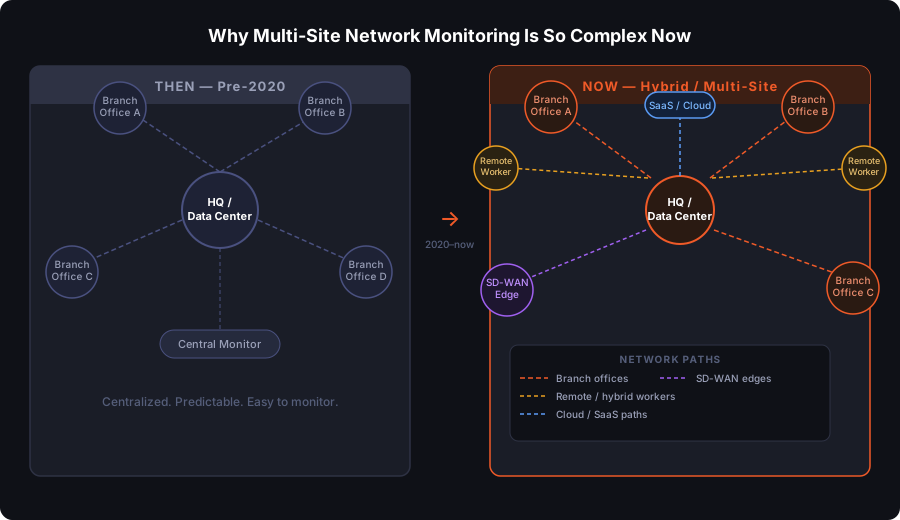
The network got distributed. The monitoring didn't.
That gap is exactly where problems hide, and where IT's credibility gets burned every time a user complains and the response is "we're looking into it."
Why Traditional Network Monitoring Falls Short for Multi-Site Businesses
Centralized network monitoring watches the core. It misses the edge: the branch, the remote site, the path between a user and their cloud app.
Here's what that looks like in practice:
A branch in Montreal has a latency issue affecting VoIP calls. Your centralized network monitoring tool, running from HQ, either doesn't see it at all or flags a vague "network issue" with no location context. Your team starts digging. Is it the ISP at that branch? The local LAN? The WAN link? The application itself? You don't know, because your tool wasn't watching from that location.
That's the blame trap. Without visibility at the branch level, every network complaint becomes a multi-hour investigation with no clear starting point. IT gets blamed for everything because IT can't quickly prove it's not their fault.
Return to office has made this worse in a specific way: users coming back to offices expect network performance that matches (or beats) what they had at home on a 1 Gbps fibre connection. Branch infrastructure that was acceptable for 20% occupancy isn't always ready for full headcount. If monitoring doesn't cover those branches, IT finds out about the gap from frustrated users, not from their tools.
Learn how to monitor distributed networks like SD-WAN using Obkio’s distributed Network Performance Monitoring tool vs. traditional centralized solutions.
Learn more

Centralized monitoring gives you a partial picture. In a multi-site world, partial is the same as blind.
What Distributed Network Monitoring Actually Does
Instead of monitoring from one central point, distributed network monitoring generally uses monitoring agents or sensors to continuously measure network performance at every key location (branch offices, HQ, data centers, cloud).

That's the key difference: it measures performance between locations, not just at one observation point.
What distributed monitoring sees that centralized monitoring misses:
- Path-level performance: latency, packet loss, and jitter between specific site pairs (branch → HQ, branch → cloud app, remote user → SaaS)
- Problem localization: whether an issue is happening on the local LAN, the ISP link, or the application path
- Real-time metrics at every site: not aggregated averages — per-location data that's actually actionable
- Consistent visibility: all of this flows into one dashboard, so IT isn't juggling separate tools or logging into five different systems to get a complete picture

The practical outcome: when something goes wrong, you know what it is and exactly where it is, and you know it within minutes, not hours.
That's exactly what Obkio is built to do.
Obkio is a synthetic, distributed network monitoring solution that uses lightweight software agents at every location that matters (branches, HQ, data centers, cloud environments, and remote workers) and continuously measures performance between them.
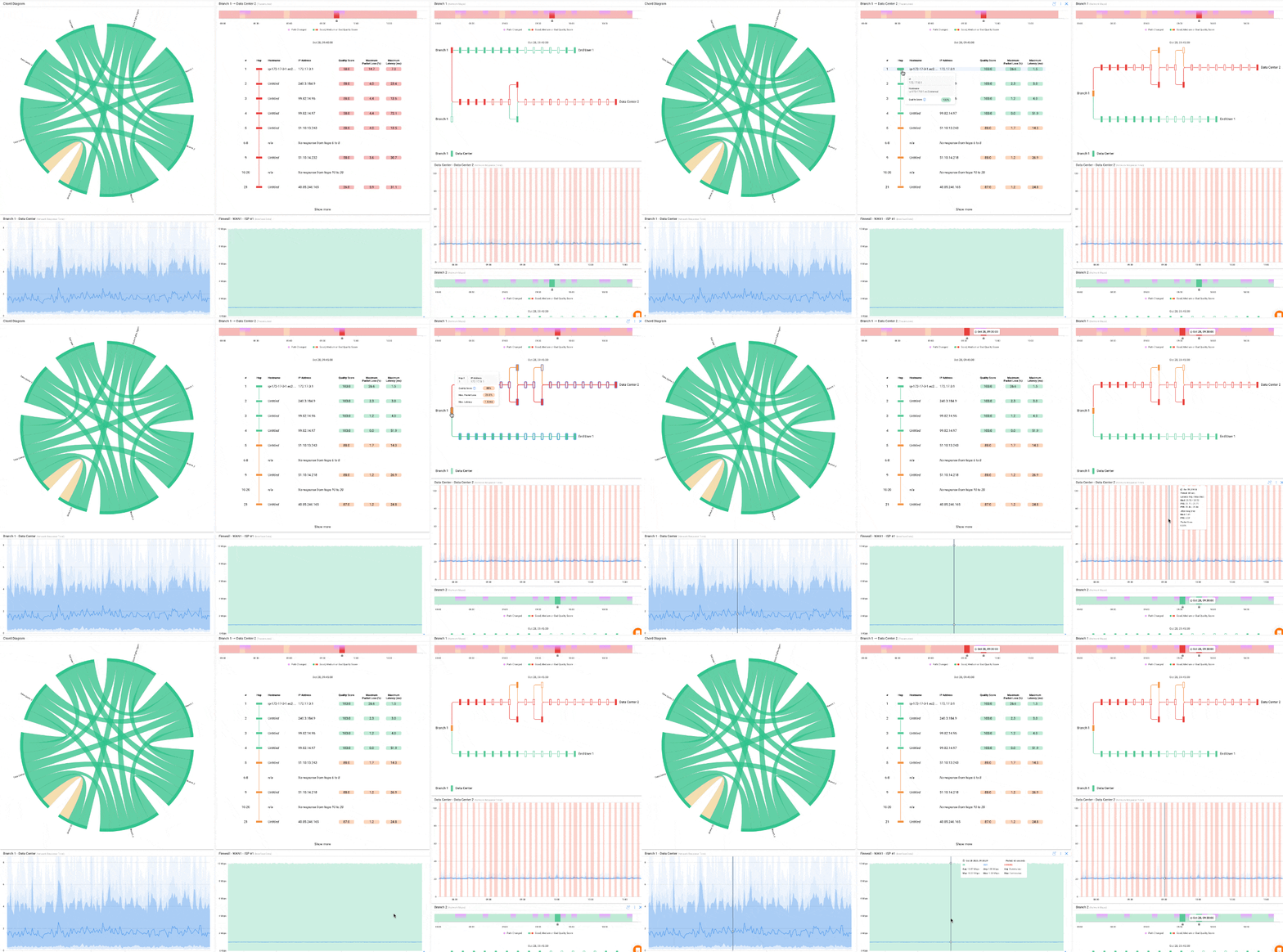
Every metric flows into a single dashboard, giving IT teams a complete, real-time picture of network health across the entire infrastructure. You get network visibility from all distributed locations, with the data you need to pinpoint network issues in remote locations and on-site in the office.

- 14-day free trial of all premium features
- Deploy in just 10 minutes
- Monitor performance in all key network locations
- Measure real-time network metrics
- Identify and troubleshoot live network problems


The Benefits of Distributed Network Monitoring for Multi-Site Businesses
Distributed Network Monitoring Benefit #1: Full Network Visibility Across Every Location
The most fundamental benefit: no more blind spots.
Every branch, every office, every cloud-connected site gets a monitoring agent. That agent continuously measures performance from its own perspective, not from HQ's perspective looking outward. If a branch has a local issue, it shows up as a local issue. If the problem is on the WAN link, that's visible too. If it's the ISP, you have the data to prove it.
For businesses that have reopened offices or expanded locations post-COVID, this is especially important. New locations often get stood up quickly, with minimal infrastructure review. Distributed monitoring gives IT visibility from day one, even before users start reporting problems.
Distributed Network Monitoring Benefit #2: Faster Troubleshooting for Remote and Office Workers
The speed of finding and fixing a network issue is where distributed monitoring pays for itself.
With monitoring agents deployed at every site, troubleshooting starts with location data already in hand. Instead of "something is wrong somewhere," you get "packet loss on the WAN link between the Toronto branch and HQ, started 14 minutes ago." That's a completely different starting point for remediation.
For hybrid teams, this matters more than ever. When an office user and a remote user are both on the same Microsoft Teams call, and one is dropping while the other isn't, that's a location-specific issue. Distributed network monitoring makes that visible immediately. IT can tell the user in the office, "This is a local issue at your branch, here's what we're doing," instead of running a generic network investigation while the user assumes IT doesn't know what's going on.
It also changes the dynamic with leadership during return-to-office mandates. When executives ask why the network is slow in a particular office, IT needs data, not a status update that amounts to "we're investigating." Distributed monitoring gives teams the ability to walk into that conversation with evidence.

Distributed Network Monitoring Benefit #3: Consistent Network Performance for Hybrid Teams
Hybrid work created a two-tier network experience inside most organizations. Office users and remote users connect differently, route differently, and experience the network differently, even when they're doing the same work.
Hybrid work network monitoring that's distributed across both environments lets IT compare performance between them. If office users are consistently experiencing worse latency than remote users for the same cloud apps, that's a signal, and it's one you can only catch if you're watching both ends.
This matters for return-to-office specifically. Before asking users to come back, IT should be able to verify that the branch network is actually ready. Distributed network monitoring provides that baseline: run agents at the office, measure performance to the apps your users rely on, and confirm the experience meets expectations. If it doesn't, you know before users arrive.
Distributed Network Monitoring Benefit #4: One Tool for Every Site, No More Tool Sprawl
Multi-site businesses often evolve into a monitoring mess. Different tools at different locations. Different configs. Different dashboards. One team managing three separate platforms because each location was set up independently or acquired at different times.
Network monitoring for branch offices at scale requires a different approach: one platform, agents everywhere, centralized management. Deploy monitoring agents at each location, manage everything from a single dashboard, and get consistent metrics across all sites.
For lean IT teams (which describes most multi-site businesses), this isn't a luxury; it's a requirement. You can't afford to context-switch between five tools every time you're troubleshooting. You need one place where everything is visible, comparable, and actionable.

Prepare your network for return-to-office mandates with this IT readiness guide. Learn how to avoid blame and prove network performance with data.
Learn more
Distributed Network Monitoring Benefit #5: Proactive Alerts Before Workers Complain
The helpdesk call is already too late. By the time a user calls to report a problem, the network issue has been degrading for minutes, sometimes longer. In a branch office with 50 users, that's a lot of lost productivity before IT even knows there's a problem.
Continuous synthetic monitoring flips that dynamic. Agents are always running tests, they are always measuring latency, packet loss, jitter, and throughput between sites. When performance metrics cross a threshold, IT gets alerted. Not because a user complained, but because network monitoring caught it first.
Thresholds can be set per location, which matters more than it sounds. A branch running on a lower-bandwidth ISP link has a different performance baseline than HQ on dedicated fibre. Contextual alerting means fewer false positives and more relevant signals.
For branch offices with no on-site IT staff (which is most branches), this proactive visibility is the difference between catching a degradation before it becomes an outage and finding out about it on Monday morning.
Distributed Network Monitoring Benefit #6: ISP Accountability and Business-Level Proof
Network problems are political as much as technical. When performance degrades, everyone points fingers: users blame IT, IT suspects the ISP, and the ISP blames the network equipment. Without data, these conversations go nowhere.
Distributed network monitoring closes that loop. When an agent at a branch is measuring performance to a cloud service, and that performance degrades (while the local LAN and internal WAN look fine), the data points directly at the ISP path. That's not a guess. That's evidence you can take to your ISP contact and use to escalate an SLA breach.
The same applies internally. When a VP asks why Teams was unusable in the Chicago office last Tuesday at 2 pm, you pull the data. Latency, packet loss, timestamps, and affected path. You don't have to reconstruct the incident from user reports and speculation; your network monitoring tool already captured it.
SLA monitoring per site is another practical output. If your branch ISP contracts include uptime or performance guarantees, distributed monitoring gives you the per-site measurement to hold them accountable.
What to Look for in a Distributed Network Monitoring Tool
Not all monitoring tools are built for distributed environments. When evaluating options, the architecture matters as much as the feature list.
1. Agent-based deployment is non-negotiable. The tool needs to place agents at every location, not just monitor from a central collector. Without local agents, you don't get local visibility.
2. Continuous synthetic monitoring means the tool is always running tests, not just polling on demand. You want a constant stream of performance data between sites, not snapshots that miss the 3-minute degradation that caused the helpdesk call.
3. Centralized dashboard with per-site drill-down: you manage everything in one place, but can zoom into any specific location or path when troubleshooting.
4. Easy deployment is critical for branch offices. If standing up monitoring at a new location requires an on-site IT visit or complex configuration, it won't get done. The tool should be deployable remotely, with minimal setup.
5. Cloud-friendly monitoring that measures paths to SaaS applications, not just internal infrastructure. Most multi-site businesses are heavily dependent on Microsoft 365, Salesforce, or similar platforms. Monitoring needs to cover those paths.
6. Lightweight and affordable: enterprise visibility shouldn't require enterprise complexity or enterprise pricing. Multi-site businesses range from 3 locations to 300. The tool should scale with the business.

These superheroic tools are armed with unparalleled capabilities to monitor and protect your network infrastructure with precision and finesse.
Learn more
How Obkio’s Distributed Network Monitoring Tool Checks Every Box for Multi-Site Businesses
Obkio is built specifically for distributed network monitoring. It deploys lightweight software agents at every location (branch offices, HQ, data centers, cloud environments) and continuously measures performance between them using synthetic traffic. No on-site IT is needed to set up network monitoring at a new location.
Every agent runs 24/7 synthetic tests and feeds real-time network metrics (latency, packet loss, jitter, throughput) into a single centralized dashboard. You get per-site visibility and per-path drill-down from one place. When performance degrades at a specific branch, you see it immediately, with historical data to back up the timeline.
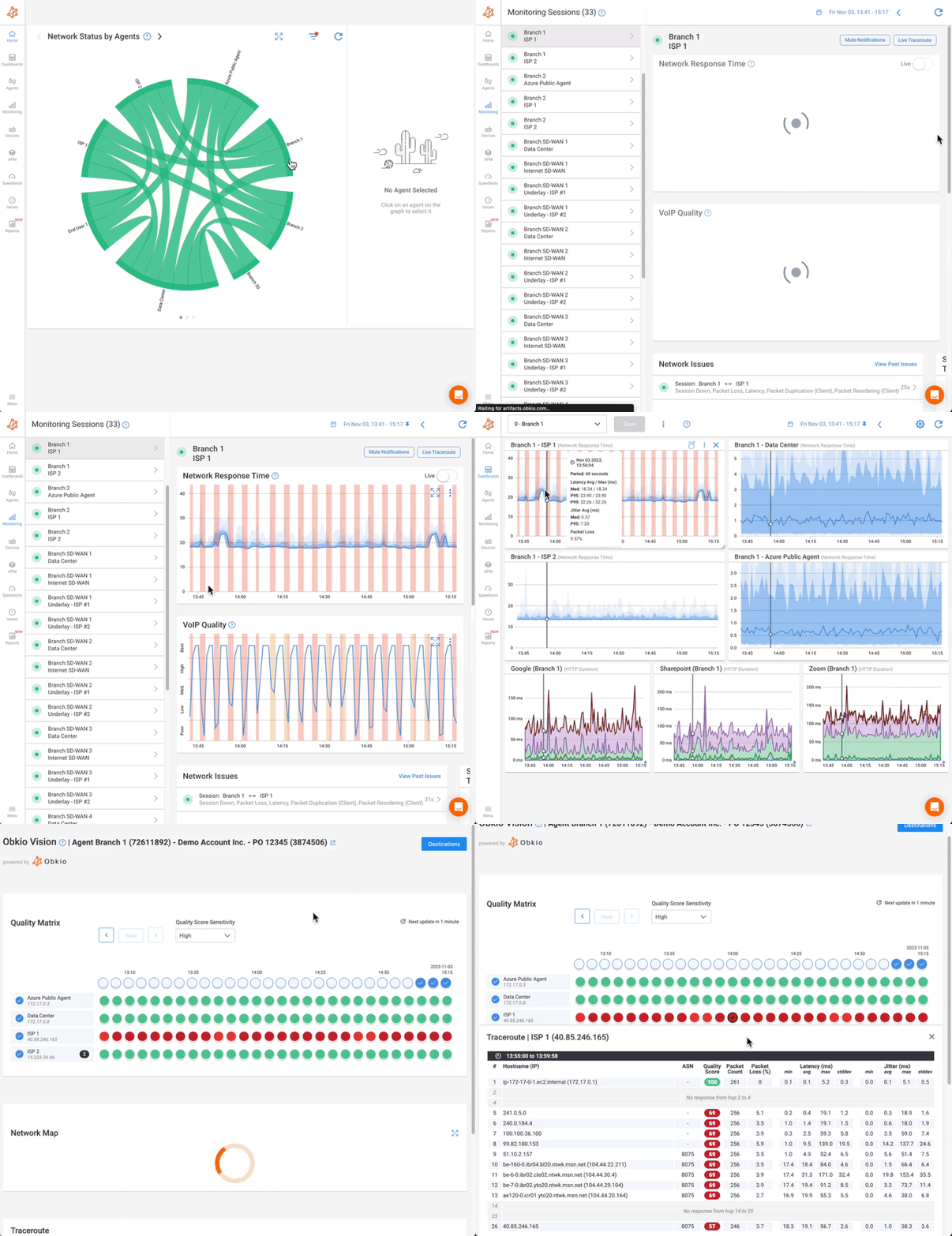
Obkio also uses APM (Application Performance Monitoring) to monitor paths to cloud and SaaS destinations (Microsoft 365, Google Workspace, AWS, and others), so your visibility isn't limited to internal infrastructure. For hybrid teams that live in cloud apps, that coverage is what makes the monitoring actually useful.
Deployment takes minutes. Agents are available for Windows, macOS, Linux, and network hardware. For branch offices with no dedicated IT staff, that matters; network monitoring shouldn't require a site visit every time you add a location.
And it's priced for multi-site businesses, not just enterprise. Whether you're monitoring 3 offices or 50, Obkio scales without forcing you into an enterprise contract to get the visibility you need.

Distributed Network Monitoring in Practice: Real Scenarios
1: Distributed Network Monitoring for a 20-Location Retail Chain
Returning to office means all branches are active again. One location's POS system keeps timing out during peak hours. Distributed monitoring identifies packet loss on the ISP link at that specific branch — not a company-wide problem, not an application bug. The ISP gets a support ticket with packet loss data attached. Issue resolved in hours, not days.
2: Distributed Network Monitoring for A Professional Services Firm (HQ + 4 regional offices)
A professional services company currently has a hybrid team, and Microsoft Teams calls are dropping for users in one office. Network Monitoring shows packet loss between that branch and the Microsoft 365 network, isolated to that ISP path. The office across town, on a different ISP, is unaffected. IT has the location data and the proof before the second user calls to complain.
3: Distributed Network Monitoring for a Manufacturing Company With Multiple Plant Facilities.
OT/IT convergence means the network is now business-critical at the plant floor level. Centralized monitoring was blind to plant-level issues. Continuously monitoring between each facility is able to identify performance problems that were invisible before, and give the network team the visibility to support both IT and OT infrastructure from a single platform.
The Bottom Line: Distributed Networks Need Distributed Network Monitoring
Multi-site businesses are running more complex networks than ever. Hybrid work and RTO didn't just change where people work; they changed what the network has to do and how far it has to reach.
Centralized monitoring was built for a centralized world. That world is gone.
Distributed network monitoring gives IT teams the visibility to see what's happening at every location, troubleshoot faster, prove where problems actually live, and stop being the default target when network performance degrades.
The fix isn't more IT staff at every branch. It's one tool that gives you eyes everywhere, from one place.
Ready to see what distributed monitoring looks like for your network? →Try Obkio free
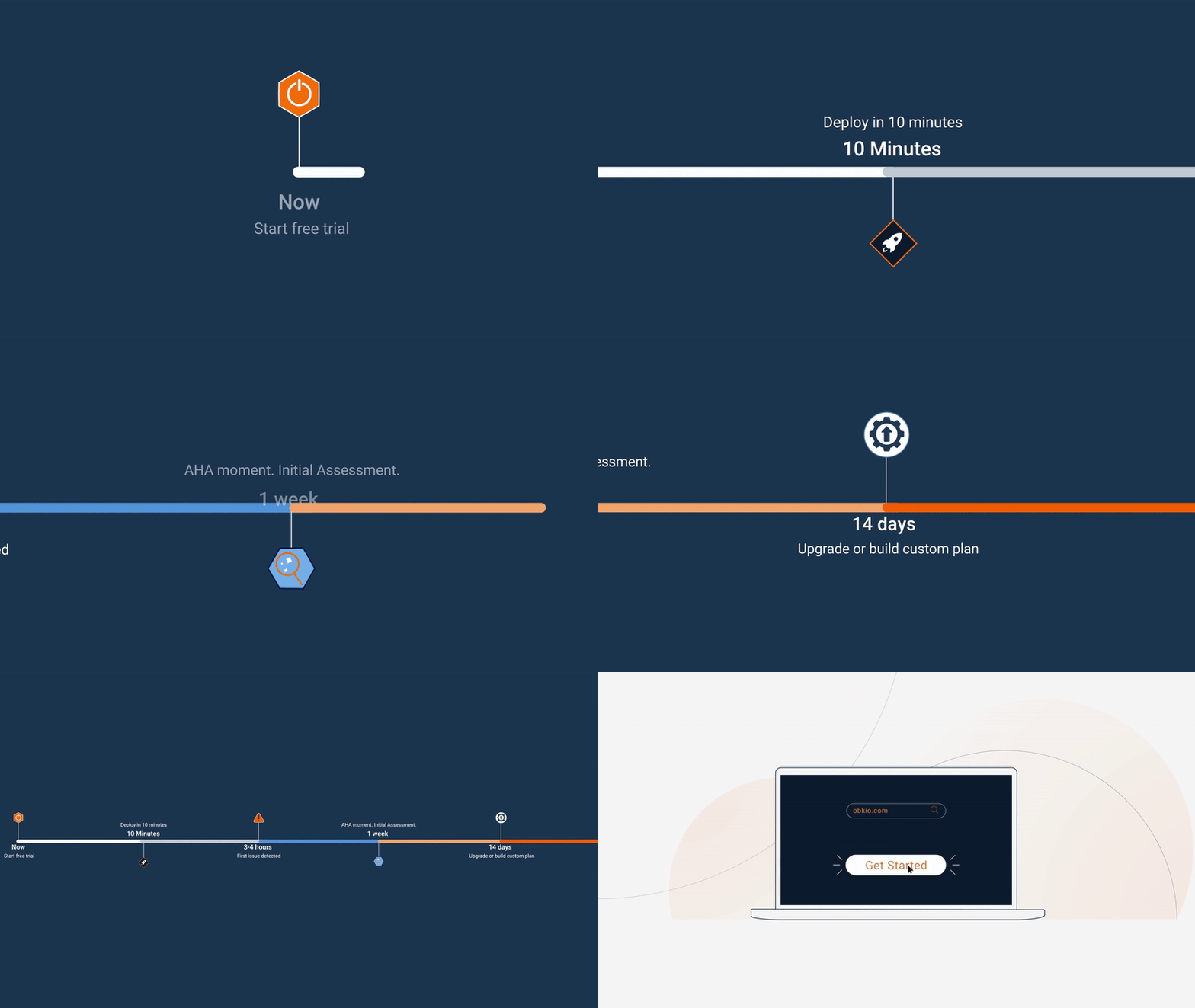
- 14-day free trial of all premium features
- Deploy in just 10 minutes
- Monitor performance in all key network locations
- Measure real-time network metrics
- Identify and troubleshoot live network problems


