











 Obkio Blog


 Subscribe
Table of Contents
Table of Contents
Imagine you’re in the middle of a phone call, and suddenly, the conversation cuts out for a moment. You miss a word, a sentence, or even an entire part of the discussion. It’s frustrating, right? This interruption is similar to what happens in a network when data packets are dropped and fail to reach their destination. These interruptions are known as network packet drops.
Network packet drops can disrupt the flow of information, causing delays, poor performance, and even complete failures in applications, streaming services, or online gaming. For businesses, packet drops can lead to lost productivity, unhappy customers, and a damaged reputation.
Understanding what network packet drops are, why they happen, and how to measure and monitor them is vital for anyone responsible for maintaining a network. Just as you’d want to avoid frequent call drops in a phone conversation, network administrators need to prevent packet drops to ensure reliable and efficient communication across their networks.
What Are Network Packet Drops? 
Network packet drops occur when data packets travelling across a network fail to reach their intended destination. These network packets, which carry pieces of information critical for communication, can be lost or discarded at various points along their journey through the network. When this happens, the data doesn't get delivered, leading to disruptions in network performance, such as slowdowns, incomplete data transfers, or even failed connections.
Industry standards classify packet drop severity as follows. Networks operating:
- Below 1% packet drop rate are considered healthy
- 1-2% indicates emerging issues that warrant investigation A* nd anything above 3% represents critical problems requiring immediate remediation

Packet drops typically refer to the deliberate discarding of packets by network devices like routers, switches, or firewalls. These devices play a crucial role in managing the flow of traffic across a network, and sometimes, dropping packets is necessary to maintain overall network health. This can happen for several reasons:
- Network Congestion: When too many packets are sent through the network at once, the traffic can exceed the capacity of the network devices. To prevent overload, these devices may drop some packets to reduce the strain and keep the network operational.
- Security Policies: Firewalls and other security devices may drop packets that don't meet specific security criteria. This helps protect the network from potential threats by preventing suspicious or harmful data from entering.
- Quality of Service (QoS) Rules: Networks often prioritize certain types of traffic to ensure that critical services – like voice or video calls – get the bandwidth they need. To achieve this, less important packets may be dropped to maintain performance for higher-priority services.
In some cases, packet drops are a controlled and intentional part of network management strategies. For example, a router may drop packets if its buffer is full, preventing it from becoming overloaded and ensuring that other, more critical traffic can continue flowing smoothly. Similarly, a firewall might drop packets as a security measure, discarding data that doesn't meet the necessary criteria for safe passage.
What Causes Dropped Packets (Network Packet Drops)?
Network packet drops can occur for various reasons, each of which can impact the performance and reliability of a network. Understanding these causes is crucial for diagnosing and resolving network issues.
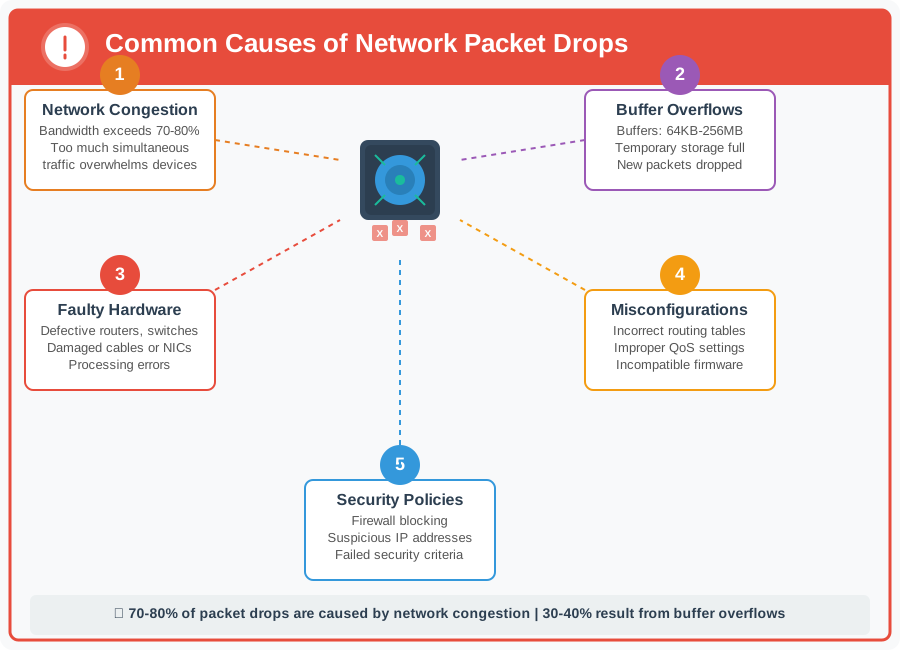
Let’s go over some of the most common factors that lead to packet drops:
1. Network Congestion Causing Packet Drops
Network congestion is one of the primary causes of packet drops. When too much data is being sent across the network simultaneously, the available bandwidth becomes overwhelmed, leading to congestion. In such cases, network devices like routers and switches may drop packets to reduce the load and prevent a complete network slowdown.
Example: Imagine a busy highway during rush hour. If too many cars try to pass through at the same time, traffic jams occur, and some vehicles might be forced to take alternative routes or stop completely. Similarly, in a congested network, packets can get delayed or dropped to manage the flow of data.
2. Buffer Overflows Causing Packet Drops
Network devices like routers and switches have buffers; temporary storage areas used to hold packets before forwarding them to their destination. If the buffer becomes full because the device is handling more traffic than it can manage, it will start dropping new incoming packets.
Typical router buffers range from 64KB for small office devices to 256MB for enterprise-grade equipment. When buffer occupancy reaches 90-95% capacity, devices enter a critical state where incoming packets are dropped. Buffer overflow is responsible for approximately 30-40% of all packet drop incidents in congested networks.
Example: Think of a buffer as a waiting room with limited seating. Once all the seats are filled, anyone else who arrives has to wait outside. In networking terms, when the buffer is full, additional packets are dropped because there’s no space left to hold them.
3. Faulty Network Hardware Causing Packet Drops
Defective or failing network hardware can also cause packet drops. This can include issues with routers, switches, networks, or even cables. Faulty hardware might not process packets correctly, leading to errors and drops.
Example: If a router's network interface card (NIC) is malfunctioning, it may fail to forward packets correctly, resulting in those packets being dropped and not reaching their destination.
4. Misconfigured Network Devices Causing Packet Drops
Incorrectly configured network devices can inadvertently cause packet drops. This might happen if devices are set up with improper routing tables, incorrect Quality of Service (QoS) settings, or incompatible firmware versions. Misconfigurations can lead to conflicts or bottlenecks that result in dropped packets.
Example: If a router is configured with incorrect QoS settings, it might prioritize less critical traffic over important data, leading to dropped packets for services that need consistent bandwidth, like video conferencing.
5. Quality of Service (QoS) Rules Causing Packet Drops
Networks often use Quality of Service (QoS) to prioritize certain types of traffic to ensure that critical services (like voice or video calls) get the bandwidth they need.
High-priority traffic typically receives 60-80% of available bandwidth, while best-effort traffic may be limited to 20-30%. To achieve this balance, less important packets may be dropped to maintain performance for higher-priority services.
6. Security Policies Causing Packet Drops
Security devices, such as firewalls, are designed to protect the network from unauthorized access or harmful data. These devices might drop packets that fail to meet security criteria, such as packets from suspicious IP addresses or those that contain certain types of data.
Example: A firewall might drop all incoming packets from an IP address that is blacklisted due to suspicious activity, preventing those packets from reaching their intended destination within the network.
How Are Network Packet Drops Measured?
Measuring packet drops is essential for understanding the extent of network issues and identifying patterns that might indicate underlying problems. There are several ways to quantify packet drops, each providing different insights into network performance. Here’s how packet drops are typically measured:
1. Percentage of Packet Drops
One of the most common ways to measure packet drops is by calculating the percentage of dropped packets relative to the total number of packets sent. This method provides a clear indication of how significant the packet drops are in relation to the overall traffic.
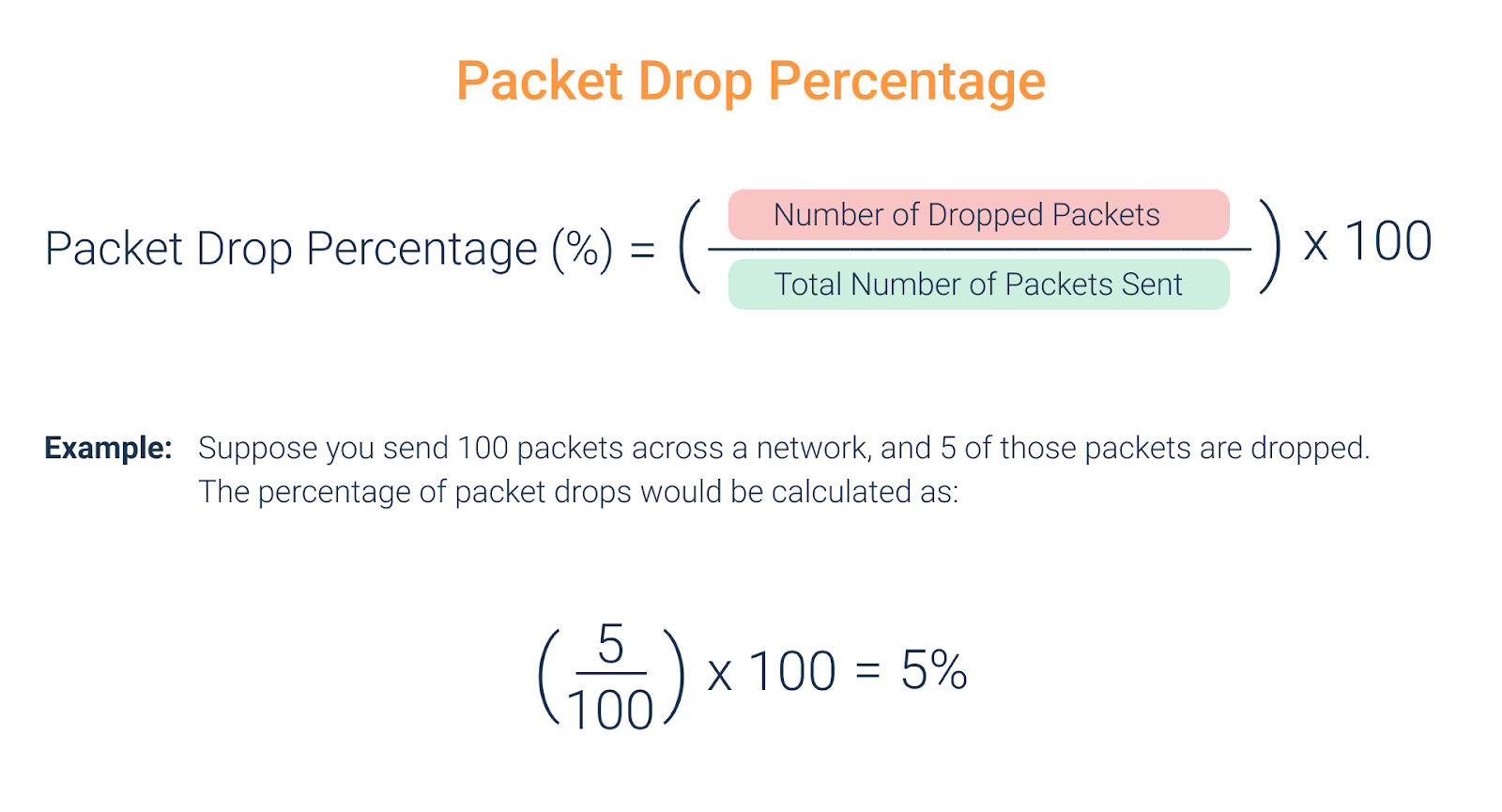
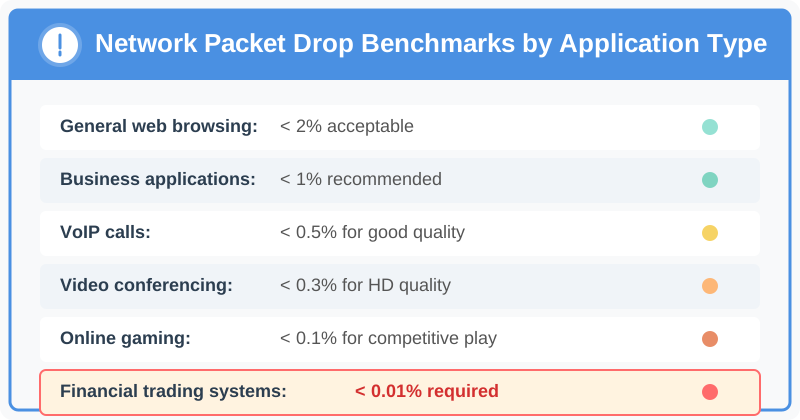
For most business applications, maintain packet drop rates below 0.5%. VoIP and video conferencing become noticeably degraded above 1% drops, with call quality rated as 'poor' at 2% and 'unusable' at 5% or higher. Real-time gaming requires even stricter thresholds, with acceptable performance only below 0.1-0.3% packet drops.
2. Packet Drop Count
The packet drop count is a straightforward measure that tracks the total number of packets dropped over a specific period or during a particular session. This method is useful for monitoring packet drops in real time and understanding how frequently drops occur.
Example: If you monitor a network interface for 10 minutes and observe that 50 packets were dropped, the packet drop count is simply 50 packets over 10 minutes. This metric provides a direct count of the lost packets, making it easier to spot trends over time.
3. Packet Drop Rate
Packet drop rate measures the number of packets dropped per unit of time, typically per minute. This metric is useful for understanding the frequency of packet drops and how they vary over time, especially during periods of high network traffic.
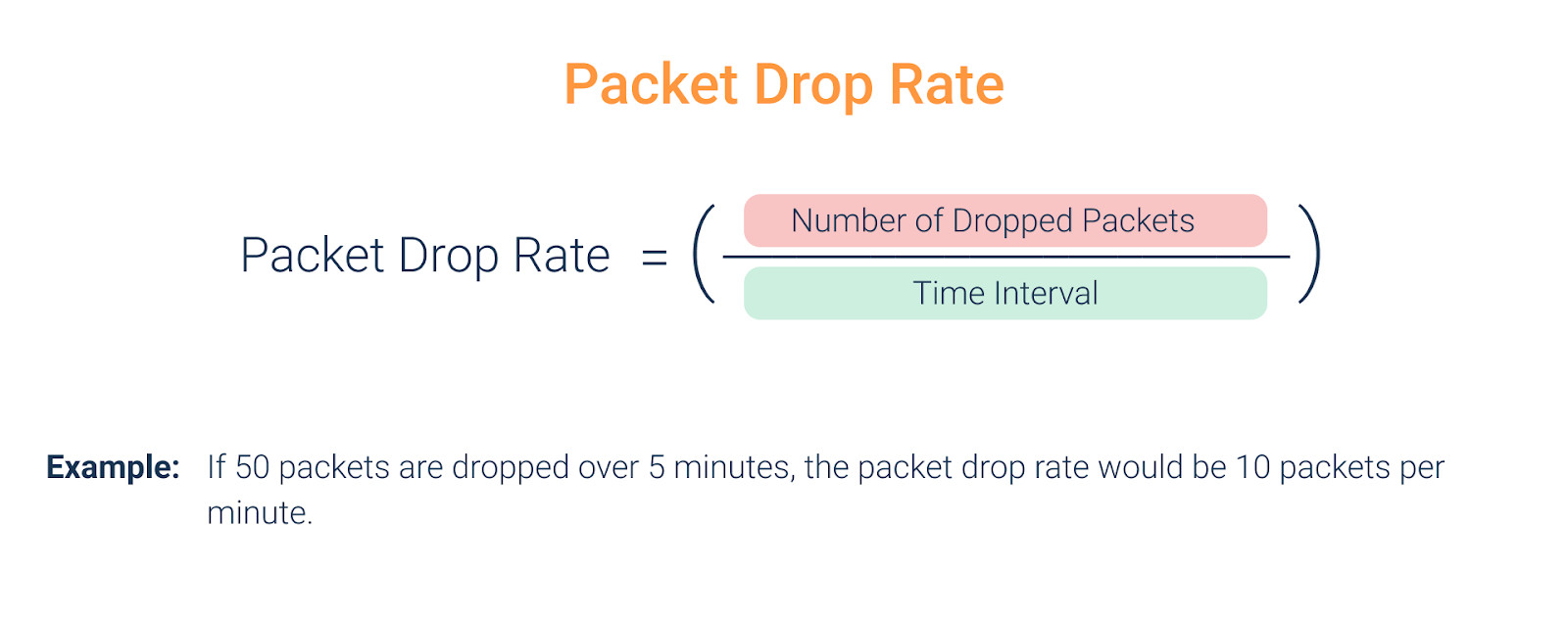
Example: A network interface drops 120 packets over a 10-minute monitoring period (600 seconds), resulting in a packet drop rate of 0.2 packets per second or 12 packets per minute. If the interface transmits 100,000 packets during this period, the drop percentage would be 0.12%; within acceptable parameters for most applications.
How to Monitor Dropped Packets in Your Network
Monitoring dropped packets in your network is crucial for maintaining optimal performance and preventing potential issues. While there are a variety of network monitoring tools available, ranging from open-source solutions to comprehensive network management systems, experience shows that most businesses, whether in retail, MSPs, manufacturing, or even individual users, gain the most visibility and control by using modern, dedicated network performance monitoring tools.
These advanced tools not only help reduce the amount of dropped packets but also optimize overall network performance, making them indispensable for ensuring a smooth and efficient network environment. Here’s how you can effectively monitor dropped packets using such tools:
1. Use a Dedicated Network Performance Monitoring Tool to Monitor Packet Drops
To accurately monitor dropped packets, use a specialized tool like Obkio Network Performance Monitoring software. This tool continuously monitors your network by sending packets every 500 milliseconds. The high frequency of packet transmission ensures that even small instances of packet drops are detected promptly.
- 14-day free trial of all premium features
- Deploy in just 10 minutes
- Monitor performance in all key network locations
- Measure real-time network metrics
- Identify and troubleshoot live network problems


2. Deploy Monitoring Agents Across Your Network to Catch Packet Drops Anywhere
For comprehensive monitoring, deploy Obkio's Monitoring Agents in key network locations, such as your office, data center, or cloud environment. These agents work by exchanging synthetic traffic with each other, allowing you to measure packet drops and identify any points in the network where packets are being dropped.
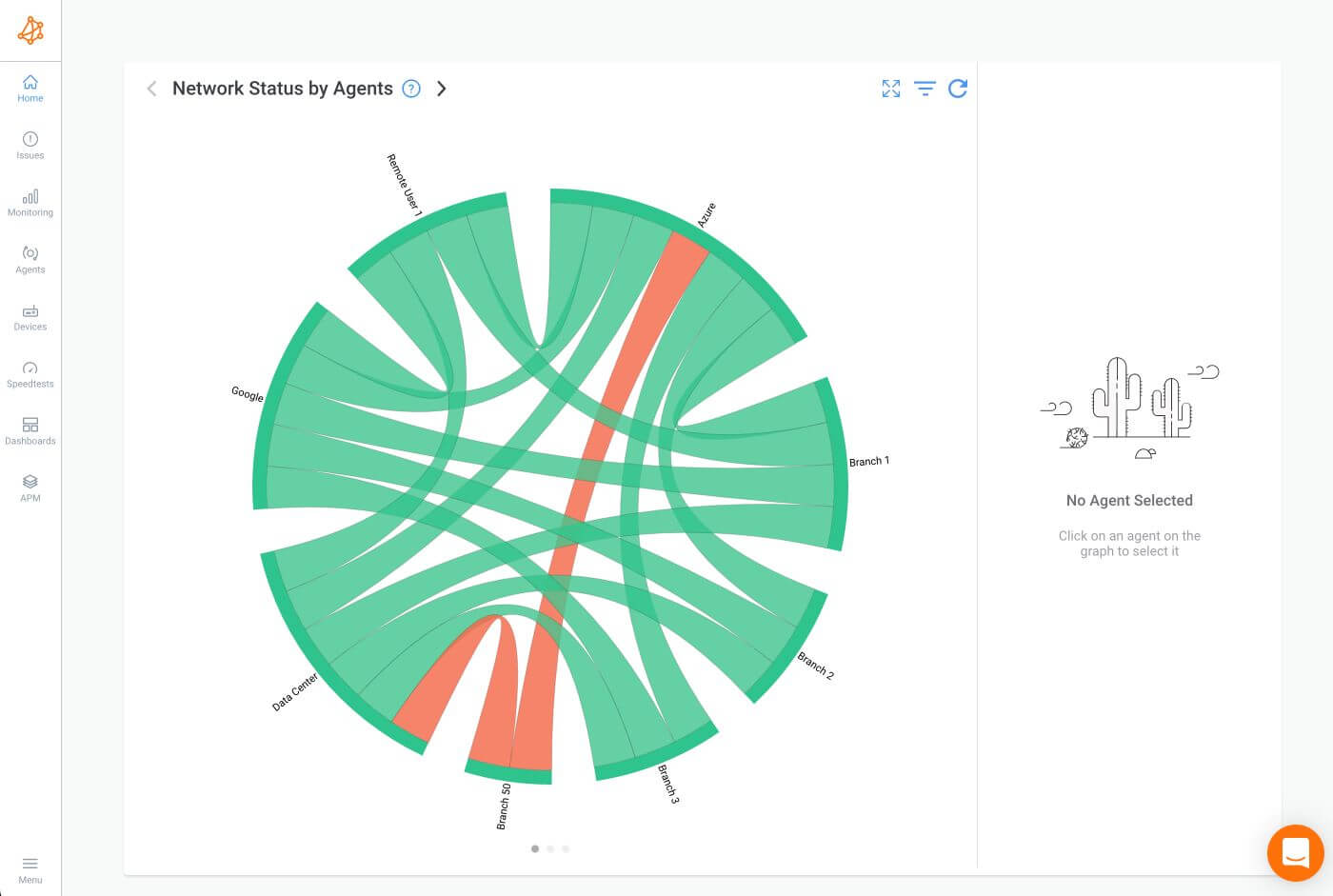
Obkio collects detailed measurements by analyzing the synthetic traffic exchanged between Monitoring Agents. The tool records the exact number and percentage of dropped packets, helping you pinpoint the locations and times where it occur. This data is essential for understanding the severity and frequency of such issues.
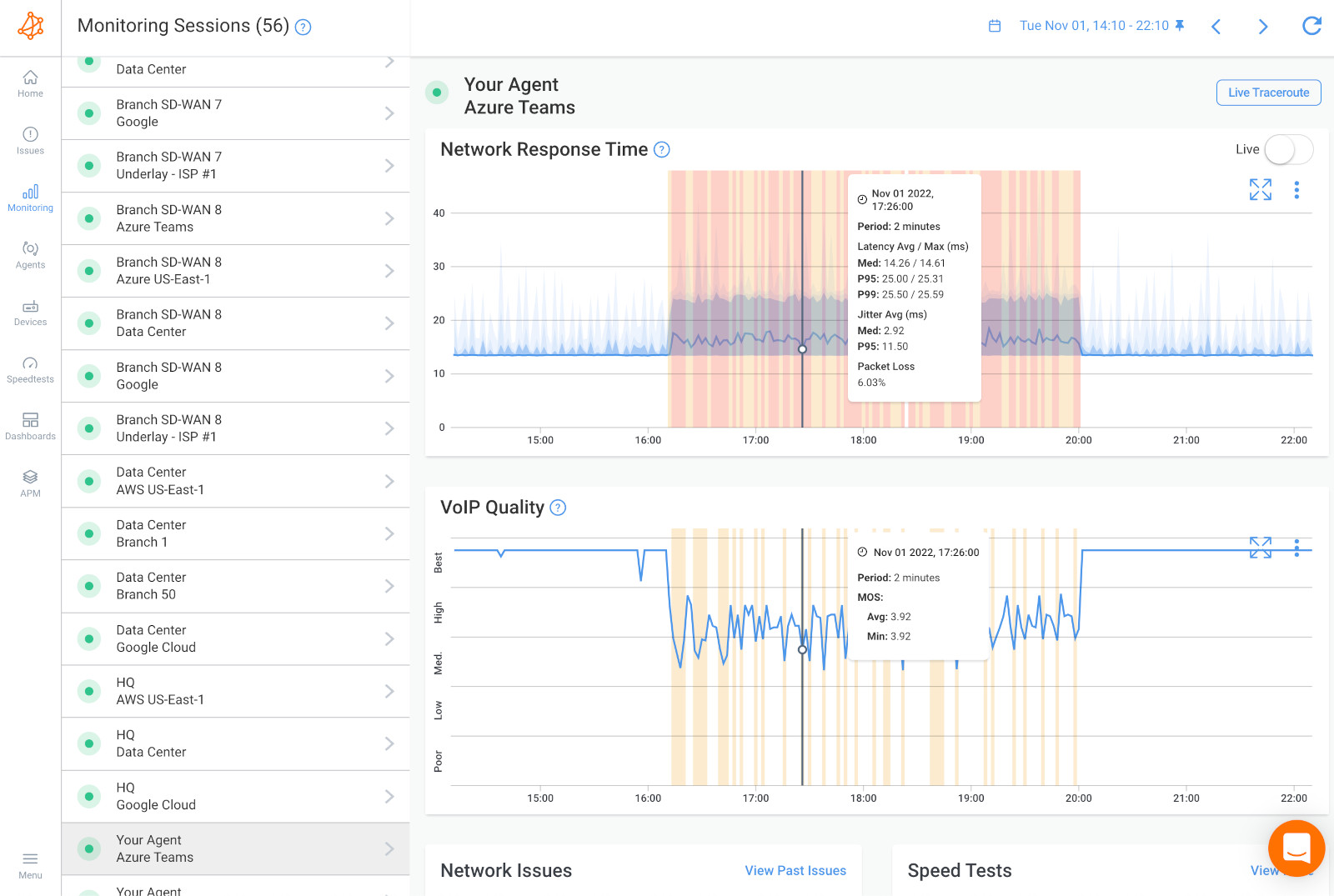
3. Monitor Packet Drops in Real-Time and Continuously Over Time
Obkio continuously measures network performance to catch dropped packets in real-time. You’ll be able to see all this data on Obkio’s intuitive dashboards. This helps you stay updated on the current state of your network. Additionally, Obkio aggregates data over time, showing you the worst instances of packet drops rather than just averages, ensuring that you don’t miss any significant issues.
4. Set Up Alerts and Reports for Dropped Packets
Obkio provides alerts and detailed reports that notify you immediately if packets are being dropped. These tools allow you to take swift action before the issue escalates and affects your network’s performance. With Obkio, you can customize these alerts and reports to fit your specific needs, ensuring that you always have the information you need at your fingertips.
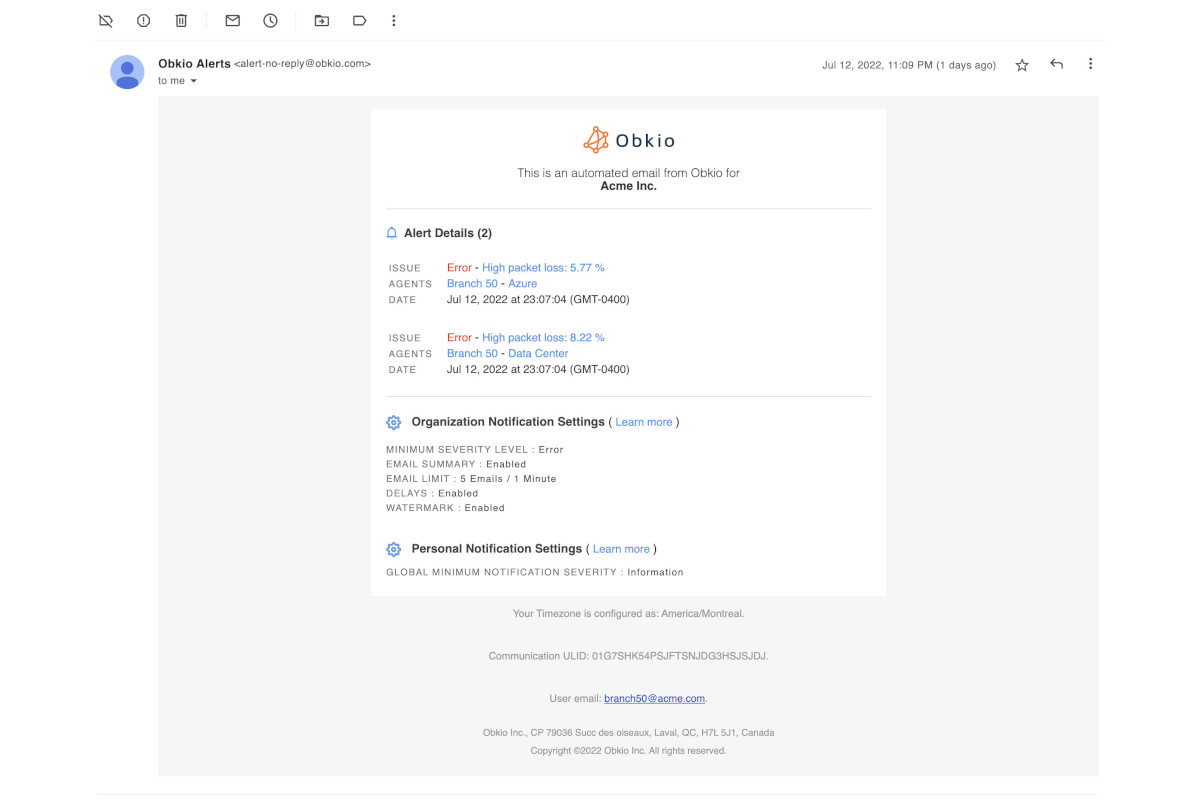
For detailed, step-by-step instructions on setting up Obkio for Monitoring Dropped Packets, be sure to check out our comprehensive guide, "How to Measure Packet Loss & Detect Packet Loss Issues" which is the same process used for packet drops This resource will walk you through everything you need to know to fully leverage Obkio's capabilities in identifying and resolving packet loss or packet drop issues.

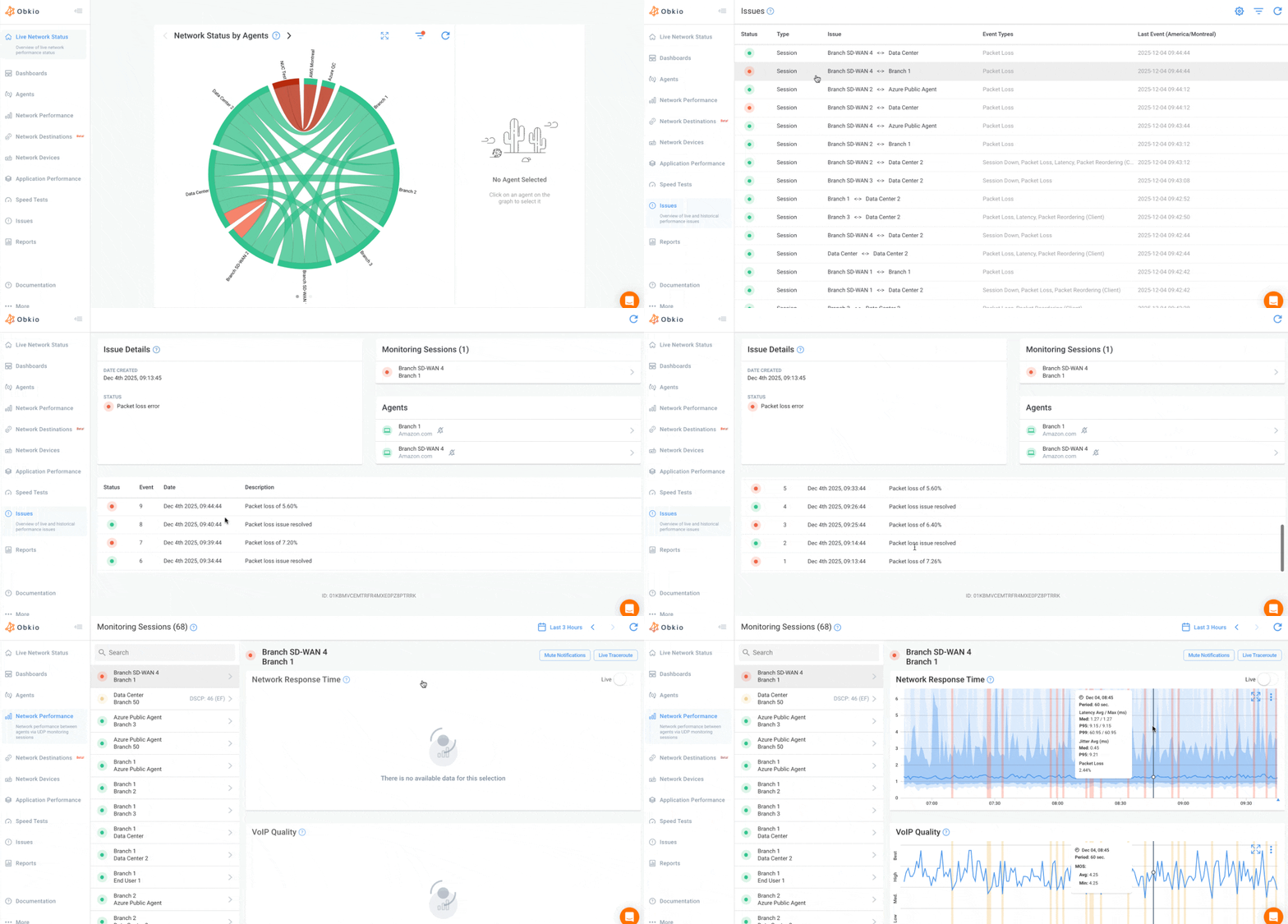
How to measure packet loss with Obkio’s Network & Packet Loss Monitoring tool. Check for packet loss in your network & read packet loss measurements.
Learn more

How to Perform Packet Drop Tests
Testing for packet drops can be conducted through a variety of methods, from basic command-line tools to more sophisticated network monitoring techniques. Here are some effective ways to assess dropped packets in your network:
1. Ping Test to Test Packet Drops
The ping test sends a series of ICMP Echo Request packets to a target IP address and measures the responses using IP monitoring.
How to Perform:
- Open the command prompt or terminal.
- Type:
ping <IP address or domain name> -n <number of packets>(on Windows) orping -c <number of packets> <IP address or domain name>(on Linux/macOS). - Example:
ping 8.8.8.8 -n 100(Windows) orping -c 100 8.8.8.8(Linux/macOS) to send 100 packets.
Interpretation: Review the results for packet drops, which will be displayed as a percentage of lost packets. Healthy networks should show 0% loss. Intermittent drops of 1-2% suggest congestion or interference, while consistent drops above 3% indicate hardware problems or severe congestion requiring immediate attention
2. Traceroute Test to Test Packet Drops
The traceroute test maps the path packets take to reach a destination and identifies where drops may occur.
How to Perform:
- Open the command prompt or terminal. Or use Obkio Vision, Obkio's free visual traceroute tool!
- Type:
tracert <IP address or domain name>(Windows) ortraceroute <IP address or domain name>(Linux/macOS). - Example:
tracert google.com.
Interpretation: Examine the results for high latency or timeouts at specific hops, which can indicate where packet drops are happening.
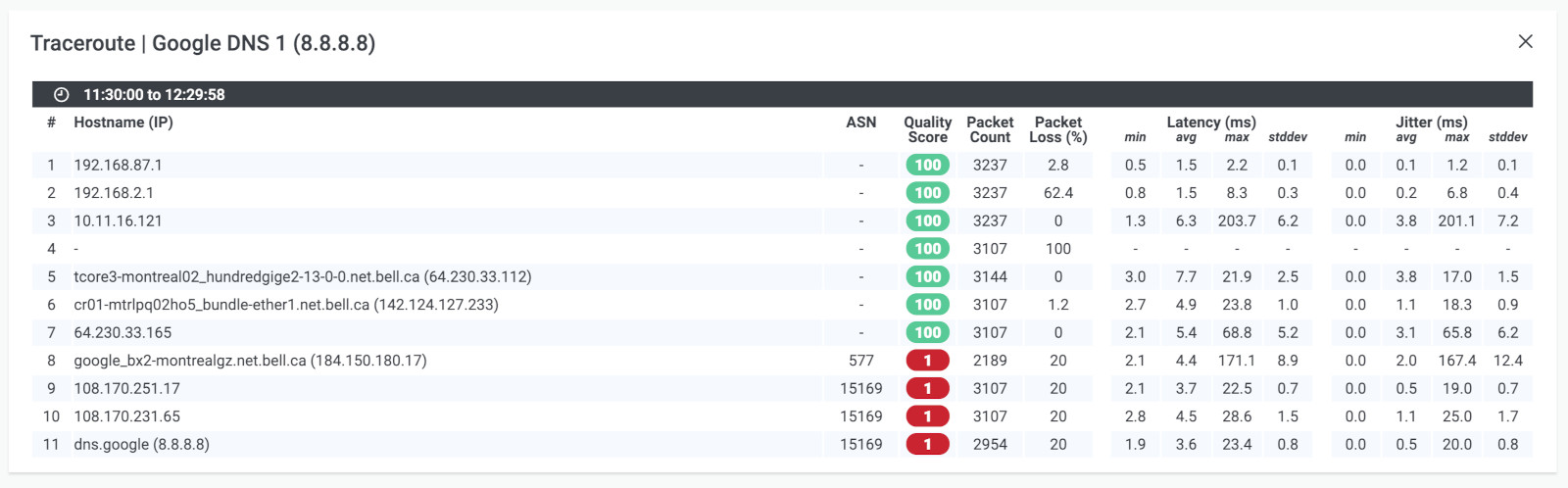 Screenshot from Obkio Vision
3. Network Monitoring Tools to Test Packet Drops
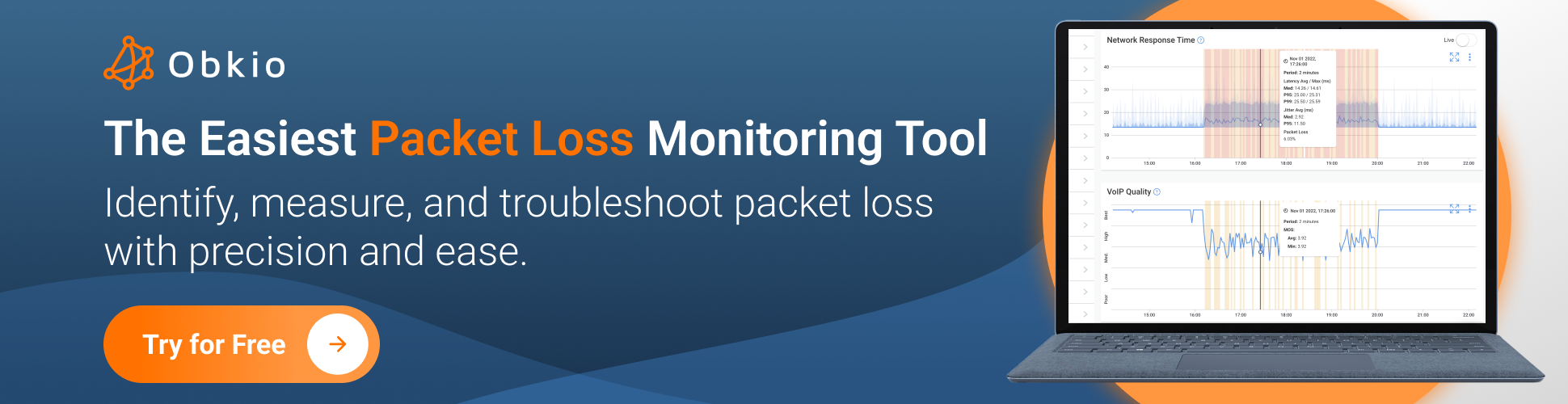
Obkio’s Packet Loss Monitoring Tool provides a comprehensive and automated approach to monitoring network performance and identifying both packet loss and packet drops.
It continuously tracks and analyzes network performance, offering detailed reports that not only identify packet drops but also assess their impact on overall network performance. This allows for proactive management and troubleshooting.
- Obkio's Synthetic Traffic: Simulates real-world application traffic to test and analyze network performance. By generating synthetic traffic, Obkio can provide insights into how packet loss and packet drops affect different types of traffic, helping you understand the broader impact on network performance and application usability.
4. Router and Switch Interface Statistics to Test Packet Drops
Examine packet drop statistics directly from network devices.
- How to Perform: Access the router or switch interface statistics.
- Interpretation: Look for indicators like "input errors" or "output drops" in the statistics, which can signal packet drops.
5. SNMP Monitoring to Test Packet Drops
Utilize SNMP (Simple Network Management Protocol) to poll network devices for packet drop statistics.
- How to Perform: Use an SNMP monitoring tool, or SNMP features from Obkio's Network Monitoring tool to collect and visualize packet drop data.
- Interpretation: Analyze the collected data to understand packet drop trends and network performance.
These methods provide a range of options for detecting and analyzing packet drops, from quick checks to in-depth analysis, helping you maintain optimal network performance.

Learn what is acceptable packet loss, how it can impact your network & how to resolve it. Spoiler alert: 10% packet loss can make your internet 100x slower!
Learn more
What is an Acceptable Packet Drop Rate?
Determining what constitutes an acceptable packet drop rate depends on your network environment, the applications running on your network, and your performance requirements. However, industry standards provide clear guidelines for evaluating packet drop severity.
Healthy Network: < 1%
Networks operating with packet drop rates below 1% are considered healthy for most business applications. At this level, users typically experience smooth performance with minimal disruptions to productivity tools, web browsing, and standard business software.
Concerning Range: 1-2%
Packet drop rates between 1-2% indicate emerging network issues that warrant investigation. While general applications may still function, latency-sensitive services like video calls or cloud applications will show noticeable degradation. This range serves as an early warning that your network requires attention before problems escalate.
Critical Threshold: > 3%
Any packet drop rate exceeding 3% represents critical network problems requiring immediate remediation. At this level, most applications experience significant performance issues, user complaints increase dramatically, and business productivity suffers measurably.
What is the Packet Drop Rate Tolerance by Application Type?
Different applications have varying sensitivity to packet drops. Understanding these requirements helps you set appropriate monitoring thresholds and prioritize troubleshooting efforts:
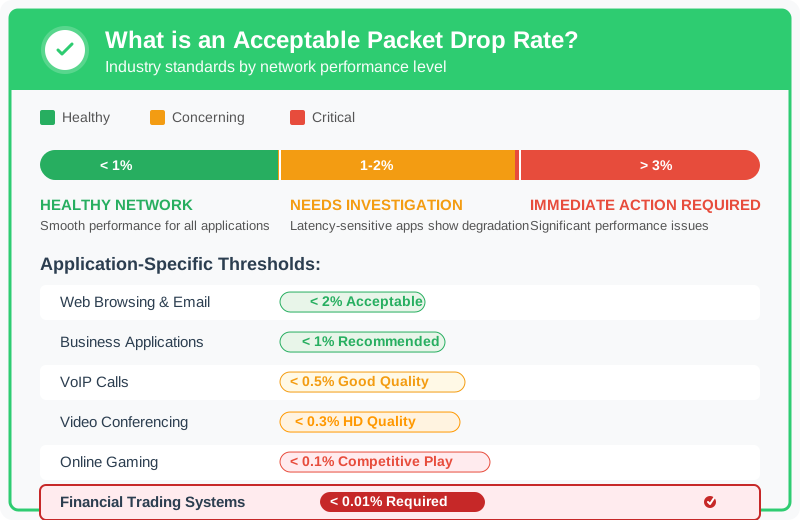
Web Browsing and Email: Acceptable: < 2%
Standard web browsing and email applications are relatively tolerant of packet drops due to TCP's retransmission mechanisms. While drops below 2% may cause occasional slowdowns in page loading, users rarely notice performance degradation at this level.
Business Applications and File Transfers: Recommended: < 1%
Enterprise resource planning (ERP) systems, customer relationship management (CRM) platforms, and file transfer applications perform best with packet drop rates below 1%. Higher rates result in timeout errors, failed transactions, and extended file transfer times that impact productivity.
VoIP and Audio Conferencing: Required: < 0.5%
Voice over IP (VoIP) systems are highly sensitive to packet drops. Rates below 0.5% maintain good call quality with clear audio. Between 0.5-1%, users experience choppy audio and occasional word loss. Above 1%, calls become difficult to understand, with frequent audio dropouts making communication frustrating.
Video Conferencing: Required: < 0.3%
High-definition video conferencing demands even stricter requirements than audio-only calls. Packet drop rates must remain below 0.3% to maintain smooth video quality without pixelation or freezing. At 0.5-1%, video becomes blocky and choppy. Above 1%, video conferences are nearly unusable with constant freezing and audio-video desynchronization.
Online Gaming and Real-Time Applications: Required: < 0.1%
Competitive online gaming and real-time trading platforms require the most stringent packet drop thresholds. Rates must stay below 0.1% to prevent lag, rubber-banding, and input delays. Even 0.3% packet drops create noticeable performance issues that affect competitive gameplay or time-sensitive transactions.
Financial Trading Systems: Required: < 0.01%
High-frequency trading platforms and financial transaction systems operate with near-zero tolerance for packet drops. These mission-critical applications require packet drop rates below 0.01% (one drop per 10,000 packets) to ensure transaction integrity and maintain competitive execution speeds.
What Factors Influence Acceptable Packet Drop Rates?
Several factors affect what packet drop rate your network can tolerate:
Network Protocol: TCP-based applications handle packet drops better than UDP-based applications because TCP automatically retransmits lost packets. UDP applications like VoIP and gaming have no built-in recovery mechanism, making them more sensitive to drops.
Application Buffer Size: Applications with larger buffers can absorb temporary packet drops by playing out buffered content while waiting for retransmissions. Streaming services with 10-30 second buffers tolerate brief packet drop spikes better than real-time applications.
User Expectations: Internal business applications may accept slightly higher packet drop rates than customer-facing services. A 1% drop rate might be acceptable for internal file sharing but unacceptable for customer video streaming services.
Network Redundancy: Networks with redundant paths and failover mechanisms can temporarily tolerate higher packet drop rates during path transitions. However, sustained drops on redundant networks indicate systemic issues requiring investigation.
How to Maintain Acceptable Packet Drop Rates
Keeping your network within acceptable packet drop thresholds requires proactive monitoring and management:
Implement Continuous Monitoring: Deploy network monitoring tools that track packet drops in real-time across all critical network segments. Set alert thresholds based on your most sensitive applications.
Establish Baseline Performance: Measure your network's normal packet drop rates during different times of day and usage patterns. This baseline helps you quickly identify when rates exceed normal levels.
Prioritize Critical Traffic: Configure Quality of Service (QoS) policies to prioritize latency-sensitive applications. Ensure VoIP, video conferencing, and business-critical applications receive adequate bandwidth even during network congestion.
Right-Size Network Capacity: Monitor bandwidth utilization alongside packet drops. If drops correlate with high utilization (above 70-80%), upgrading network capacity may be necessary.
Schedule Regular Maintenance: Proactively update device firmware, replace aging hardware, and review network configurations to prevent packet drops caused by equipment failures or misconfigurations.
When Zero Packet Drops Isn't Realistic
While zero packet drops represents the ideal state, several scenarios make some level of packet drops unavoidable:
- Intentional QoS Dropping: Networks deliberately drop lower-priority packets during congestion to protect high-priority traffic
- Security Policy Enforcement: Firewalls and security devices drop packets from blocked sources or that fail security checks
- Temporary Congestion Events: Brief traffic spikes during peak usage times may cause momentary packet drops that quickly resolve
- Network Transitions: Path changes during failover or load balancing can cause brief packet drop spikes
The goal isn't necessarily zero packet drops but maintaining rates within acceptable ranges for your specific applications and consistently staying below critical thresholds that impact user experience.

How to Fix and Reduce Network Packet Drops
After identifying and measuring packet drops, it’s crucial to address and troubleshoot the underlying issues to ensure network performance and reliability. Here’s a structured approach to fixing and reducing network packet drops:
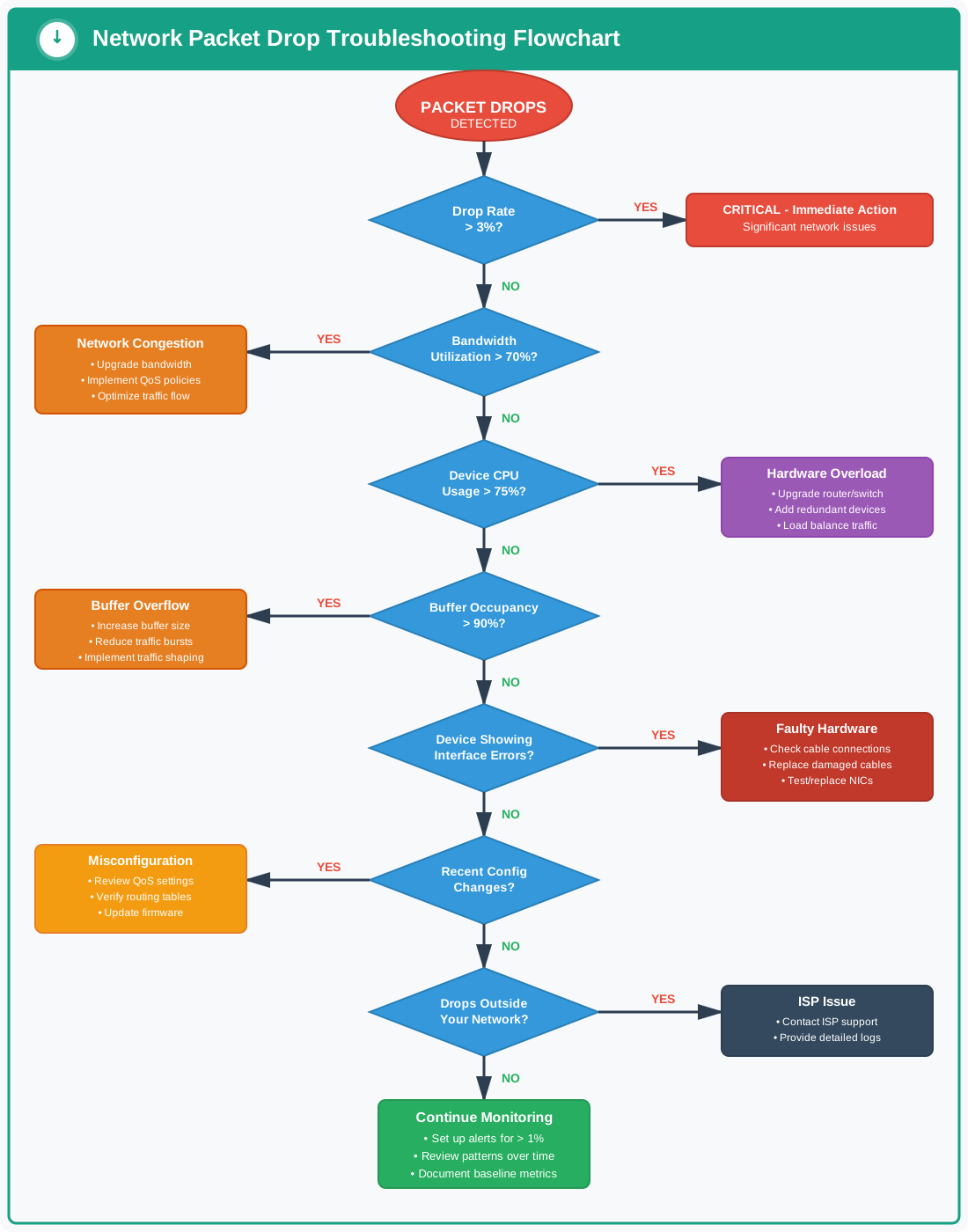
1. How to Troubleshoot Packet Drops
Simply measuring packet drops is not enough; troubleshooting is essential to address the root causes. Even a small amount of packet drops can indicate significant issues. Start by using a comprehensive network monitoring tool, such as Obkio, to collect detailed data and diagnose problems. Key steps include:
- Monitor Network Devices: Examine packet drops on routers, switches, and firewalls. Issues may arise from software bugs, misconfigurations, or high resource usage.
- Check Bandwidth and CPU Usage: High bandwidth or CPU usage on network devices can contribute to packet drops. Upgrading your bandwidth or hardware may resolve these issues. Router CPU utilization above 75% often correlates with increased packet drops, as the device struggles to process traffic efficiently. Similarly, when link utilization consistently exceeds 70-80% of capacity, upgrading your bandwidth or hardware may resolve these issues.
- Identify Network Congestion: Network congestion can overwhelm devices and links. Use monitoring tools to detect congestion points and take steps to alleviate them, such as optimizing traffic flow or increasing network capacity.
- Inspect Hardware and Cabling: Faulty hardware or cabling can cause packet drops. Check for damaged cables, malfunctioning network cards, or other hardware issues.
- Update Drivers and Firmware: Outdated drivers or firmware can lead to packet drops. Ensure all network devices have the latest updates installed.
- Assess ISP’s End: If internal resources are not the issue, packet drops may originate from your ISP. Open a service ticket with detailed information to address the issue with your ISP.
2. How to Maintain Proactive and Continuous Network & Packet Drop Monitoring
Continuous monitoring is vital for maintaining optimal network performance and proactively addressing potential packet drops issues. Even after initial troubleshooting, ongoing monitoring with tools like Obkio is essential:
- Performance Optimization: Continuous monitoring helps identify patterns and trends in packet drops, enabling you to optimize network performance and enhance the user experience.
- Troubleshoot Network Issues: Ongoing monitoring allows for quick identification and resolution of network problems, minimizing downtime and reducing user impact.
- Quality of Service (QoS) Management: Ensure that QoS policies are effective by monitoring packet drop rates for different traffic types. Adjustments can be made to maintain consistent service quality.
- Proactive Maintenance: Early detection of packet drop trends can indicate potential issues, allowing for timely maintenance or component replacement to prevent major disruptions.
- Service Level Agreement (SLA) Compliance: For networks managed by service providers, continuous monitoring ensures adherence to SLA benchmarks and provides evidence of compliance.
- Capacity Planning: Analyzing historical packet drop data helps in planning for future capacity needs, preventing potential issues by upgrading network infrastructure or provisioning additional resources.
By integrating these strategies, you can effectively address packet drop issues and ensure the long-term health and efficiency of your network.

Fix packet loss at the source. Learn how to measure it, find where it happens in your network or your ISP, diagnose the root cause, and stop it coming back.
Learn more
Packet Drops vs. Packet Loss: What’s the Difference?
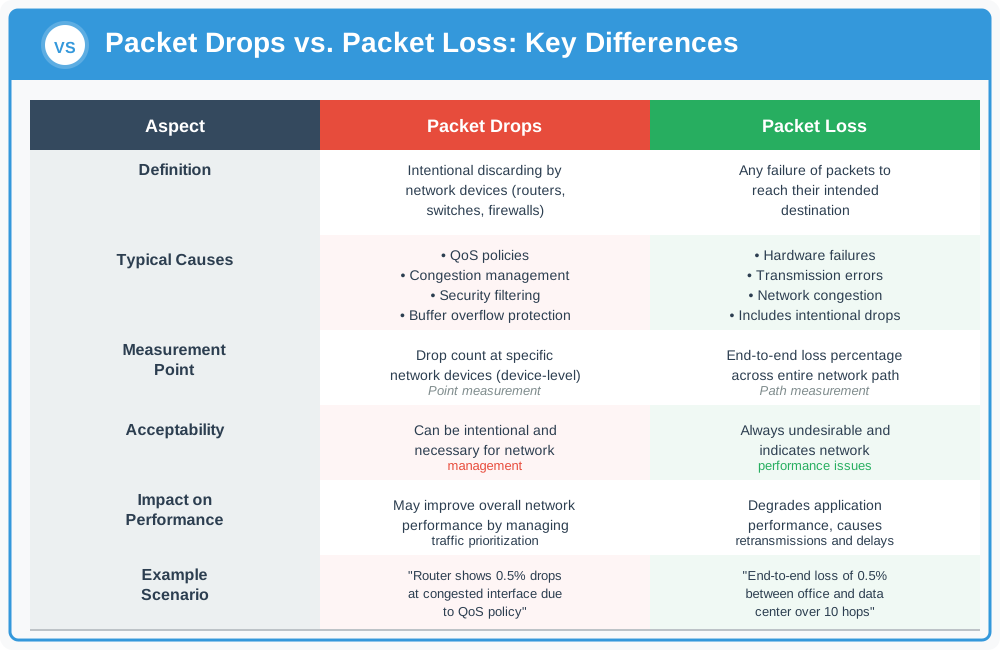
"Packet Drops" and "Packet Loss" are terms frequently used interchangeably in the world of networks, and although they can mean the same thing, they are sometimes used to refer to different concepts depending on the context:
What Are Packet Drops?
This term often refers to instances where packets are intentionally discarded by network devices such as routers or switches. Packet drops can be a part of network management practices, used to prevent congestion or prioritize certain types of traffic.
For example: A router might drop packets from a less critical application to ensure that more important traffic, such as real-time voice or video, is delivered efficiently.
Packet drops are typically managed and occur at specific points in the network where policies or conditions dictate that dropping packets is necessary.
What is Packet Loss?
Packet Loss encompasses all instances where packets fail to reach their intended destination, whether the loss is intentional or unintentional. Packet loss can result from various issues, including network congestion, hardware failures, or routing problems.
Packet loss is often measured as a percentage of total packets sent and is a key indicator of network health and performance.
High packet loss rates can degrade network performance, affecting the quality of services like VoIP, streaming, and online gaming. Packet loss reflects the overall efficiency and reliability of the network and is crucial for diagnosing and addressing network problems.
Understanding the distinction between packet drops and packet loss helps in identifying and resolving network issues more effectively. While packet drops might be a part of network management strategies, packet loss generally signals underlying issues that need attention to maintain optimal network performance.

Explore what is packet loss, how packet loss impacts network performance, and how to reduce packet loss to minimize its impact on businesses.
Learn more
Frequently Asked Questions About Network Packet Drops
- What is an acceptable packet drop rate?
An acceptable packet drop rate is below 1% for most networks. Rates between 1-2% may cause noticeable performance issues for sensitive applications like VoIP or video conferencing. Any rate above 2-3% indicates serious network problems requiring immediate investigation.
What causes network packet drops? Network packet drops are primarily caused by network congestion (accounting for 70-80% of cases), buffer overflows when routers run out of memory, faulty hardware like damaged cables or failing network cards, device misconfigurations, and security policies that block suspicious traffic.
How do I check for packet drops? Check for packet drops using ping tests (ping -c 100 [destination]), traceroute commands to identify problematic network hops, network device statistics showing drop counts, SNMP monitoring tools, or comprehensive network monitoring software like Obkio that continuously tracks packet drops in real-time.
What's the difference between packet drops and packet loss? Packet drops refer specifically to intentional discarding of packets by network devices for management purposes, while packet loss encompasses all instances where packets fail to reach their destination, whether intentional or due to network problems.
Can packet drops affect Internet speed? Yes, packet drops significantly affect Internet speed. When packets are dropped, the sending device must retransmit the lost data, effectively reducing throughput. A 2% packet drop rate can reduce actual throughput by 30-40% due to retransmission overhead.
Streamline Your Network, Stop the Packet Drops
Packet drops can be a major pain point for businesses, leading to decreased productivity, frustrated customers, and a damaged reputation. But with Obkio, you can identify and address these issues quickly and efficiently.
Obkio's Network Monitoring Tool is your network's secret weapon. It helps you:
- Pinpoint Performance Problems: Identify exactly where packet drops are occurring and their root causes.
- Minimize Downtime: Quickly resolve issues before they escalate and disrupt your operations.
- Optimize Network Efficiency: Streamline your network traffic and improve overall performance.
- Enhance Customer Satisfaction: Ensure a reliable and high-performing network for your employees and customers.
Don't let packet drops drag your business down. Invest in Obkio and experience the benefits of a streamlined, efficient network.

- 14-day free trial of all premium features
- Deploy in just 10 minutes
- Monitor performance in all key network locations
- Measure real-time network metrics
- Identify and troubleshoot live network problems

