









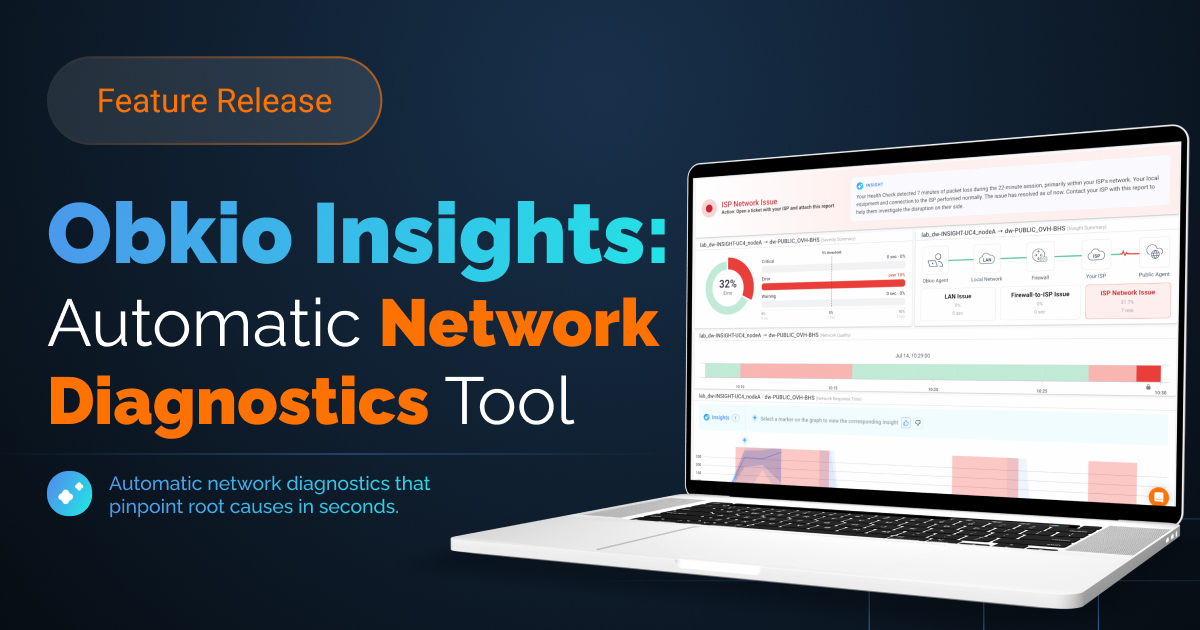


Network Monitoring Built for Schools, Not Just Enterprises
Get visibility across every school in your district, prove ISP issues with hard evidence, and do it all with the IT resources you already have.


4.96 Average Rating (169 Reviews)





Schools & School Boards Are Asked to Monitor Like Enterprises,
Without Enterprise Resources
Most boards run this with one or two IT staff, not a dedicated network team, and no realistic way to check every site by hand.
When something breaks, IT usually finds out the same way everyone else does, from a phone call.
And when the cause sits with your ISP, "everything looks fine on our end" is hard to argue with when you have no data of your own. Enterprise monitoring tools don't solve this.
They're built for teams and budgets school boards don't have.
Obkio monitors every school in your district from a single dashboard, so problems surface before staff report them, not after.
When an ISP pushes back, you escalate with a timestamped report instead of a complaint. And because Obkio is built for generalist teams, deployment takes an agent and a few minutes, not a network engineer.
District-wide visibility, ISP-proof evidence, and a setup your team can actually run.
That's Obkio for school boards.
The Challenges Schools Face Every Day
Network problems disrupt classrooms, waste IT time, and go unnoticed for days. These scenarios happen in school boards everywhere.
"A school's network goes down, and no one tells you for two days."
A site loses connectivity on a Tuesday morning. Nobody calls until Thursday, because there's no one checking. With dozens of schools spread across the district, problems live in the dark until someone happens to notice.
"Your ISP says everything's fine. Your teachers say otherwise."
Slow connections and dropped calls during class, but when you call your provider, the line tests clean. Without proof of what's actually happening on your end, the issue just repeats next week.
"One IT person. Forty schools. Zero time."
Your team is stretched across every site in the district, with no realistic way to manually check each one. Enterprise tools assume a team you don't have and a budget you don't either.

Why School Boards Choose Obkio
Your IT team is stretched thin, and your ISP says everything's fine. Obkio gives you the visibility and the evidence to prove otherwise.
Built for distributed networks
Monitor every school site from one dashboard, without needing a network engineer at each location.
Evidence-grade ISP reporting
Exportable traceroutes and performance reports give you leverage when escalating with your provider.
Education-friendly pricing
Volume-based pricing designed for multi-site public institutions, not enterprise budgets.
No specialized training required
Simple enough for a generalist IT team to deploy and use day one.
Alerts before staff even notice
Get notified the moment a school's connection degrades, so you're already looking into it before the first call comes in.
Let's Discuss Your Needs
Want to see how Obkio's School Board IT Monitoring works?
Identify the Issue, and Who Needs to Fix It
Obkio gives school board IT teams the visibility and proof they need to stop chasing ghosts, resolve network issues faster, and hold their ISP accountable.
Issue is on your side
A school's router, firewall, or internal network is degrading performance. Obkio isolates it to that site's LAN before anyone picks up the phone. Fix it internally with precise data pointing to which device or segment is the culprit.
Issue is your ISP
Performance degrades beyond the school's gateway. Obkio logs every second of it so you have proof, not just a complaint. Escalate with data, and hold your ISP accountable to their SLA instead of waiting days for a response to a vague ticket.
How Obkio Works for Schools
See Every School. Prove Every Problem. In Minutes.
Deploy an agent at each school
Lightweight monitoring agents at each site, no hardware changes required.
Monitor performance continuously
Real-time visibility into latency, packet loss, jitter, and uptime across your entire district.
Get alerted and get proof
Automatic alerts when something's wrong, plus exportable reports and traceroutes for ISP escalation.
Fix it, or escalate it, then confirm it's resolved
Either way, keep monitoring to confirm the fix actually held.
Step 1: Deploy an Agent at Each School
Start your free trial, deploy Obkio, and start monitoring your first school in about 10 minutes.
Deploying Obkio across your district is simple. Our onboarding wizard walks you through setup step by step, so you have full access to every feature during your 14-day free trial from day one.
To get your first school online, you only need one internal Monitoring Agent installed at that site and one Public Monitoring Agent, which is already deployed over the Internet on Obkio's end. No hardware changes, no specialized configuration.
Once the first site is running, repeat the same process for each additional school. There's no per-site learning curve, the setup is identical whether you're onboarding your second school or your fortieth.
Step 2: Collect Real-Time Network Performance Metrics
Speed and uptime tell you something is wrong. They don't tell you why, and a school being "online" doesn't mean the connection is actually usable.
It's tempting to judge a school's Internet by one number: is it up, and how fast is it. But speed is shaped by other factors too, latency, jitter, and packet loss all affect what a teacher or student actually experiences, even when the connection is technically up and running at full speed.
This is why monitoring performance, not just speed, matters. Slowness is a symptom, not the cause. Obkio measures the underlying metrics that actually explain what's happening on a school's connection.
Once an agent is deployed, Obkio continuously monitors performance at each site and gives you real-time insight into every school on the network. Minute-by-minute measurements build a reliable baseline for each site, so you know what normal looks like and can spot the moment a school drifts from it.
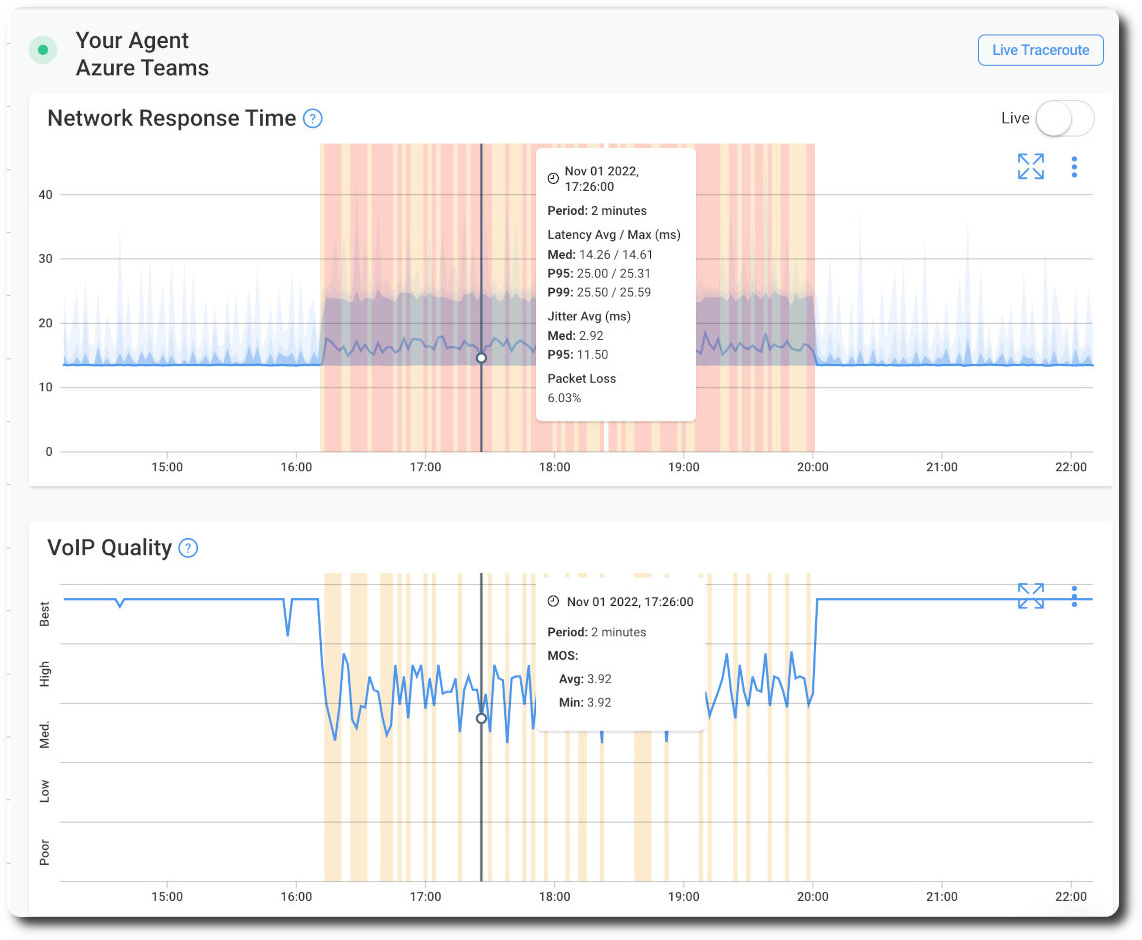
Steps 3: Analyze Continuous Traceroutes Data
When troubleshooting a school's network, you need two things: when the issue occurred, and how often it happens.
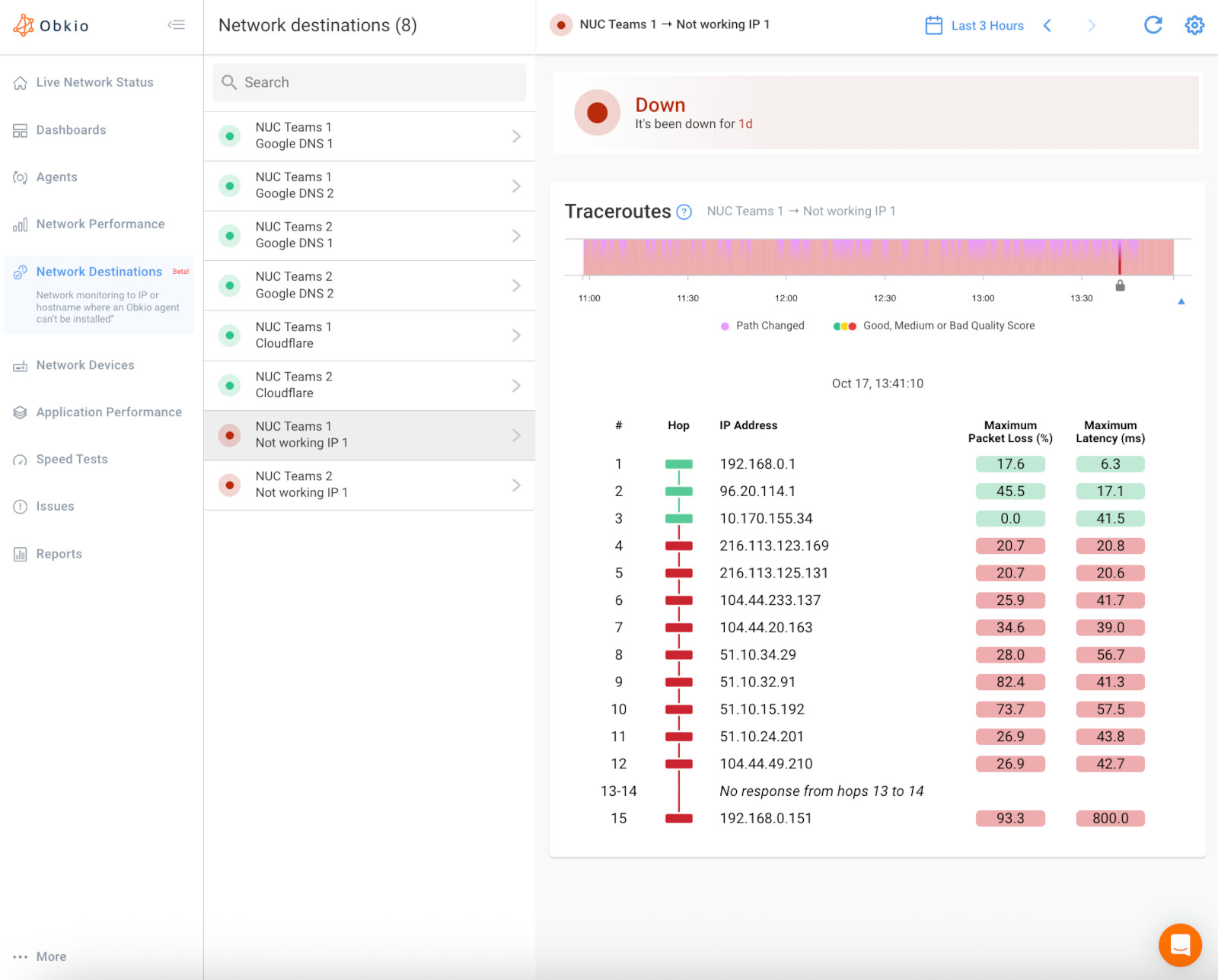
Obkio's Visual Traceroute runs continuously and keeps a history, not just a one-time snapshot. The moment a school's performance drifts from its baseline, Obkio flags it and logs the traceroute for that exact window, showing which hop was failing and when. You're not trying to catch the problem live. You already have the hop-by-hop record from the moment it happened.
For issues reported after the fact, that history means you can pull up last Tuesday's traceroute during testing, or last Friday's lunch-hour slowdown, and see exactly which segment was responsible, instead of telling a teacher to call back next time it happens.
Step 4: Track Every School, Before and After the Fix
Obkio lets you build a custom dashboard for each school, so you can see performance before an issue, during it, and after you've resolved it.
Create a custom dashboard for each school, tracking the metrics that matter for that site, latency, packet loss, jitter, bandwidth, or CPU on a specific device. When you make a change, whether it's a firmware update, a new firewall rule, or a call to your ISP, you can pull up that school's dashboard and compare performance from before the fix to after it, on the same timeline.
That comparison is also what turns a fix into proof. If you escalated to your ISP and they made a change on their end, you can show them the data confirming performance actually improved, not just take their word that it's resolved. And if a similar issue shows up again three months later, you have the historical baseline to catch it fast, instead of starting the investigation from zero.
No Matter the Size of Your Educational District, We've Got a Plan For You
Obkio is designed to be the easiest network performance monitoring tool on the market, making it the right fit for school boards of any size, from a single-school district to a board managing dozens of sites across a region.
- 14-Day Proof of Concept
- Small boards with a handful of schools
- Mid-size districts with a dozen or more sites
- Large, multi-school boards and regional CSS networks
- * Colleges and Universities
Check out our plans, all available with a free 14-day trial, no credit card required.
Let's Discuss Your Needs
Still have questions? Want to discuss how Obkio can help?
Network Monitoring, Troubleshooting & Diagnostics:
Expert Insights and How To's
Welcome to our blog, where we address the common challenge of identifying network issues and provide you with effective solutions. At times, network problems can be elusive, causing disruptions, performance bottlenecks, and frustration. But fret not, because we are here to help. Our team of experts has extensive experience in tackling network issues head-on, and we are excited to share our knowledge and insights with you.




Frequently Asked Questions


Network monitoring for school boards is the practice of continuously tracking network performance, meaning latency, packet loss, jitter, and uptime, across every school site in a district from one central dashboard, instead of relying on staff or teachers to report outages.
Obkio measures Internet performance independently of your ISP and uses Visual Traceroute to show exactly where in the path a problem occurred. That gives you a timestamped record to bring to your provider instead of a verbal complaint.
Yes. Obkio deploys a Monitoring Agent at each school and reports performance data from every site to a single dashboard, so IT can see the whole district at once.
Obkio prices for multi-site and education deployments rather than a single enterprise rate. Talk to sales for a quote sized to your district's number of sites.
Most districts can complete initial onboarding in under an hour using Obkio's setup wizard, then add remaining school sites as agents are deployed.
No. Obkio is designed for generalist IT teams. No specialized networking certification is required to deploy agents or read the dashboard.
Start Your Free 14-Day Trial Now!
Get a free POC with Obkio's 14-day trial. Identify network problems & collect data to troubleshoot.
Start Now Book a Demo