

Obkio Insight: Automatic Network Diagnostics Tool

Stop troubleshooting manually. Start diagnosing automatically. Obkio Insight correlates all your monitoring data to pinpoint the root cause of network issues in seconds.


4.96 Average Rating (169 Reviews)

4.96 Average Rating (169 Reviews)

Software Advice Network Performance Monitoring Front Runners Capterra Network Performance Monitoring tool shortlist G2 Network Performance Monitoring Category High Performer GetApp Network Performance Monitoring Category Leaders
Orange hexagone background image Obkio Best Internet Monitoring Tool Image

Introducing Obkio Insight:
Automatic Network Diagnostics

The network diagnostics tool, 8 years in the making.

For most IT teams, network troubleshooting is one of the most time-consuming, frustrating parts of the job.

When a network performance issue hits, diagnosing the root cause is a manual process that can be slow, complex, and overwhelming for anyone who isn't a dedicated network specialist. Alerts pile up. Data lives in silos. And by the time you've pieced everything together, the issue has already impacted your users.

Network monitoring tells you something is wrong. Obkio Insight tells you why.

Obkio Insight changes that. It's an automatic network diagnostics engine built directly into Obkio's network monitoring platform. The moment a network issue is detected, Insight goes to work; correlating data across your entire network to automatically diagnose the problem, identify the root cause, and tell you exactly who is responsible for fixing it. All in seconds.

What Is Obkio Insight?

Obkio Insight is an automatic network diagnostics engine that uses multi-source data correlation to identify the root cause of network issues automatically, the moment they're detected.

Built on 25 years of networking and troubleshooting expertise and 8 years of foundational feature development, Insight consolidates NPM, SNMP Device Monitoring, and Visual Traceroute performance data into one intelligent network diagnostic layer that works for you in the background.

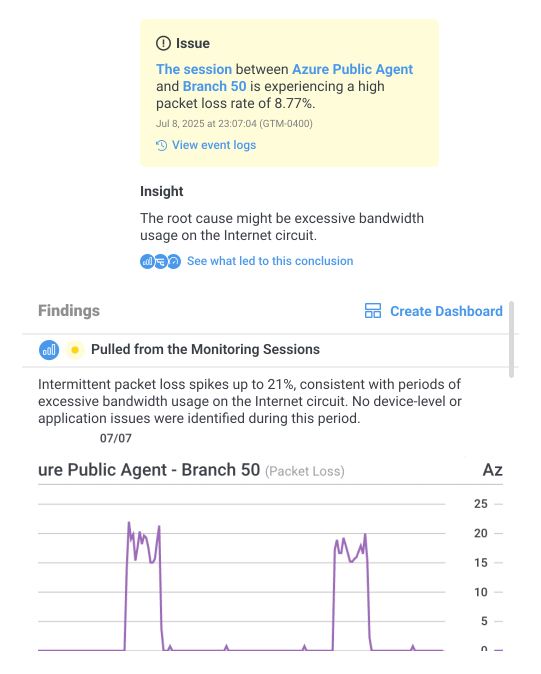
When a network alert is triggered, Insight doesn't just notify you, it automatically diagnoses the issue for you, delivering a probable root cause alongside the alert.

Obkio Network Internet Monitoring Pricing Plans

Key Benefits of Automatic Network Diagnostics with Obkio Insight

Less time troubleshooting. More time fixing what matters.
Automatically Understand the Root Cause

Automatically Understand the Root Cause

Stop spending hours manually correlating network data. Insight automatically identifies the root cause of network issues in seconds, the moment a performance problem is detected.

Get Network Diagnostics From Many Sources

Get Network Diagnostics From Many Sources

Insight correlates NPM, SNMP, APM and Traceroute data simultaneously. Every layer of your network is analyzed together for a complete and accurate network diagnosis.

Network Troubleshooting for Non-Experts

Network Troubleshooting for Non-Experts

IT pros who aren't network specialists can now diagnose network issues with confidence, pinpointing whether the problem is internal, external, or with a specific device, and knowing exactly who needs to fix it.

Get Proactive Alerts Before Users Notice

Get Proactive Alerts Before Users Notice

Insight captures and correlates diagnostic data automatically at the time of the issue. No more scrambling to recreate the conditions of a network problem after the fact.

One-Click Network Diagnostic Dashboards

One-Click Network Diagnostic Dashboards

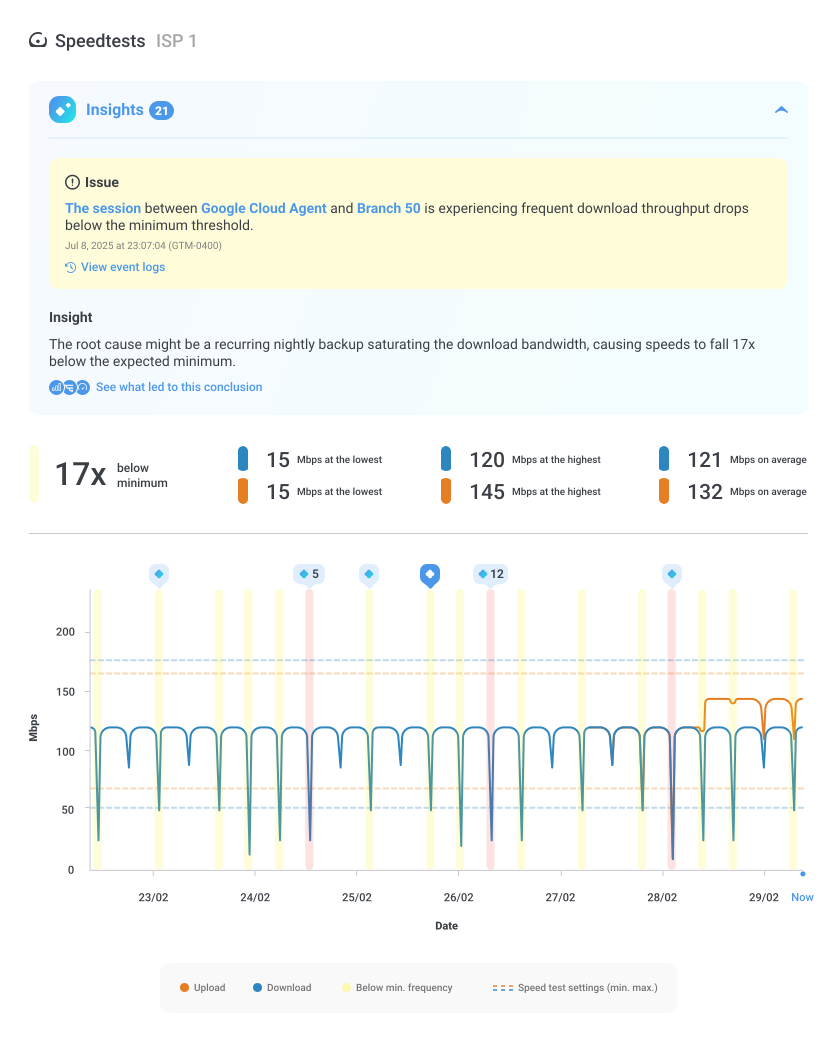
Every automatic diagnosis comes with a generated dashboard showing all the correlated network data from the issue's timeframe with the root cause sources highlighted for fast, clear interpretation.

>

Why IT Teams Need Automatic Network Diagnostics

Network troubleshooting is broken. Most IT professionals aren't dedicated network specialists; they're managing a long list of competing priorities, and when a network performance issue hits, troubleshooting is just one more thing on the list.

The problem isn't that IT teams don't care about network diagnosis. It's that the manual troubleshooting process requires correlating data across multiple sources, interpreting complex outputs, and connecting the dots between network performance, device health, routing paths, and application behaviour. That's time-consuming even for experts, and intimidating for everyone else.

Traditional network monitoring tools send alerts. But an alert without a diagnosis is just noise.

Obkio Insight was built to solve exactly that. It automates the network diagnostic process, the same correlation a senior network engineer would perform manually, and completes it in seconds.
Obkio Network Internet Monitoring Pricing Plans

How Obkio's Automatic Network Diagnostics Works

No setup. No manual investigation. Automatic network troubleshooting from day one.

A Network Issue Is Detected

A Network Issue Is Detected

Obkio's Network Performance Monitoring feature detects a network performance issue and triggers an alert.

Automatic Network Diagnosis Begins

Automatic Network Diagnosis Begins

The correlation engine immediately analyzes all monitoring data from the same time window.

Get a Diagnosis, Not Just an Alert

Get a Diagnosis, Not Just an Alert

A probable root cause is automatically identified and delivered alongside the alert.

Drill Into the Diagnostic Evidence With One Click

Drill Into the Diagnostic Evidence With One Click

Open an automatically generated dashboard showing all the correlated data behind the diagnosis.

Let's Show You How Insight Works!

Want to see how Obkio works? Or discuss your use case?

Green Dotted Line Transition Arrow Step Number Icon Step Number Icon

Detect Network Issues in Seconds With Network Performance Monitoring Features

Everything starts from Obkio's core Network Performance Monitoring feature. Obkio continuously monitors your network in real-time, measuring key metrics like packet loss, latency, jitter, and bandwidth across all your monitoring sessions.

The moment a session detects a network performance issue, like a spike in packet loss or a sudden jump in latency, an alert is triggered and Insight's automatic network diagnostic engine immediately goes to work.

No manual action needed. Insight is always running in the background, ready to diagnose the moment something goes wrong.

Obkio Network Internet Monitoring Pricing Plans
Green Dotted Line Transition Arrow Step Number Icon Step Number Icon

Begin Automatic Network Diagnosis to Automatically Correlate and Analyze Data

In the background, Insight's correlation engine analyzes all available monitoring data from the same time window; the same network troubleshooting process a senior network engineer would follow manually, completed in seconds.

Checks for false positives: Insight first verifies whether the Monitoring Agent had all the resources it needed to run its tests properly. If not, the issue is flagged as user-side immediately, saving your team from chasing a network problem that isn't really there.

Diagnoses network device performance: Insight examines CPU, memory, and bandwidth usage across your network devices to identify congestion or resource constraints that may be preventing equipment from processing traffic in real-time — and pinpoints the specific device responsible.

Correlates traceroute data for network path diagnosis: Insight cross-references traceroute data from the same time period to identify latency, packet loss, or jitter between IP addresses, and surfaces the exact hops affected along the network path.

Obkio Network Internet Monitoring Pricing Plans
Green Dotted Line Transition Arrow Step Number Icon Step Number Icon

Get A Network Diagnosis That Identifies the Root Cause of Issues For You

In the past, Obkio would send an alert notifying you of a network issue like packet loss, and from there, the troubleshooting was on you.

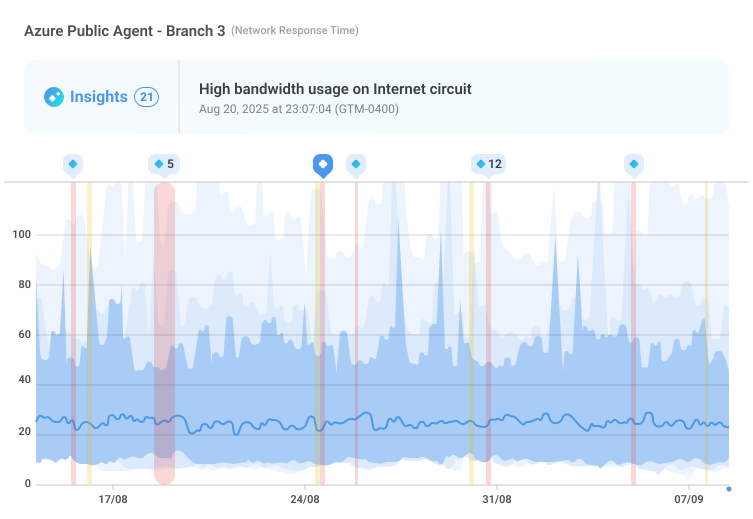
With Insight, the investigation is already done by the time the alert reaches you. The notification includes a probable root cause, clearly identified: whether it's a congested device, an ISP routing issue, or a problem at a specific hop along the network path.

Your team gets the answer, not just the alarm — allowing them to act immediately, escalate with confidence, or open a support ticket with proof in hand.

Obkio Network Internet Monitoring Pricing Plans
Green Dotted Line Transition Arrow Step Number Icon Step Number Icon

Drill Into the Diagnostic Evidence With Dashboards Highlighting the Cause of Issues

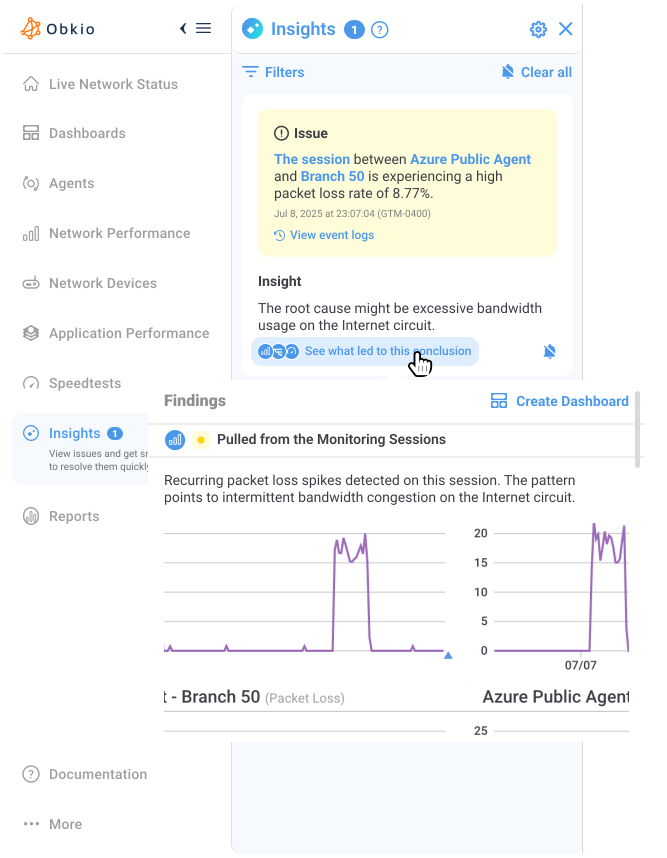
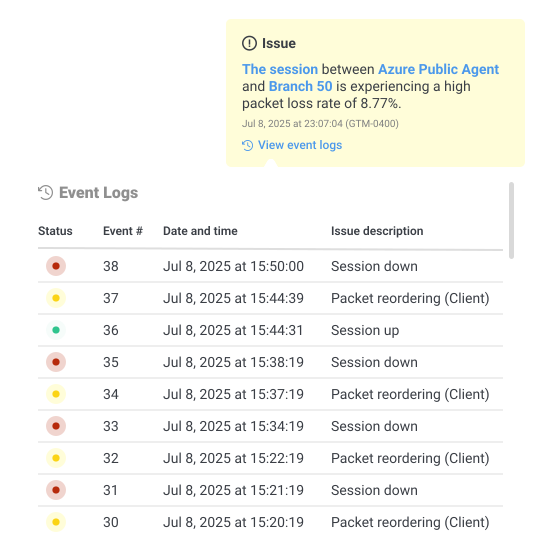
Users are invited to log into the app to see the full alert and diagnostic details. From there, clicking "Show me what led to that conclusion" opens an automatically generated network diagnostic dashboard displaying all the metrics collected during the issue's timeframe.

The dashboard brings together NPM performance data, SNMP device metrics, and traceroute path data, all correlated and visualized side-by-side for the exact period of the detected issue. The root cause data sources are highlighted directly in the dashboard, so you can follow Insight's reasoning step by step and see exactly what triggered the diagnosis.

No digging, no switching between tools, no piecing together data manually. Everything you need to understand, explain, and resolve the network issue is in one place.

Obkio Network Internet Monitoring Pricing Plans

Who Is Obkio Insight's Automatic Network Diagnostics Tool For?

Built to help IT pros troubleshoot faster, and not experts prove their issues exist.

IT Generalists

IT Generalists

Network issues used to mean hours of frustration and calls to specialists. Insight automatically diagnoses the problem and tells you exactly where it's coming from, so you can resolve it or escalate it with confidence, no networking expertise required

Network Engineers

Network Engineers

You know how to troubleshoot — Insight just does it faster. Skip the manual data correlation and get straight to the root cause. The full diagnostic evidence is always there when you need to dig deeper or challenge your ISP.

MSPs

MSPs

Empower your entire team to diagnose network issues that used to require your most senior engineers. Insight provides concrete, data-backed proof of where issues originate, ending the blame game with clients and letting you open tickets with evidence.

IT Managers & Leadership

IT Managers & Leadership

Network downtime has a real cost, and now you can prove it. Insight gives your team the diagnostic reports they need to hold ISPs accountable, justify infrastructure investments, and show management the direct impact of network performance on business productivity.

How to Get Started With Automatic Network Diagnostics

Automatic network diagnostics from day one. Obkio monitors, analyzes and troubleshoots issues for you.

  • 1. Start Your Free Obkio Trial: Sign up and follow the onboarding wizard to deploy your Monitoring Agents and create your first Monitoring Sessions.

2. Deploy Your Network Monitoring Agents: Add Monitoring Agents across your network locations. These collect the performance, device, and path data that Insight needs to run automatic network diagnostics.

3. Configure SNMP Polling on Your Network Devices: Set up SNMP polling on your routers, switches, and firewalls so Insight can correlate device-level data — like CPU, memory, and bandwidth usage — as part of the automatic diagnostic process.

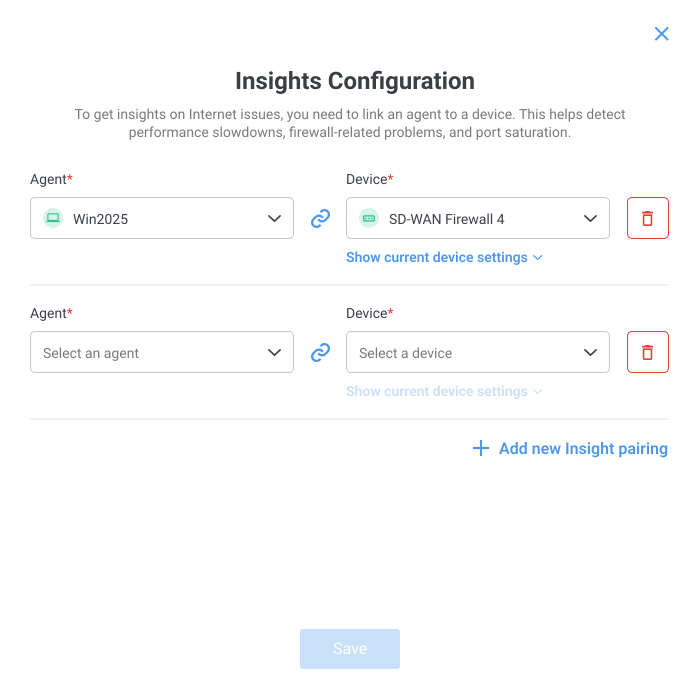
4. Configure Obkio Insight: Enable and configure Insight within the app. Once set up, Insight runs automatically in the background, ready to diagnose network issues and deliver root cause analysis the moment a performance problem is detected.

Obkio Automatic Network Diagnostics setup

Talk With Our Network Pros

Have any questions about Insight? Let's talk!

Conquering Network Issues with
Expert Insights and Diagnosis

Welcome to our blog, where we address the common challenge of identifying network issues and provide you with effective solutions. At times, network problems can be elusive, causing disruptions, performance bottlenecks, and frustration. But fret not, because we are here to help. Our team of experts has extensive experience in tackling network issues head-on, and we are excited to share our knowledge and insights with you.

Network Diagnostics

Network Problems

InterNetworknet Metrics

Case Studies

Network Troubleshooting

Frequently Asked Questions

What is automatic network diagnostics? Icon Grey Arrow Up Icon Grey Arrow Down

Automatic network diagnostics is the process of identifying the root cause of a network performance issue without manual investigation. Instead of requiring a network engineer to manually correlate data across multiple sources, an automatic diagnostics engine like Obkio Insight does this work instantly, analyzing NPM, SNMP, and traceroute data simultaneously to pinpoint root causes the moment an issue is detected.

What is Obkio Insight? Icon Grey Arrow Up Icon Grey Arrow Down

Obkio Insight is Obkio's automatic network diagnostics engine. When a network issue is detected, Insight automatically correlates data across NPM, SNMP Device Monitoring, and Visual Traceroutes to identify the root cause.

How is Insight different from a regular network monitoring alert? Icon Grey Arrow Up Icon Grey Arrow Down

Standard network monitoring alerts tell you something is wrong. Obkio Insight tells you why. When a network issue is detected, Insight automatically runs a full network diagnosis and delivers a probable root cause alongside the alert, along with a one-click diagnostic dashboard showing all the correlated evidence.

Do I need to be a network expert to use Insight's automatic diagnostics? Icon Grey Arrow Up Icon Grey Arrow Down

Not at all. Obkio Insight was specifically designed for IT professionals who aren't dedicated network specialists. It automates the complex network diagnosis process so any IT team member can understand what's wrong, where the network issue happened, and who needs to fix it.

What network data sources does Insight correlate for diagnostics? Icon Grey Arrow Up Icon Grey Arrow Down

Insight correlates data from Obkio's Network Performance Monitoring (NPM), SNMP Device Monitoring, and Visual Traceroutes performance data, all analyzed together from the time of the detected network issue.

What network troubleshooting use cases does Insight cover at launch? Icon Grey Arrow Up Icon Grey Arrow Down

At launch, Insight covers Internet connectivity diagnostics and network troubleshooting. We'll be expanding to cover VPN, SD-WAN, Microsoft Teams, and more network use cases throughout the coming months.

Start Your Free 14-Day Trial Now!

Get a free POC with Obkio's 14-day trial. Identify network problems & collect data to troubleshoot.

Start Now Book a Demo