











 Obkio Blog


 Subscribe
Table of Contents
Table of Contents
Network outages are easy. Something goes down, alarms fire, you fix it, life moves on. Everyone understands a full outage. It's clean, binary, and at least somewhat predictable.
Network instability is the opposite of all that.
Nothing fully breaks. Nothing fully works. The ping responds. The connection shows active. And yet users are complaining about choppy calls, sluggish apps, and sessions dropping for no apparent reason. You run a speed test, and it's fine. You check the dashboard, and it’s green. You ask the user to reproduce it, and it's gone.
This is the specific kind of problem that makes experienced IT teams question their own sanity. Not because it's technically complex, but because it's designed to disappear right when you're looking at it. Intermittent by nature, invisible to many tools built to catch binary failures, and almost always underestimated until it becomes a pattern that's impossible to ignore.
This article is your reference for all of it: what network instability actually is, how to recognize it, the eight most common causes, and how to find it and fix it for good.
What Is Network Instability? 
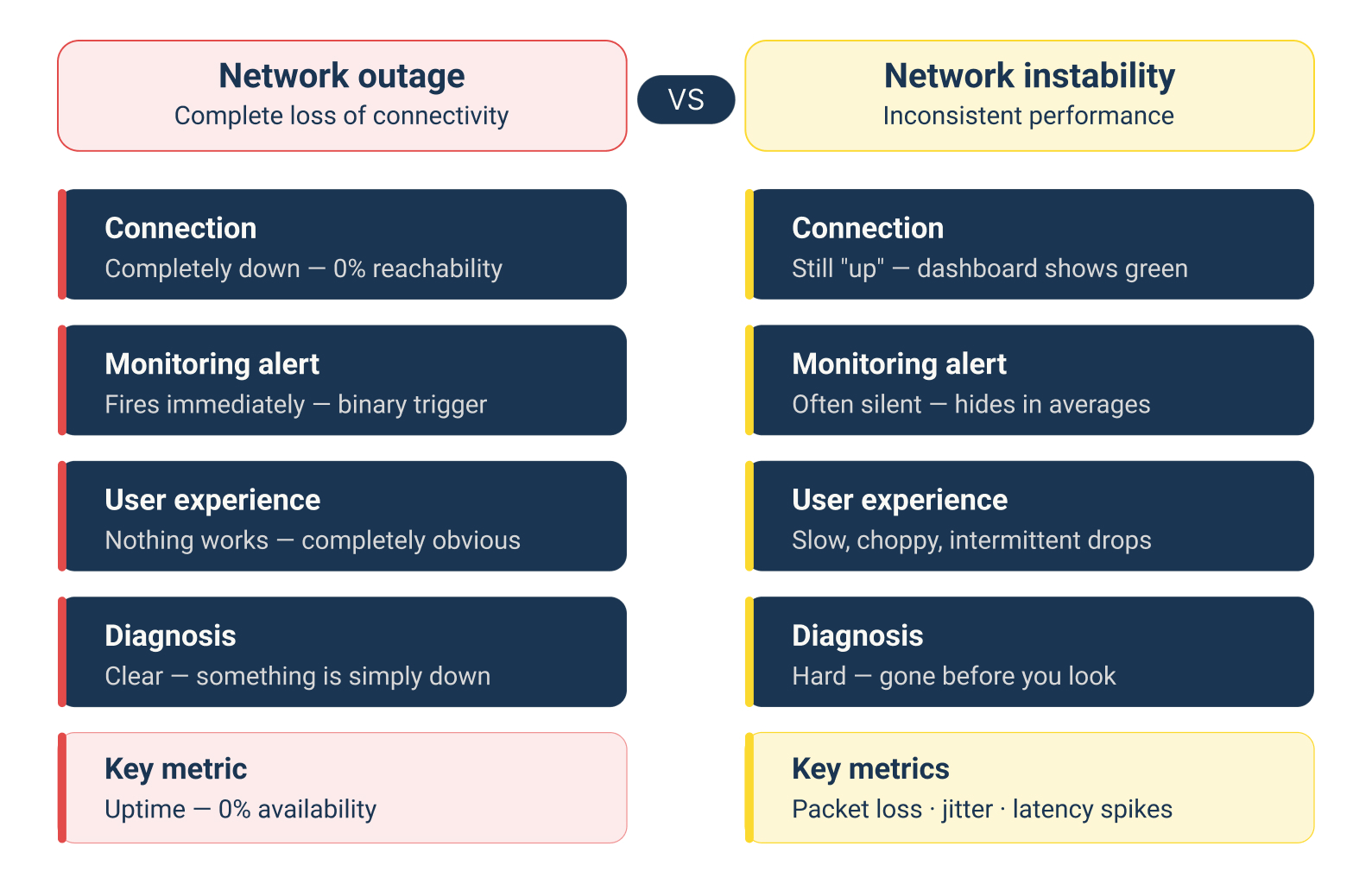
Network instability refers to a network that behaves inconsistently, performing acceptably at some times and degrading sharply at others. Unlike a full outage, the connection stays "up" on the surface, which is exactly what makes it harder to identify and trace.
There's no single failure point. No obvious error. Just a network that occasionally misbehaves in ways that are real to users but hard to reproduce on demand. Intermittent packet loss, erratic latency, jitter spikes; these are the fingerprints of an unstable network.
The trouble is that most traditional monitoring tools only tell you whether something is on or off. Network instability lives in the gray zone between those two states.
What Are the Symptoms of Network Instability?
If any of the following are happening intermittently (not constantly, but unpredictably) you're likely dealing with network instability rather than a configuration error or hardware failure.
Here are the most common network instability symptoms:
1. Intermittent packet loss: Not a sustained drop, but occasional bursts where packets fail to reach their destination. Users might not notice one dropped packet, but 2–3% intermittent loss during a VoIP call is enough to make voices sound robotic or cut out entirely.
2. Latency spikes: Round-trip times that are normally fine but occasionally jump by 50–200ms or more. Not consistently high but erratic. This is one of the clearest signs of instability.
3. Jitter: Inconsistent delay between packets. Jitter above 30ms starts impacting real-time applications like VoIP and video conferencing, even when average latency looks acceptable.
4. Randomly dropped VoIP or video calls: If calls drop or degrade only sometimes, and you can't reproduce it on demand, instability is almost always the cause.
5. Slow application response unrelated to bandwidth: Your pipe isn't saturated, but applications are sluggish. This often points to latency or packet retransmissions caused by underlying instability.
6. BGP route flapping: For enterprise and ISP environments, routes that are repeatedly announced and withdrawn create instability that ripples across multiple destinations.
7. Devices connecting and disconnecting: Clients dropping and re-associating on Wi-Fi, or sessions timing out unexpectedly, are common symptoms at the edge of an unstable network.
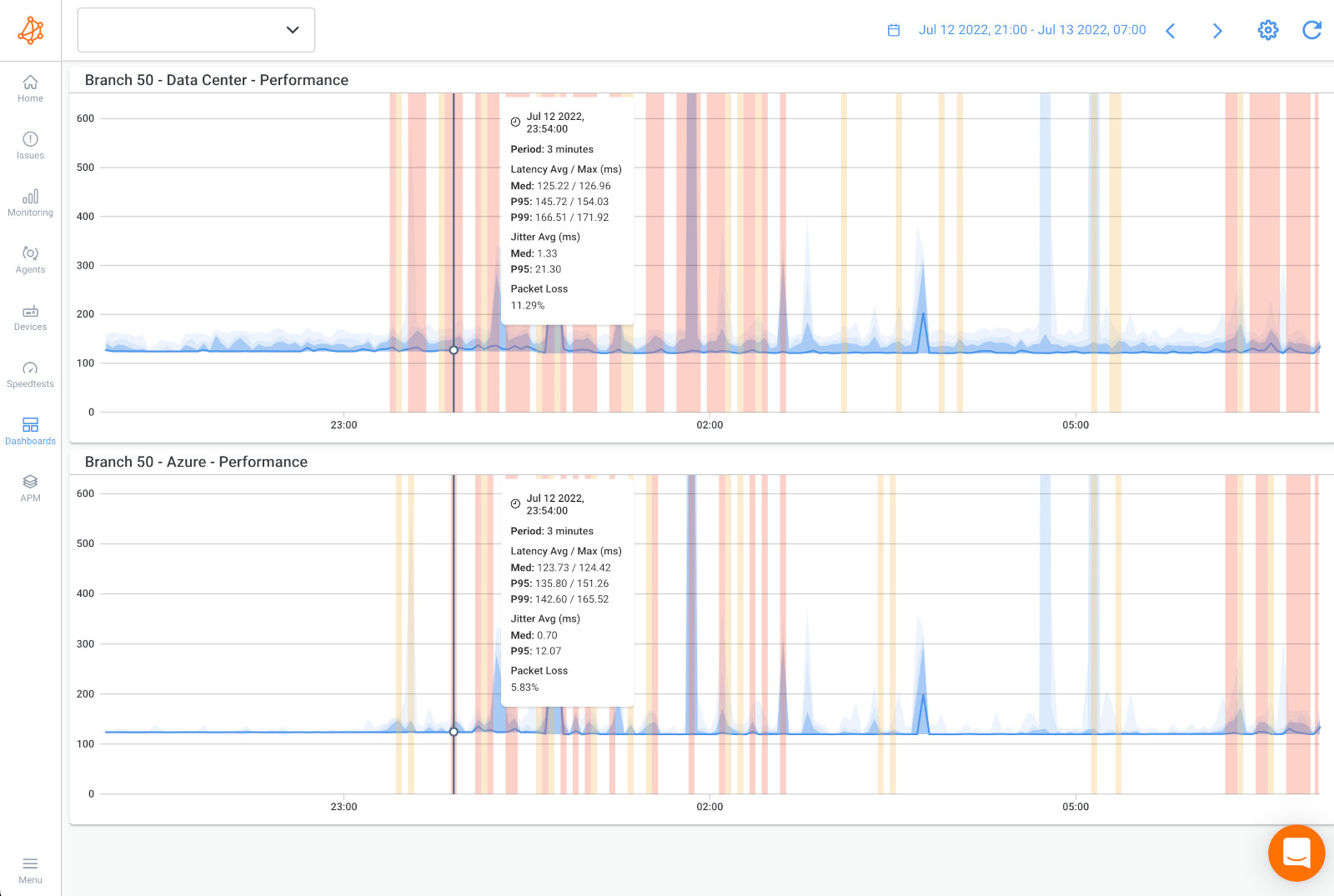
The key pattern: these symptoms come and go. That's what separates network instability from a straightforward fault. The intermittent nature is what makes it hard to catch, and why you need to be watching continuously, not just checking in when someone complains.
Learn how to detect intermittent network problems to troubleshoot performance issues that are hard to catch with Obkio Network Monitoring software.
Learn more

What Causes Network Instability?
Network instability can originate anywhere in the path: from a failing cable in your server room to a routing issue three hops upstream with your ISP. Pinpointing the cause requires isolating where the instability begins.
Here are the most common culprits:
The Cause of Network Instability #1: Hardware Issues
Often, network instability is caused by aging switches, routers, and NICs that degrade over time. Overheating equipment is particularly sneaky, like a switch that runs fine at 8 AM but becomes unstable at 2 PM when the room temperature peaks.
Faulty cables are one of the most overlooked causes of network instability: a slightly damaged Ethernet cable or a poorly seated SFP transceiver causes intermittent drops, not full failures. It still passes a physical check, but causes havoc under load.
The Cause of Network Instability #2: Network Congestion
Network utilization doesn't have to hit 100% to cause network instability. At 70–80% sustained utilization on a link, latency-sensitive traffic like VoIP and video starts competing with bulk data transfers. Buffers fill up. Packets get dropped or delayed. The network is technically "connected," BUT it's just degrading under pressure.
The Cause of Network Instability #3: Misconfigured Network Equipment
Network instability can often be caused by misconfigured network equipment. Duplex mismatches between a switch port and a NIC are a textbook example: everything appears connected, but you get constant retransmissions.
Network instability can also happen when incorrect MTU settings cause fragmentation and packet loss that only show up with certain traffic types. Misconfigured QoS policies can accidentally deprioritize the exact traffic you need to protect.
The Cause of Network Instability #4: ISP or Upstream Issues
A significant portion of what looks like "internal" network instability is actually originating outside your perimeter. BGP route flapping, upstream congestion, transit provider outages, and ISP peering issues can all cause intermittent degradation and instability. These are especially hard to diagnose because your internal network is clean, so the problem starts the moment traffic leaves your edge. And you need an end-to-end network monitoring tool to prove where the issue started.
The Cause of Network Instability #5: Wireless Interference
Wi-Fi is inherently more susceptible to network instability than wired infrastructure. Channel overlap with neighbouring networks, physical obstructions, microwave interference, and outdated access point hardware all contribute to erratic performance. Clients might show full signal strength while experiencing significant packet loss.
The Cause of Network Instability #6: DNS or Routing Instability
Misconfigured DNS resolvers that return inconsistent results, DHCP lease issues causing address conflicts, or flapping routes in your routing table can all cause intermittent connectivity to specific destinations, while everything else looks fine. This one is particularly deceptive because it affects only certain applications or destinations.
The Cause of Network Instability #7: Software Bugs and Firmware Issues
Outdated router or switch firmware, buggy NIC drivers, and OS-level networking changes (especially after an update) can cause network instability that wasn't there before. If network behaviour changed after a scheduled maintenance window or OS patch cycle, firmware or software is the first place to look.
The Cause of Network Instability #8: Overloaded Network Devices
High CPU or memory usage on endpoints can produce symptoms that look exactly like network instability. A workstation at 95% CPU will exhibit slow application response, dropped packets, and poor VoIP quality even when the network path is perfectly healthy. Always check endpoint resource utilization before concluding the network is the problem.

Master the art of network stability testing with our comprehensive guide. From testing network stability to optimizing, empower your network resilience.
Learn more
How to Diagnose Network Instability with Network Performance Monitoring
Diagnosing network instability is fundamentally different from troubleshooting a clean network outage. You're not looking for a single failure; you're looking for a pattern that only reveals itself over time and under specific conditions.
Here's the process that actually works:
Step 1: Establish a Network Baseline
You cannot identify network instability without knowing what "normal" looks like for your network. What are your typical latency values between key sites? What does jitter look like during off-peak hours versus peak hours? Without a baseline, a spike that looks alarming might be completely normal for your environment or vice versa.
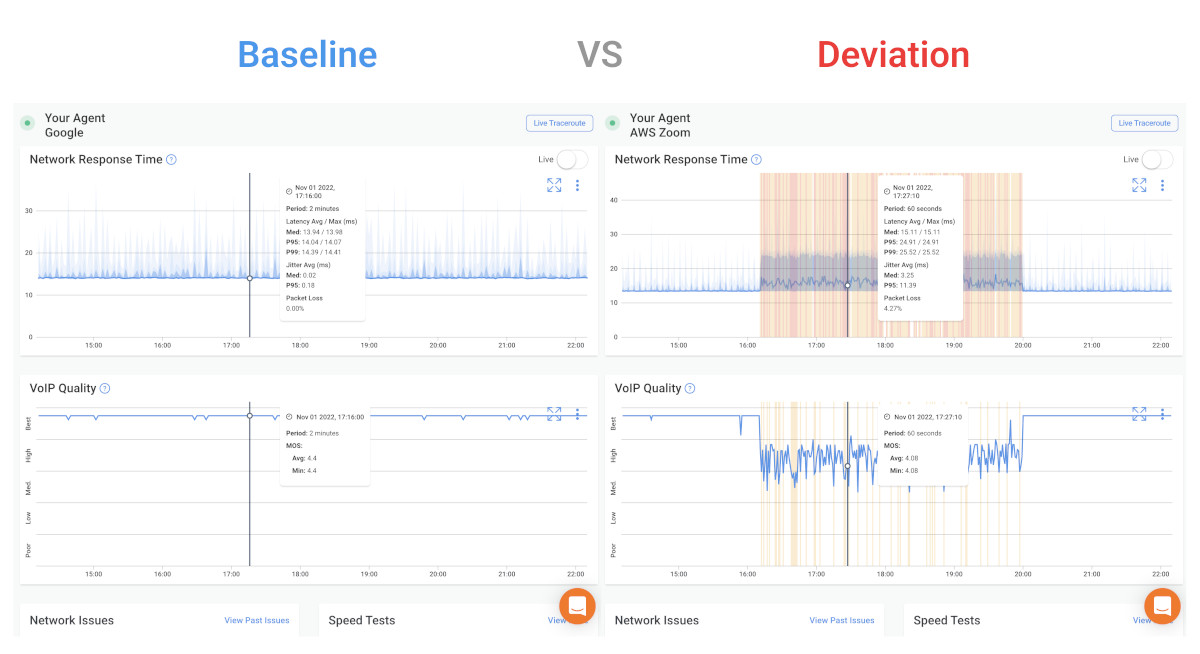
Passive log review after the fact almost never catches intermittent issues. By the time you look, the problem is gone. You need continuous, active monitoring that's always measuring, so when instability occurs, you have data from that exact moment.

Learn what a network baseline is, why it’s essential for monitoring and optimizing performance, and easy steps to establish your baseline.
Learn more
Step 2: Continuously Monitor Network Metrics Related to Network Instability
Focus on metrics that can impact network instability, like packet loss, latency, jitter, and MOS score (if VoIP is in scope), and monitor them between multiple points on your network simultaneously. A single ping to 8.8.8.8 tells you almost nothing. You need to know whether the instability is happening on your LAN, on your WAN link, or somewhere upstream beyond your edge.
Active network monitoring tools generate synthetic test traffic continuously between monitoring agents deployed at key points: your office, data center, cloud environment, or remote user locations. This approach catches instability as it happens, not after users have already suffered through it.
This is where Obkio fits in.
Obkio is a network performance monitoring (NPM) tool built specifically for identifying intermittent issues like these. It deploys lightweight network monitoring agents at every key network location (head office, branch offices, cloud, remote workers) and continuously measures packet loss, latency, jitter, and MOS scores between them every 500ms.

- 14-day free trial of all premium features
- Deploy in just 10 minutes
- Monitor performance in all key network locations
- Measure real-time network metrics
- Identify and troubleshoot live network problems


When instability occurs, you see it in real time on a dashboard, and you can correlate it with SNMP device data, bandwidth utilization, and traceroute hops — all in one place.
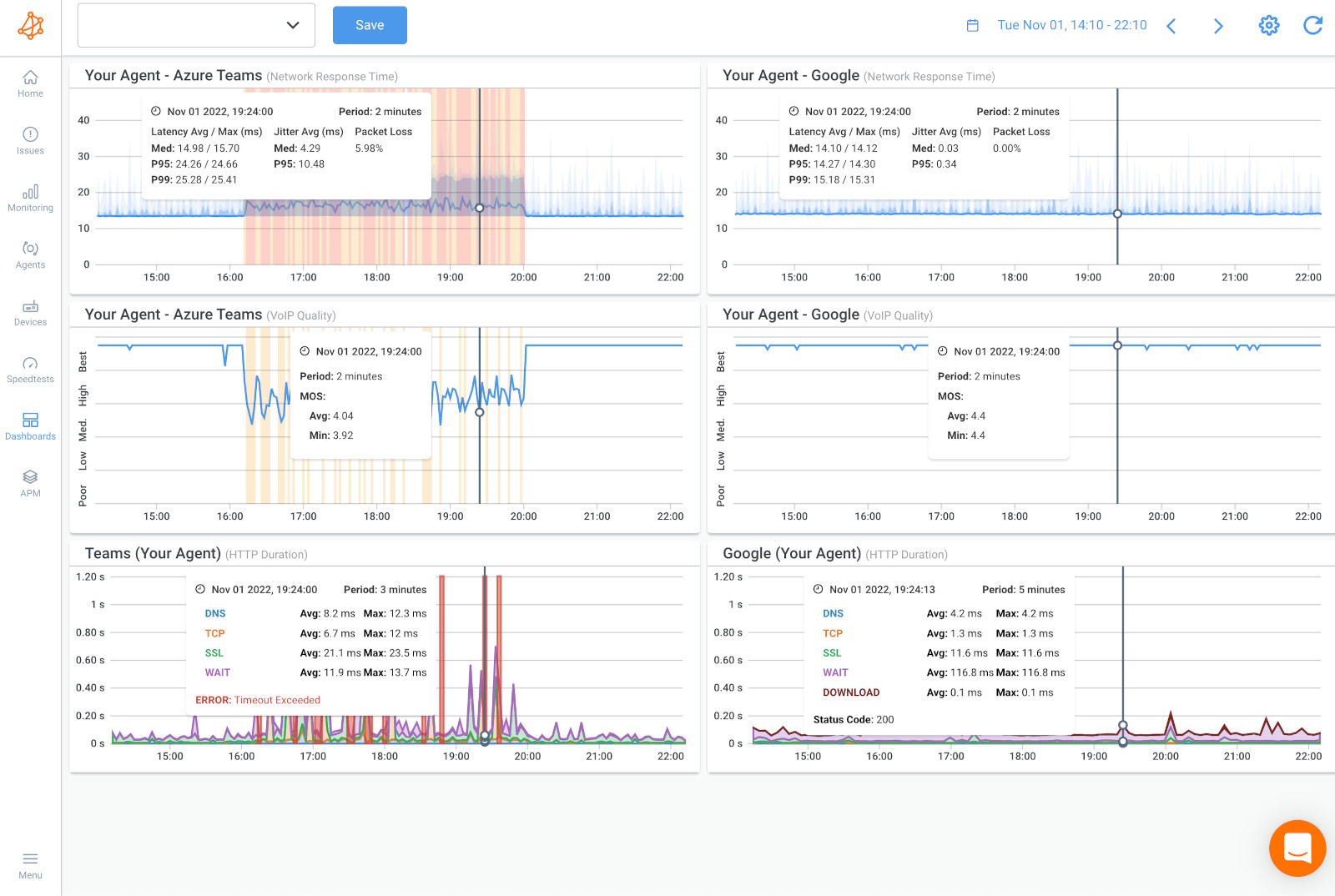
The practical outcome: instead of a user calling to say "the network was slow this morning", you already have a graph showing exactly when the degradation started, which session was affected, and where in the path it originated.
Step 3: Isolate the Location of Network Instability
Is the network instability on the LAN, on the WAN link to your ISP, or upstream beyond your edge? This distinction determines who needs to fix it.
Use hop-by-hop traceroute analysis to walk the path from source to destination. The hop where latency first spikes or packet loss first appears is your starting point.
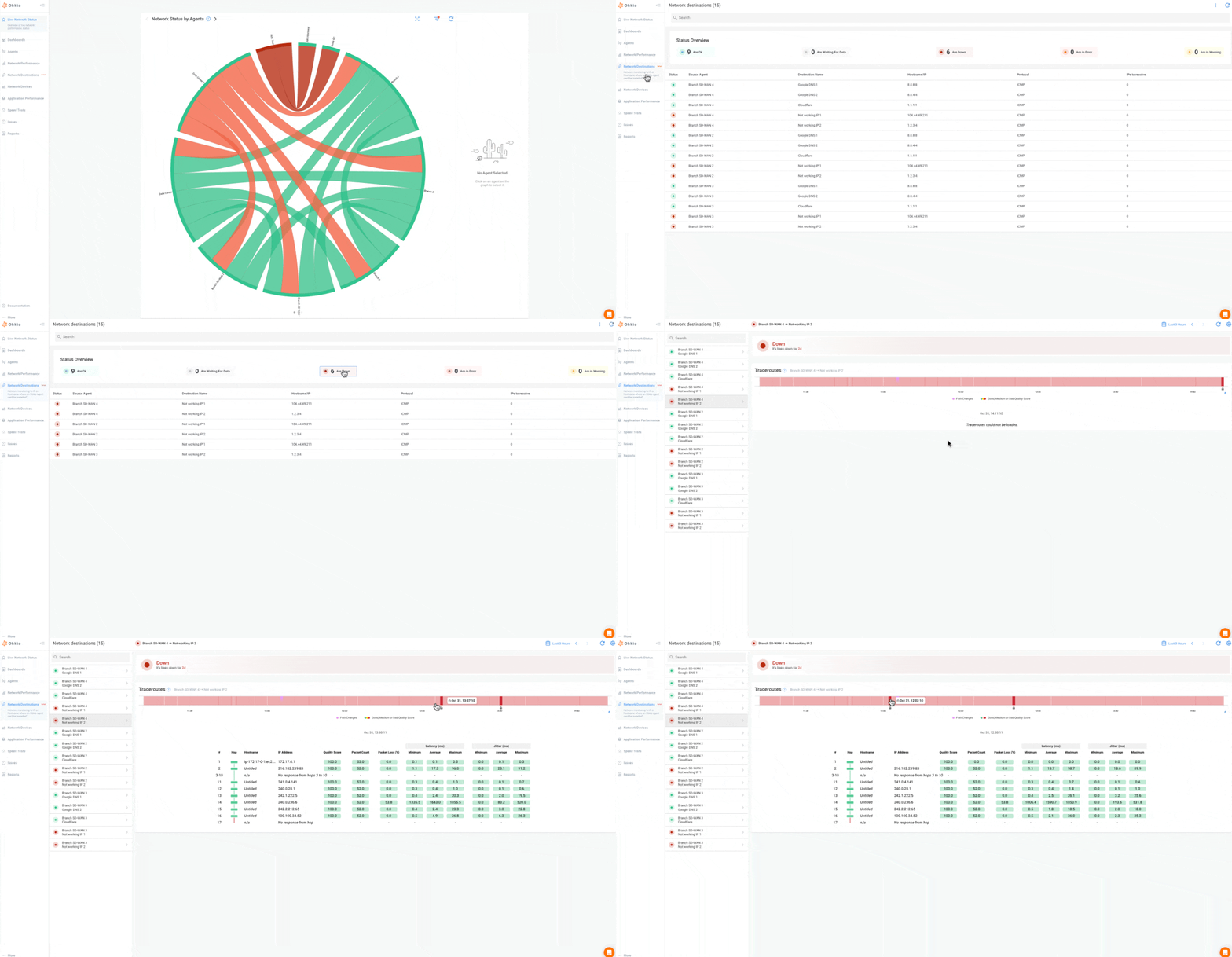
Obkio's Visual Traceroute tool makes this significantly faster: it runs continuous automatic traceroutes across all monitoring sessions, colour-codes each hop by quality (latency, jitter, packet loss), and stores up to six months of traceroute history at one-minute granularity. You can go back to the exact moment instability occurred and see the full path, not just a single snapshot.

This bidirectional traceroute capability matters more than people realize. IP networks are asymmetric: the path from A to B is often different from B to A. Problems frequently appear only on the return path. Obkio runs traceroutes in both directions simultaneously, so you catch issues that a standard one-way traceroute would miss entirely.

If you need to monitor external endpoints (cloud services, SaaS platforms, vendor APIs), where you can't deploy an agent, Obkio's Network Destinations feature provides continuous ICMP monitoring with traceroute visibility to any IP address. No destination agent required.
Step 4: Correlate Timestamps and Patterns of Network Instability
Once you have continuous monitoring data, look for patterns.
- Does the instability occur at the same time of day?
- When a specific user logs in?
- After a scheduled task runs?
- Immediately following a firmware update?
Time-based correlation is one of the most powerful diagnostic tools available. Network instability that occurs every day at noon is almost certainly congestion-related. The instability that started three days ago is probably tied to a change made three days ago. Instability that only affects one branch is almost certainly not an ISP issue.
Obkio's dashboards and historical data let you do this kind of correlation directly, overlaying packet loss timelines with SNMP device CPU graphs, for example, to see if a router is redlining at the same time performance degrades.
How to Fix Network Instability
Network instability troubleshooting depends entirely on where and why the instability is occurring. Isolate the source first, then apply the appropriate remediation.
- Hardware issues → Replace suspected cables before you replace expensive switching gear. Swap out the cable, wait, and observe. If the problem persists, test the SFP or the port. Upgrade overheating equipment or improve airflow. For aging switches and routers, proactive hardware refresh cycles beat reactive emergency replacements every time.
- Congestion → Upgrade the affected link if it's consistently saturated. In the interim, implement Quality of Service (QoS) to protect latency-sensitive traffic. Move VoIP and video to a dedicated VLAN with strict priority queuing. Even a modest QoS configuration can recover real-time application quality without a hardware upgrade.
- Misconfiguration → Audit duplex settings across switch ports and NICs. Fix MTU mismatches, particularly in environments with VPNs, tunnelling, or SD-WAN overlays. Review QoS configurations end-to-end. Misconfigurations tend to cause consistent, reproducible instability: if you can reproduce it, you can usually find it in the config.
- ISP issues → Contact your ISP with data, not anecdotes. Packet loss percentages, traceroute outputs showing exactly which hop the degradation starts at, and time-stamped graphs from your monitoring platform are what move ISP tickets from Tier 1 to someone who can actually do something. This is exactly the kind of evidence Obkio produces automatically: shareable traceroute links, historical graphs, and session data you can attach to a support ticket.
- Wi-Fi → Use a Wi-Fi analyzer to identify channel congestion and switch to a less congested channel. In dense environments, move to Wi-Fi 6 access points, which handle higher client density with significantly less contention. Ensure APs are positioned to minimize physical obstructions.
- DNS and routing → Test alternate DNS resolvers and compare results. Review routing tables for flapping routes. Check DHCP lease logs for address conflicts. For BGP environments, review dampening and timer configurations.
- Firmware and software → Update firmware on routers, switches, and APs, but do it in a controlled change window. If instability started after an update, check the vendor's release notes for known issues and roll back if necessary.

How to Prevent Network Instability Long-Term
Fixing instability once is the easy part. Keeping it from coming back requires building network visibility into your network that doesn't depend on users reporting problems.
The shift from reactive to proactive monitoring is the most impactful change most IT teams can make. Reactive troubleshooting means you find out about instability when someone calls. Proactive monitoring means you know about it before they do.
Set alerting thresholds that catch early warning signs: A gradual increase in jitter from 5ms to 15ms over two weeks isn't a crisis, but it's a leading indicator that something is degrading. An alert threshold that fires when jitter exceeds 20ms gives you time to investigate before it impacts users. Obkio supports dynamic threshold alerting on packet loss, latency, jitter, MOS score, and device metrics with smart notifications that reduce alert fatigue by grouping related events.
Establish and document baselines: After your initial deployment, document what normal looks like for each monitored path. Update those baselines after infrastructure changes. Without documented baselines, you're always comparing today's performance to memory.
Build redundancy into critical paths: Dual ISP connections with automatic failover, redundant WAN links, and backup routing paths won't prevent instability on a primary link, but they will prevent it from becoming a user-impacting outage.
Schedule hardware audits and firmware review cycles: Equipment doesn't fail all at once. A switch that's running firmware from 2021 on aging hardware is a time bomb. Build these reviews into your quarterly or annual operational calendar.
Maintain a change log: A significant percentage of network instability is self-inflicted, caused by a configuration change, software update, or infrastructure modification that wasn't properly tested or documented. A simple change log eliminates a large category of guesswork when troubleshooting.
With continuous monitoring in place, Obkio surfaces the early warning signs automatically: a gradual increase in packet loss toward a specific destination, jitter that's trending up on a WAN link, an SNMP alert showing interface errors accumulating on a core switch. These signals are there before instability becomes a user complaint. The question is whether you have the visibility to see them.
Frequently Asked Questions About Network Instability
What is the difference between network instability and an outage?
Network outage is a complete loss of connectivity when users can't reach the network at all. Network instability means the connection exists but performs inconsistently, with intermittent packet loss, latency spikes, or jitter. Instability is often harder to diagnose precisely because the network never fully goes down. Traditional uptime monitoring won't catch it. You need performance monitoring that measures quality, not just availability.
Network instability vs packet loss: Can network instability cause packet loss?
Yes, packet loss is one of the most common and direct symptoms of network instability. It occurs when data packets fail to reach their destination due to congestion, hardware degradation, flapping routes, or wireless interference. Even intermittent packet loss of 1–2% has a measurable impact on VoIP quality and TCP throughput.
How do I know if my ISP is causing network instability?
If your internal network metrics are clean but you're seeing packet loss or latency spikes toward external destinations, the issue is likely originating with your ISP or an upstream provider. Hop-by-hop traceroute analysis will show you exactly where in the path degradation begins. If the first few hops inside your network look fine, but a hop immediately after your edge router degrades, that's your ISP. Collecting this data and sharing it with your provider (with timestamps and traceroute evidence) is the fastest path to resolution.
Does network instability affect VoIP and video calls?
Significantly. VoIP and video conferencing are highly sensitive to jitter and packet loss because they're real-time protocols, and there's no buffer to absorb inconsistency. Jitter above 30ms starts causing audio degradation. Packet loss above 1–2% causes voice to cut out or robotic distortion. Even brief periods of instability (seconds, not minutes) can drop calls or freeze video. MOS score monitoring is the most direct way to track the real-world quality impact on VoIP.
What is the most common cause of network instability?
Hardware degradation (especially aging cables and switches), network congestion, and ISP-side issues are the three most common causes in business environments. In office environments with significant wireless usage, Wi-Fi interference and channel congestion are frequently the culprits. Misconfigurations like duplex mismatches, MTU issues, and QoS policy errors are common in environments that have grown organically without consistent documentation.
How do I test for network instability?
Run continuous ping tests and traceroutes to multiple destinations over a sustained period, not just once. A single ping gives you a snapshot. Instability only reveals itself over time, under real traffic conditions. For a complete picture, deploy active network monitoring that measures packet loss, latency, jitter, and path changes between multiple points in your network, not just to a single external host. That's the only reliable way to catch intermittent issues before they become chronic ones.
Stop Chasing Network Instability. Start Seeing It.
Network instability doesn't announce itself. It doesn't trip a breaker or set off an alarm. It accumulates quietly: a jitter spike here, a burst of packet loss there, a VoIP call that drops once and never reproduces on demand. By the time your users are consistently frustrated, you've already lost hours you'll never get back.
The teams that resolve instability fastest aren't necessarily the most skilled. They're the most informed. They have continuous data from the right points in their network, and when something goes wrong, the evidence is already there: timestamped, path-specific, and ready to act on.
That's exactly what Obkio is built for. When instability occurs, you see it in real time. When it happened overnight, and users are just now complaining, you pull up the historical data and find it in seconds. When your ISP pushes back, you share the traceroute evidence directly from the platform and end the conversation.
No more chasing ghosts. No more "it was fine when I checked." No more reactive firefighting after users have already suffered through it.
- 14-day free trial of all premium features
- Deploy in just 10 minutes
- Monitor performance in all key network locations
- Measure real-time network metrics
- Identify and troubleshoot live network problems

