











 Obkio Blog


 Subscribe
Table of Contents
Table of Contents
Your ISP tells you your connection is up 99.9% of the time. Your users tell you the MS Teams video calls keep freezing. Both can be true at once, and that gap is exactly why you need to monitor Internet uptime yourself instead of taking your provider's word for it.
This article covers what Internet uptime actually means, how to calculate it, what a good internet uptime SLA looks like, and how to monitor internet uptime with your own data so you're not stuck relying on your ISP's version of events.
What Is Internet Uptime? 
Internet uptime is the percentage of time your Internet connection is available and successfully passing traffic, measured against the total time in a given period. It tells you whether your connection is up. It says nothing about how well it's performing while it is.
That distinction matters more than most SLAs let on. A connection can post 99.9% uptime for a month and still deliver a frustrating experience the whole time, because uptime only checks whether traffic is passing, not how fast, how clean, or how consistent it is. High latency, jitter, and packet loss all happen on a connection that's technically "up."
If you're checking Internet uptime to answer "is our connection reliable," you're only getting half the answer. The other half is performance, which is a separate metric with its own Internet Performance Monitoring approach.
Internet Uptime vs. Internet Downtime
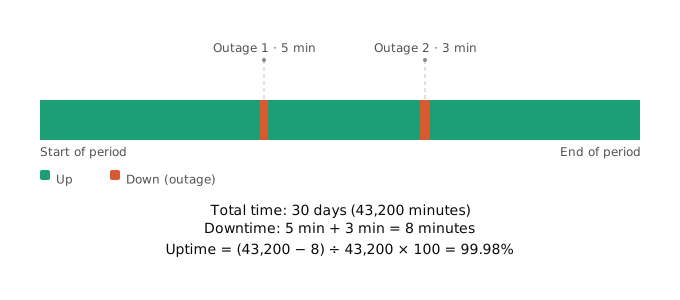
Downtime is the inverse of uptime: the total time within a period during which your connection was unavailable or unable to pass traffic. It's what gets subtracted in the uptime formula, and it's also the number most ISPs lean on, often narrowly, to decide whether they've met their SLA.

Is the network down again? Discover the top causes of network downtime and how to prevent outages with real-time monitoring, visibility, and control.
Learn more

The Internet uptime vs downtime distinction isn't just semantics. ISPs typically count downtime as a hard outage: no signal, no response, nothing passing. They don't count the hours your connection stayed technically up while packet loss made every call choppy. That's the blind spot you need to monitor around.
How Is Internet Uptime Measured?
Internet uptime is measured by tracking the total time your connection is available against the total time in a given period, then applying a simple formula to turn that into a percentage.
The Internet Uptime Formula
Here's the Internet uptime formula in its simplest form:
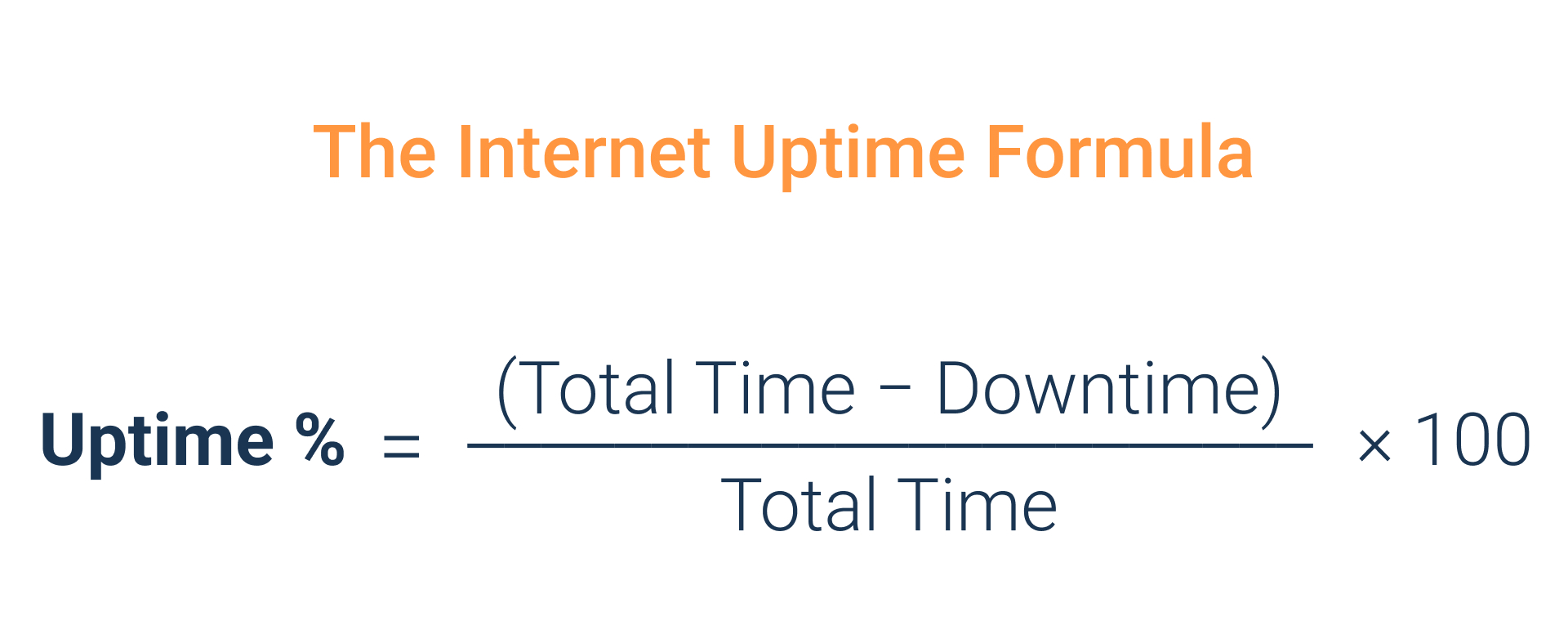
Two inputs matter here:
- Total Time: the full period you're measuring, whether that's a day, a month, or a year.
- Downtime: the cumulative time your connection was down within that period.
Plug in real numbers, and the formula does the rest. If your Internet connection was down for 45 minutes out of a 30-day month (43,200 minutes total), your uptime works out to 99.9%.
What Counts as "Down" in An Internet SLA (Service-Level Agreement)?
This is where most disputes with ISPs start. A full Internet outage, no traffic passing at all, always counts as down. A degraded connection with high packet loss or intermittent timeouts usually doesn't, at least not from your provider's side of the ledger.
If you're only tracking hard outages, you're measuring the same narrow definition your ISP uses, which won't catch the slow bleed of a connection that's degraded but technically alive.
How to Run an Internet Uptime Test
Not all Internet uptime tests measure the same thing, even when they produce a similar-looking percentage at the end. What you actually catch (a five-minute outage, a thirty-second drop, a pattern of short drops that repeats all week) depends entirely on how the test is run and how often it checks. Before setting up any kind of monitoring, it's worth knowing what each method can and can't see.
A few common ways teams run an Internet uptime test:
1. Manual Checks or ISP Status Pages:
You look, you see what your provider reports. This means checking a dashboard, calling support, or waiting for a status page update after something already feels wrong. It's slow, reactive, and you're relying entirely on your ISP's own definition of an incident, which may not match yours. If their status page doesn't log it, it didn't happen, as far as this method is concerned.
2. Ping or ICMP Checks:
Periodic ping tests to see if a target responds. Cheap, easy to automate, and fine for catching a long outage. The weakness is the gap between checks: a ping every 5 minutes can miss a 3-minute outage entirely if it falls between two successful pings, which means the uptime % this method reports can be quietly inflated. Ping also only confirms something answered, not that the connection is healthy; it won't tell you the difference between a clean response and one buried in packet loss.
3. Continuous Synthetic Network Monitoring:
An Internet uptime monitor that tests the connection constantly, every few hundred milliseconds rather than every few minutes, so a brief drop doesn't slip through the gap between checks. This is also what makes a reported uptime % defensible: the event log has no blind spots for an ISP to dispute.
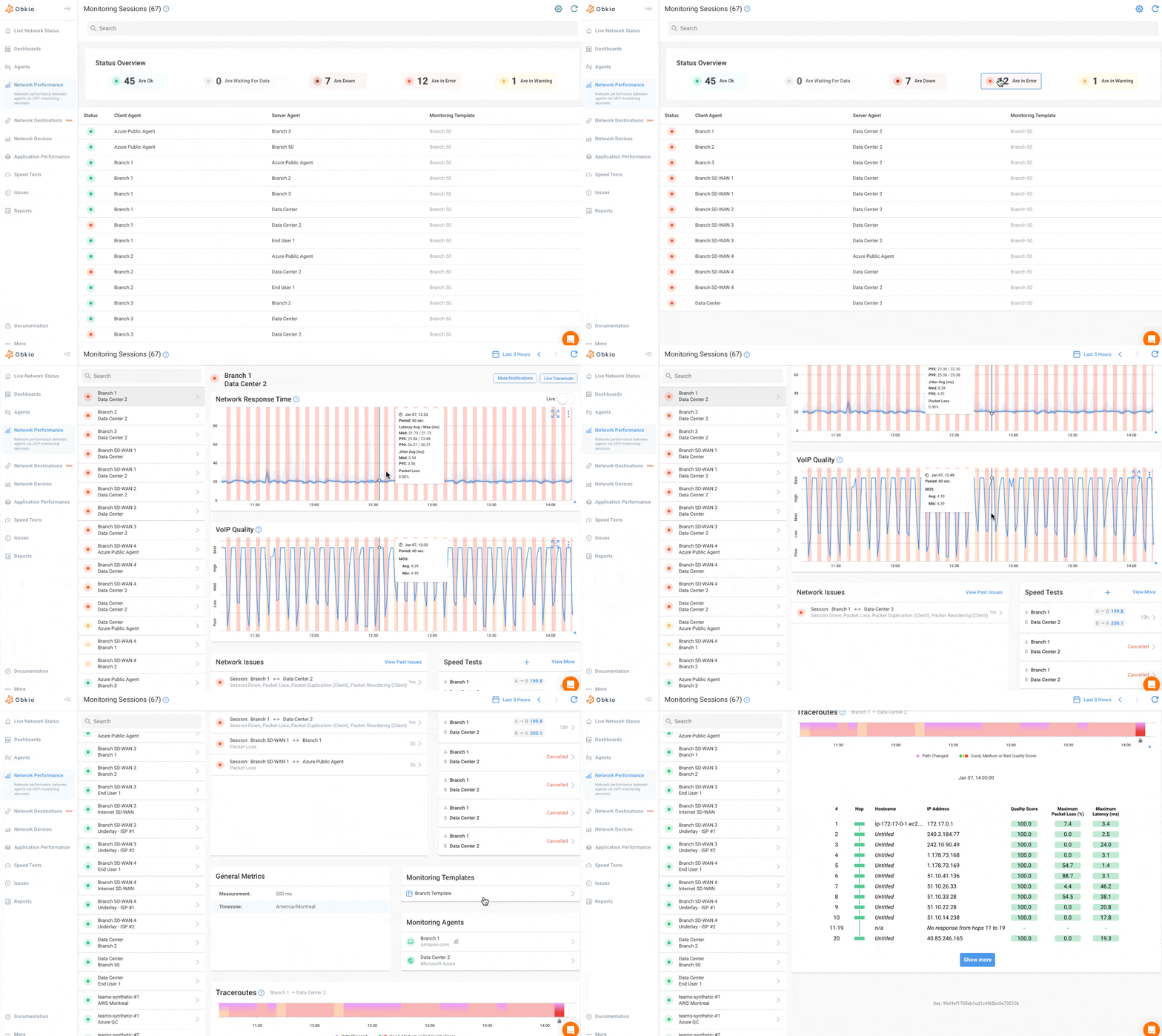
The method you pick determines how much you actually catch. Periodic checks work fine for spotting long outages. They're weak at catching the short, repeated drops that add up over a month but never show up as a single dramatic event.
What Internet Uptime Percentage Should You Expect? (Internet SLAs Explained)
A good Internet uptime SLA for a standard business connection usually falls between 99.9% and 99.95%. Anything above 99.99% typically requires redundancy, like an active SD-WAN Internet circuit, not just a single, well-maintained circuit.
An Internet SLA, or Service-Level Agreement, is the contractual agreement between you and your ISP that defines the guaranteed uptime percentage for your connection, often alongside latency, packet loss, and support response commitments. The SLA's uptime clause is the benchmark your own measured uptime gets compared against, so it's worth knowing what these numbers actually mean before you assume you're covered.
What is a Good Internet Uptime SLA: The "Nines" Table
You'll see SLA uptime expressed in "nines," shorthand for how many 9s appear in the percentage. Each additional nine cuts your allowed downtime by roughly 10x.
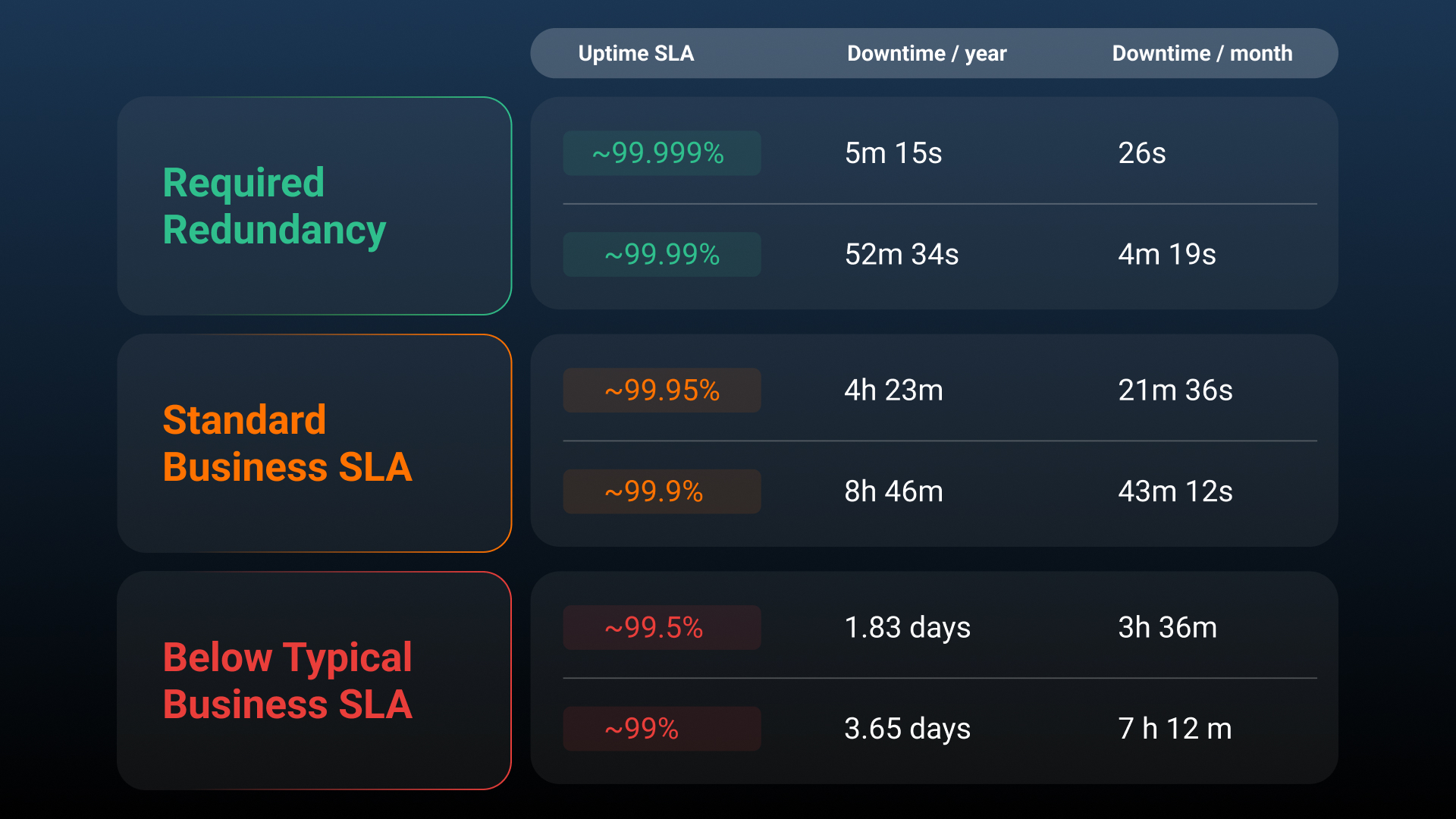
That table is the answer to most "how many nines is 99.9% uptime" searches: it's the difference between 43 minutes and 4 minutes of allowed downtime a month, and that gap gets wider fast as you move up the table.
What's A Realistic Internet Uptime SLA for a Standard Business Connection?
Standard ISP business SLAs usually land at 99.9% to 99.95%. Pushing past 99.99% generally isn't something a single circuit can deliver on its own. It usually calls for redundancy: a second circuit, a failover path, or a managed SD-WAN setup that can shift traffic the moment the primary connection drops.
If your business needs uptime above what a single ISP link can realistically guarantee, redundancy is the lever, not a stricter contract with the same provider.
Why Internet Uptime Alone Doesn't Tell the Full Story
An ISP can hit its uptime SLA at 99.99% while your users still deal with slow pages, choppy calls, and dropped video, because uptime SLAs are binary. They check whether the connection is responding, not whether it's usable.
Uptime SLAs don't trip on degradation. High latency, jitter, and packet loss never count against the "up" measurement, no matter how bad they get, as long as something is still passing traffic. A connection can run with 8% packet loss all afternoon and still post 0% downtime for that day. Perfect uptime score. Unusable for a client call during that exact window.
That's also why uptime monitoring alone misses most of what actually generates complaints. Nobody calls IT to say "our uptime dropped." They say "it's slow" or "the call kept cutting out," and neither of those registers as downtime under a standard SLA.
Speed, latency, jitter, and packet loss are what determine whether an "up" connection actually feels usable, and that's a performance question, not an uptime one. If that's the problem you're chasing, Internet Performance Monitoring is where you want to look next.

How to Monitor Internet Uptime
To monitor Internet uptime accurately, deploy monitoring Agents on both ends of the connection, define what counts as down before you start measuring, log every state change continuously, and calculate uptime against your own dashboard data instead of your ISP's report.
Here's how to check Internet uptime in a way that actually holds up if you need to dispute a number with your provider.
Step 1: Deploy Internet Uptime Monitoring on Both Ends
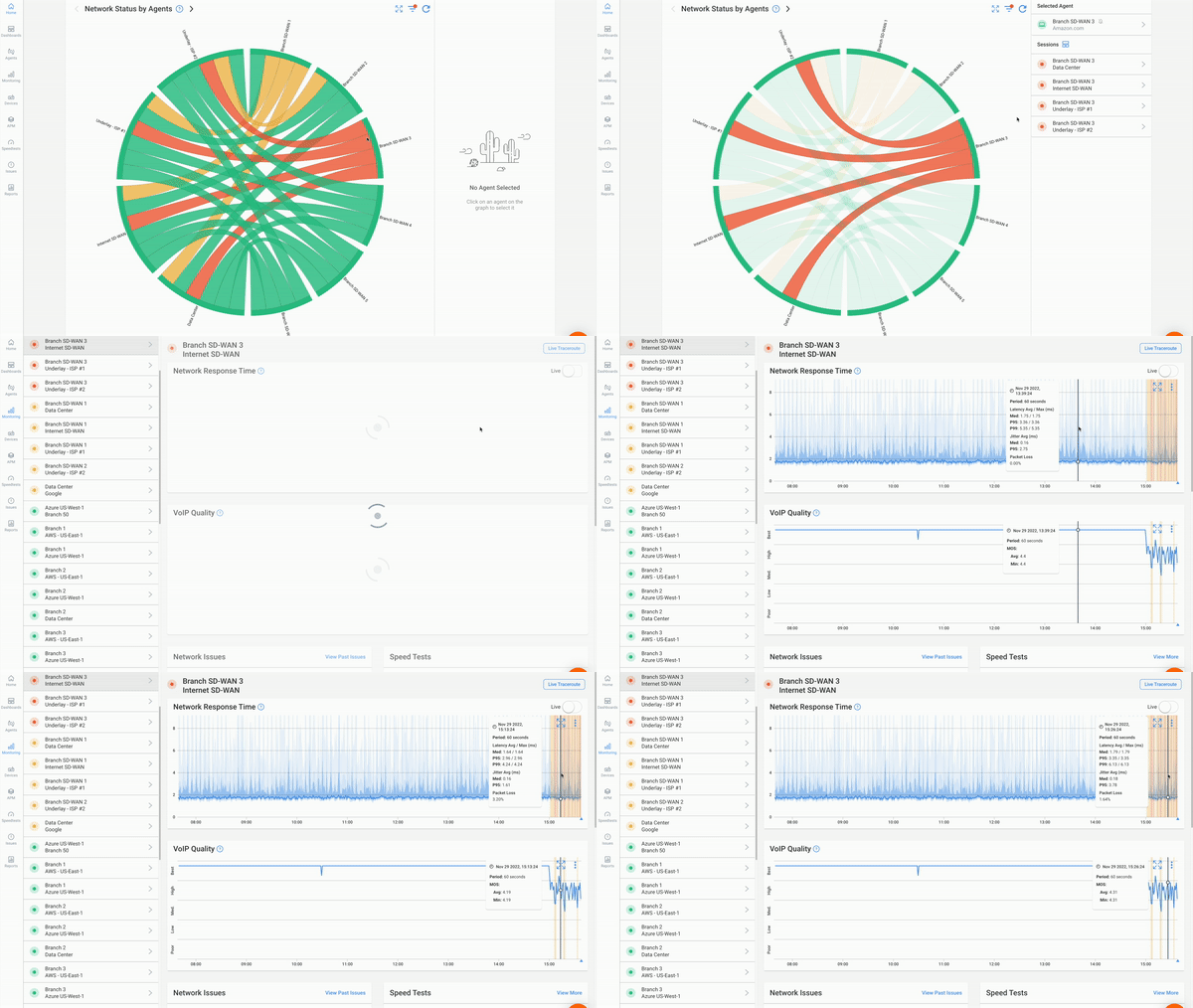
You need visibility on both sides of your ISP handoff, not just one. Obkio does this with Network Monitoring Agents, small software, hardware, or virtual endpoints that continuously exchange synthetic traffic to measure what's happening on the connection between them.
- 14-day free trial of all premium features
- Deploy in just 10 minutes
- Monitor performance in all key network locations
- Measure real-time network metrics
- Identify and troubleshoot live network problems


For Internet uptime specifically, that means:
- A local Agent inside your network, at your office, data center, or branch location, giving you the "your side" view.
- Two Public Monitoring Agents hosted by Obkio and major providers like Azure, AWS, and Google Cloud, giving you the "beyond your gateway" view.
Once deployed, these Agents exchange traffic every 500ms and continuously test the path between them. That constant testing is what makes this an Internet uptime monitor rather than a spot check. Deployment itself takes about 10 minutes through Obkio's onboarding wizard.
Step 2: Define What Counts as "Down" Before You Start
Set the threshold up front, for example, no successful response for a set number of consecutive seconds, so the number you end up with is defensible and consistent. Deciding this after you've already collected data is how teams end up with a number they can't defend to their ISP.
Step 3: Log Every Internet Uptime Change With a Timestamp
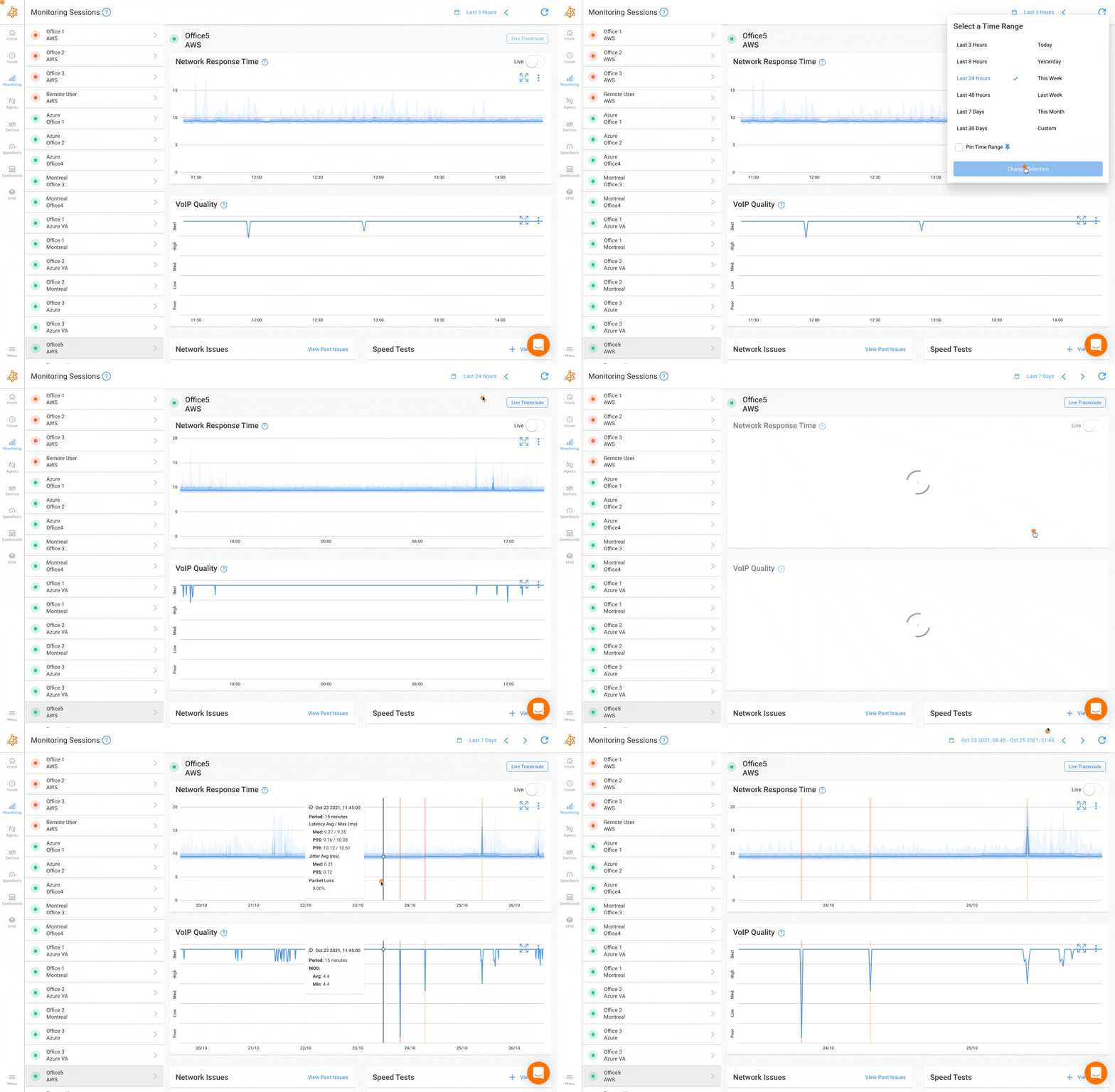
Continuous testing, not periodic pings, is what keeps short outages from disappearing into the gaps between checks. Every state change your Agents detect gets logged with a timestamp, which is what turns "the Internet felt shaky yesterday" into an actual, timestamped record.
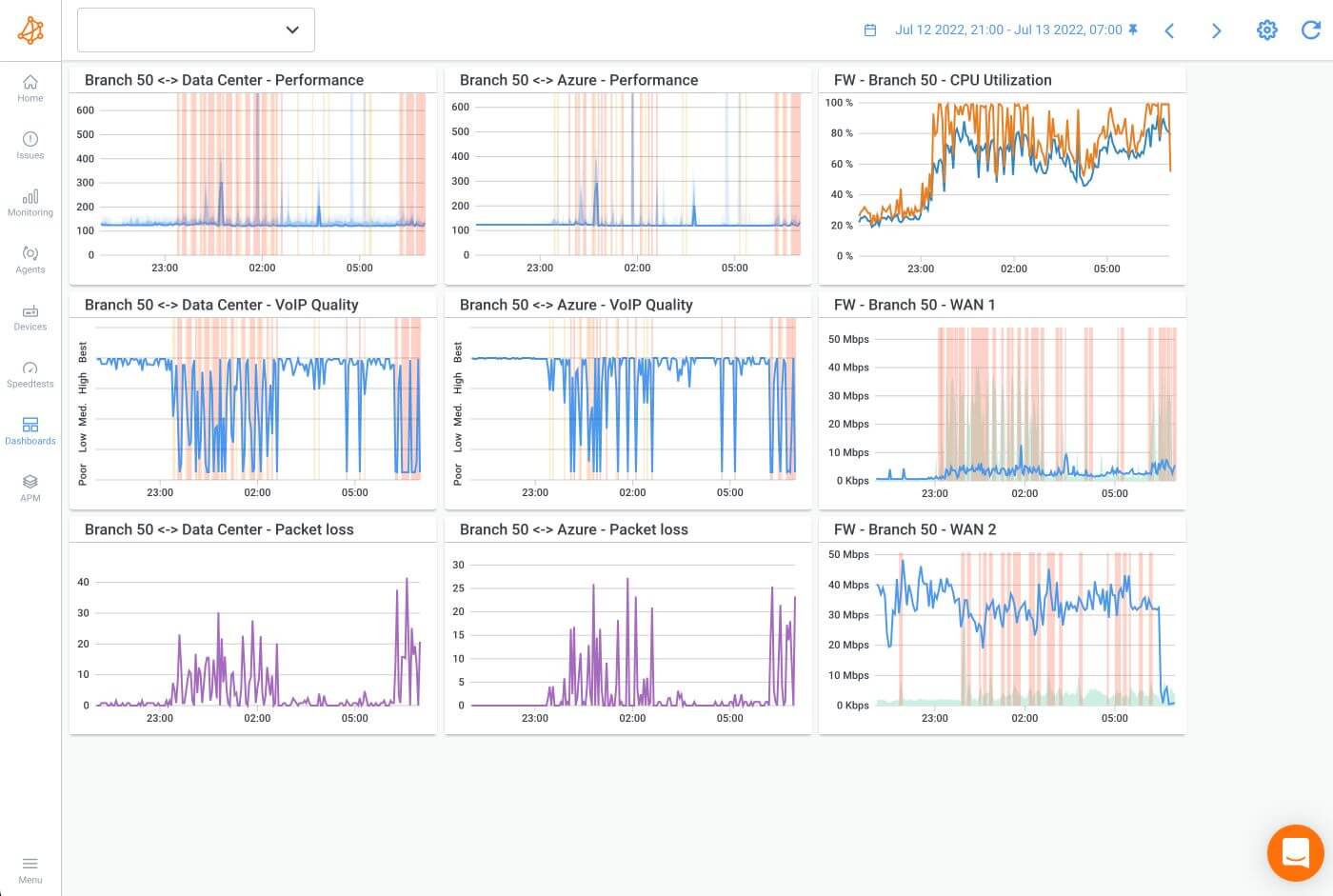
Step 4: Build a Dashboard Around Internet Uptime, Not Just Speed
Raw logs are hard to read at a glance, which is why the next step is putting that data somewhere you can actually use it. A dashboard built for internet uptime monitoring should show:
- Uptime percentage for the period, tracked against your SLA target
- Number and duration of outages, not just the overall percentage
- Packet loss and latency alongside uptime, so you can see when a connection was "up" but still degraded
- Bandwidth utilization, to catch saturation before it starts causing timeouts
- Historical trends, so you can compare this month against last month instead of looking at one snapshot in isolation
Obkio lets you build custom, real-time dashboards that pull all of this into one view, so you're not jumping between tools to piece together what happened during an outage window.
Step 5: Set Alerts on the Metrics That Actually Matter for Internet Uptime
Configure Smart Notifications on the specific thresholds tied to your SLA, a device going unreachable, a full outage, or packet loss crossing a level you've defined as unacceptable. This is what turns your internet uptime monitor from a passive log into something that tells you about a problem while it's happening instead of when a user complains.
How to Report on Internet Uptime SLA
A useful Internet uptime report includes the uptime percentage for the period, the number of separate outages, the timestamp and duration of each one, and a direct comparison against your SLA target.
The percentage alone doesn't tell the whole story. Two connections can both post 99.9% uptime in a month, one from a single four-hour outage overnight, the other from twelve short drops during business hours. Same number, very different impact on your users. That's why incident count matters just as much as the percentage, and it ties directly back to the nines table above: frequent flapping at a given uptime level is a different problem than one bad afternoon.
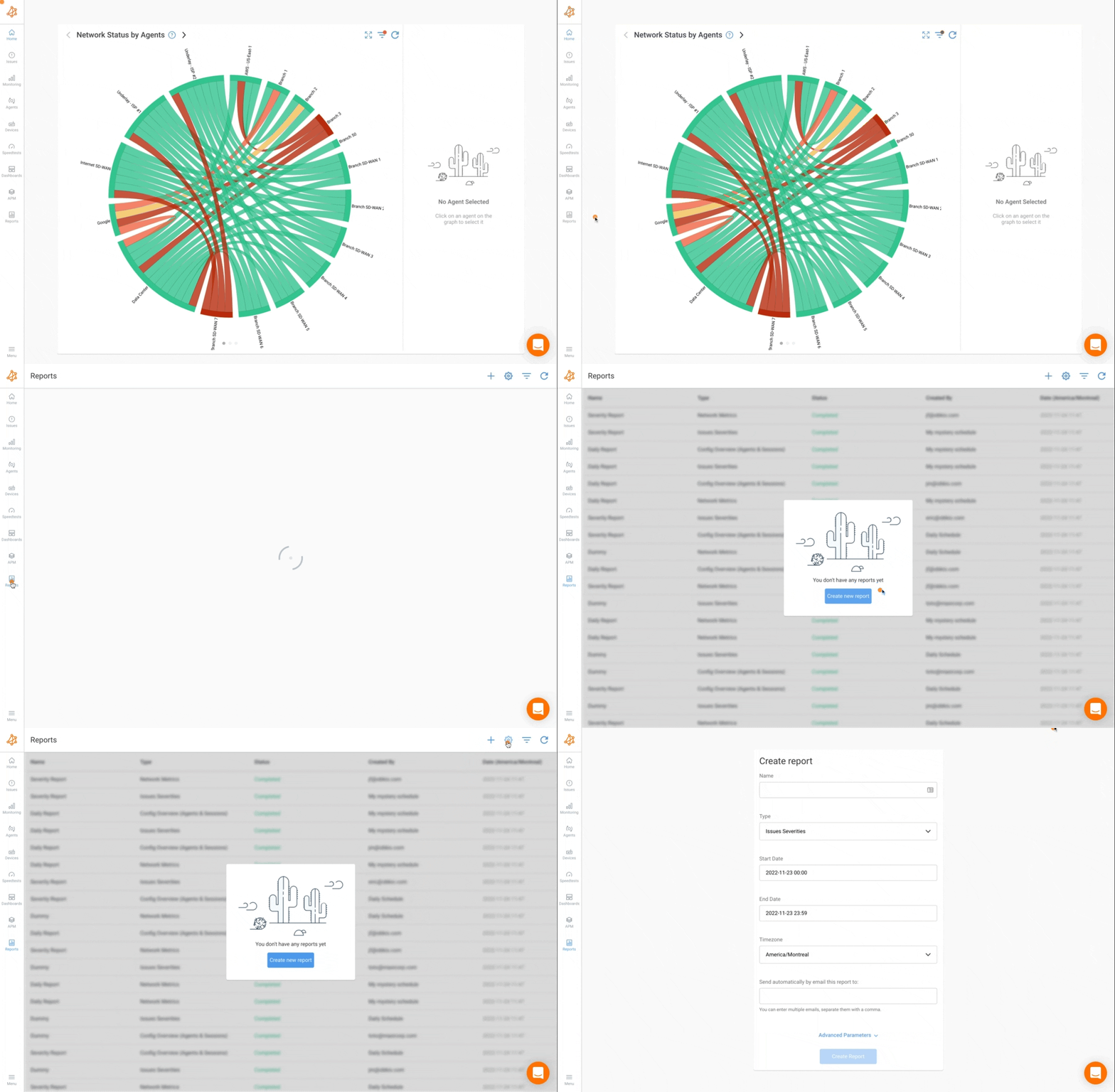
This kind of documented history is also your evidence when you sit down with your ISP. A clean report with dates, durations, and a comparison against the contracted SLA carries far more weight than "the Internet felt slow last week."
Obkio supports scheduled, automated reports so you're not pulling this together by hand every time someone asks.
Learn about SLA monitoring & reporting using Network Monitoring to measure network, service performance, user experience & understand if SLAs are being met.
Learn more
How to Improve Internet Uptime
Improving Internet uptime starts with adding redundancy where it matters most, but before you spend on a second circuit, rule out whether the "downtime" you're seeing is actually coming from your own equipment.
1. Add Redundancy at the Internet Connection Level
A single circuit has a ceiling on how much uptime it can realistically deliver, no matter how well your ISP maintains it. Refer back to the SLA tiers covered earlier: moving from a single circuit to a dual circuit, or to an active failover setup with SD-WAN, is what pushes achievable uptime past what any single ISP link can promise.
The jump matters more than it sounds. A single circuit at 99.9% still leaves you with around 43 minutes of allowed downtime a month. Add a second circuit with automatic failover, and that number drops hard, because the odds of both connections failing at the same time are far lower than either one failing on its own. This is also the point where it's worth checking that your failover actually fails over. A redundant path that sits unused because the switchover never triggers correctly gives you the cost of redundancy without the uptime benefit.
2. Diagnose Internet Connection Issues End-to-End Before Assuming It's the ISP
A chunk of what looks like ISP downtime is actually local: a struggling firewall, an overloaded router, a LAN switch on its way out, or a failover that didn't actually fail over when it should have. Blaming the ISP for a problem that's sitting on your own rack wastes a support ticket and delays the actual fix.
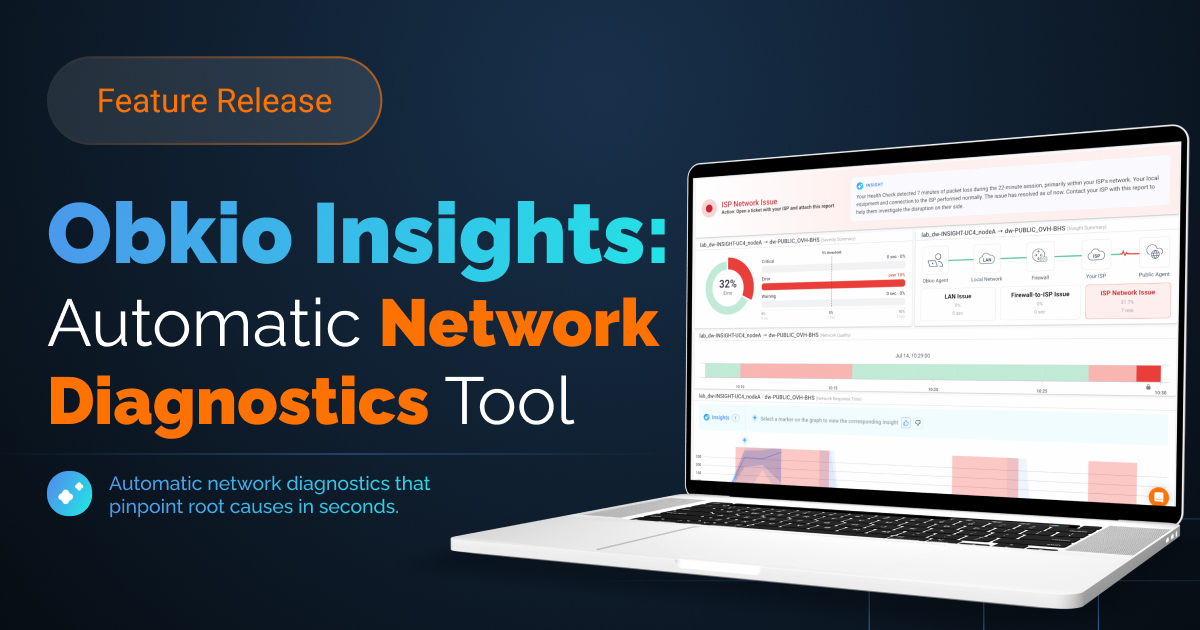
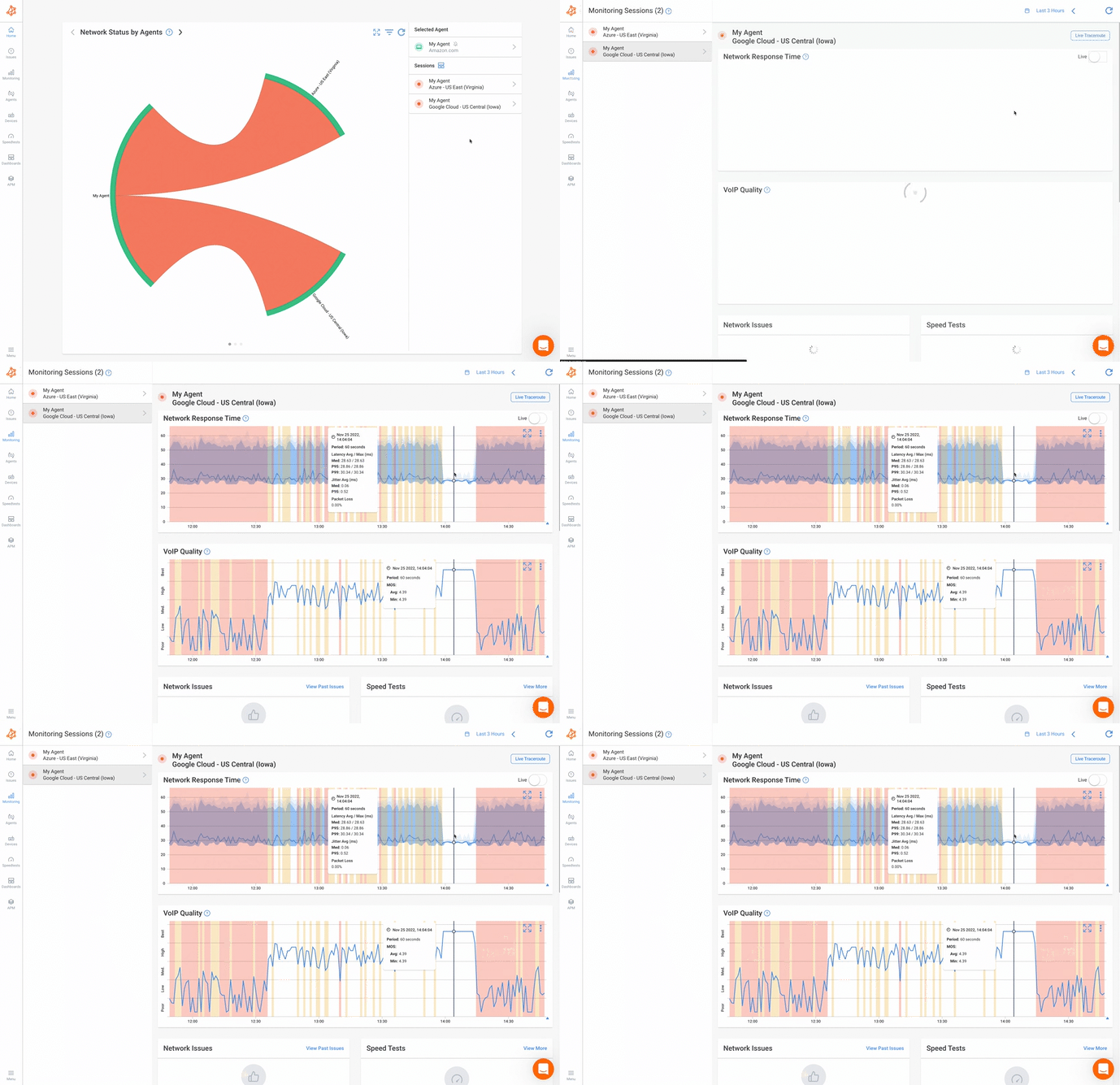
This is exactly where Obkio Insights (now in beta) earns its place in the process. When a monitoring session flags an issue, Insight automatically correlates the surrounding data, traceroute hops, device CPU and memory, bandwidth saturation, from the same time window, and tells you whether the fault sits on your side of the connection or your ISP's.
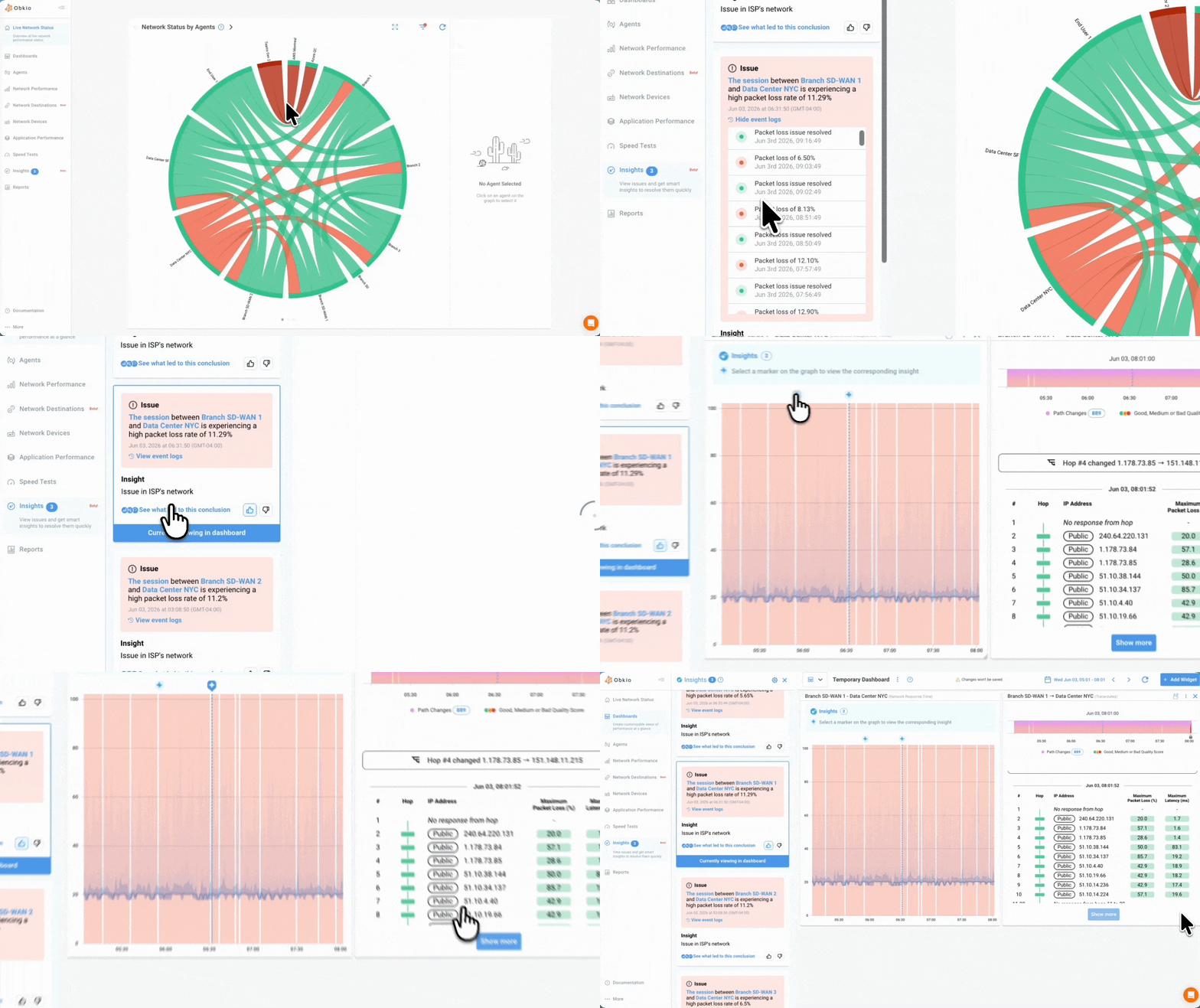
You get that answer before you spend time escalating a ticket to a provider who isn't the actual problem, and if it is on your side, you already know which device to look at first.
3. Use Your Own Monitoring Data to Negotiate a Better Internet SLA
A documented uptime history, built the way described in the reporting section above, is leverage. Not just for claiming credits after a breach, but for asking your ISP for a higher tier SLA or making the case to switch providers altogether.
This works because it removes the argument from "it feels slow sometimes" territory. A report showing outage count, duration, and timestamps over a full quarter is hard for an account rep to wave away, and it's the same data you'd bring to a competing provider if you decide the current one isn't worth renewing.
4. Set Alerts on Early Degradation, Not Just Outages
Rising packet loss or intermittent flapping usually shows up before a connection fails completely. Catching that trend early beats reacting to the full outage it eventually turns into.
Set thresholds for the metrics that tend to move before a hard failure: a steady rise in latency, packet loss creeping past a level you've defined as normal, or a device that keeps dropping and reconnecting instead of staying stable. Route those alerts to more than one channel and give critical alerts a shorter escalation window than minor ones, so a slow leak toward failure doesn't sit unnoticed in an inbox until it turns into the outage you were trying to avoid.

Unlock the secrets of Internet SLA monitoring, optimize your online experience, and hold your ISP accountable. Empower your Internet journey!
Learn more
Internet Uptime FAQs
What is Internet uptime?
Internet uptime is the percentage of time your Internet connection is available and successfully passing traffic during a given period, measured against the total time in that period.
How do you calculate Internet uptime percentage?
Use the formula Uptime % = (Total Time − Downtime) ÷ Total Time × 100. Total Time is the full period being measured, and Downtime is the cumulative time the connection was unavailable during that period.
What's a good uptime SLA?
For most business connections, 99.9% to 99.95% is standard. Going above 99.99% usually requires redundancy, such as a dual circuit or SD-WAN failover, rather than relying on a single connection.
Can my Internet be "up" but still slow?
Yes. Uptime SLAs are binary; they only check whether the connection is responding. A connection can show 100% uptime and still suffer from high latency, jitter, or packet loss that makes it feel unusable.
How can I hold my ISP accountable to their SLA?
Monitor your connection independently with your own data, log outages with timestamps and durations, calculate your own uptime percentage, and compare it against your SLA. A documented history gives you real evidence to bring to your ISP instead of relying on their own reporting.
Final Thoughts: How to Monitor Internet Uptime SLA With Confidence
Internet uptime is a useful number, but it's only ever half the picture. It tells you whether your connection was up. It won't tell you if it was any good while it was, and it won't catch the local hardware issue hiding behind what looks like an ISP problem. Monitor it yourself, define your own thresholds, and use the data you collect to hold your provider to the SLA you're actually paying for.
Ready to start monitoring Internet uptime on your own terms? Try Obkio free for 14 days and see exactly what your connection is doing, on both sides of your ISP handoff.
- 14-day free trial of all premium features
- Deploy in just 10 minutes
- Monitor performance in all key network locations
- Measure real-time network metrics
- Identify and troubleshoot live network problems
Have a question about your own setup, or something you think this article missed? Let us know; we're always looking to make these guides more useful for the IT teams actually using them.


