











 Obkio Blog


 Subscribe
Table of Contents
Table of Contents
A customer calls to place an urgent order. Your agent's VoIP line cuts out mid-sentence. Is it their home connection? Your network? The ISP? The phone system? You have no visibility, and by the time you figure it out, the customer's gone.
This is the reality for modern call centers. Whether your agents work from a central office, from home, or split between both. Network issues don't just slow operations; they destroy customer experiences in real-time. Every dropped call, every choppy connection, every frozen screen impacts revenue and satisfaction directly.
Traditional network monitoring wasn't built for distributed call centers. It monitors switches and routers, not the actual call quality your agents experience. On-site teams battle bandwidth congestion. Remote teams struggle with unmanaged home networks and varying ISP quality. Hybrid models need visibility across both. When performance tanks, you're troubleshooting blind while customers wait.
This article shows you how to monitor network performance for call centers of any size or structure. You'll learn how to deploy monitoring from agent locations, track network metrics that matter, identify issues before customers complain, and troubleshoot remotely with data instead of guesswork. Whether your team is on-site, remote, or hybrid.
What Is Call Center Network Monitoring? 
Call center network monitoring tracks network performance that directly impacts voice quality and agent productivity across all locations (headquarters, remote contact centers, and home-based agents).
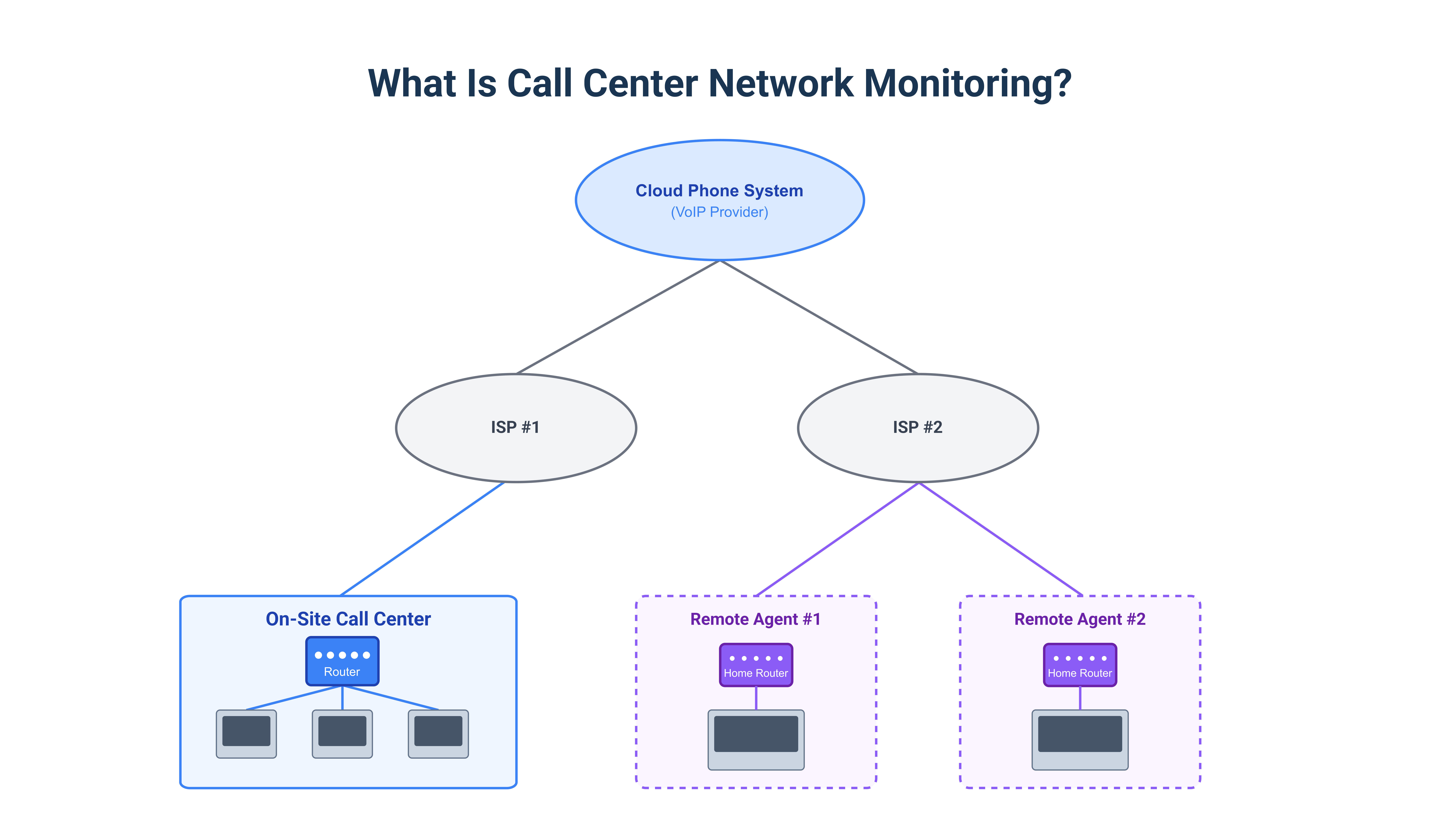
The scope varies by call center model:
- On-site call centers: Monitor centralized infrastructure you control, internal network health, WAN connections, and paths to cloud phone systems.
- Remote call centers: Monitor from individual agent locations through unmanaged home networks and residential ISPs you don't control.
- Hybrid call centers: Combine both with unified visibility across on-site and remote workers.
This differs from traditional network monitoring in critical ways. It focuses on real-time voice quality metrics like latency, jitter, and packet loss. It monitors from the call center agent's perspective, not just infrastructure. It tracks VoIP-specific indicators like MOS scores and call quality. And it covers distributed locations with dramatically different network characteristics.
For call centers, this matters because voice quality directly impacts customer satisfaction. Network issues cause immediate revenue loss. Agent productivity depends on stable connections. Call abandonment rates spike during network problems.
Why Do Traditional Network Monitoring Tools Fail for Call Center Network Monitoring?
Traditional monitoring assumes you control the infrastructure. But call centers operate across remote agent home networks you can't access, third-party cloud phone systems, distributed contact center locations, and multiple ISP connections.
Common blind spots of traditional monitoring tools for contact center network monitoring include:
- No access to the agent home routers
- Zero visibility into ISP performance
- Missing VoIP-specific metrics
- Reactive rather than proactive troubleshooting approaches
What you need to know but can't see:
- Is agent latency affecting call quality?
- Which ISP has routing problems?
- Are home network issues causing dropped calls?
- Is it the VoIP provider or your network?
Without answers, you're guessing while call quality suffers.
How Should You Monitor Network Performance from Call Center Agent Locations?
Stop monitoring TO call center locations from headquarters. Instead, monitor FROM each agent location to measure performance exactly as they experience it.
This approach works because it tests from agent devices (the endpoints you control), measures actual call quality instead of just network stats, provides complete path visibility from home network through ISP to phone system, and enables remote troubleshooting without site visits.

Learn how to monitor unmanaged networks and remote workers' home connections. Get visibility into networks you don't control with distributed monitoring.
Learn more

How Does Obkio Monitor Call Center Network Performance?
Obkio is a SaaS network performance monitoring and observability platform built specifically for distributed environments, exactly what call centers need. Unlike traditional monitoring tools designed for centralized data centers, Obkio monitors from the endpoint perspective, measuring performance exactly as your agents experience it.
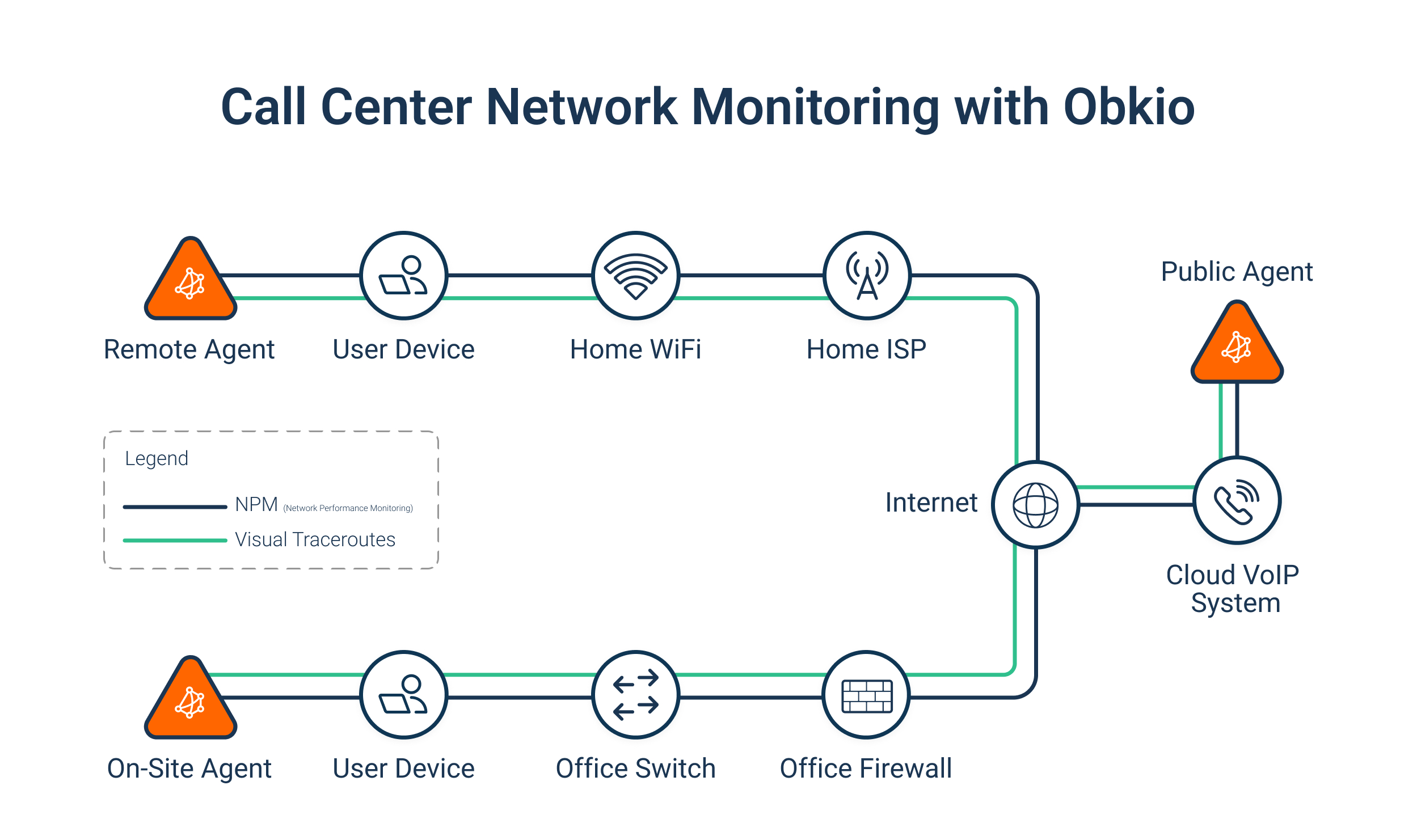
The architecture is straightforward:
Obkio uses lightweight Monitoring Agents deployed at every location where call quality matters. For call centers, that means software agents on remote worker laptops, hardware appliances at on-site locations, or virtual machines in data centers. These agents continuously exchange synthetic UDP traffic every 500 milliseconds to simulate VoIP calls without generating actual calls or capturing packets.
This synthetic traffic approach means:
- No privacy concerns, we're not capturing real call data
- Continuous monitoring even when no calls are active
- Proactive detection of issues before they impact live calls
What Obkio measures for call centers:
The platform tracks the network metrics that directly affect VoIP quality:
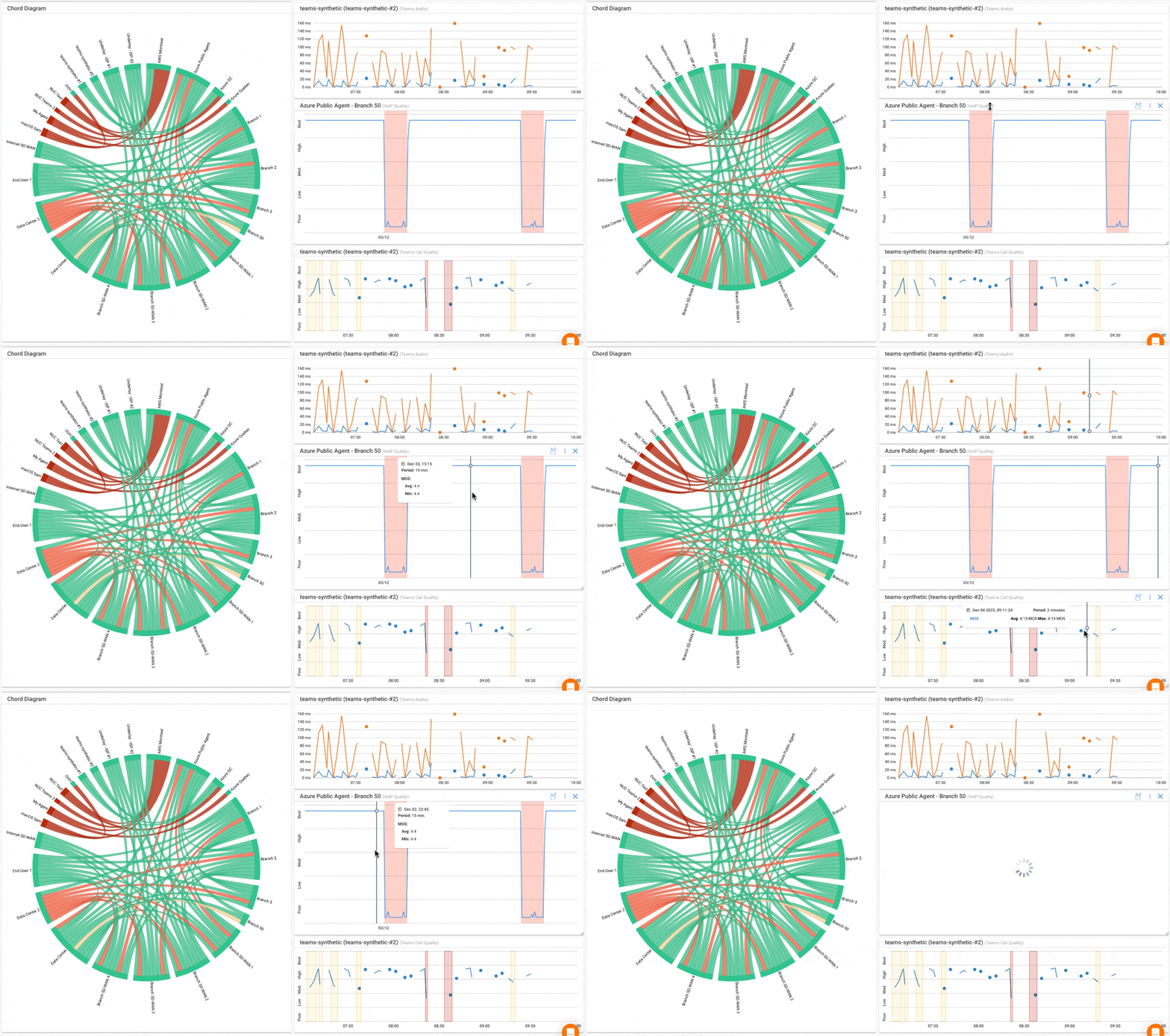
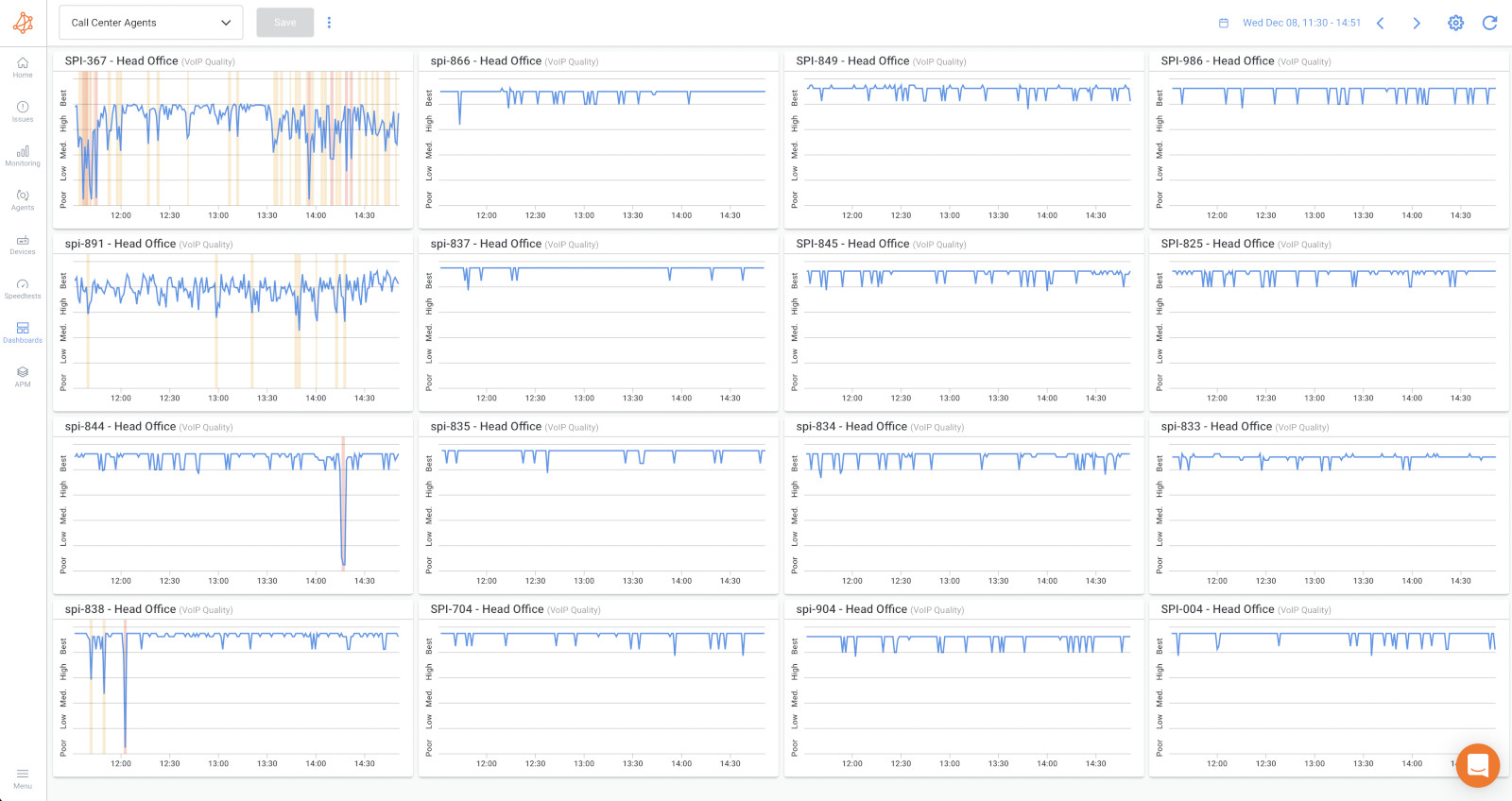
MOS Score (Mean Opinion Score): Obkio calculates MOS every minute. The VoIP Quality graph categorizes call quality as Best, High, Medium, Low, or Poor for every minute, making it immediately clear when performance degrades.
Latency, jitter, packet loss: Measured bidirectionally every 500ms. You see upload and download performance separately because VoIP quality depends on both directions working well.
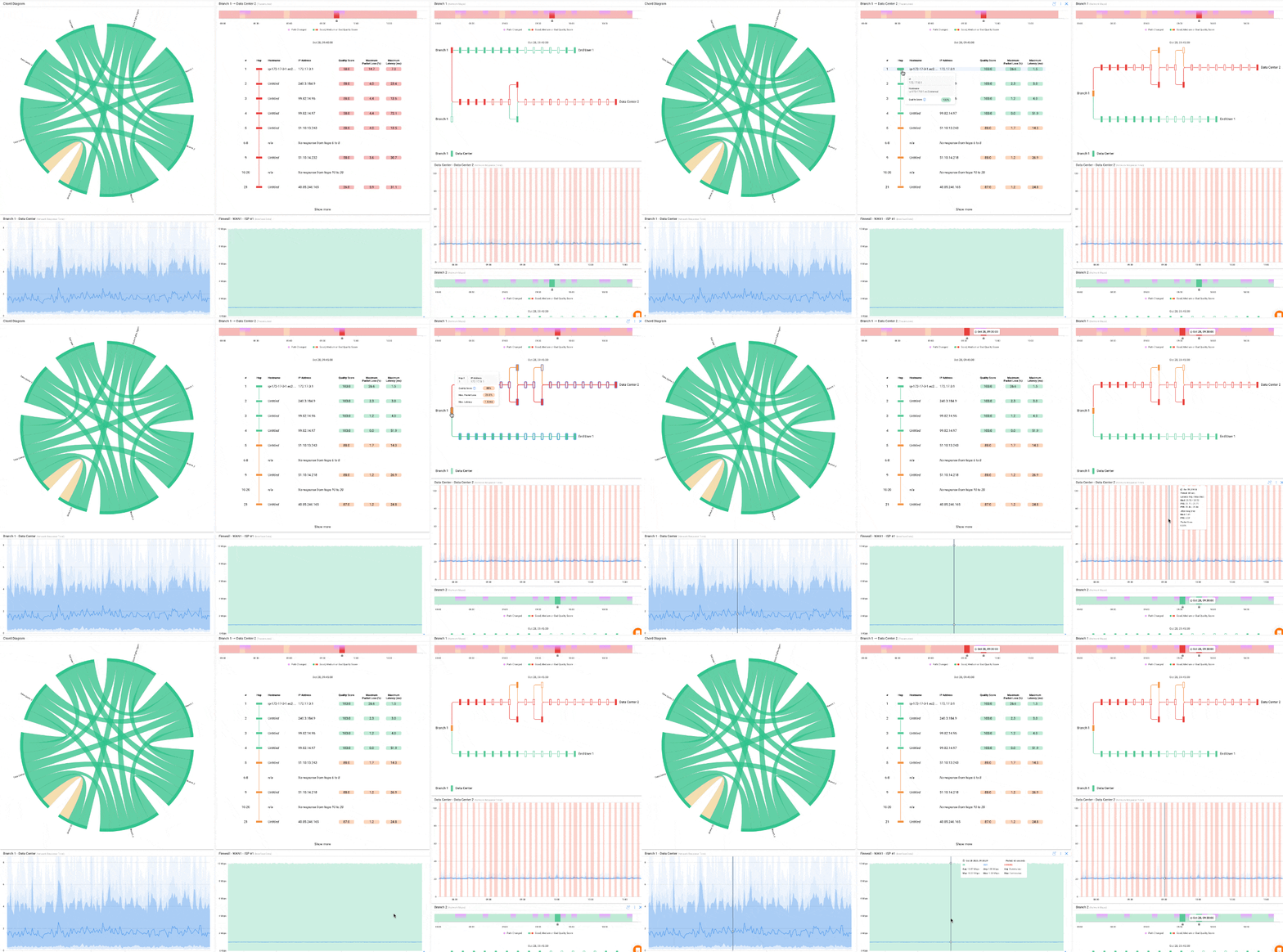
Visual Traceroutes: Obkio's Visual Traceroute Tool the complete network path hop-by-hop from the agent location through their ISP to your phone system. When call quality drops, you can see exactly where: is it the agent's home Wi-Fi? Their ISPs' routing? Your cloud phone provider? The traceroute colour-codes each hop based on performance, making problem locations obvious.
SNMP device monitoring: For on-site call centers, Obkio's SNMP Network Device Monitoring polls network devices (routers, switches, firewalls) via SNMP to track CPU, memory, bandwidth utilization, and interface errors. This catches infrastructure problems affecting multiple agents simultaneously.
Remote Call Center Network Monitoring Interface IT Pros Actually Want:
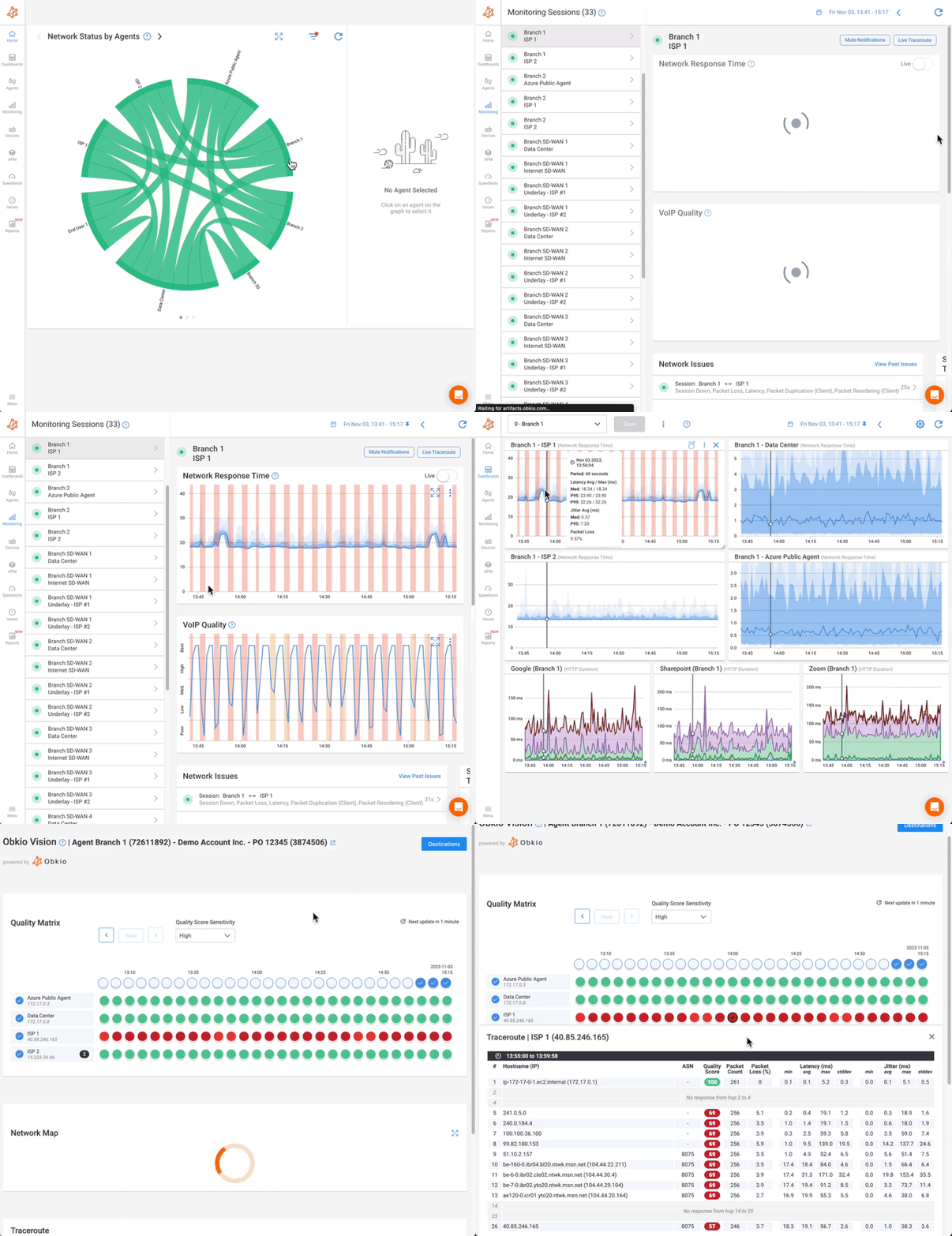
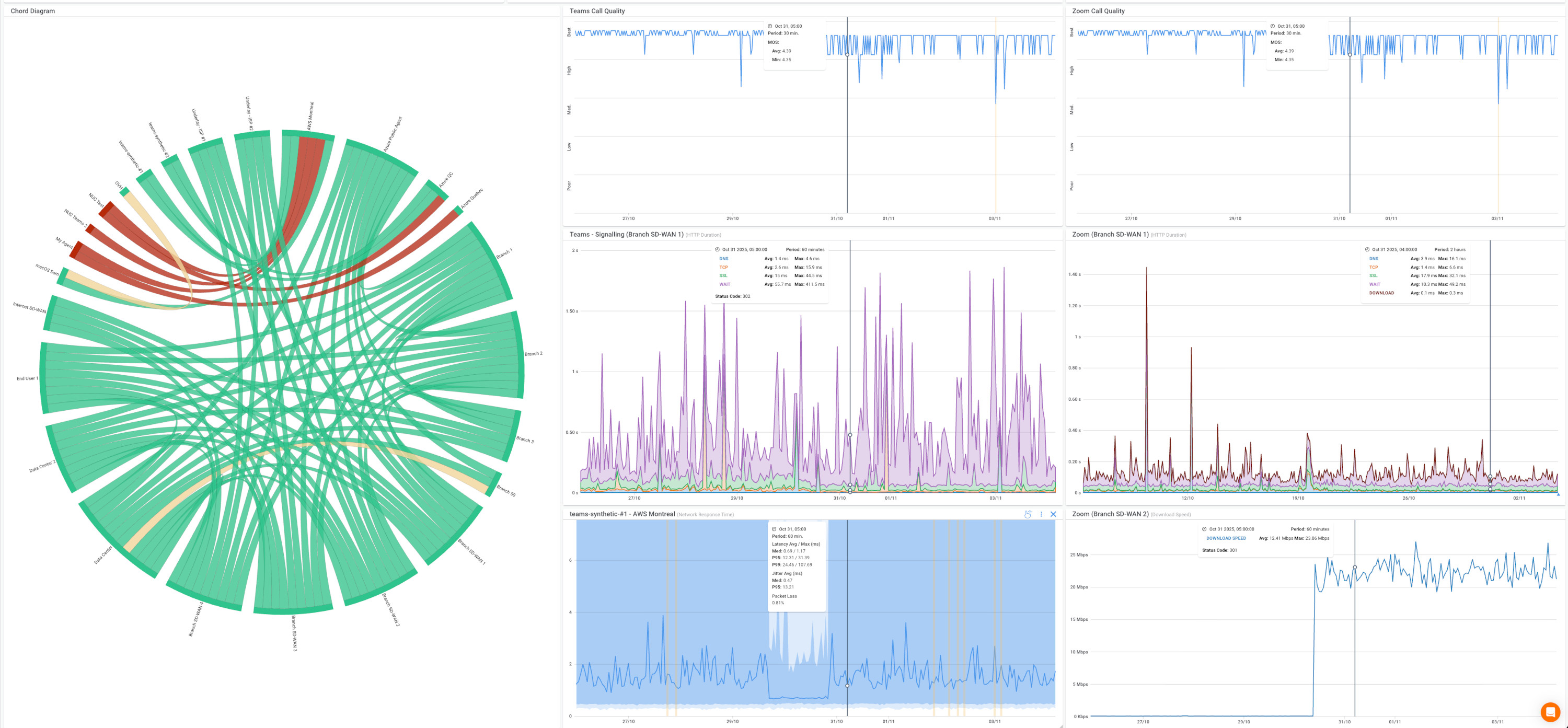
- Chord Diagram: Single-screen overview showing every monitored network path and its current status. Green means performance is good, yellow indicates degradation, red means serious problems. Click any path to drill into detailed graphs.
- Custom dashboards: Build views showing only what matters: remote agent VoIP quality, on-site bandwidth utilization, ISP performance by provider. Share dashboards with management without giving them full access to configuration.
- Smart notifications: Configure alerts based on VoIP-specific thresholds (MOS score drops below 3.5, latency exceeds 150ms, packet loss above 1%). Notifications are grouped intelligently, so you don't get flooded with 50 alerts when one ISP fails, affecting multiple agents.
- Historical data: Months of performance history for troubleshooting intermittent issues. When an agent says, "Calls were bad yesterday afternoon" , you have the data to prove what happened and where.


Why Remote Network Monitoring matters for call center IT teams:
You're managing network performance across infrastructure you don't fully control. Remote agents use home networks and residential ISPs. Cloud phone systems run on third-party infrastructure. Traditional monitoring assumes you control everything: routers, switches, circuits. Obkio was built for the reality of distributed work.
The platform is designed to be deployed fast (with a mass deployment option) and require minimal ongoing management. Configuration happens through the web interface. No on-site visits required for remote troubleshooting.
For call centers specifically, Obkio's Remote Network Monitoring solves the visibility gap: you finally know if call quality problems are the agent's Wi-Fi, their ISP, routing to your phone provider, or your own infrastructure. You get data-backed evidence to escalate with ISPs instead of generic "our Internet is slow" tickets. And you can monitor VoIP quality continuously instead of reactively troubleshooting after customers complain.
What Are the Differences Between Remote and On-Site Call Center Network Monitoring?
Call center network monitoring isn't one-size-fits-all. The infrastructure and problems differ based on where agents work.
On-site vs Remote Call Center: Different Monitoring Challenges
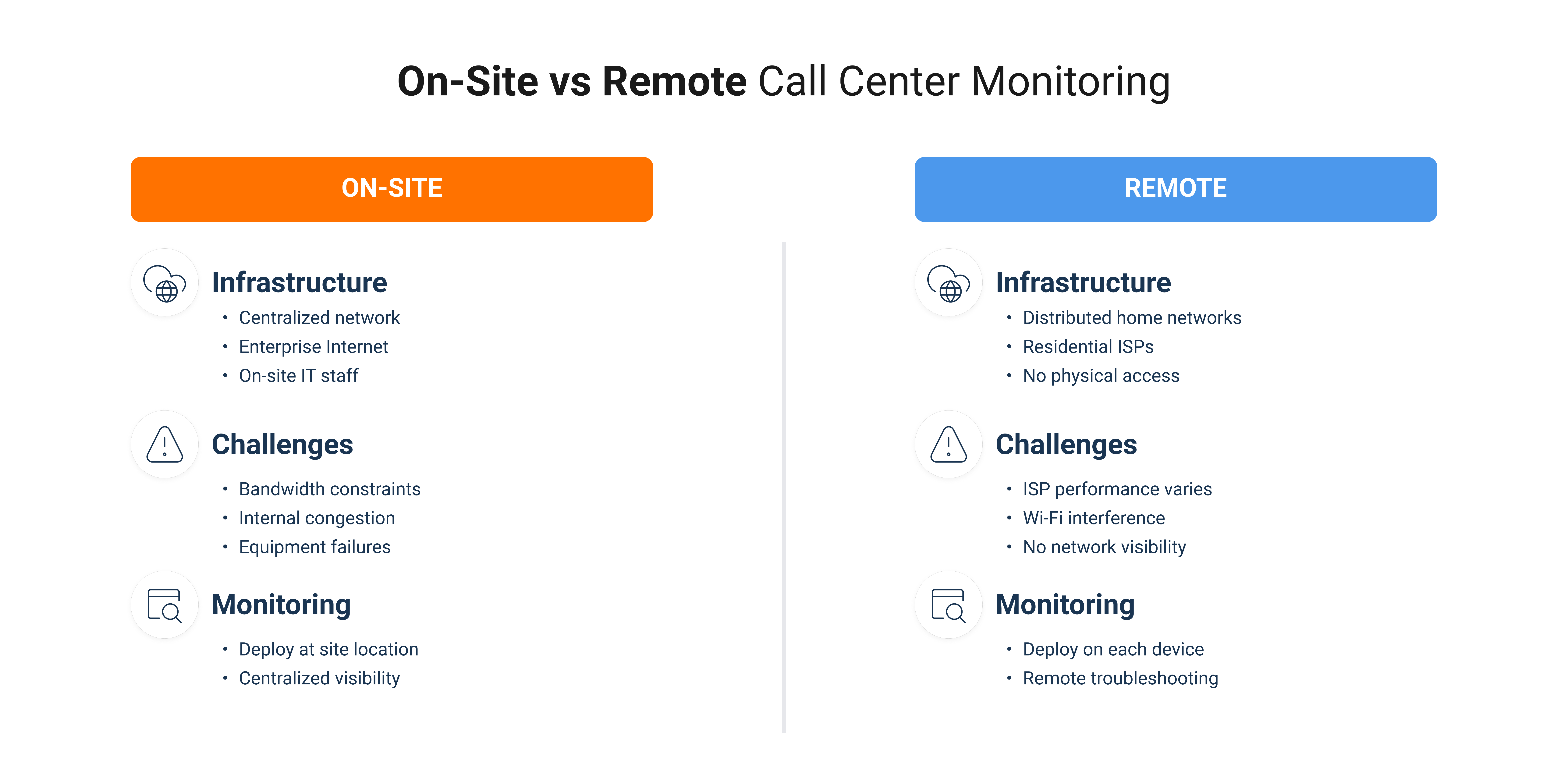
On-Site Call Centers
Infrastructure: Centralized network you manage, enterprise Internet connections, managed switches and routers, dedicated VoIP infrastructure, on-site IT staff, consistent hardware across workstations.
Common challenges: Bandwidth constraints during peak hours, internal network congestion, equipment failures affecting multiple agents, firewall or QoS misconfigurations, WAN connection issues to headquarters or cloud systems.
Monitoring approach: Deploy agents at the site location, monitor from data center or office to cloud phone systems, use SNMP for network devices, centralized visibility with local troubleshooting.
Key advantage: You control the infrastructure and make changes immediately.
Remote Call Centers
Infrastructure: Distributed agents across hundreds of unmanaged home networks, residential ISP connections with varying quality, consumer-grade routers and Wi-Fi, mixed device types and operating systems, zero physical IT access, completely different network quality per agent.
Common challenges: ISP performance varies dramatically by location and provider, home Wi-Fi interference and weak signals, competing bandwidth from family streaming or gaming, router configuration issues you can't directly fix, last-mile connection problems with residential ISPs, no visibility into network paths.
Monitoring approach: Deploy agents on individual remote worker devices, monitor FROM each agent's location to your systems, test paths through various ISPs simultaneously, troubleshoot remotely without site visits, continuous monitoring to catch intermittent issues.
Key challenge: You don't control infrastructure but must still ensure call quality.
Hybrid Call Centers
Most modern call centers operate hybrid models: some agents on-site, some remote, some rotating between locations.
Requirements: Unified visibility across all locations, consistent performance standards regardless of where agents work, ability to compare performance between sites, identify if issues are location-specific or system-wide, support both controlled and unmanaged network segments.
Best practice: Deploy monitoring agents at every location type, then centralize visibility into one dashboard. This lets you compare on-site vs. remote agent performance, identify if problems affect only remote workers (ISP issues) or everyone (system issues), make data-driven decisions about remote work policies, and prove network readiness for expanding remote workforce.
Should Your Call Center Support Work from Home Agents?
If you're evaluating whether your call center can support remote workers, work-from-home call center monitoring provides the answer.
Before going remote: Test agent home network performance with monitoring agents. Establish minimum requirements for latency, jitter, packet loss, and bandwidth. Identify agents whose home connections won't support call center work. Document baseline performance for comparison after rollout.
During remote rollout: Monitor each agent's network continuously. Catch problems before they impact customer experience. Build evidence for ISP escalations or hardware upgrades. Compare remote vs. on-site performance.
After going remote: Maintain visibility across distributed locations. Identify patterns: specific ISPs, times of day, geographic regions with issues. Make data-driven decisions about remote work sustainability. Support agents proactively instead of reactively.
The SPI Health and Safety case study demonstrates this perfectly: they moved their entire call center remote, deployed Obkio monitoring to every agent's workstation, and gained the visibility needed to support distributed workers without on-site IT resources.

What Are the Most Common Call Center Network Performance Issues?
Call center network problems don't announce themselves clearly. Agents report "the system is slow" or "calls keep dropping", but the root cause could be anywhere. Here are the most common issues.
Call Center Network Performance Issue #1. High Latency (Delay)
What it is: Time for data to travel from agent to customer and back. Latency over 150ms becomes noticeable.
Symptoms: conversations feel awkward with overlapping speech, agents and customers talk over each other, and delayed responses.
Causes: ISP routing inefficiencies, overloaded home routers, geographic distance to phone system servers, VPN overhead, and congested network paths during peak hours.
Call Center Network Performance Issue #2. Jitter (Inconsistent Latency)
What it is: Jitter is the variation in packet arrival times. Voice packets need consistent intervals for clear audio.
Symptoms: robotic or choppy voice quality, words cutting in and out, garbled audio, customers asking for repetition.
Causes: unstable Wi-Fi connections, network congestion spikes, ISP traffic shaping, competing bandwidth from streaming, and poor QoS configuration.
Call Center Network Performance Issue #3. Packet Loss
What it is: Voice data packets never reach their destination. Even 1-2% packet loss significantly degrades call quality.
Symptoms: words or syllables missing, audio cutting out mid-sentence, one-way audio, calls sounding "underwater".
Causes: failing network hardware, Wi-Fi signal degradation, ISP connection quality issues, overloaded equipment, and faulty cables.
Call Center Network Performance Issue #4. Bandwidth Congestion
What it is: Insufficient bandwidth to handle all network traffic, including VoIP.
Symptoms: call quality degrades during specific times, multiple agents report issues simultaneously, video freezes while audio continues, and applications slow down during peak usage.
Causes: undersized Internet connection, no QoS prioritization for voice traffic, agents streaming video or downloading files, backup systems running during business hours.
Call Center Network Performance Issue #5. ISP Connection Problems
What it is: Issues with Internet Service Provider infrastructure or connection quality.
Symptoms: consistent performance problems at specific times daily, issues affect multiple agents with the same ISP, performance is fine on speed tests but poor during calls, traceroutes show problems at ISP network hops.
Causes: ISP infrastructure overload in residential areas, peering disputes causing suboptimal routing, last-mile connection degradation, ISP traffic shaping or deprioritizing VoIP.
Call Center Network Performance Issue #6. Wi-Fi Problems (Remote Agents)
What it is: Wireless connection issues in home offices are causing instability.
Symptoms: intermittent connection drops, performance varies based on agent location in the home, call quality degrades when the agent moves, issues are worse evenings/weekends from neighbour congestion.
Causes: weak Wi-Fi signal strength, interference from neighbouring networks, outdated router firmware, 2.4GHz band congestion, and physical obstacles blocking the signal.
Call Center Network Performance Issue #7. Cloud Phone System Connectivity
What it is: Network path issues between agents and cloud-hosted VoIP platforms.
Symptoms: all agents experience issues simultaneously, problems correlate with specific cloud regions or data centers, login issues or system unavailability.
Causes: cloud provider regional outages, Internet routing problems to cloud data centers, insufficient bandwidth to the cloud provider, and DNS resolution failures.
Call Center Network Performance Issue #8. Device and Endpoint Issues
What it is: Problems with agent computers, headsets, or local equipment.
Symptoms: issues isolated to specific agents consistently, CPU or memory spikes during calls, audio quality issues with one headset but not another.
Causes: outdated network drivers, CPU/memory overload from too many applications, faulty USB ports or headset connections, and antivirus software interfering with VoIP traffic.
Why Network Monitoring Solves These Call Center Network Performance Issues
Without monitoring, these problems are invisible until agents complain or customers leave. By the time you investigate, the issue has passed, and you're left with vague descriptions like "it was slow earlier."
Network monitoring for call centers changes this completely.
- It identifies which category the problem falls into: whether you're dealing with latency, packet loss, or bandwidth congestion.
- It pinpoints the exact location in the network path: agent device, home network, ISP infrastructure, or your own systems.
- When you need to escalate with ISPs or vendors, you have concrete evidence instead of user complaints.
- The monitoring catches intermittent issues that happen when you're not actively troubleshooting, so problems don't disappear before you can diagnose them.
- It establishes performance baselines so you know immediately when metrics deviate from normal.
- Most importantly, it helps to proactively solve issues before poor call quality impacts customer experience.
With continuous monitoring in place, you stop guessing and start solving problems with actual data.
How Do You Set Up Network Performance Monitoring for Call Centers?
Before monitoring your call center network, you need the right platform.
Step 1: Choose and Deploy Network Monitoring for Call Center Locations
Look for distributed monitoring capabilities that can monitor from remote agent locations, VoIP-specific features that track MOS scores and call quality metrics, easy deployment that rolls out quickly without technical expertise at each location, real-time visibility with immediate alerts when call quality degrades, and scalability that handles 10 agents today and 500 tomorrow.
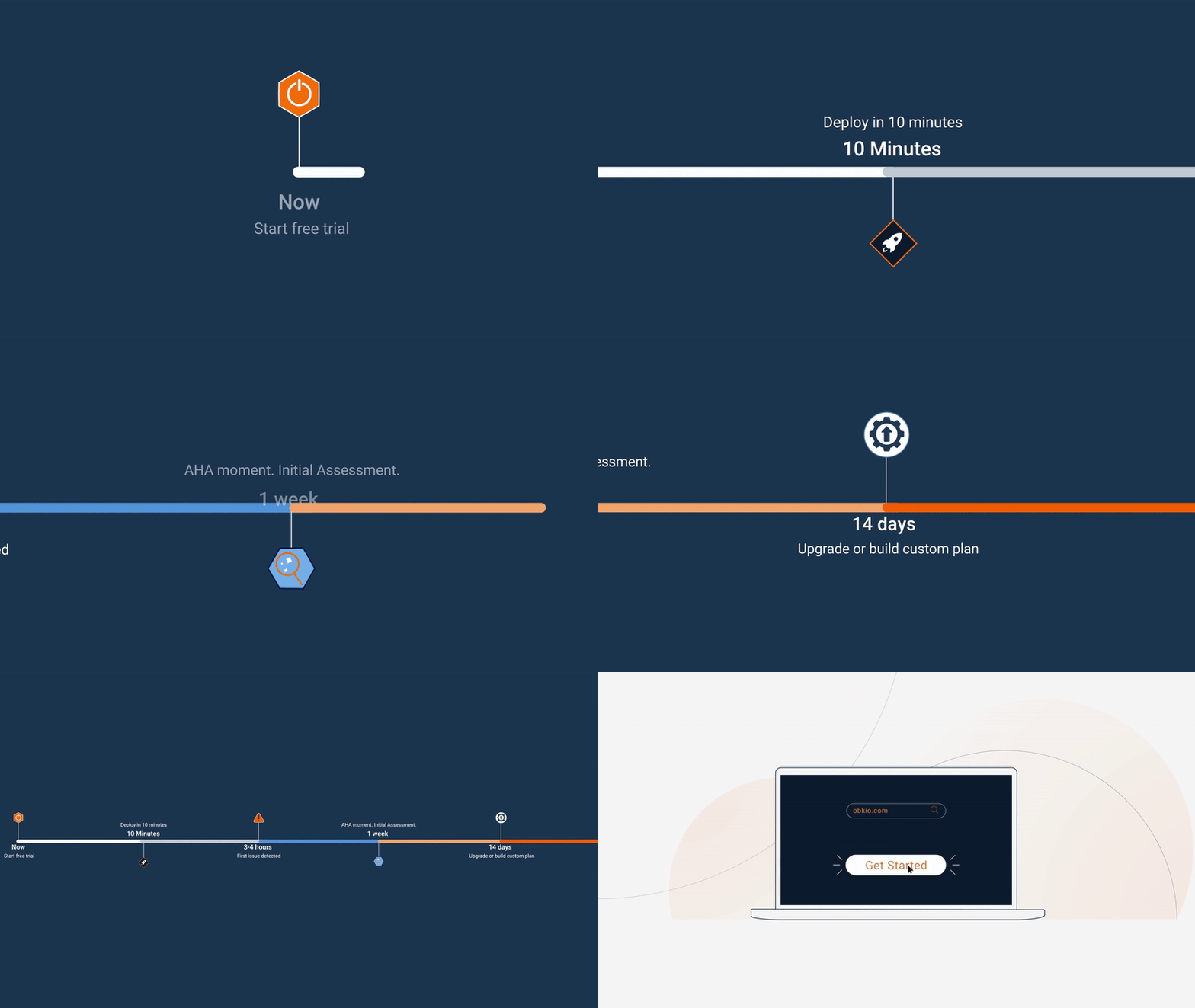
Getting started with Obkio: Sign up for a free 14-day trial to test call center network monitoring without commitment. The trial includes full access to all premium features: deploy agents, monitor VoIP quality, and troubleshoot issues before deciding.
- 14-day free trial of all premium features
- Deploy in just 10 minutes
- Monitor performance in all key network locations
- Measure real-time network metrics
- Identify and troubleshoot live network problems
Deploy Monitoring Agents at Call Center Locations:
Deploy at remote agent home offices (mass deployment of software agents on laptops and workstations), on-premise contact centers (hardware appliances or virtual machines), satellite offices (virtual appliances for cloud environments), and branch locations (software agents).
Deployment methods:
- Mass deployment for remote workers: Silent installation through existing device management tools like Intune, Jamf, or Group Policy. SPI Health and Safety used Obkio's deployment profiles to roll out agents to their entire remote call center in minutes.
- Individual installation: Agents can self-install with a simple download link, which takes under 10 minutes.
- Hardware appliances: Plug in power and Ethernet, the device pairs automatically using its serial number.
Deployment strategies by call center model:
1. For on-site call centers
Deploy hardware appliances or virtual machines at the site location. Single deployment point covers all on-site agents. Install once, monitor continuously from that location. Complement with SNMP device monitoring for network equipment.
Time to deploy: 1-2 hours for entire site.
2. For remote call centers
Deploy software agents on every remote worker's device. Use mass deployment tools for scale. Leverage deployment profiles for consistent configuration. Each agent requires individual monitoring.
Time to deploy: 10 minutes per agent (or mass deploy in 1-2 hours).
3. For hybrid call centers
Combine both approaches: site appliances plus individual agents. Ensure consistent monitoring templates across all locations. Centralize visibility despite different deployment methods. Tag agents by location type for comparison. Time to deploy: varies based on remote agent count.
Best practices for Call Centers Network Monitoring:
- Start with critical agents: Deploy monitoring to your top performers or agents handling critical accounts first to prove value quickly
- Minimal performance impact: Choose lightweight agents that run transparently without affecting device performance
- Cross-platform support: Ensure your solution works on Windows, macOS, and Linux for diverse remote workforces
- Fast time to data: From installation to first performance data should take under 10 minutes
Within minutes of deployment, you'll have visibility into network performance across every call center location, whether that's headquarters, remote offices, or agents working from home.
Step 2: Continuously Monitor Call Center Metrics
Monitor synthetic VoIP traffic with continuous call quality simulation, MOS scores for predicted call quality, bidirectional testing for upload and download, latency, jitter, and packet loss specific to voice, speed tests to validate bandwidth, and HTTP monitoring for call center applications.
Call center network performance benchmarks:

Excellent:
- Latency < 50ms
- Jitter < 10ms
- Packet Loss < 0.1%
- MOS Score 4.0-5.0
Acceptable:
- Latency 50-100ms
- Jitter 10-30ms
- Packet Loss 0.1-1%
- MOS Score 3.5-4.0
Poor (requires action):
- Latency > 150ms
- Jitter > 30ms
- Packet Loss > 2%
- MOS Score < 3.5
Continuous monitoring catches intermittent ISP congestion, identifies peak-hour call quality degradation, predicts problems before calls drop, and creates performance baselines.
Step 3: Configure Alerts for Call Center Network Issues
Set thresholds for MOS score drops below acceptable levels, latency exceeding VoIP requirements (>150ms), jitter impacting voice clarity, packet loss affecting call quality, and agent connectivity loss.
Use notification channels like Slack or Teams for IT teams, PagerDuty for escalation, and email alerts for management.
Step 4: Use Visual Traceroutes to Identify Call Quality Issues in Call Centers
When call quality degrades, you need to see the complete network path, not just that there's a problem, but exactly where it's happening.
Unlike standard traceroute commands that give you a single snapshot, Obkio's Visual Traceroute tool continuously maps the network path and overlays performance data on every hop. You see the complete route from agent location through their ISP to your phone system, with hop-by-hop VoIP performance metrics displayed for each network device.
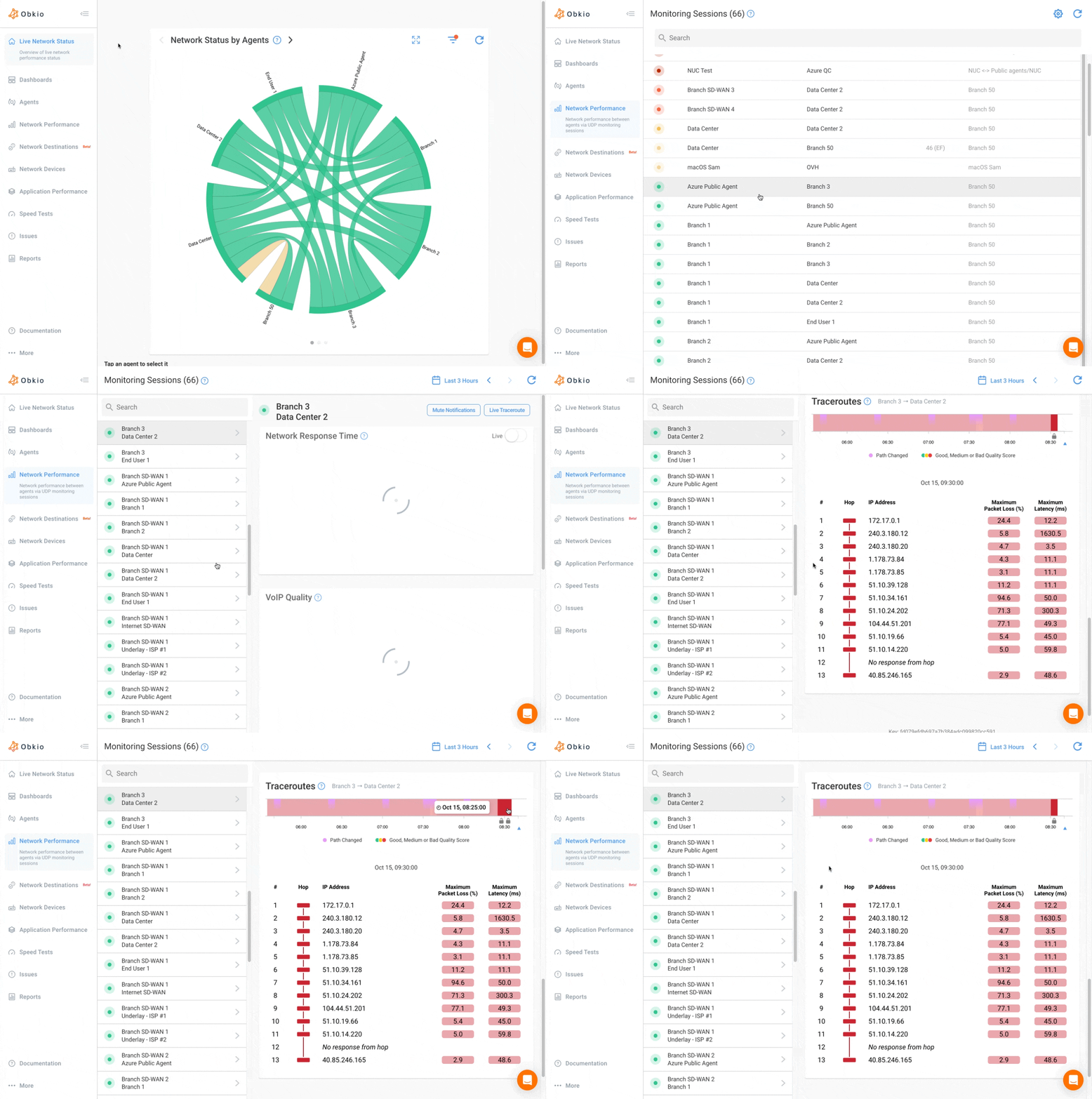
Is it hop 2 (the agent's home router)? Hop 5 (their ISP's network)? Or hop 12 (your cloud phone provider's infrastructure)?
Visual traceroutes instantly differentiate between home network issues, ISP problems, and cloud phone system issues. If performance degrades at the first hop, it's the agent's local network, likely Wi-Fi interference or bandwidth congestion. If your ISP suddenly changes routing paths and call quality tanks, you'll see the route change correlated with performance degradation, critical evidence when escalating with providers.
For endpoints without agents:
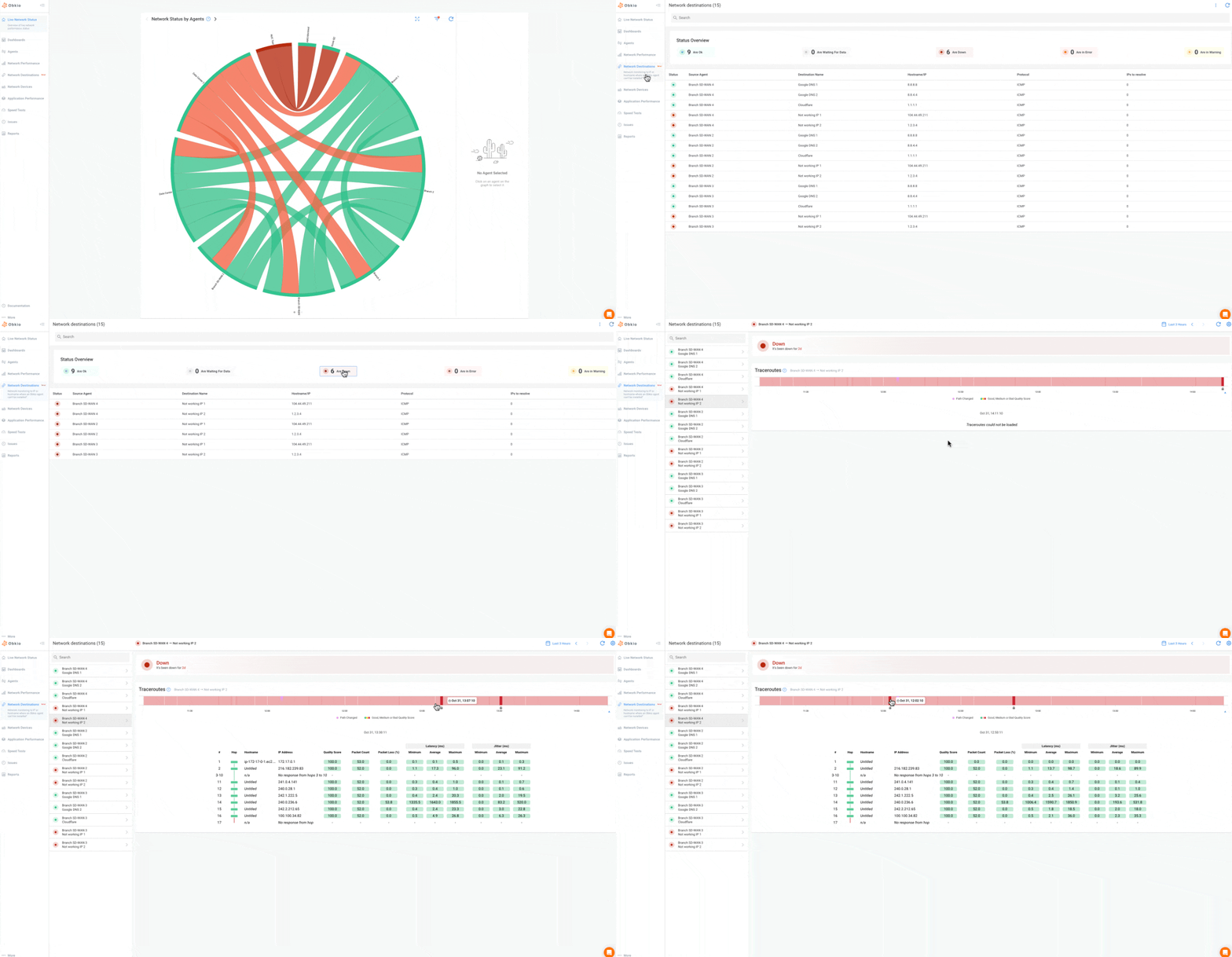
Need to monitor cloud phone system IPs or VoIP endpoints where you can't deploy an agent? Obkio's Network Destinations feature provides ICMP monitoring with continuous traceroutes to any IP address.
Step 5: Determine If Call Center Issues Are Local or ISP-Related
Decision tree for call center issues:
- If problems start at the agent device: CPU/memory overload during calls, network driver issues, Wi-Fi signal problems.
- If problems at the first external hop: home router configuration, Wi-Fi congestion, or local network overload.
- If problems mid-route: ISP backbone issues, routing problems, peering congestion.
- If problems at the destination: VoIP provider infrastructure, cloud phone system issues, or your PBX/phone servers.
Issue patterns by call center model:
- On-site call centers: Issues affect multiple agents simultaneously (internal network or WAN connection), problems during specific times (bandwidth congestion or backup windows), isolated to one area of the office (local switch or cabling issue), affect all agents (ISP, firewall, or upstream infrastructure).
- Remote call centers: Issue isolated to one agent (their home network, Wi-Fi, or local ISP), multiple agents same ISP (provider-specific problem), multiple agents same geographic area (regional ISP issues), same time daily across agents (residential ISP peak-hour congestion), issues when agent moves (Wi-Fi signal strength problem).
- Hybrid call centers: Only remote agents affected (unmanaged network issues, not your infrastructure), only on-site agents affected (internal network problem at office location), all agents affected (your phone system, cloud provider, or central infrastructure), remote agents on a specific ISP affected (target that provider for escalation).
Step 6: Analyze Historical Performance for Call Center Networks
Use historical data to identify peak-hour call quality patterns, track agent-specific recurring issues, compare performance across shifts, prove ISP problems with evidence, and correlate network issues with abandoned calls.
Benefits: predict when call quality will degrade, optimize agent schedules based on network reliability, provide evidence for ISP escalation, and justify infrastructure upgrades.
Step 7: Proactively Troubleshoot Call Center Networks Remotely
Instead of "Is your Internet slow? Try rebooting your router," do this: "Your ISP is dropping 5% of packets during afternoon hours. Here's the data to show them. Meanwhile, switch to your backup connection for critical calls."
Remote troubleshooting enables fixing issues without dispatching techs, identifying problems before agents report them, providing specific guidance based on data, and escalating ISP issues with evidence.
Why remote call center troubleshooting is different: With on-site call centers, you walk to an agent's desk and physically check connections. With remote workers, troubleshooting happens entirely through data. Instead of physical access, you have real-time performance metrics from their device, visual traceroutes showing their complete network path, historical data proving patterns vs. one-time issues, device health metrics, and evidence to guide remote agents through fixes.
This is where distributed call center monitoring becomes essential. Without data, you're asking users to describe symptoms. With monitoring, you're diagnosing problems remotely with precision.
Step 8: Report Network Performance to Call Center Management
Provide call quality metrics by location/agent, network uptime across all sites, impact on customer experience, and ROI of network improvements.
Communicate clearly:
- "Network issues caused 47 dropped calls this week"
- "Agent productivity down 15% due to latency"
- "ISP problems affecting customer satisfaction scores"
Real-World Example: How Did SPI Health and Safety Monitor Their Remote Call Center Workers?
The Challenge:
SPI Health and Safety, a Canadian leader in health and safety services, moved their entire call center to remote work during the pandemic. Almost immediately, they faced critical VoIP quality issues: choppy calls, dropped connections, and frustrated customers. Their IT team struggled to troubleshoot network problems remotely without visibility into each agent's home network.
The Solution:
Using Obkio's network monitoring platform, SPI deployed lightweight Windows monitoring agents to every remote call center workstation. The mass deployment took just minutes using deployment profiles, and the IT team immediately gained visibility into network performance across all home offices.

The Results:
- Proactive issue detection: Custom dashboards showed VoIP quality (MOS scores) for every agent at a glance, often identifying problems before agents noticed
- Faster troubleshooting: Identified whether issues were local (Wi-Fi problems) or ISP-related, then guided agents through fixes remotely
- Smart call routing: When agents experienced network issues, they could be immediately taken off calls while IT resolved the problem
- Reduced downtime: IT resolved issues without on-site visits, getting agents back to work faster
- Better customer experience: Customers no longer experienced poor call quality, and agents received the support they needed to work effectively from home
See How Obkio Can Help You Monitor Your Call Center Network
If you're facing similar challenges with on-site, remote, or hybrid call center network monitoring, our team can show you exactly how Obkio monitors contact center network performance for distributed teams.
Book a quick call to discuss your specific call center setup, whether you're managing remote agents across residential ISPs, maintaining on-site infrastructure, or running a hybrid model.
We'll walk through how to deploy monitoring across your locations, track VoIP quality metrics that matter, troubleshoot issues remotely without site visits, and maintain visibility across all agent locations.
What Are the Best Practices for Call Center Network Monitoring?
1. Start Monitoring High-Impact Call Center Agents First
Top performers handling critical accounts or VIP customers. Deploy monitoring here first to prove value quickly and protect your most important customer relationships. Once you've validated the approach, scale to your entire call center operation.
2. Set VoIP-Specific Thresholds for Call Center Performance
Set VoIP-specific thresholds that align with actual call quality requirements, not generic network benchmarks. Configure alerts for MOS scores dropping below 3.5, latency exceeding 150ms, jitter above 30ms, and any packet loss above 1%. These thresholds directly correlate with user experience, so you're alerted when performance degrades enough to matter.
3. Document Baseline Call Center Performance Per Remote Location
Document baseline call quality for each location before problems occur. What's normal performance for your on-site office versus remote agents in different geographic regions? Establishing these baselines lets you immediately recognize when performance deviates and gives you comparison data when troubleshooting.
4. Use Monitoring Templates for Deployment Across Call Center Agents' Workstations
Use monitoring templates for consistency across your deployment. Configure one template with your VoIP thresholds, monitoring intervals, and alert settings, then apply it to all agents. This ensures uniform monitoring standards, whether you're measuring performance for on-site agents or remote workers across different ISPs.
5. Regularly Report Call Center Performance & Business Impact
Regularly report network impact to business metrics that management understands. Don't just say "latency increased by 40ms." Translate that to "network issues caused 47 dropped calls this week, affecting customer satisfaction scores" or "agent productivity decreased 15% during ISP performance problems." Connect network data to business outcomes.
6. Monitor Backup Connections for Call Center Agents
Monitor backup connections for failover readiness, especially for on-site call centers with redundant Internet circuits. Your primary connection might look healthy, but if your backup circuit has degraded performance and you failover during an outage, you're switching to a connection that can't handle your call volume.
7. Test Network Paths to Call Center Phone Systems
Test network paths to cloud phone systems using public monitoring agents deployed in major cloud providers like AWS, Azure, and Google Cloud. This simulates the actual network path your agents use to reach cloud-hosted VoIP platforms without requiring agent deployment on your phone provider's infrastructure. You gain visibility into performance all the way to your VoIP service, not just to the edge of your network.

Frequently Asked Questions About Call Center Network Monitoring
Q: What network metrics are most important for call centers?
The most critical metrics are MOS (Mean Opinion Score) for call quality, jitter (should be under 30ms), latency (under 150ms for VoIP), and packet loss (should be near 0%). These directly impact whether customers can understand agents clearly.
Q: How much does call center network monitoring cost?
Network monitoring solutions vary widely. Cloud-based tools like Obkio start with free trials and scale based on the number of monitored locations. Traditional enterprise solutions can cost thousands monthly. Most SMB call centers spend $50-200 per agent location monthly.
Q: Can I monitor call center agents working from home?
Yes. Deploy lightweight monitoring agents on remote worker laptops to track network performance from their home office. You'll gain visibility into their ISP connection, home network quality, and call path performance without accessing their router.
Q: What's the difference between network monitoring and call recording?
Network monitoring tracks the quality of the network connection (latency, jitter, packet loss) that affects call quality. Call recording captures actual conversations for quality assurance. Network monitoring is proactive and prevents issues; call recording is reactive and reviews what happened.
Q: How quickly can I deploy network monitoring for my call center?
With cloud-based solutions, deployment takes minutes per agent. Mass deployment tools can roll out monitoring to hundreds of agents in under an hour. You'll see performance data within 10 minutes of agent installation.
Q: Will network monitoring slow down my agents' computers?
Quality monitoring agents are lightweight and use minimal resources (typically under 1% CPU and 50MB RAM). Agents won't notice them running, and they won't impact call handling capacity.
Q: Should I monitor remote call center agents differently than on-site agents?
Yes. Remote agents require monitoring from their individual devices through unmanaged networks, while on-site agents can be monitored from a central location. Remote monitoring focuses on ISP quality, home Wi-Fi, and last-mile connections. On-site monitoring focuses on internal infrastructure, WAN connections, and centralized equipment.
Q: Can I use the same monitoring tool for both on-site and remote call centers?
Absolutely. The best solutions (like Obkio) support both deployment models simultaneously. You deploy hardware appliances or VMs for on-site locations and software agents for remote workers, then view all performance data in one unified dashboard.
Q: My call center is hybrid (some on-site, some remote). How do I monitor both?
Deploy monitoring agents at both on-site locations (hardware appliances or VMs) and on individual remote worker devices (software agents). Use consistent monitoring templates and centralized dashboards to compare performance across all locations, regardless of where agents work.
Q: What performance differences should I expect between on-site and remote agents?
On-site agents typically have lower, more consistent latency (10-30ms), minimal jitter, and near-zero packet loss with enterprise Internet. Remote agents vary widely based on their ISP, expect 20-50ms latency on good residential connections, with occasional spikes during peak hours. Remote agents are more susceptible to Wi-Fi interference and bandwidth competition from household usage.
Conclusion: Stop Troubleshooting Call Center Networks Blind
Call center network monitoring isn't about controlling every network, you can't control agent home ISPs or residential connections. It's about gaining visibility into the infrastructure that directly impacts customer experience, regardless of where your agents work.
- You get real-time VoIP quality visibility across every location, from headquarters to home offices.
- You identify issues proactively before call quality degrades enough to affect customers.
- You troubleshoot remotely with actual data instead of asking agents to describe symptoms.
- You make network decisions based on performance metrics, not guesswork.
And ultimately, you deliver a better customer experience because network problems get resolved before customers notice them.
Stop flying blind. Start monitoring your call center network from every agent location.
Monitor your call center's network performance with Obkio's 14-day free trial. Deploy agents, track VoIP quality, and identify issues before they impact customers.

- 14-day free trial of all premium features
- Deploy in just 10 minutes
- Monitor performance in all key network locations
- Measure real-time network metrics
- Identify and troubleshoot live network problems


