











 Obkio Blog


 Subscribe
Table of Contents
Table of Contents
The Internet at one of your school sites slows to a crawl. Teachers can't load their lesson plans. A video call for a virtual class freezes. Your IT team calls the ISP. The ISP runs its own checks and tells you everything looks fine on their end.
Sound familiar?
This is the core problem every school board and public institution runs into eventually. Your ISP has full visibility into their own network. You don't. Without independent measurement of your own, the burden of proof sits entirely on your side, and most IT teams don't have the data to push back.
Holding an ISP accountable starts with taking monitoring into your own hands. Instead of relying on your provider's own diagnostics, you need continuous data collected from your side of the connection: packet loss percentages, latency trends, jitter over time, and timestamped traceroutes showing exactly where in the network path the failure occurs. With that data, you can dispute service level agreements, request credits, and escalate with evidence instead of anecdotes.
This guide walks IT teams at school boards and public institutions through building that evidence, escalating it effectively, and using monitoring tools to hold providers accountable for what they're contracted to deliver.
Why Schools and Public Institutions Face a Unique ISP Problem 
School boards face weaker leverage with ISPs than most businesses because of limited carrier choice, procurement red tape, and Internet connections spread across dozens of sites that no one is watching in real time.
- Limited carrier choice: Many school boards, especially in rural or semi-urban regions, operate under regional ISP contracts with few real alternatives. A business unhappy with its provider can threaten to switch. A school board usually can't. That shifts nearly all the leverage to the ISP.
- Public procurement constraints: Switching providers, escalating through legal channels, or even disputing an invoice usually requires documentation and board approval. Without written, timestamped evidence of underperformance, none of that moves forward. A ticket number and a verbal complaint won't get a procurement officer anywhere.
- Distributed sites mean distributed pain: A single board may run dozens of school sites, each with its own connection, sometimes from different ISPs or different contract tiers. A problem at one remote school can go unnoticed for days. Not because nobody cares, but because there's no automated way to know it's happening.

Discover how network monitoring optimizes IT operations in educational institutions, ensuring uninterrupted connectivity for students, teachers, and staff.
Learn more

Why ISP Accountability for School Boards Matters More Than Ever
ISP accountability isn't a side issue anymore. Schools now run cloud-based platforms, hybrid classrooms, and VoIP over the same Internet connection that's already stretched thin, and most boards are trying to support that shift on technology budgets that were never sized for it.
The network a school relies on today looks nothing like it did even five years ago. Cloud-based learning platforms, hybrid and remote classrooms, VoIP phone systems, and bandwidth-heavy tools like video conferencing and streaming have all moved from "nice to have" to core infrastructure. When a class depends on a cloud platform loading correctly or a video call holding steady, packet loss and latency stop being an IT inconvenience and start being a direct hit to instructional time.
That shift raises the stakes on the connection itself. A dropped VoIP call or a slow-loading lesson isn't just annoying anymore; it's a service failure that a teacher, a parent, or a director general will notice and ask about. And because more of a school's daily operation now runs through that single Internet connection, the cost of an ISP not delivering what it promised is higher than it used to be.
At the same time, funding hasn't necessarily kept pace with that growing dependency. This tension isn't new. Statistics Canada's research into ICT use in Canadian schools found that principals considered getting sufficient funding for technology an extensive, ongoing challenge, and that pattern has persisted for as long as school boards have been reporting on it. Budgets for network upgrades, bandwidth increases, and infrastructure improvements are typically approved in phases, and they compete with every other capital priority a board has to weigh.
That makes it all the more important to get full value out of the Internet service you're already paying for, rather than quietly absorbing underperformance because a new circuit or a contract renegotiation isn't in this year's budget.
This is exactly where ISP accountability earns its place as a priority. If a board can't add bandwidth or switch providers overnight, the fastest lever it actually has is making sure the connection it's already paying for delivers what the contract promises.
Independent monitoring doesn't cost anywhere near what a network upgrade does, and it directly protects the investment a board has already made in cloud platforms, VoIP, and digital classroom tools. Without it, a board can spend heavily on modernizing its network and still lose a meaningful share of that investment to an ISP quietly underdelivering on the connection underneath it all.

The Four Things You Need Before You Can Escalate ISP Issues
To dispute an ISP SLA (Service Level Agreement), you need a network baseline, real-time detection, path-level evidence from a traceroute, and a report you can hand to someone outside IT.
ISP escalation for public institutions #1: Network baseline performance data
You can't prove degradation without knowing what normal looks like. Continuous monitoring builds a historical record of latency, packet loss, jitter, and uptime at each site, so any deviation is measurable and documented instead of a gut feeling.
ISP escalation for public institutions #2: Real-time network issues detection
A problem that isn't caught until a teacher calls in can't be timestamped with any real precision. Monitoring that flags the issue the moment it happens gives you an exact start time, duration, and severity to work with.
ISP escalation for public institutions #3: Path-level evidence with traceroutes
A complaint that says "the Internet is slow" is easy for an ISP to wave off. A traceroute showing packet loss spiking at a specific hop, the one just outside your building and inside the ISP's network, is not. This is the evidence that actually moves an escalation forward.
ISP escalation for public institutions #4: Exportable, shareable performance reports
IT directors at school boards often need to hand evidence to people who don't work in networking: a director general, a procurement team, or a formal ISP escalation contact. The report has to be clear enough for someone without a networking background to read and forward.
Obkio covers all four of these in one platform, and you don't need to be a dedicated network engineer to set it up or read what it tells you.
Obkio is a network observability tool that sits quietly in the background and keeps watch on your Internet and network connection around the clock, the same way a security camera keeps watch on a building. You install small pieces of software called monitoring agents at each school site. Once an agent is running, it continuously checks the quality of the connection between that site and the outside world, tracking things like how fast data travels, whether any of it gets lost along the way, and whether the connection is stable or choppy. All of that happens automatically, with no ongoing manual testing required.

When something goes wrong, Obkio sends an alert (by email, or into tools like Slack or Teams), and it can automatically pull together the diagnostic detail behind that alert into a plain-language explanation of what happened, roughly where it happened, and whether it looks like a problem on your side of the connection or the ISP's. That last part matters most for someone who isn't a networking specialist: you don't have to interpret raw technical data to know who's responsible for fixing it.
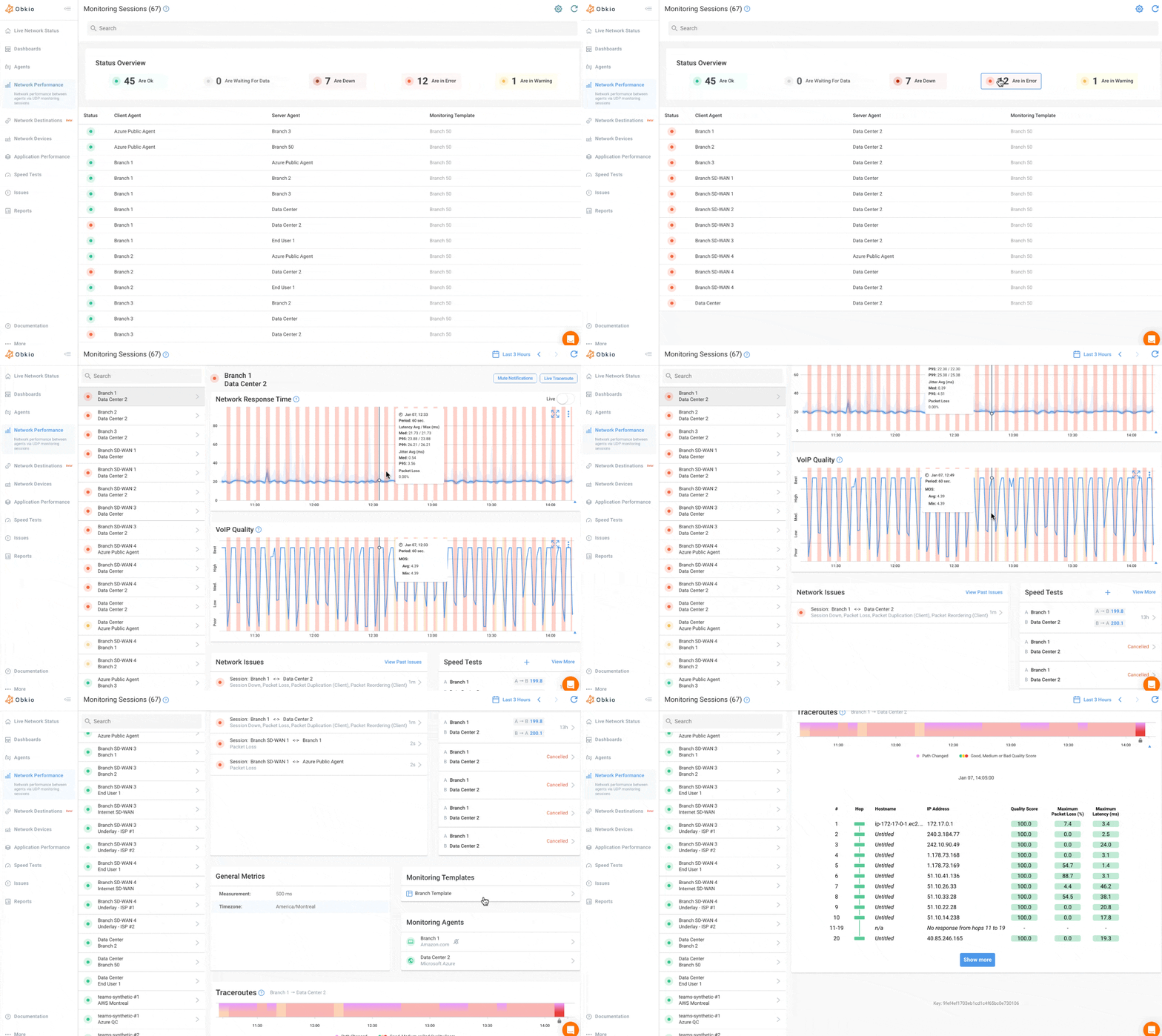
Everything Obkio collects, from real-time alerts to the traceroute results to the exportable reports, lives in one dashboard you can log into from a browser. No specialized hardware to maintain, no command-line tools to learn, and no need to be the most technical person in the IT department to get value out of it.
For a school board where the person handling network issues is often a generalist wearing several hats, that's the whole point: the tool does the technical correlation work in the background so your team can focus on reading the conclusion and deciding what to do next.

- 14-day free trial of all premium features
- Deploy in just 10 minutes
- Monitor performance in all key network locations
- Measure real-time network metrics
- Identify and troubleshoot live network problems


How to Use Visual Traceroutes to Identify ISP Issues
A traceroute maps every hop your traffic takes to reach a destination and shows latency at each one, so you can pinpoint the exact point where a network problem starts.
A traceroute traces the path data packets take from your network to a destination, hop by hop, showing latency at each stop along the way. When something's wrong, the traceroute tells you where.
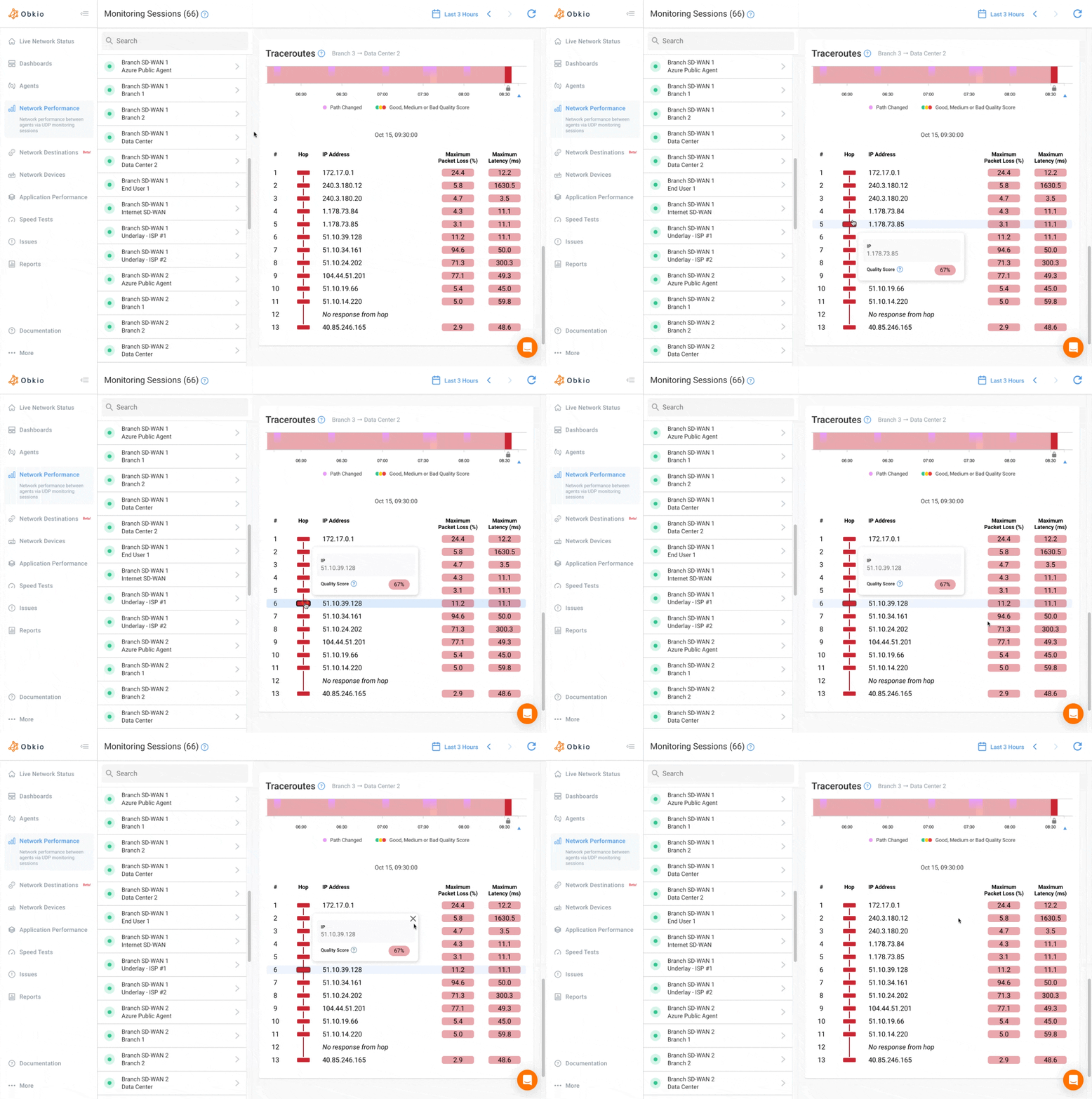
Here's what to look for: the hop where latency spikes or packet loss first appears. That single detail decides where the responsibility sits.
If the degradation starts at a hop inside your building or on your router, that's your issue to fix. If it starts at the hop right after your connection hands off to the ISP's network, that's their issue. This distinction matters because it removes the ISP's easiest excuse: "it must be something on your end." A traceroute with a clear hand-off point showing degradation on their side of the line closes that door.
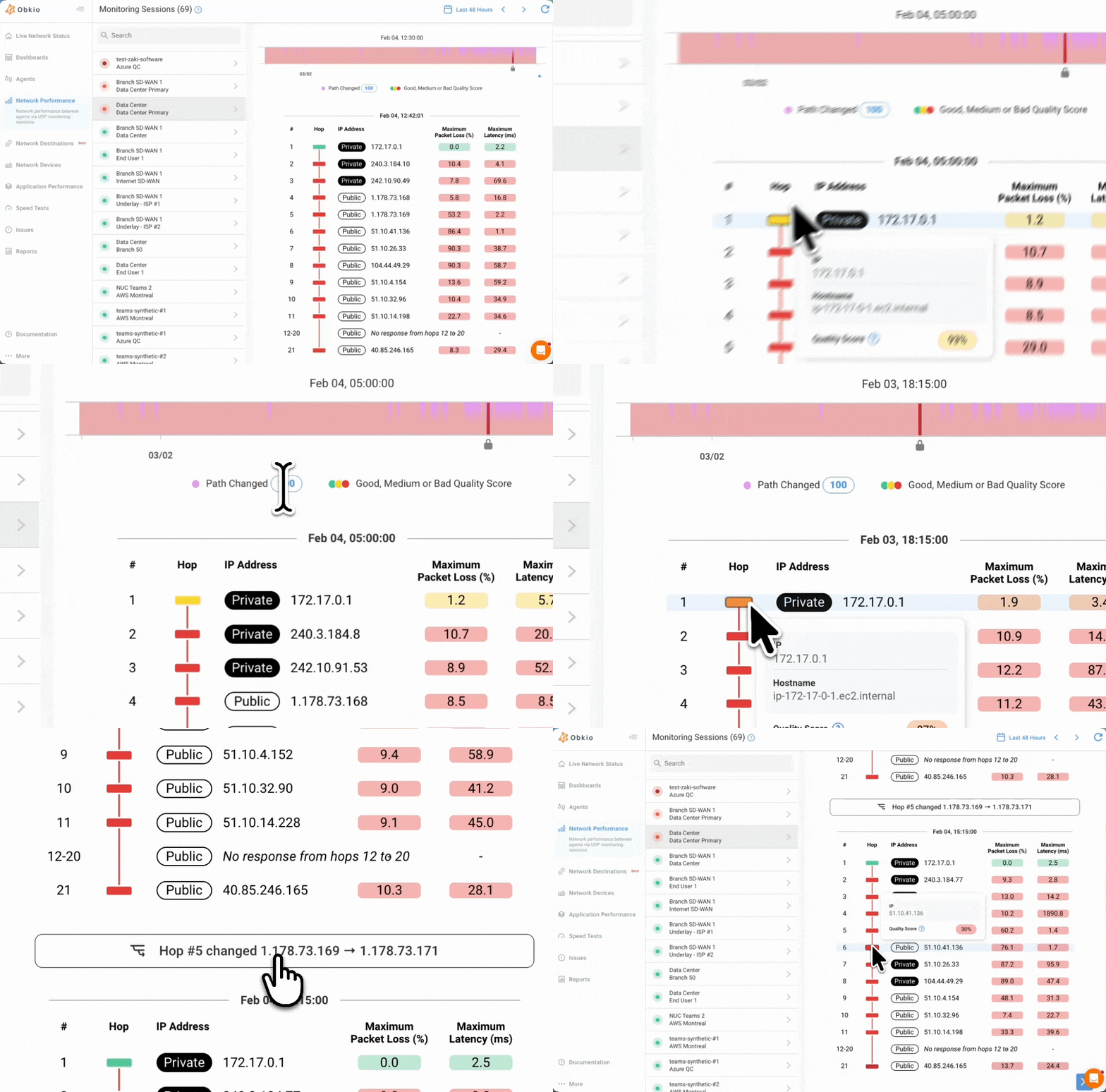
Obkio's Visual Traceroutes takes this further than a standard command-line traceroute. Instead of a wall of raw hop data that only a network engineer can interpret, it shows an interactive, color-coded network path map. Every hop is visualized with latency, packet loss, jitter, and MOS scores overlaid directly on the map. Green means healthy, yellow means some degradation, red means a real problem. Hovering over any hop shows the IP address and quality score, and if a hop doesn't respond, it's flagged clearly instead of just leaving a gap in the data.
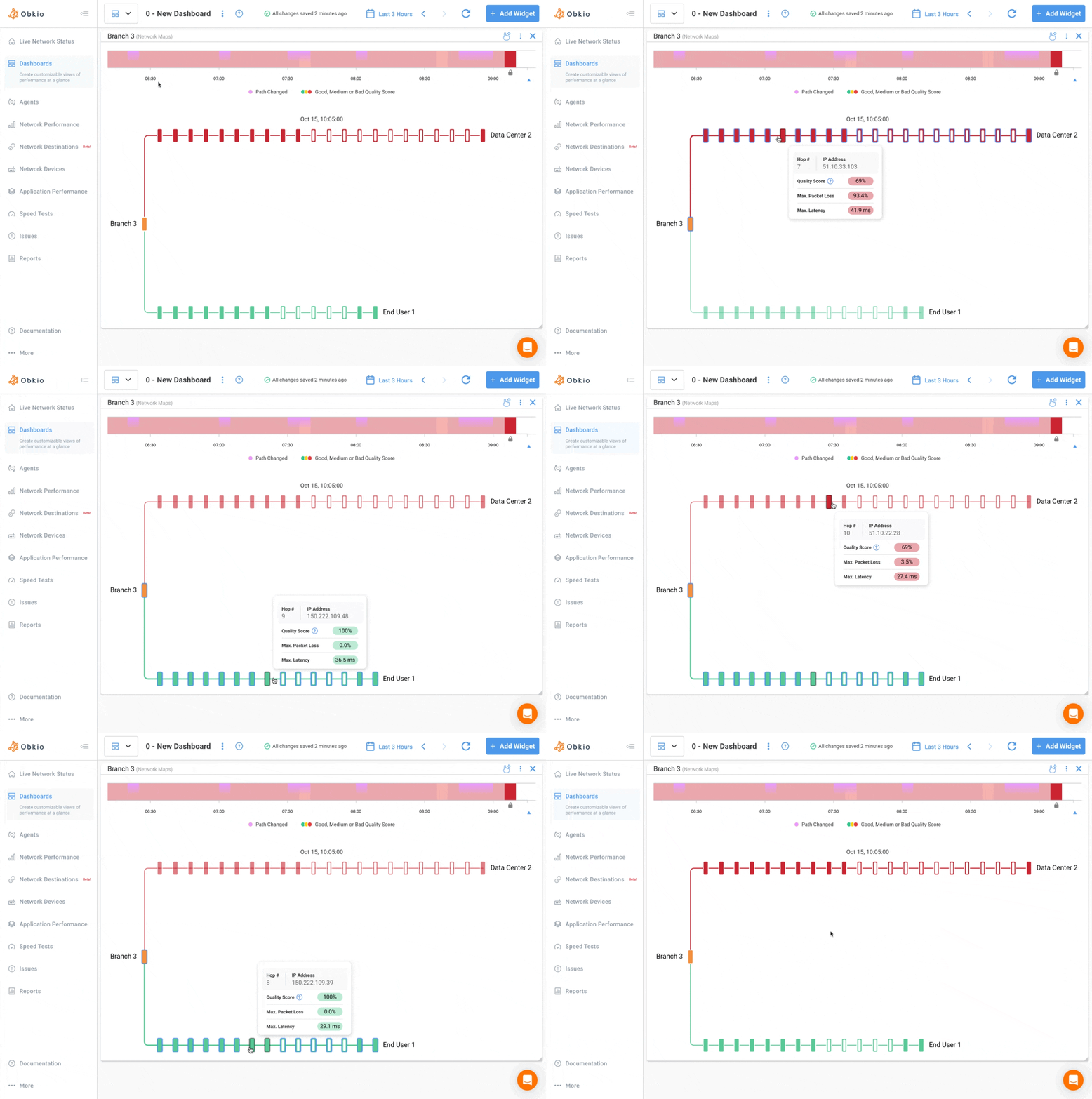
This matters a lot for school board IT teams, where the person running diagnostics often isn't a dedicated network engineer. Obkio's traceroutes also run continuously in the background with no manual triggering required, with up to six months of history at one-minute granularity. That means when an intermittent issue happens at 7am on a Tuesday and nobody notices until Thursday, the data is still there.
How to Identify ISP Issues Across Multiple School Sites
Automatic network diagnostics solve the scaling problem of multi-site monitoring by detecting and diagnosing issues at every site simultaneously, without waiting for a person to notice and investigate.
If you're managing 40 school sites, you can't manually run a traceroute at every one of them every time something feels slow. You'd need more staff, more time, and a process that doesn't exist at most school boards on the budgets they're given.
This is exactly the problem Obkio Insight (now in Beta) was built to solve. Insight is Obkio's automatic network diagnostics engine. It correlates data from Network Performance Monitoring, SNMP device monitoring, and Visual Traceroutes across every monitored site at once. The moment a performance issue is detected anywhere in the network, Insight goes to work in the background, correlating that data automatically and surfacing a probable root cause alongside the alert. No one has to notice the problem first and then go dig through dashboards to explain it.
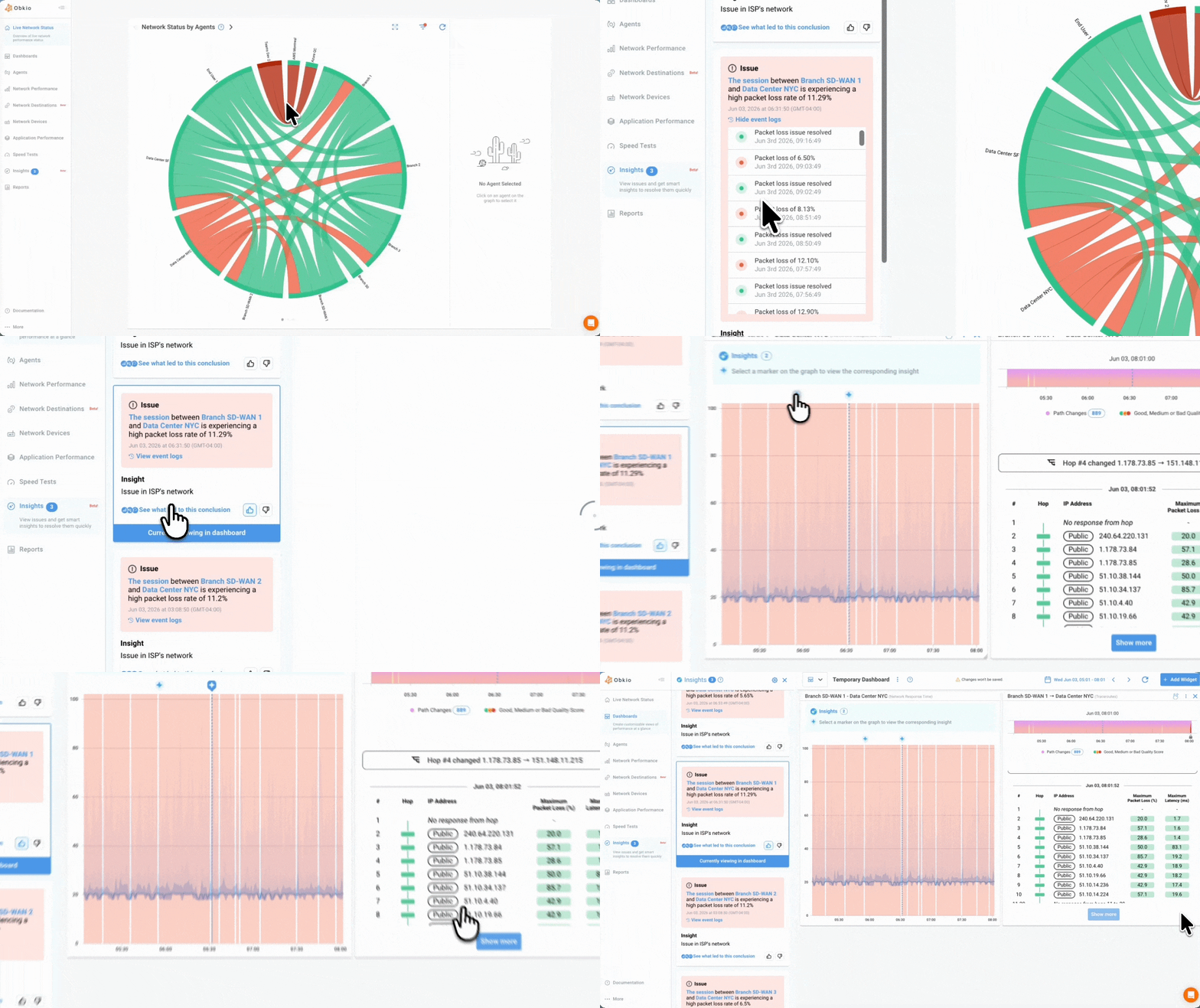
At launch, Insight can identify several specific root causes automatically: an issue on the ISP's local loop (the segment between your building and the ISP's point of presence), an issue deeper inside the ISP's own network, a problem confined to your LAN, high bandwidth usage saturating an Internet circuit, or high CPU usage on a firewall facing the Internet. That first distinction, local loop versus deeper in the ISP's network, is the same distinction a traceroute reveals manually, except Insight surfaces it without anyone running a test.
For a school board, this changes what's practical:
- It removes the dependency on someone being available in real time to investigate.
- It works across every monitored site at once, not just the one someone happened to be looking at.
- The output is in plain language, so a generalist IT staffer, not just a network specialist, can read it and act.
- It speeds up ISP escalation because the likely cause is already identified before the IT team even picks up the phone.
This is the shift from "we know something is wrong" to "we know what's wrong, where it's happening, and who's responsible for fixing it."
How to Actually Escalate an ISP Issue: A Step-by-Step Process
Confirm the issue with data first, run a traceroute to locate the fault, export a timestamped report, open a formal ticket, cite your SLA terms directly, and escalate to an account manager if first-line support stalls.
Step 1: Confirm the network issue is measured
Don't call the ISP until you have data in hand. Pull up your monitoring dashboard, confirm the exact time and duration of the degradation, and note the specific numbers: packet loss percentage, latency in milliseconds above baseline, jitter, and which site or circuit was affected. For example: 18% packet loss over 45 minutes starting at 9:12am on the primary WAN link at Site 14. Vague language costs you credibility on the call. "It was slow this morning" gets you nowhere. A specific figure with a timestamp gets taken seriously, because it signals you're tracking this properly and you're not guessing.
Step 2: Run a traceroute and locate the fault
Use Visual Traceroute to find which hop shows the degradation, and note the hop count, the IP address at that hop, and whether it sits before or after the handoff to the ISP's network. If Insight already flagged the event as an "issue on ISP's local loop" or an "issue in ISP's network," that classification is worth including directly, since it tells the ISP's technician exactly where to start looking instead of making them run their own diagnostics from scratch.
If the traceroute instead points to your own LAN or a device on your side, it's worth knowing that too, since escalating a problem that's actually yours wastes everyone's time and weakens your credibility for the next real incident.
Step 3: Export your network performance report
Pull a timestamped performance report covering the incident window, ideally with a bit of buffer before and after so the ISP can see the before-and-after contrast, not just the worst moment. This becomes your primary piece of documentation, the thing you actually attach to a ticket or hand to a procurement officer.
Obkio can generate these as Excel, PDF, or JSON files, and they can be shared by email even with people who don't have an account in the app, which matters when the recipient is a director general or a contract administrator who will never log into a monitoring platform.
Step 4: Open a formal ticket, not just a support call
A phone call leaves no paper trail, and a paper trail is the entire point of this process. Open a ticket through the ISP's formal escalation portal, attach your report, and describe the incident in the same terms you used internally: site, time window, metric, and severity. This creates a written obligation for the ISP to respond, and it gives you a ticket number and a timestamp you can reference later if the issue isn't resolved or if it recurs. If your board tracks incidents for governance or budget purposes, this ticket is also the record that justifies the conversation later.
Step 5: Reference your SLA explicitly
Know your SLA terms before you escalate, not after. Pull the actual contract language on uptime percentage, latency guarantees, and packet loss thresholds, and note precisely where the incident fell outside those terms. Saying "your SLA guarantees 99.9% uptime and this outage puts us below that for the month" lands very differently than saying "this seems bad." In public-sector contracts specifically, SLA breaches can trigger service credit provisions or formal dispute procedures, but only if you actually cite the clause instead of leaving it to the ISP to volunteer.
Step 6: Escalate to your account manager if it stalls
First-line support at most ISPs is trained to close tickets, not issue credits or authorize internal escalations. If your ticket sits unresolved past the SLA's stated response window, or if you get a response that doesn't address the data you provided, go directly to your account manager or regional business team. Reattach your report, reference the original ticket number, and note explicitly that first-line support did not resolve it within the SLA window.
This is usually the point where an ISP starts taking the issue seriously, since it's no longer a single ticket in a queue, it's an account-level conversation with a paper trail behind it.
Tip for school boards: Keep a log of every escalation ticket by site, date, and resolution. Over time, a pattern of recurring issues at the same site becomes leverage, whether that's for renegotiating your contract or, in public procurement contexts, grounds for competitive re-tendering.
How to Set Up ISP SLA Monitoring Across Your Entire School Board
Deploy one monitoring agent per school site, point it at external destinations to isolate WAN and ISP performance, let it run for two to four weeks to establish a baseline, then set alert thresholds from that data.
Setting this up doesn't require a network overhaul. Here's the practical rollout:
Step 1: Deploy one Obkio agent per school site, or per Internet connection
Most sites only need a single agent to get a reliable reference point. Obkio's monitoring agents come in a few forms, so the choice depends on what's already sitting in the server room. A software agent runs on Windows, Linux, or Docker if the site has a server or spare workstation. A virtual appliance works for sites running VMware or Hyper V. If a site has no virtualized environment at all, a plug-and-play hardware agent handles it: connect it to an RJ-45 port with DHCP enabled and it provisions itself from the cloud, no configuration needed. For a board with dozens of sites and very different levels of IT infrastructure, mixing agent types by site is normal and expected.
Step 2: Point agents at external monitoring destinations to measure WAN and ISP performance specifically
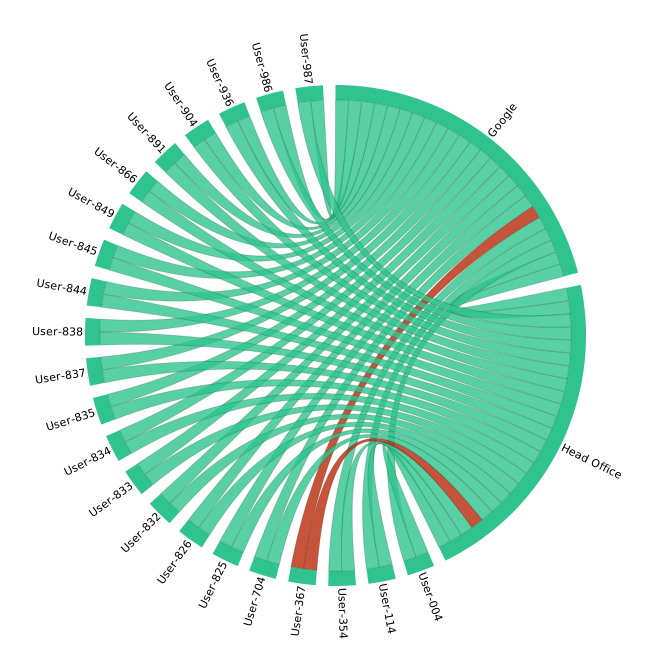
This step is what separates ISP accountability data from generic network monitoring. If your agent only measures traffic within the building, you'll see LAN problems but you'll have nothing to say about the ISP. Set up monitoring sessions between each site's agent and Obkio's public monitoring agents, which are hosted across major cloud providers, or between sites if your board has a hub location.
This isolates the WAN and ISP segment of the connection from everything happening inside your own four walls, which is exactly the distinction you need when a hop-by-hop traceroute later shows whether a problem is yours or theirs.
Step 3: Establish a real network performance baseline before you set any thresholds
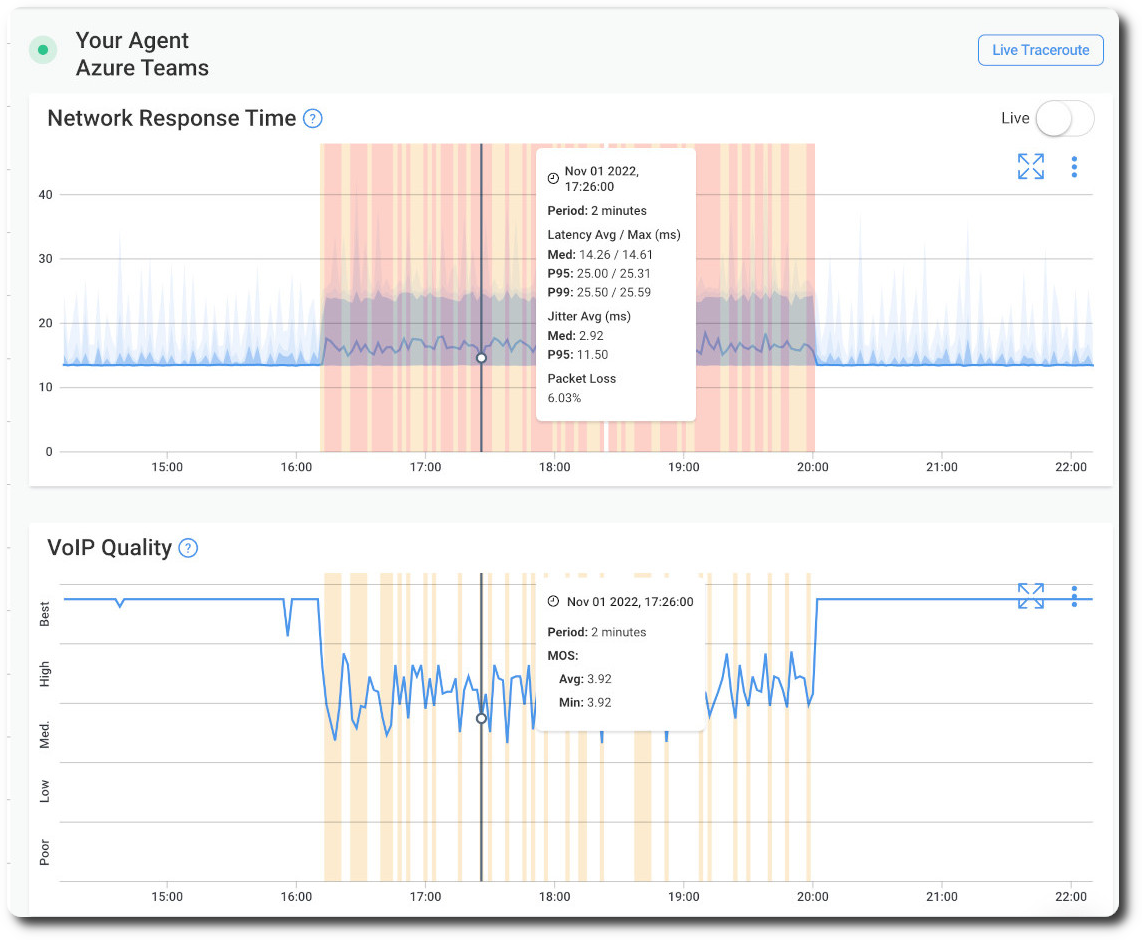
A threshold set on day one without a baseline is a guess, and guessed thresholds either fire constantly on normal variation or stay silent through a real problem. Every site is different: a rural site on a lower-tier connection might run a bit higher latency day to day than a site downtown, and that's not a defect, it's just the baseline. Give the data a few weeks to settle before deciding what "normal" looks like at each individual site, not board-wide.
Step 4: Set alert thresholds based on that baseline to reflect your actual site conditions
Once you know what normal looks like, set dynamic thresholds for packet loss, latency, and jitter that reflect an actual deviation at that site, not a generic number pulled from a vendor's marketing page. Route those alerts wherever your team already works: email, Slack, Teams, or a webhook into whatever ticketing system the board uses. The goal is that a real degradation reaches a human without anyone needing to be staring at a dashboard when it happens.
Step 5: Review your monitoring data and alerts regularly so nothing slips through between manual check-ins
Once agents and thresholds are in place, Insight runs in the background and correlates data automatically the moment an alert fires, so this step is less about manual digging and more about building a habit of checking in. A short weekly review across all sites is usually enough to catch slow-building patterns, like a site that's had three minor packet loss events in a month that individually looked minor but together tell a different story. It's also worth scheduling a recurring performance report (daily, weekly, or monthly depending on how often your board needs to report up) so there's a standing record even for the weeks nothing goes wrong.
For school boards specifically, you don't need to deploy everywhere on day one. Starting with your highest-risk or most-complained-about sites gives you meaningful coverage fast, and it gives you an early proof point to show the rest of the board before rolling out further. Once the process is working at a handful of sites, expanding board-wide is mostly a matter of repeating the same steps, not rebuilding them.
If you're evaluating this for a multi-site public institution, it's worth talking to Obkio's sales team directly about volume pricing across your sites. Start with a free trial to see how the monitoring and diagnostics work in practice, no credit card required.
Learn about SLA monitoring & reporting using Network Monitoring to measure network, service performance, user experience & understand if SLAs are being met.
Learn more
The Bottom Line: ISP Accountability for Schools & Multi-Site Public Institutions
When your ISP knows you have continuous, independent monitoring, your calls carry more weight. When your board has a 12-month performance record by site, contract renewals become a data conversation instead of a guessing game. When procurement teams have documented evidence of recurring underperformance, competitive re-tendering becomes a real option instead of a theoretical one.
For school boards operating on tight budgets with limited carrier choice, this data does more than resolve individual tickets. It helps justify technology spend, documents service levels for governance purposes, and builds the case for infrastructure investment when the time comes.
Obkio Insight is what makes this sustainable for a small IT team. It's not another dashboard you have to actively babysit. It diagnoses the problem for you, so your team can stay focused on everything else already on their plate.
- 14-day free trial of all premium features
- Deploy in just 10 minutes
- Monitor performance in all key network locations
- Measure real-time network metrics
- Identify and troubleshoot live network problems
Want Us to Show You?
Let us show you in a quick meeting! We'll discuss your use case and show you around Obkio's app.
Frequently Asked Questions: How to hold your ISP accountable
How do you hold an ISP accountable?
You hold an ISP accountable by measuring your connection independently of their diagnostics. Continuous monitoring that tracks packet loss, latency, and jitter, combined with timestamped traceroutes, gives you the evidence needed to dispute service levels and request credits instead of relying on the ISP's word.
How can a school board prove an Internet outage?
A school board can prove an outage with a timestamped performance report showing the exact start time, duration, and severity of the degradation, paired with a traceroute showing where in the network path the fault occurred. Continuous monitoring tools generate this evidence automatically.
What evidence do you need to dispute an ISP SLA?
You need a documented performance baseline, the specific metrics during the incident (packet loss percentage, latency spike, duration), and traceroute data showing whether the fault sits inside the ISP's network or on your own. An exportable report that ties all of this together is what most escalation processes require.
What is a traceroute and how does it help with ISP escalation?
A traceroute maps the path your data takes to reach a destination and measures latency at each hop along the way. It helps with ISP escalation because it isolates exactly where a problem starts, letting you show whether the fault is inside your network or inside the ISP's.
How do I know if my ISP is causing network problems?
Run a traceroute during the period of degraded performance and look at where latency or packet loss first appears. If it starts at the hop right after your connection hands off to the ISP's network, the problem is on their side.
What is automatic network diagnostics?
Automatic network diagnostics is the process of identifying the root cause of a network issue without manual investigation. Instead of a person correlating data across multiple tools by hand, a system like Obkio Insight does it instantly by analyzing performance, device, and path data together the moment an issue is detected.
How do I monitor Internet performance at multiple school sites?
Deploy one monitoring agent per site, point it at external destinations to isolate WAN and ISP performance from LAN issues, and let it run for a few weeks to build a baseline before setting alert thresholds. This gives you visibility across every site without needing staff physically present at each one.


