











 Obkio Blog


 Subscribe
Table of Contents
Table of Contents
Obkio's ServiceNow integration is now live.
When Obkio detects a network issue, it opens an incident in ServiceNow. When the issue recovers, it resolves that same incident. Your team works the problem in the platform they already use for incident management, with the monitoring context already attached.
The Challenge We're Solving: Stop Manually Creating Tickets for Network Issues 
If you use ServiceNow to manage IT operations and Obkio to monitor network performance, you know the pain of working across disconnected platforms.
When Obkio catches a network issue, like latency spikes at a remote office, packet loss hurting VoIP quality, or a degraded path to a cloud service, someone has to create a ServiceNow incident by hand, copy over the performance data, and remember to close it once things recover.
That's extra work that slows down response time and leaves gaps in your incident history.
How Obkio's ServiceNow Integration Works
The integration follows each network issue from start to finish, so every network issue that Obkio detects always maps to one ServiceNow incident.
- Obkio detects an issue: An incident opens in ServiceNow automatically, with the issue title, details and severity.
- The issue gets worse or better: Obkio updates the same incident instead of creating a duplicate. Each issue carries a unique correlation ID that keeps everything on one ticket.
- The issue recovers: Obkio resolves the incident and keeps the highest severity reached during the issue, so your records reflect the real impact.
- The issue comes back later: A new incident opens, so recurring problems stay visible as separate events.
Behind the scenes, Obkio sends each event to an Import Set table in your ServiceNow instance through the Import Set API, and a Transform Map turns it into an incident. The integration is one-way: acknowledging or closing an incident in ServiceNow doesn't change anything in Obkio.
What Your Team Sees in ServiceNow
Issues from every part of Obkio can open incidents: Monitoring Sessions, Network Devices, Device Interfaces, APM Tests (including Microsoft Teams tests) and Obkio Vision.
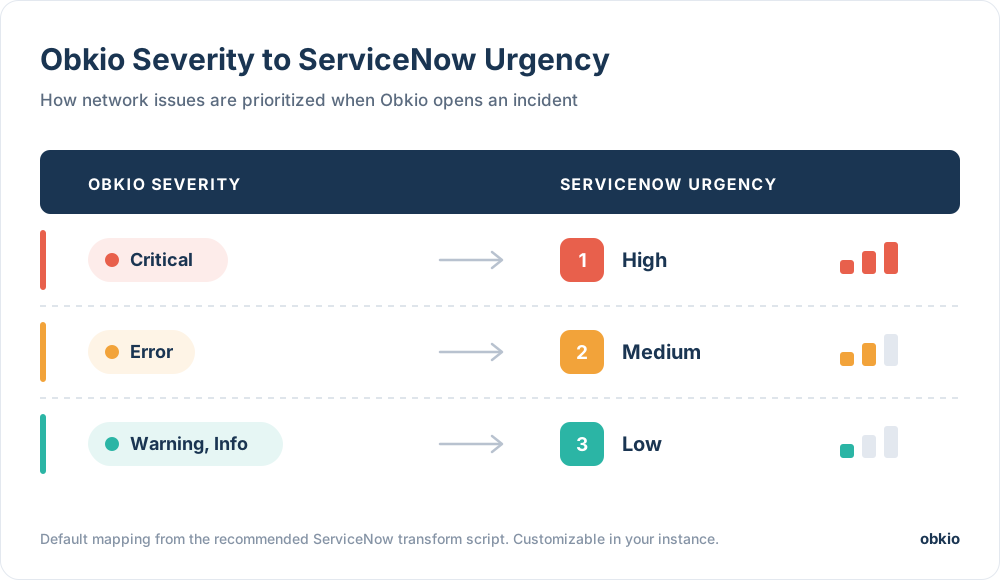
The recommended setup maps Obkio severity to ServiceNow urgency:
Each incident also gets work notes with the context your team needs to start troubleshooting: the affected agents, device, interface or APM test, the event type, when it was observed, and the latency, jitter or packet loss values for performance issues.
The integration follows the same rules as your other Obkio notifications. Only issues that reach your organization's Minimum Notification Severity are sent, and notification delays and muted notifications apply too. That keeps your ServiceNow queue focused on what actually needs attention.
Requirements and Setup for Obkio's ServiceNow Integration
The ServiceNow integration is available on Obkio's Premium plan. You'll need:
- ServiceNow Washington D.C. release or later, since Obkio authenticates with an API key that earlier releases don't support
- A ServiceNow administrator who can create tables, transform maps and API access policies
- The Administrator role in your Obkio organization
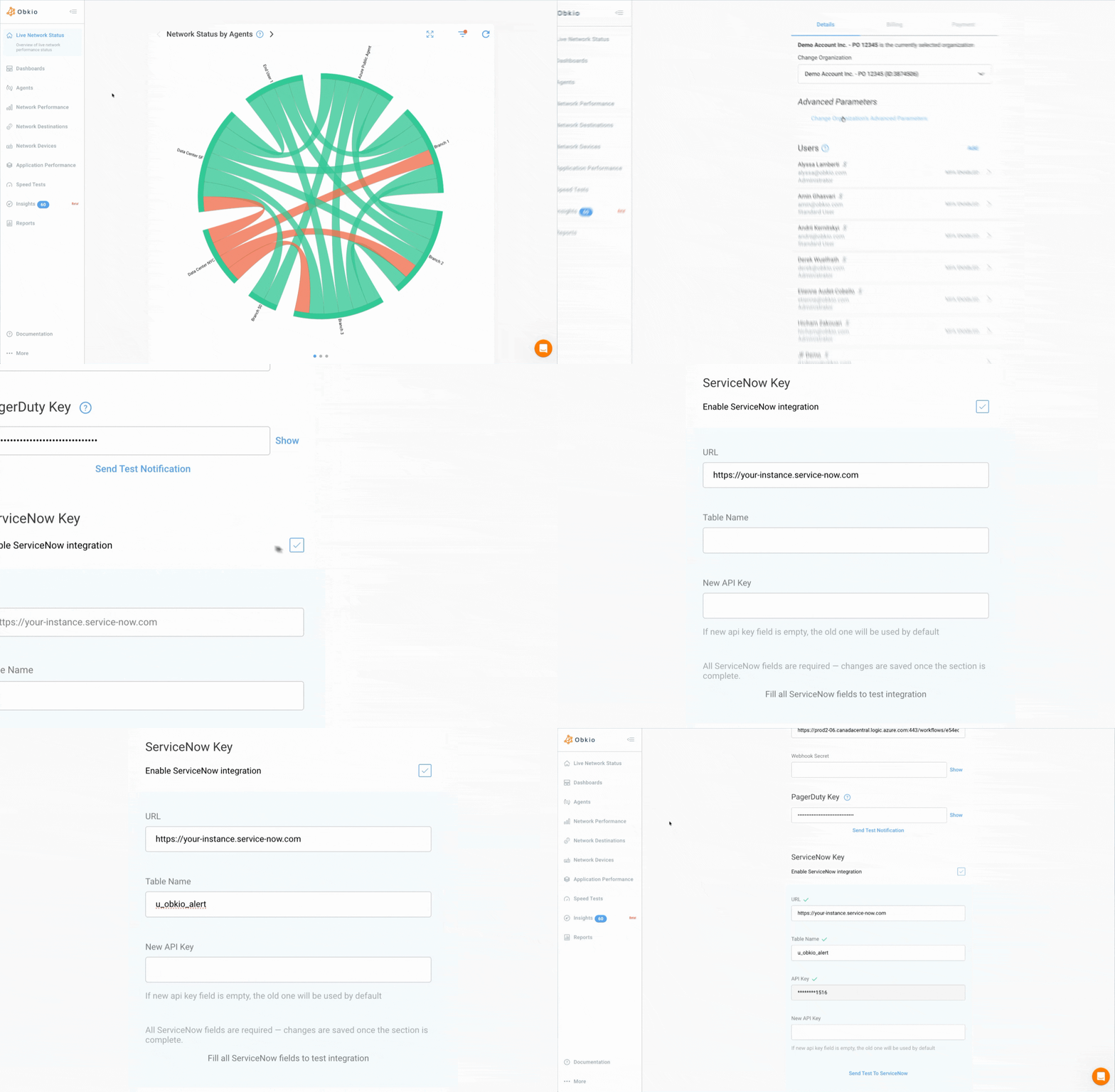
Setup happens in two parts. In ServiceNow, you create an Import Set table for Obkio alerts, a Transform Map that turns them into incidents, and an API key. In Obkio, you enable the integration in your organization settings, enter your instance URL, table name and API key, then send a test to confirm everything connects.
The ServiceNow integration guide walks through every step, including ready-to-paste scripts and troubleshooting tips.
Try Obkio Network Monitoring + ServiceNow Today
Already on Premium? Head to your organization's Advanced Parameters in the Obkio app and follow the setup guide to connect your instance.
New to Obkio? Deploy your Monitoring Agents in minutes and see what's happening across your network. When you're ready, connect ServiceNow and let network issues open and close their own tickets.
What would your team do with the time it spends on manual network tickets today?

- 14-day free trial of all premium features
- Deploy in just 10 minutes
- Monitor performance in all key network locations
- Measure real-time network metrics
- Identify and troubleshoot live network problems


Frequently Asked Questions
What does Obkio's ServiceNow integration do?
It opens a ServiceNow incident automatically when Obkio detects a network issue, updates that incident as the issue changes, and resolves it when the issue recovers. Your team no longer has to create tickets or copy monitoring data by hand.
Which Obkio plan includes the ServiceNow integration?
The integration is available on the Obkio Premium plan. You also need the Administrator role in your Obkio organization to set it up.
Which ServiceNow versions are supported?
ServiceNow Washington D.C. release or later. Obkio authenticates with an API key sent in an HTTP header, which earlier releases don't support. You can check your release under System Diagnostics, Stats, in the Build name field.
Will Obkio create duplicate incidents for the same issue?
No. Each Obkio issue has a unique correlation ID, so when an issue gets worse or better, Obkio updates the same incident. A new incident only opens if the issue comes back after it was closed in Obkio.
Which Obkio issues are sent to ServiceNow?
Issues from Monitoring Sessions, Network Devices, Device Interfaces, APM Tests (including Microsoft Teams tests) and Obkio Vision. Only issues that reach your organization's Minimum Notification Severity are sent, and notification delays and muted notifications apply too.
Is the ServiceNow integration two-way?
No, it's one-way. Acknowledging or closing an incident in ServiceNow doesn't change anything in Obkio.
Can I change how incidents are prioritized in ServiceNow?
Yes. The recommended setup maps Critical to High urgency, Error to Medium, and Warning or Info to Low. Since the mapping lives in a transform script in your ServiceNow instance, your admin can adjust it to fit your processes.
How do I know the ServiceNow integration is working?
After entering your instance URL, table name and API key in Obkio, click Send Test To ServiceNow. A record titled "Test record from Obkio" appears in you


