











 Obkio Blog


 Subscribe
Table of Contents
Table of Contents
Every minute a network incident goes unresolved costs your company money. Lost productivity, missed SLAs, degraded user experience, and, in other cases, direct revenue loss. For IT teams and network admins, the pressure to resolve incidents fast isn't just operational, it's existential.
Mean Time to Resolve (MTTR) is the metric that tells you exactly how fast your team gets from "something's broken" to "everything's back to normal." It's one of the most closely watched KPIs in IT operations, and one of the most misunderstood. Teams often confuse it with related metrics like Mean Time to Repair, MTTD, or MTBF, and that confusion leads to reporting that looks good on paper but doesn't reflect real incident performance.
This article cuts through the noise. You'll get a clear definition of MTTR, how to measure it the real reasons MTTR stays high, and tips for how to improve, including how continuous network monitoring plays a central role in faster resolution.
What Is Mean Time to Resolve (MTTR)? 
Mean Time to Resolve (MTTR) is the average time it takes an IT team to fully resolve an incident, from the moment it's first detected to the moment the system is confirmed restored and operational.
It's a core incident management metric used to measure the efficiency and responsiveness of IT operations, network teams, and support organizations. The key word is fully. Unlike Mean Time to Repair, MTTR (resolve) includes the entire incident lifecycle: detection, diagnosis, remediation, and verification. The clock doesn't stop when you apply a fix; it stops when the system is confirmed back to normal.
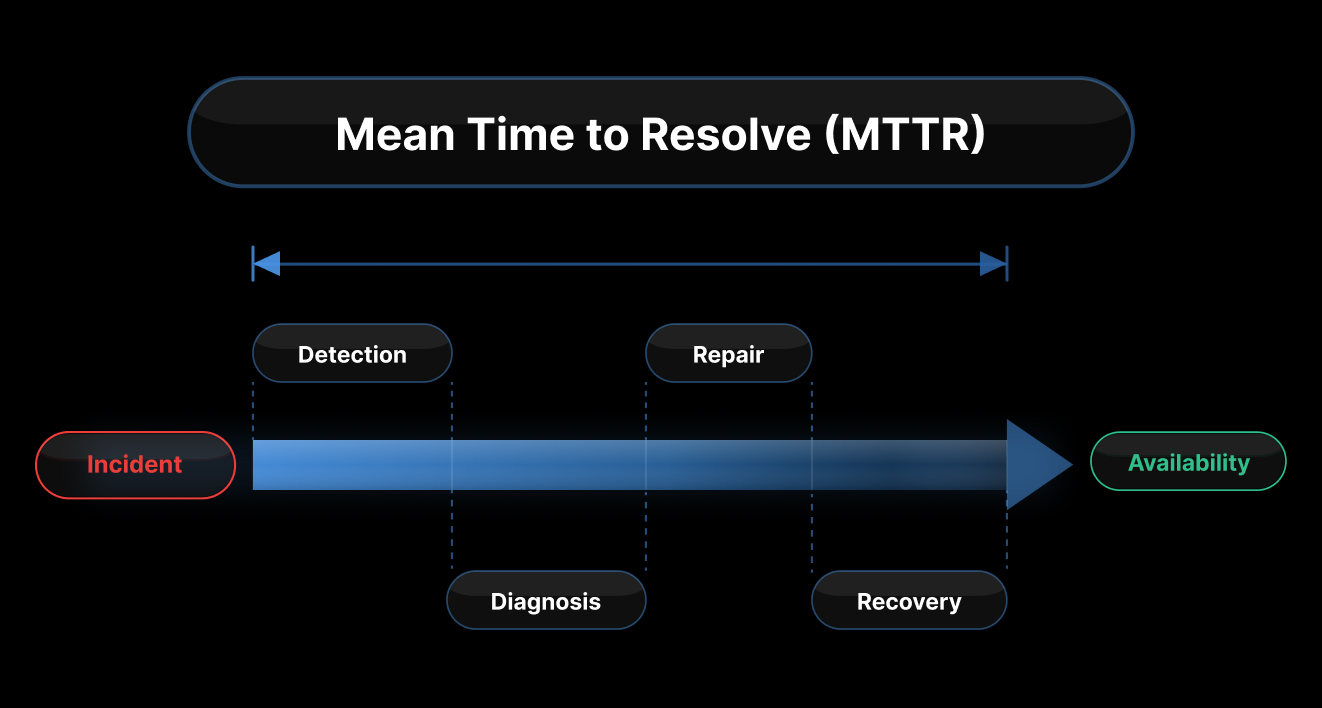
Quick definition: Mean Time to Resolve (MTTR) = the average elapsed time between when an incident is detected and when it is fully resolved. Measured in minutes or hours. Lower is better.
For IT teams and network admins specifically, MTTR carries a weight that goes beyond a number on a dashboard. It's one of the few metrics that makes your team's work directly visible to management, and not always in a favourable way.
A high MTTR gets noticed fast: by your CTO, your operations leadership, and anyone tied to an SLA. It doesn't matter how complex the incident was, how understaffed the team is, or how long the problem had been silently building before detection. The number on the report is the number.
That pressure is real, and it's worth naming. MTTR becomes a proxy for team competence in the eyes of stakeholders who don't see the diagnostic work, the dead-end triage paths, or the hours spent waiting on ISP callbacks. What they see is how long the outage lasted.
That's what makes improving MTTR, not just measuring it, so important for IT and network teams. It's not just an operational goal. It's directly tied to how your team is perceived and evaluated.
MTTR Formula: How to Calculate Mean Time to Resolve
The MTTR calculation formula is straightforward:
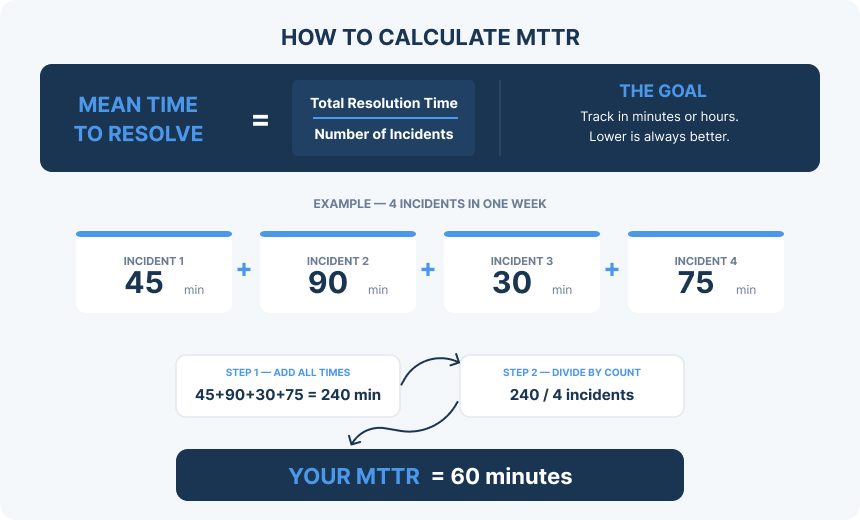
MTTR = Total Time to Resolve All Incidents / Number of Incidents
Example:
Your team handles 4 network incidents in a week:
- Incident 1: 45 minutes
- Incident 2: 90 minutes
- Incident 3: 30 minutes
- Incident 4: 75 minutes
Total: 240 minutes / 4 incidents = MTTR of 60 minutes
Simple math. The complexity is in what you include and what you don't.
What's Included in the MTTR Calculation
The incident clock starts at detection (when the alert fires or the issue is first identified), not when a ticket gets created or an engineer picks it up. It includes:
- Triage — initial assessment of severity and scope
- Diagnosis — identifying the root cause and affected components
- Remediation — implementing the fix
- Verification — confirming the system has returned to normal operation
The clock stops at confirmed resolution, not when the patch is applied, not when the ticket is marked resolved by the technician, but when the metrics show the system is operating normally.
What's NOT Included in the MTTR Calculation
Two common mistakes inflate perceived performance:
- Stopping the clock at "fix applied." If you close incidents the moment you push a change without verifying that the metrics are normalized, you're measuring your patch speed, not your resolution speed. Incidents that reopen because the fix didn't hold will also artificially inflate your count and skew averages.
- Excluding after-hours incidents. Some teams only track incidents that occur during business hours, which makes MTTR look better than it actually is. If your SLA covers 24/7, your MTTR measurement should too.

Learn about SLA monitoring & reporting using Network Monitoring to measure network, service performance, user experience & understand if SLAs are being met.
Learn more

Mean Time to Resolve vs. Other MTTR Metrics
MTTR is a genuinely confusing acronym because it stands for two different things depending on context. Add MTTD and MTBF to the mix, and you have four metrics that teams constantly conflate.
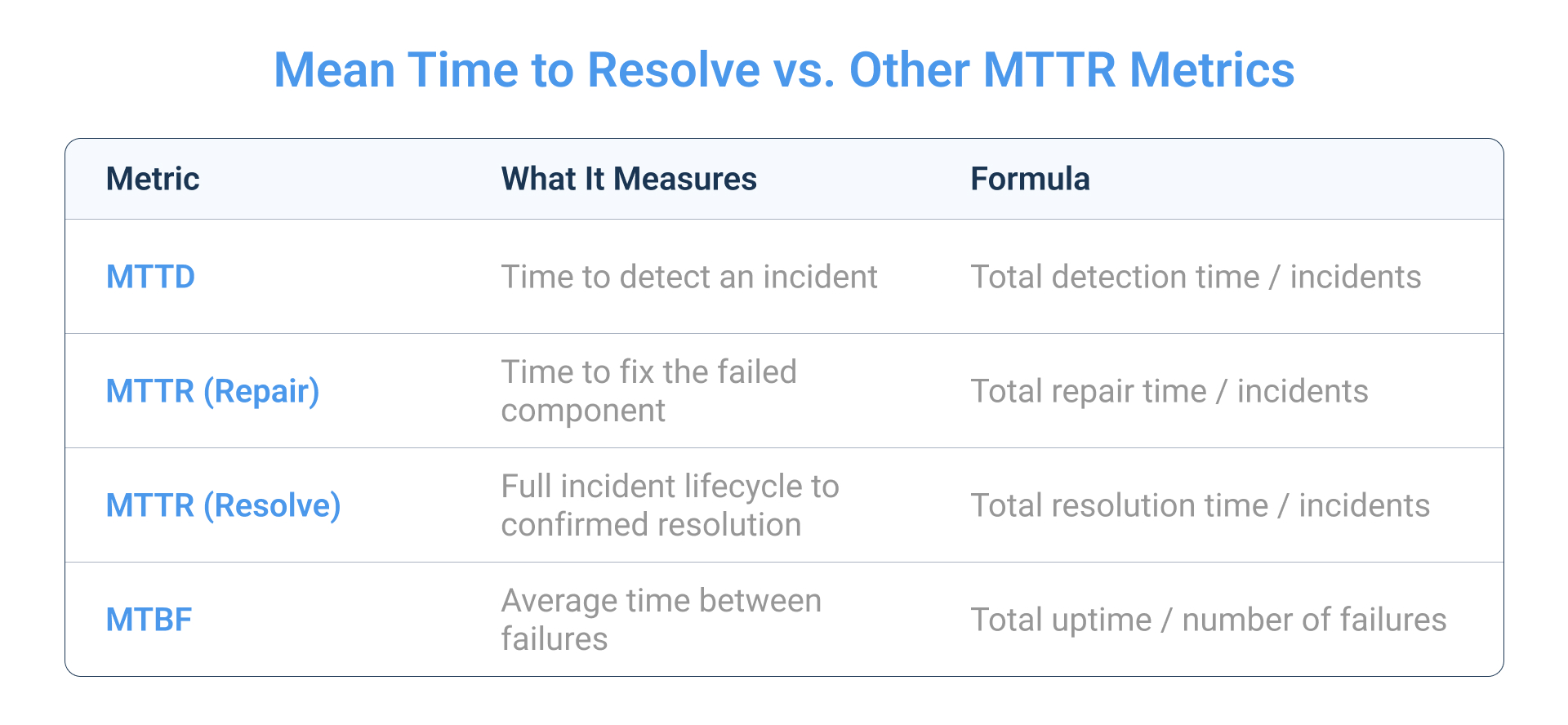
Mean Time to Resolve vs. Mean Time to Repair
Both use the acronym MTTR. Here's the difference:
- Mean Time to Repair = the time to fix the failed component (hardware replacement, config change, patch deployment)
- Mean Time to Resolve = the full incident lifecycle, including root cause confirmation, service restoration, and verification
Mean Time to Resolve is always ≥ Mean Time to Repair.
You can repair the component in 15 minutes and still spend another 45 minutes verifying that everything upstream and downstream is functioning correctly. If you're tracking repair time and calling it resolution time, you're understating your actual MTTR.
Mean Time to Resolve vs. Mean Time to Detect (MTTD)
MTTD measures how long it takes to discover an incident. MTTR starts where MTTD ends.
This matters because you can't resolve what you haven't detected. If a network issue runs undetected for 40 minutes before an alert fires, those 40 minutes are added to your total incident duration, even though your resolution process hasn't started yet. Reducing MTTD is one of the fastest ways to reduce MTTR.
Mean Time to Resolve vs. Mean Time Between Failures (MTBF)
MTBF measures reliability (how frequently failures occur), and MTTR measures recovery speed (how quickly you resolve them). Together, they define system availability:
Availability = MTBF / (MTBF + MTTR)
A system that fails rarely but takes hours to recover isn't necessarily more available than one that fails more often but recovers in minutes. Both metrics matter, and they tell different stories.
What Is a Good MTTR? Benchmarks by Incident Type
MTTR benchmarks vary significantly by industry, team size, and incident severity. Here's a practical reference:
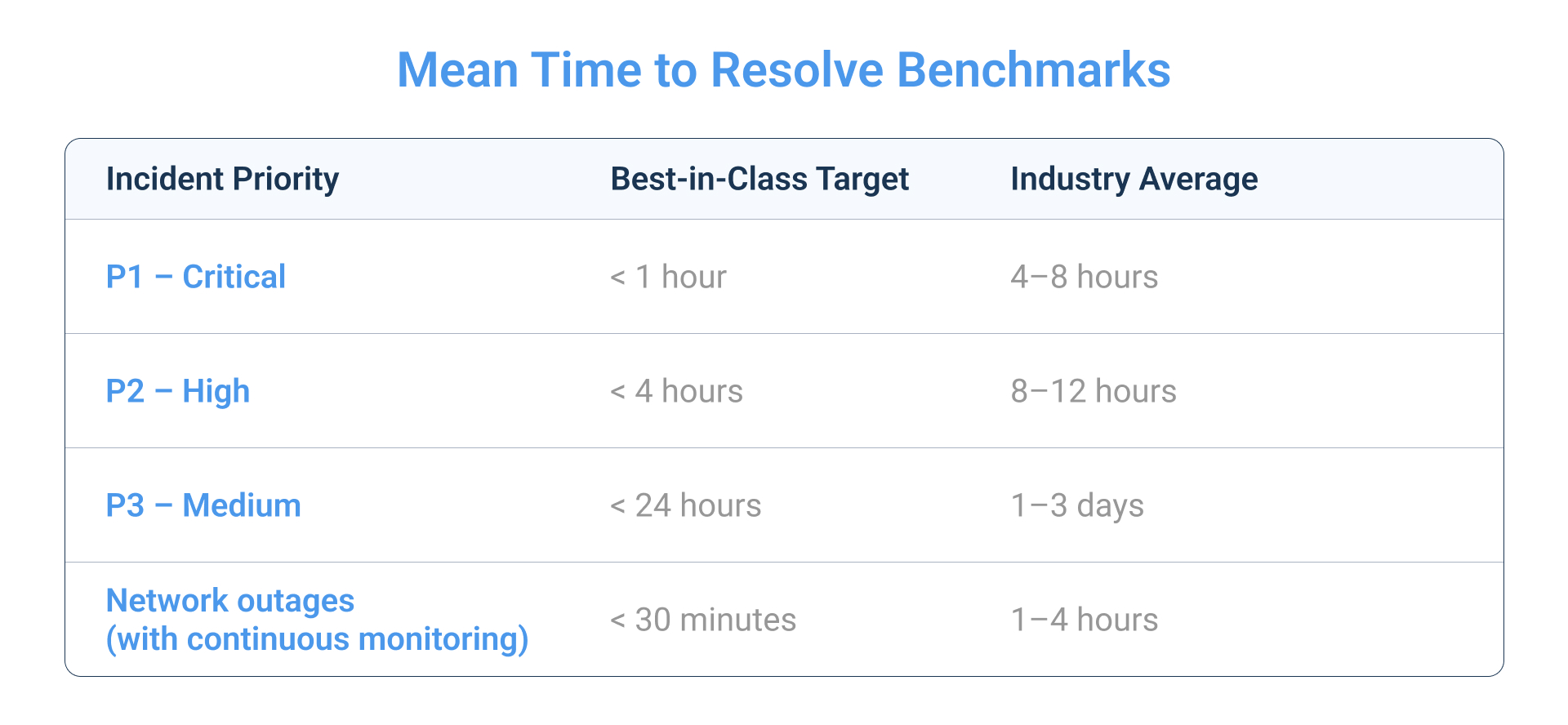
SLA context: Most enterprise SLAs require P1 resolution within 4 hours. MSP contracts typically target 2–4 hours. If your actual MTTR is sitting at 6–8 hours for P1 incidents, you're not just performing poorly, you're likely breaching commitments.
The teams consistently hitting sub-1-hour MTTR on critical incidents share one trait: they invest in detection and visibility before incidents occur, not after.
Why Is MTTR So High? Common Causes of Slow Network Issue Resolution
Before you can fix your MTTR, you need to understand where the time is actually going. In most organizations, it's not the remediation phase that's slow; it's everything that happens before the fix gets applied.
Cause of Slow MTTR #1: Slow Network Issue Detection
Incidents that go undetected for minutes or hours inflate MTTR before the resolution clock even starts. If your primary detection mechanism is a user calling the helpdesk, you're already behind. Every minute between when a network issue starts and when your team gets an alert is dead time and you can't recover it.
Teams relying on reactive monitoring (check dashboards manually, wait for complaints) consistently report MTTR 3–5x higher than teams with automated threshold-based alerting.
Cause of Slow MTTR #2: Poor Visibility Into the Network
Without real-time network data, engineers spend the majority of resolution time in the diagnosis phase: guessing whether the problem is on the LAN, WAN, ISP circuit, or application layer. No network visibility means no context, and no context means long triage sessions that often lead to the wrong conclusion first.
Industry data consistently shows that diagnosis accounts for 60–80% of total incident time for teams without adequate network monitoring. That's the single biggest lever for reducing MTTR.
Cause of Slow MTTR #3: Siloed Teams and Tools
When network, security, and application teams operate separately with different toolsets, handoffs between teams add significant dead time. An incident that requires cross-team coordination (a network issue that looks like an application problem) will consistently produce higher MTTR than one that can be owned end-to-end by a single team with complete visibility.
Cause of Slow MTTR #4: Manual, Reactive Processes
Teams relying on manual checks, ticket-based workflows, and reactive troubleshooting spend more time per incident. Without automated alerting and pre-built runbooks, each incident starts from scratch, requiring engineers to diagnose without context and build response steps on the fly.
Cause of Slow MTTR #5: Lack of Historical Network Baseline Data
Without historical performance data, engineers can't quickly distinguish an anomaly from normal behaviour. Is 80ms latency to this destination unusual? You'd know immediately if you had 3 months of network baseline data. Without it, you're making judgment calls that slow down every diagnosis.

Learn why historical network data is the key to establishing a baseline, finding patterns, proving issues, and fixing network problems faster.
Learn more
How to Improve MTTR: A Framework for Faster Mean Time to Resolution
Improving MTTR isn't about making your engineers work faster. It's about removing the friction between incident start and incident resolution. Here's a practical framework.
Step 1: Detect Network Problems Before Users Do
The fastest path to lower MTTR is closing the gap between when an incident starts and when your team finds out about it. Every minute an issue runs undetected is a minute of MTTR that no amount of remediation speed can recover.
Implement continuous, automated monitoring across your network infrastructure: LAN, WAN, internet circuits, and cloud paths. Set threshold-based alerts on latency, packet loss, jitter, and bandwidth so your team is notified the moment performance degrades, not after users start calling.
Obkio takes this approach with synthetic monitoring agents deployed at key network locations like head offices, branch sites, data centers, and cloud environments. The agents exchange synthetic UDP traffic every 500ms, continuously measuring latency, jitter, packet loss, and throughput.

- 14-day free trial of all premium features
- Deploy in just 10 minutes
- Monitor performance in all key network locations
- Measure real-time network metrics
- Identify and troubleshoot live network problems


When a metric crosses a threshold (say, packet loss exceeding 1% or latency spiking above 150ms) Obkio triggers an alert immediately, reducing detection time to seconds rather than minutes. That's MTTD compression, and it directly compresses MTTR.
Step 2: Reduce Diagnosis Time with End-to-End Network Visibility
Diagnosis is where most MTTR is lost. For teams without adequate network visibility, 60–80% of total incident time is spent just figuring out where the problem is.
Network monitoring shortens this phase by giving you:
- Real-time path data showing exactly where packet loss or latency degradation is occurring
- Historical graphs to identify when the problem started, how it progressed, and what changed
- Segment-level visibility to distinguish LAN from WAN from ISP from cloud issues within the first few minutes
Obkio's monitoring sessions create a mesh of monitored network paths between all deployed agents. When an incident fires, you can see at a glance which path is affected, where in that path the degradation is occurring, and when it started, cutting diagnosis from hours to minutes.
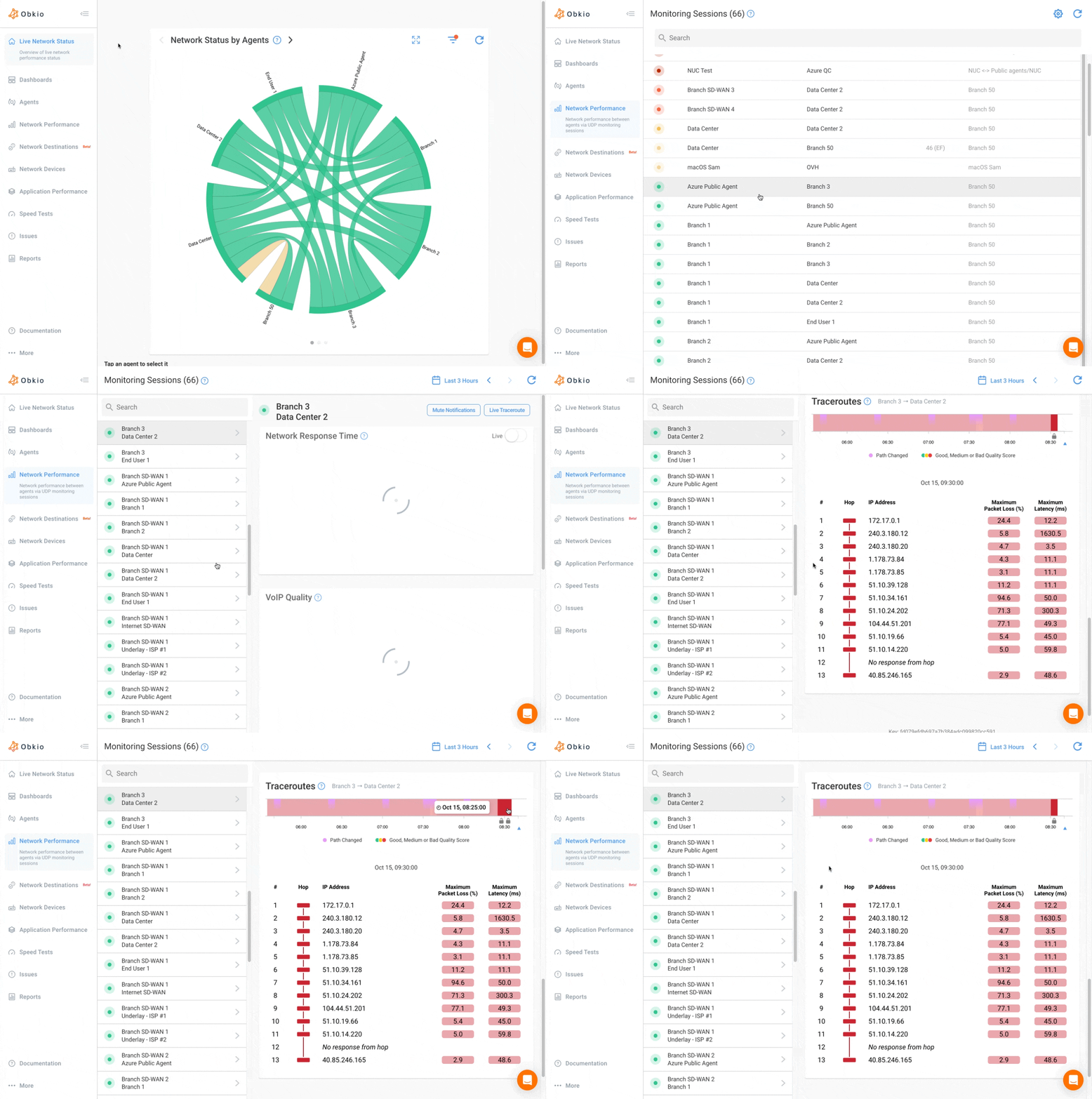
Visual Traceroutes give you hop-by-hop path data to confirm whether an issue is internal, carrier-level, or cloud-side, which means no more guessing and no more escalating to the wrong team.
Step 3: Establish Network Baselines So Any Deviations Are Obvious
Fast diagnosis depends on knowing what normal looks like. Without baseline data, engineers have to manually assess whether a reading is problematic, like a slow, error-prone judgment call that adds time to every incident.
Continuous monitoring builds baselines automatically over time. When an incident occurs, you can immediately compare current metrics to historical norms and quantify the deviation. "Latency is 3x the 30-day average on this WAN circuit" is a much faster diagnostic starting point than "this number looks kind of high."
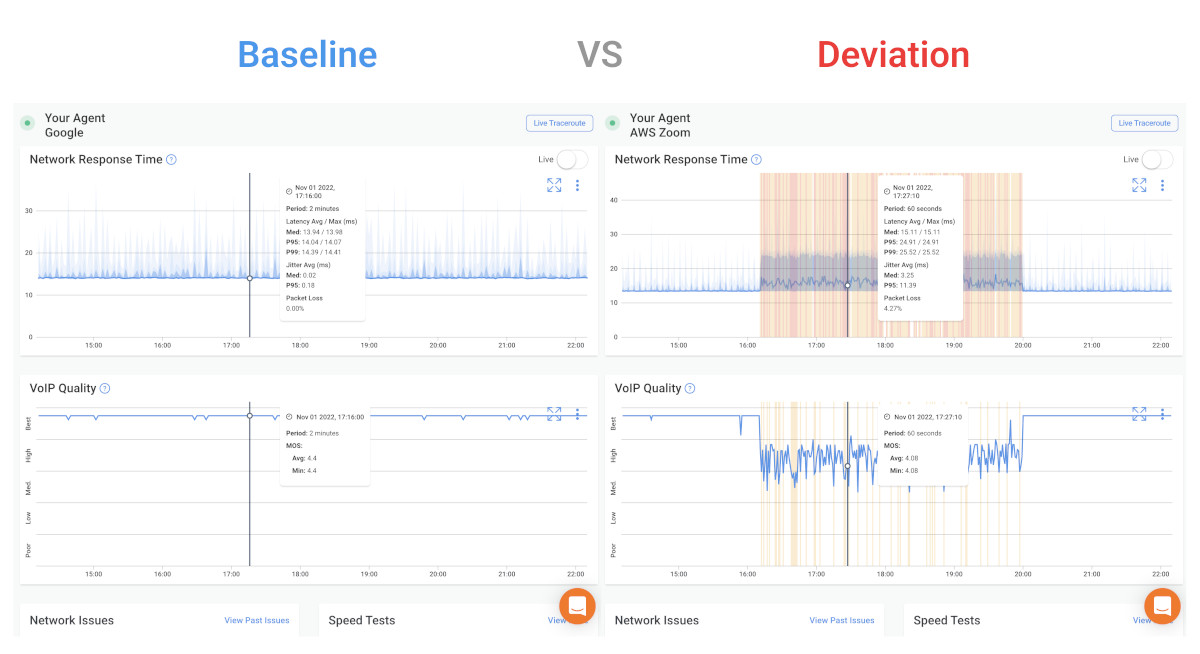
Obkio's dashboards display historical performance data alongside real-time readings, so the baseline comparison is immediate and visual, no manual data pulls required.
Step 4: Verify Mean Time to Resolution Before Closing Incidents
Many teams stop the clock the moment they apply a fix, then discover the incident recurs, and reopen the ticket, inflating MTTR on the next occurrence. Build a verification step into every incident: confirm that metrics have returned to baseline before marking the incident resolved.
With network monitoring in place, this is straightforward. The same network metrics that triggered the alert (packet loss, latency, jitter) should return to normal ranges before closure. If the monitoring dashboard still shows elevated readings, the incident isn't resolved. This simple discipline dramatically reduces re-open rates and prevents artificially compressed MTTR numbers.
Step 5: Track MTTR as a Trend, Not a One-Time Number
A single MTTR data point tells you very little. A downward trend over six months tells you your improvements are working. Track MTTR by incident type, severity, and team to identify where the bottlenecks are.
Use post-incident reviews (PIRs) on high-MTTR events to identify the specific phase where time was lost: detection, diagnosis, remediation, or verification. Over time, this produces a clear picture of which improvements have the highest impact and where to focus next.
How Network Performance Monitoring Reduces MTTR
It's worth making the connection explicit, because network monitoring is sometimes treated as a general best practice rather than a specific MTTR lever.
Here's how continuous network monitoring directly reduces each phase of incident time:
1. Detection (MTTD → MTTR): Automated threshold-based alerting cuts the gap between incident start and team notification. Instead of waiting for user complaints, you get alerted the second performance degrades. Obkio agents exchange traffic every 500ms (that's continuous testing, not periodic polling), so detection happens in near real-time.
2. Diagnosis: This is the highest-value phase for network monitoring impact. Real-time dashboards, historical baselines, segment-level visibility, and visual traceroutes compress diagnosis from hours to minutes. Teams know within the first few minutes whether the issue is on their LAN, WAN, ISP circuit, or a cloud provider, and they have the data to prove it when escalating to a carrier or vendor.
3. Root cause confirmation: Historical data lets you confirm not just where a problem is, but when it started and whether it's happened before. That context speeds up root cause analysis and prevents misattribution.
4. Verification: The same monitoring that detected the incident confirms resolution. Metrics returning to baseline = incident closed. No guesswork, no premature closure, no re-opens.
Teams using continuous network monitoring consistently report MTTR reductions of 40–60% compared to reactive, ticket-driven approaches, primarily because they compress the two most time-consuming phases: detection and diagnosis.
How to Measure and Track MTTR Practically
Knowing the formula is one thing. Actually implementing MTTR tracking in your environment is another. Here's how to do it cleanly:
1. Define your timestamps consistently. MTTR starts at detection time — when the alert fired or the incident was first identified, not when a ticket was created or acknowledged. This is the most common source of inconsistency in MTTR reporting.
2. Pull data from your ticketing system. Tools like ServiceNow, Jira Service Management, and PagerDuty all capture incident timestamps. Export incident data and calculate resolution time as: Resolved timestamp − Detection timestamp.
3. Segment your data. Overall MTTR averages can mask significant variation. Break it down by incident priority (P1/P2/P3), incident type (network, application, security), and team. Patterns in the segments tell you where the biggest improvement opportunities are.
4. Set a baseline period first. Calculate your current MTTR over the first 30 days before making any process changes. This gives you a baseline to measure improvement against.
5. Correlate with network monitoring data. For high-MTTR incidents, pull the corresponding network monitoring data from the same time window. You'll often see exactly when the problem started, how it progressed, and whether it was detected immediately or ran for minutes before an alert fired. That correlation drives smarter post-incident reviews.

FAQs About MTTR
What does MTTR stand for?
MTTR stands for Mean Time to Resolve (or Mean Time to Repair, depending on context). In IT incident management, MTTR most commonly refers to Mean Time to Resolve, which is the average time to fully restore service after an incident, from detection to confirmed resolution.
What is a good MTTR for IT incidents?
For critical (P1) incidents, a target MTTR under 1 hour is considered best-in-class; the industry average is 4–8 hours. For lower-priority incidents, targets of 4–24 hours are typical depending on SLA requirements and organization size.
What is the difference between MTTR and MTTD? MTTD (Mean Time to Detect) measures how long it takes to discover an incident. MTTR (Mean Time to Resolve) starts where MTTD ends and covers the full resolution process. Reducing MTTD is one of the fastest ways to lower MTTR, so you can't resolve an incident you haven't detected yet.
What is the difference between MTTR and MTBF?
MTBF (Mean Time Between Failures) measures how often failures occur. MTTR measures how quickly they're resolved. Together, they determine system availability: Availability = MTBF / (MTBF + MTTR).
How does network monitoring reduce MTTR?
Network monitoring reduces MTTR by automating incident detection (compressing MTTD), providing real-time visibility into network conditions (shortening the diagnosis phase), supplying historical baselines for faster root cause analysis, and enabling metric-based verification before incident closure. Teams using continuous network monitoring like Obkio typically report MTTR reductions of 40–60% compared to reactive approaches.
What causes high MTTR?
The most common causes of high MTTR are slow incident detection, poor network visibility during diagnosis, siloed teams and tools, reactive rather than proactive monitoring, and the absence of documented runbooks and response procedures.
How do I calculate MTTR?
MTTR = Total time to resolve all incidents/number of incidents. For example, 4 incidents with resolution times of 45, 90, 30, and 75 minutes = 240 total minutes / 4 incidents = 60-minute MTTR.
The Best Way to Have Low MTTR? Stop Relying on Expertise Alone
MTTR is a direct measure of how well your organization responds to incidents. The math is simple. The real work is in the underlying process and the underlying data.
Here's something most teams get wrong: the assumption that lower MTTR is primarily a function of team expertise. It isn't. The most efficient IT teams aren't necessarily the ones with the deepest networking knowledge, they're the ones with the best tools. An experienced engineer staring at disconnected data sources with no automated correlation will consistently take longer to resolve incidents than a less experienced engineer with a platform that does the diagnostic heavy lifting for them.
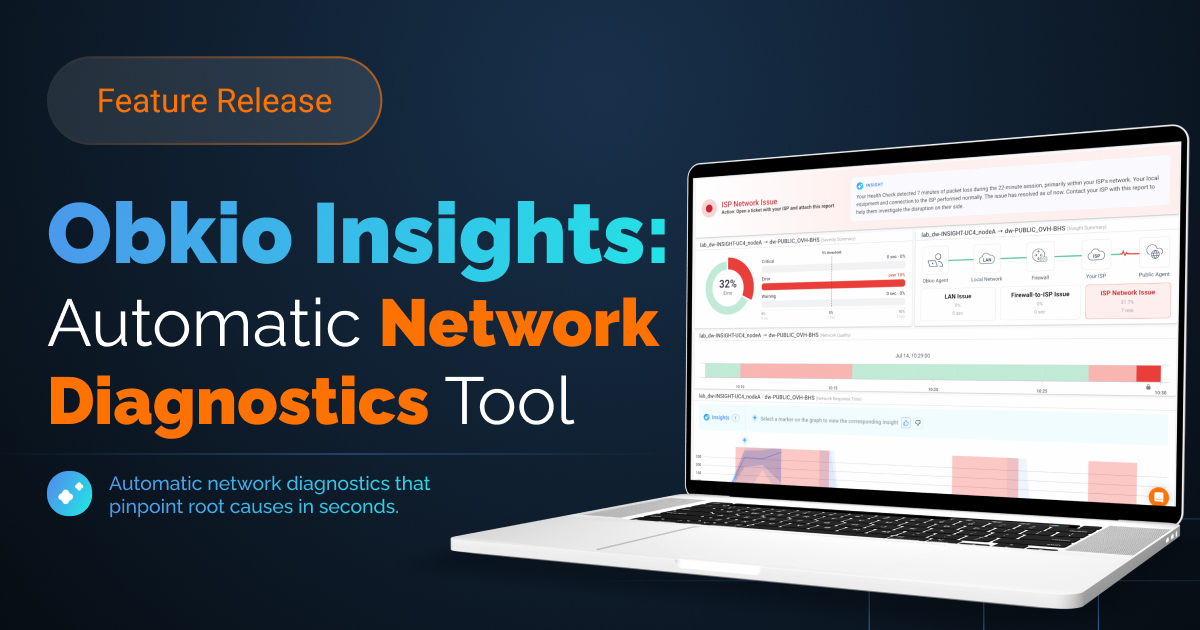
That's exactly the problem Obkio Insights is going to solve. Insights is Obkio's automatic network diagnostics engine, a correlation layer that analyzes data simultaneously across NPM, SNMP, APM, Traceroute, and Network Destinations to identify the root cause of network issues in seconds, not hours.
Instead of manually cross-referencing graphs and piecing together what happened, Insights (currently in beta) does it automatically. It tells you what the problem is, when it started, where it originated, and who is responsible for fixing it, without requiring deep network expertise to interpret the data.

- 14-day free trial of all premium features
- Deploy in just 10 minutes
- Monitor performance in all key network locations
- Measure real-time network metrics
- Identify and troubleshoot live network problems


