







 Obkio Blog


 Subscribe
Table of Contents
Table of Contents
When you’re a business managing network performance across 15 branch offices in different cities, you’re going to see some blind spots. Your headquarters may experience consistent connectivity, while remote location experience unpredictable slowdowns that can affect your daily operations.
Multi-site businesses face unique network performance challenges. Distributed infrastructure, varying ISP quality, inconsistent user experiences, and limited visibility into remote location issues create a complex monitoring problem. Traditional centralized network monitoring approaches fail because they only show network performance from the headquarters' perspective, while missing last-mile issues, local ISP problems, and actual user experience at remote sites.
The solution: Comprehensive multi-site network monitoring that provides centralized visibility, proactive issue detection, and performance data across all locations.
This article covers a step-by-step roadmap for implementing network performance monitoring across distributed business locations, with practical deployment strategies and performance benchmarks you can use immediately.
What Is a Multi-Site Business? 
A multi-site business operates from multiple physical locations rather than a single centralized office. These organizations include:
Common Multi-Site Business Types:
- Retail chains - Stores across multiple cities, regions, or countries
- Healthcare systems - Hospitals, clinics, and medical facilities at different locations
- Financial institutions - Banks with branch offices throughout a region
- Manufacturing companies - Production facilities, warehouses, and distribution centers
- Franchise operations - Independently owned locations under a common brand
- Professional services firms - Law offices, accounting firms, consulting agencies with regional offices
- Hospitality businesses - Hotels, restaurants, or resorts across multiple properties
- Educational institutions - School districts, university campuses, training centers
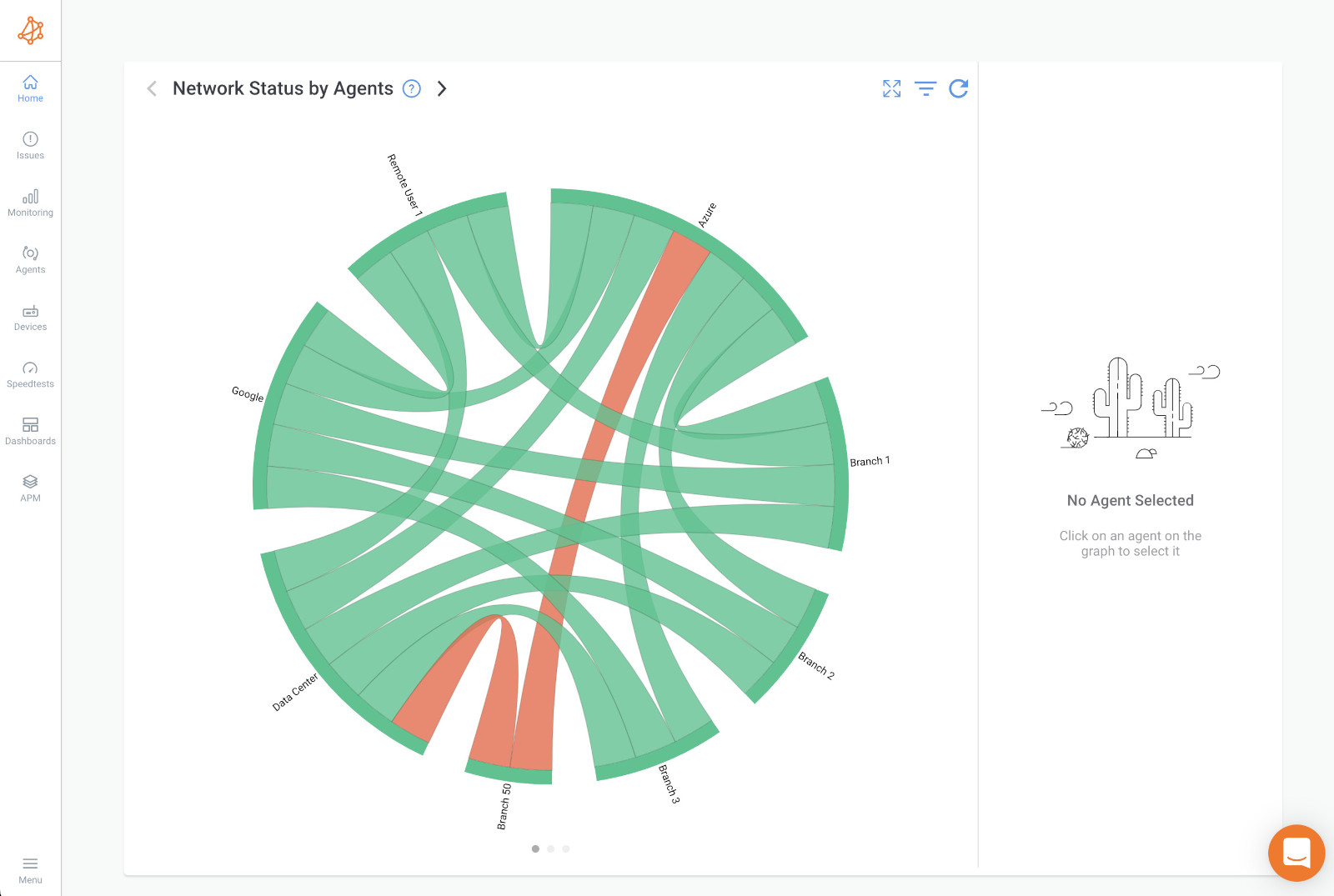
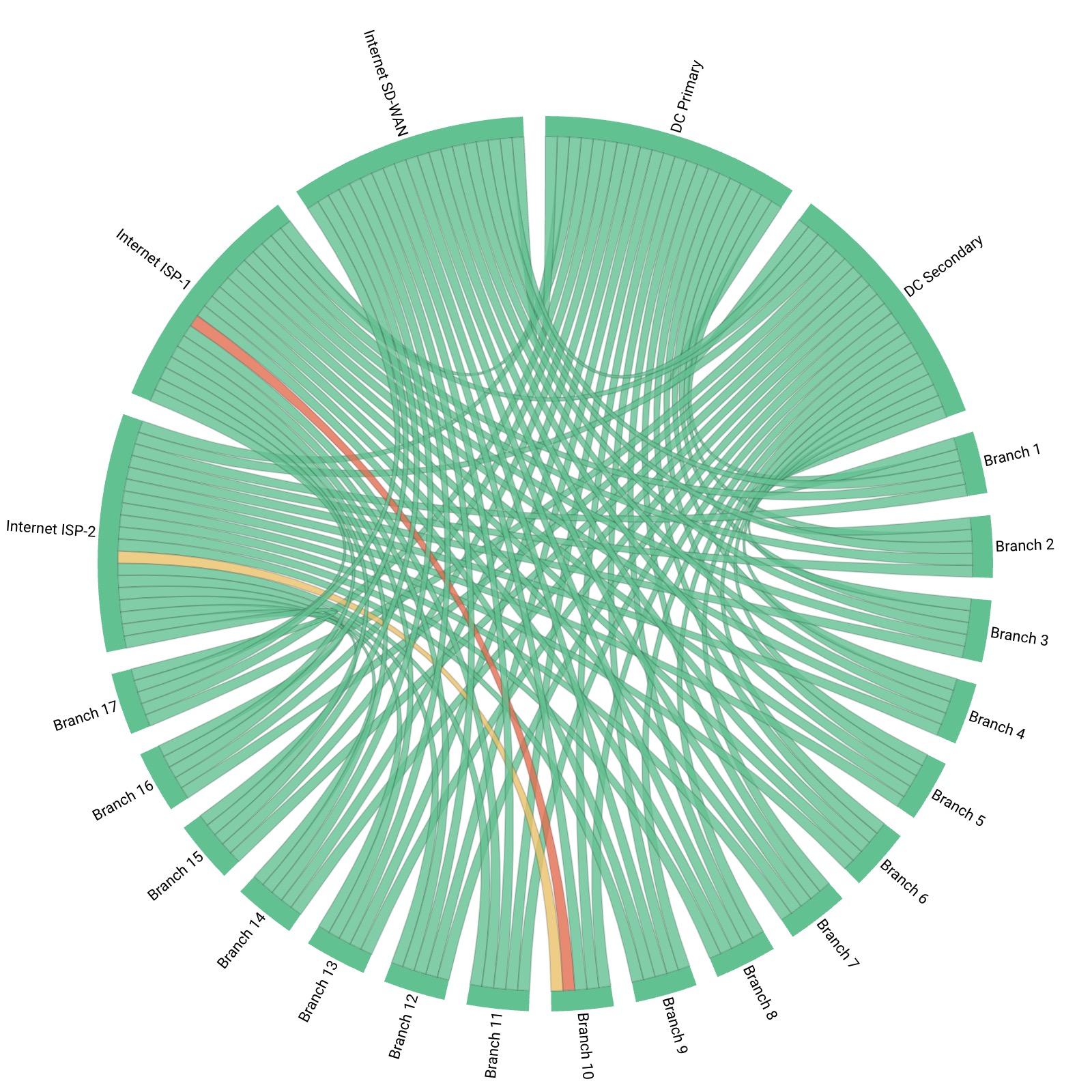 Obkio's Chord Diagram showing a corporate multi-site network configuration
What Are the Main Characteristics of Multi-Site Businesses?
- Each location requires network connectivity for daily operations.
- Locations share centralized resources like applications, databases, and file servers.
- Remote sites need access to cloud services and SaaS applications.
- IT infrastructure varies between locations: different ISPs, circuit types, bandwidth capacities.
- Limited on-site IT support at smaller branch offices.
The network connectivity challenge: Multi-site businesses depend on reliable network performance across all locations to maintain consistent operations, collaboration, and customer service, making network monitoring and network connectivity critical for business continuity.
Why Multi-Site Network Monitoring Is Different
Multi-site environments require a fundamentally different monitoring approach than single-location networks. Here's why:
Common Multi-Site Networks Performance Issues:
- Inconsistent ISP quality across locations - Branch offices often use different providers with varying SLA guarantees. What works reliably at headquarters may be completely different at remote locations.
- Limited IT resources at remote sites - Fewer technical staff to troubleshoot local issues. When something breaks, you're often diagnosing remotely or waiting for someone local who may not have networking expertise.
- Application performance disparities - Cloud apps and centralized resources experience different latency from each location. A SaaS application that's fast at headquarters might be barely usable three states away.
- Visibility gaps - IT teams struggle to distinguish between local, ISP, or WAN issues. Is it the branch router, their ISP, your WAN circuit, or the application server?
- Scalability challenges - Traditional monitoring approaches don't scale efficiently across dozens of sites. Managing individual monitoring configurations for 50 locations becomes unmanageable.
Key principle: Multi-site environments require a distributed monitoring architecture, not centralized monitoring that only sees headquarters performance.
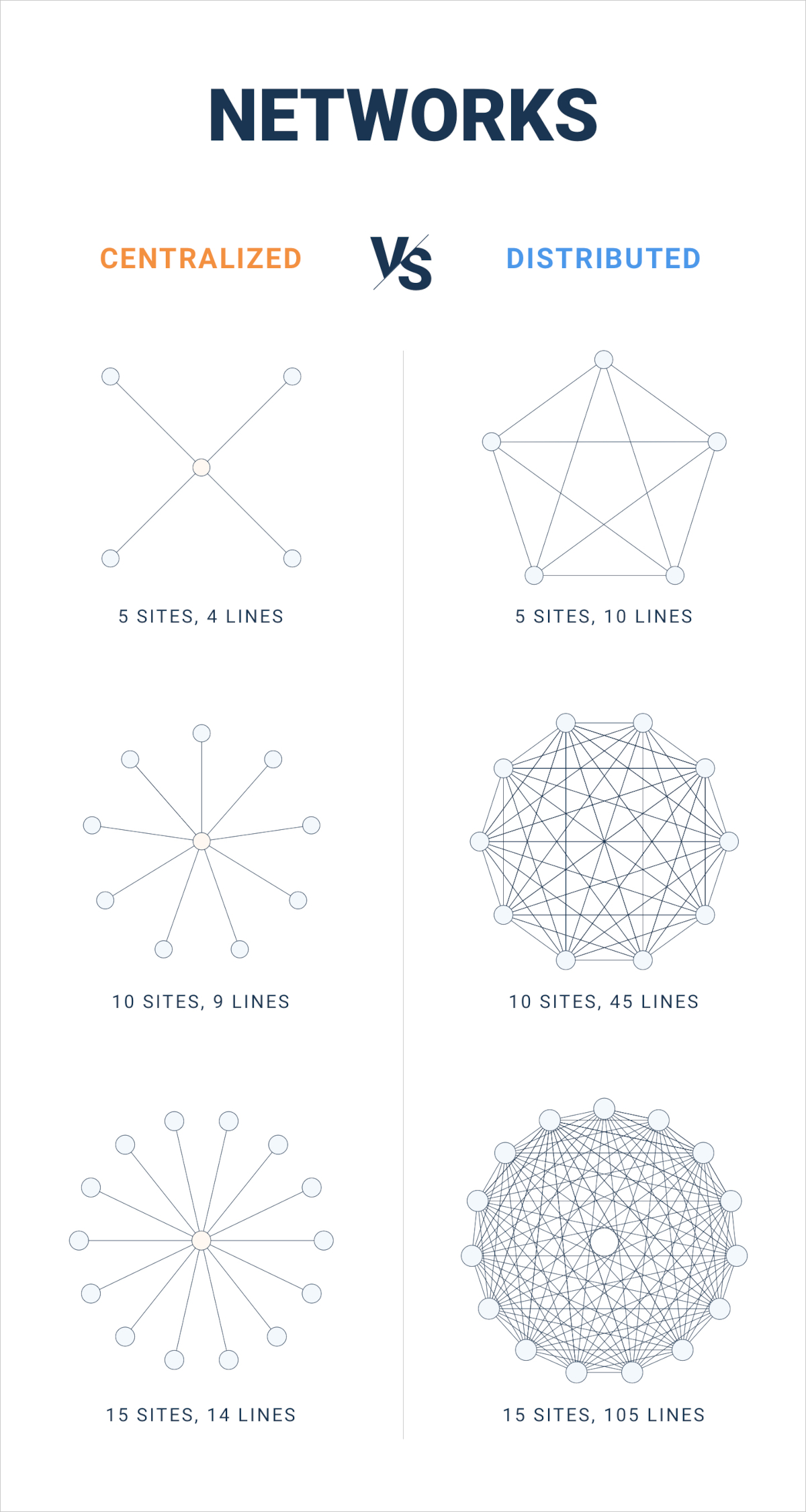
How Distributed Network Monitoring Solves Multi-Site Networks Challenges
Instead of monitoring your entire network from a single headquarters location, distributed network monitoring deploys lightweight monitoring agents at each business site to measure actual performance from every location's perspective.
How distributed network monitoring works:
Monitoring agents installed at each branch office, data center, and critical location continuously measure network performance (latency, packet loss, jitter, bandwidth). A centralized dashboard provides unified visibility across all sites. Location-specific alerts identify issues before users report problems. Historical data reveals trends and capacity planning needs per site.
Multi-Site Business benefits:
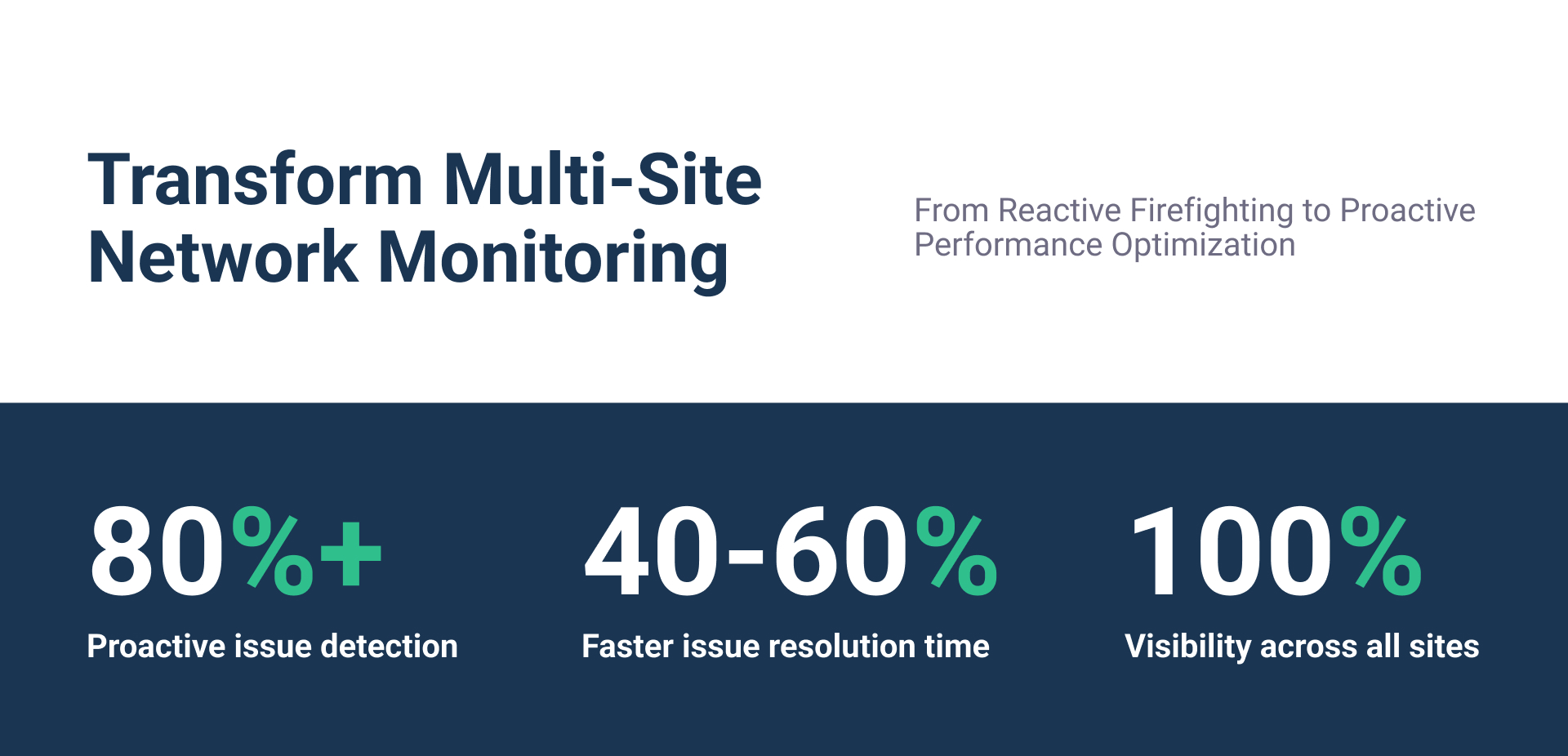
- 80%+ proactive issue detection - Identify problems before they impact users
- 40-60% faster resolution - Pinpoint exact location and cause of network issues
- Complete visibility - See performance from every site, not just headquarters perspective
- Scalable deployment - Add new locations without rebuilding monitoring infrastructure
Obkio's distributed network monitoring provides real-time visibility across all your business locations with easy agent deployment and centralized management.

Learn More About Distributed Monitoring
What Are Key Network Metrics for Multi-Site Businesses?
Different metrics matter for multi-site environments. Here's what to track and why:
Network Metric for Multi-Site Businesses #1: Latency Between Sites
- Acceptable threshold: less than 50ms for same-region, less than 100ms for different regions
- Critical threshold: greater than 150ms indicates performance degradation
- Impact: Affects application responsiveness, VoIP quality, file transfers
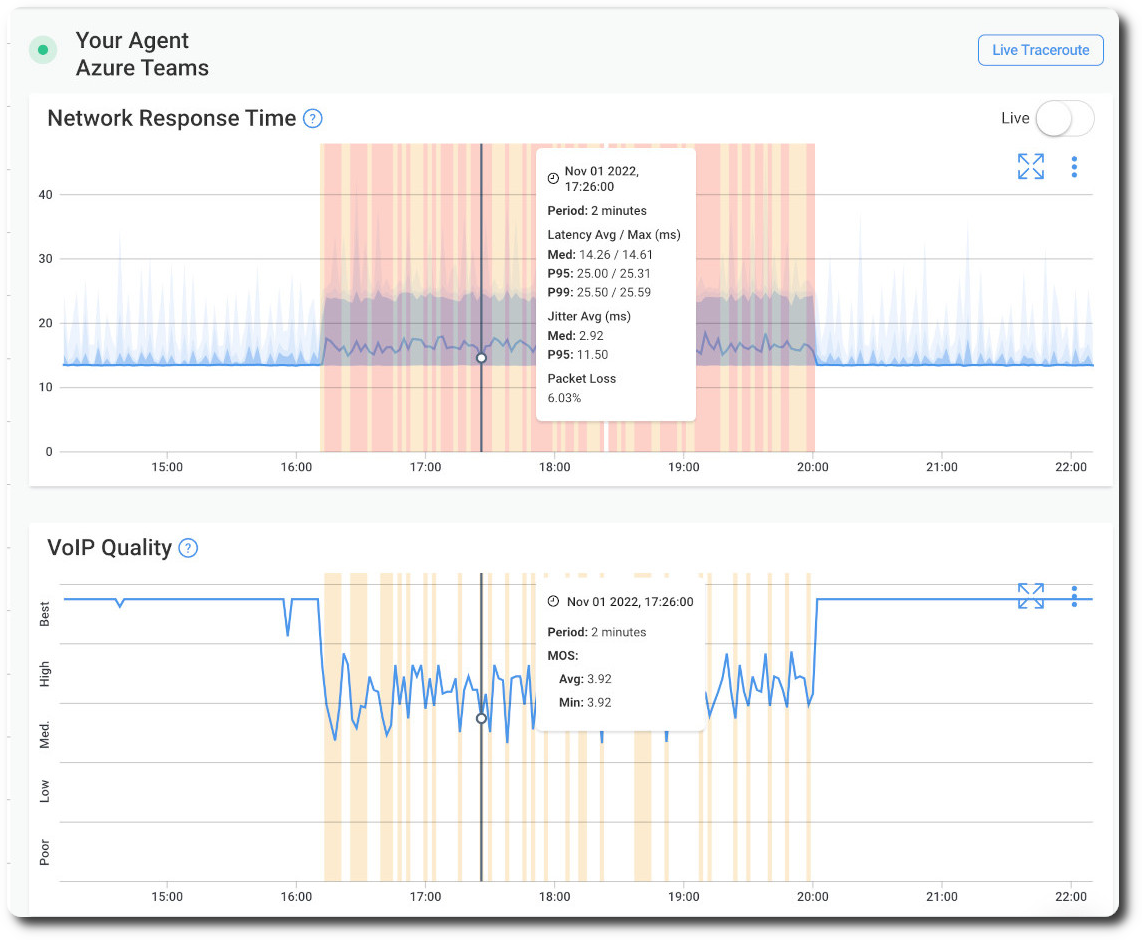
Each millisecond of latency adds up. A database query that takes 50ms at headquarters might take 200ms from a remote branch, making the same application feel completely different. Tools like Obkio continuously measure latency between all site pairs, providing real-time visibility into inter-site performance degradation before it impacts users.
- 14-day free trial of all premium features
- Deploy in just 10 minutes
- Monitor performance in all key network locations
- Measure real-time network metrics
- Identify and troubleshoot live network problems


Network Metric for Multi-Site Businesses #2: Packet Loss Per Location
- Acceptable: less than 0.1% for business applications
- Critical: greater than 1% causes noticeable application issues
- Monitoring frequency: Continuous measurement, not periodic testing
Even small amounts of packet loss destroy real-time application performance. A 1% packet loss rate can make VoIP calls unintelligible and video conferencing unusable.
Network Metric for Multi-Site Businesses #3: Jitter for Real-Time Applications
- VoIP/video conferencing threshold: less than 30ms
- Critical level: greater than 50ms causes audio/video quality issues
- Per-site requirement: Each location needs separate baseline
Jitter measures variation in latency. Consistent 100ms latency is manageable; latency jumping between 50ms and 150ms creates choppy audio and frozen video frames.
Network Metric for Multi-Site Businesses #4: Bandwidth Utilization Per Site
Monitor both upload/download capacity, identify peak usage periods per location, and plan capacity for growing locations. Not all sites need the same bandwidth: a 5-person satellite office has different requirements than a 200-person regional hub.
Inter-Site Connectivity Performance
- Site-to-site latency measurements
- Data center to branch office performance
- Cloud service accessibility from each location
Location-Specific Network Metrics for Multi-Site Businesses:
- Local Internet performance - ISP-specific issues affecting individual sites
- WAN circuit performance - MPLS, SD-WAN, or VPN tunnel health
- Last-mile connectivity - Provider-specific issues before traffic reaches your WAN
Critical insight: Each location requires independent baseline metrics: headquarters performance doesn't predict remote site experience.
How to Choose a Multi-Site Network Monitoring Strategy
Building an effective multi-site monitoring strategy requires making deliberate decisions about architecture, monitoring points, and alert configuration. These choices determine whether you'll have real visibility or just more noise. Here's how to make those decisions.
Step 1: Choose Your Network Monitoring Architecture
Distributed Monitoring Approach:
Deploy lightweight monitoring agents at each business location. Agents perform continuous synthetic testing to simulate user traffic. A centralized dashboard aggregates data from all sites.
Benefits: Real-time visibility, location-specific troubleshooting, scalable deployment
Centralized Monitoring Limitations:
Only measures performance from headquarters perspective. Misses last-mile and local ISP issues. Cannot identify location-specific problems. Creates blind spots for remote user experience.
The difference: Centralized monitoring tells you "the network is fine" while users at three branch offices can't access critical applications. Distributed monitoring shows exactly which sites have problems and why.
Step 2: Determine Your Multi-Site Network’s Critical Monitoring Points
Essential monitoring locations:
- Each branch office/retail location
- Regional data centers
- Cloud service entry points
- Key application servers
- Remote worker home offices (for hybrid environments)
Don't just monitor your biggest sites. Often the smallest locations with the fewest IT resources experience the most problems and get the least attention.

Step 3: Establish Your Network Monitoring Targets Per Distributed Location
Internal monitoring targets:
- Inter-site connectivity (branch-to-branch, branch-to-headquarters)
- Internal application servers
- Private data center resources
External monitoring targets:
- Cloud applications (Microsoft 365, Salesforce, etc.)
- SaaS platform performance
- ISP gateway performance
- Public Internet services critical to operations
Step 4: Define Your Network Monitoring Frequency
- Continuous monitoring: Core metrics (latency, packet loss, jitter) every 1-5 seconds
- Regular testing: Bandwidth capacity tests every 15-30 minutes
- Scheduled deep testing: Comprehensive application performance tests during off-peak hours
Real-time monitoring catches intermittent issues that periodic testing misses. A 30-second outage at 2 PM doesn't show up in hourly tests, but it disrupts everyone working at that moment.
Step 5: Set Up Alert Thresholds Per Location
- Location-specific baselines (not one-size-fits-all)
- Graduated alert levels (warning vs. critical)
- Time-based thresholds (issue duration before alerting)
- Escalation procedures for persistent issues
Key principle: Monitoring architecture must reflect your actual network topology: hub-and-spoke, mesh, or hybrid models require different monitoring approaches.
How to Deploy Multi-Site Network Monitoring
Once you've defined your monitoring strategy, it's time to implement it. This section walks through the actual deployment process: from how to choose and select your network monitoring tool, to how to collect performance data from each multi-site location. Follow these steps to get comprehensive visibility across all your locations.
Step 1: Choose The Best Networking Solutions for Multi-Site Business
Select a network monitoring solution that supports distributed agent deployment and provides centralized visibility. The right tool should allow you to deploy lightweight monitoring agents across multiple locations without complex infrastructure requirements.
Look for solutions that don't require dedicated hardware at every site, support automated deployment, provide a single management interface, and scale to hundreds of locations without performance impact.
Obkio's architecture is specifically designed for multi-site environments: agents deploy in minutes, work across any network topology (MPLS, SD-WAN, hybrid), and provide immediate visibility without complex configuration.

Step 2: Deploy Network Monitoring Agents at Key Multi-Site Locations
Install monitoring agents at each critical business site to measure network performance from every location's perspective.
Agent Deployment Options:
Choose the right agent type for each location:
- Hardware agents - Physical appliances for permanent locations (branch offices, data centers, regional hubs)
- Software agents - Installed on existing Windows/Mac/Linux computers for flexible, cost-effective deployment
- Virtual agents - Deployed on cloud infrastructure for hybrid environments and cloud connectivity monitoring
- Public Monitoring agents - Hosted in major cloud regions worldwide (AWS, Azure, GCP). Perfect for testing remote site connectivity to the Internet, monitoring SaaS application access, and validating ISP performance claims across different geographic regions.
Obkio offers all four agent types, giving you deployment flexibility based on each location's needs. Software agents work on existing infrastructure at branch offices, hardware agents provide dedicated monitoring at critical sites, and virtual agents monitor cloud connectivity and remote workers.
Key Deployment Locations:
- Branch offices and retail locations
- Data centers and regional hubs
- Remote sites and satellite offices
- Inter-site strategic points
- Remote worker home offices
Agents continuously measure latency, packet loss, jitter, and bandwidth from each site's actual perspective.
Mass Deployment for Multi-Site Scale:
For businesses with dozens or hundreds of locations, automate agent deployment using remote installation scripts for simultaneous multi-site rollout, Group Policy or configuration management tools (Ansible, Puppet), pre-configured system images with agents pre-installed, and centralized agent management dashboard for updates and configuration.
Deployment strategy: Start with Tier 1 priority locations, validate monitoring, then scale to remaining sites using automated mass deployment. This approach works especially well for distributed environments with remote workers across many locations.
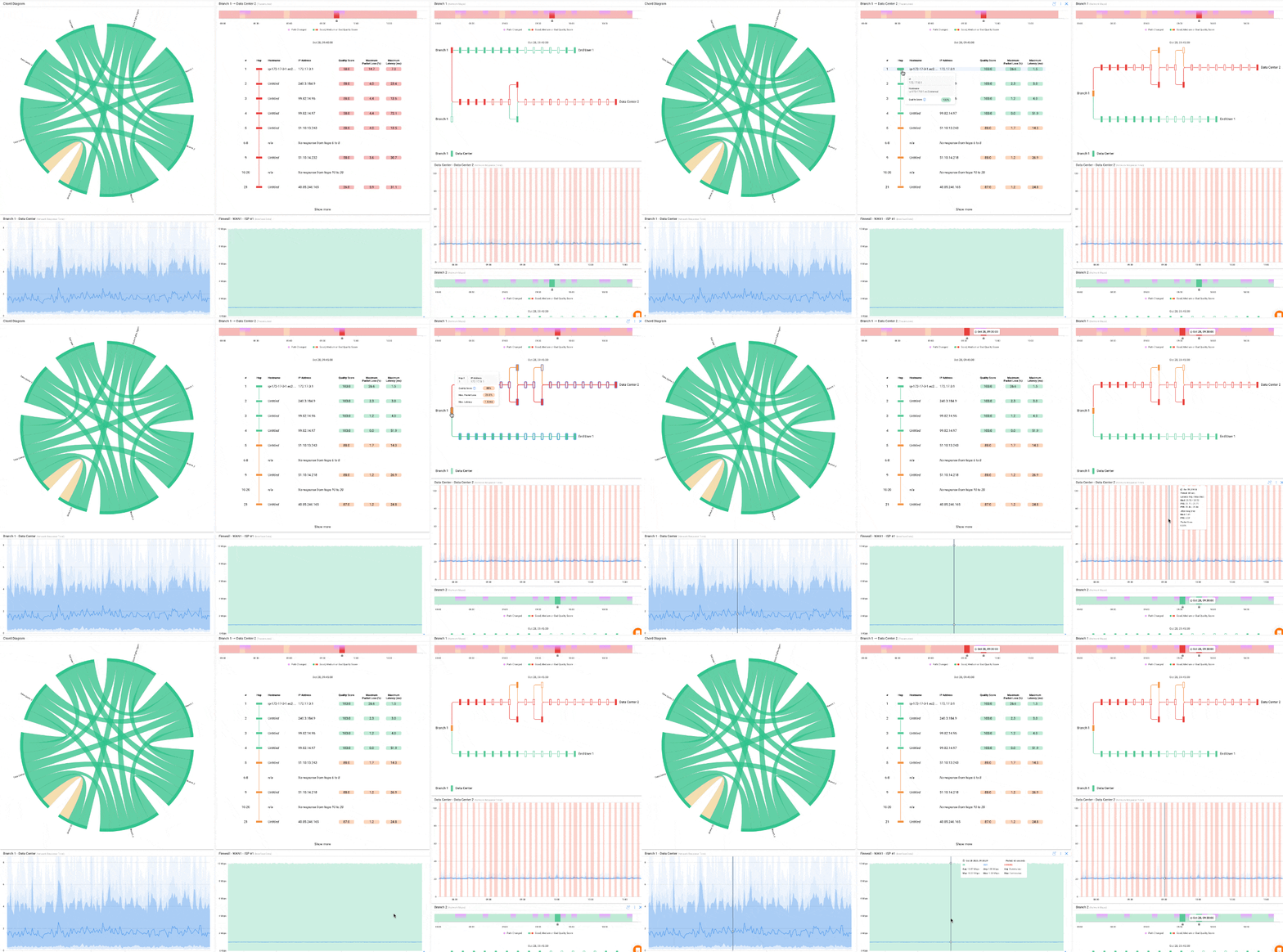
Step 3: Collect and Analyze Network Performance Data from a Centralized Dashboard
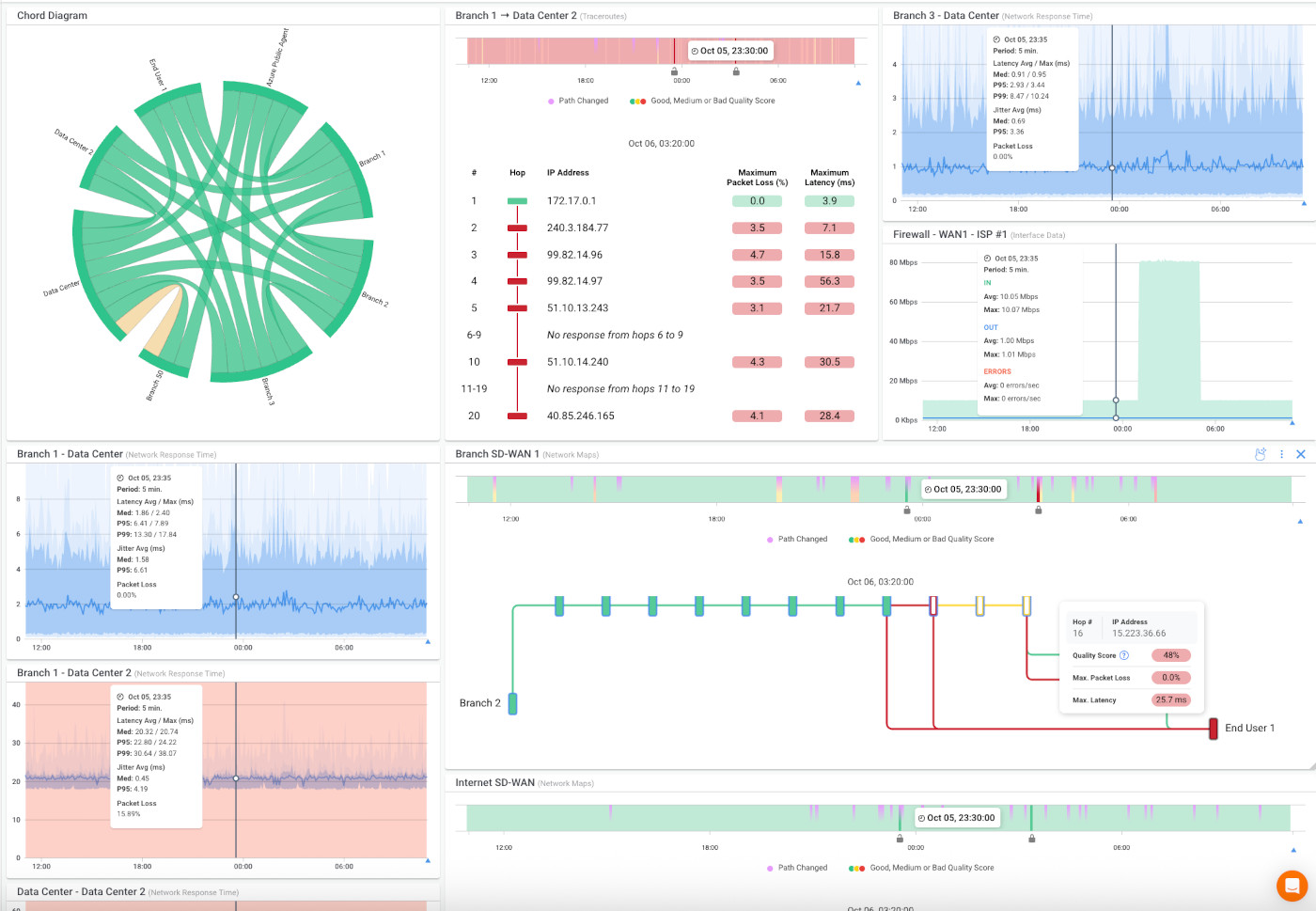
All monitoring agents send performance data to a centralized dashboard where you can:
- View real-time performance across all locations simultaneously
- Filter and compare specific sites or regions
- Identify which locations are experiencing issues
- Distinguish between local ISP problems, WAN issues, or application-specific degradation
The dashboard becomes your single source of truth for network performance across your entire business footprint.
Step 4: Configure Alerts for Distributed Location and Generate Reports
Set up location-specific alerts to detect performance degradation before users report problems. Generate reports showing per-site performance trends over time, comparative analysis across locations, SLA compliance per site, and capacity planning data for growing locations.
Obkio deploys lightweight monitoring agents at each of your business locations, continuously measuring network performance and sending data to a centralized dashboard. You get complete visibility across all sites with location-specific alerts and comprehensive reporting, all from a single interface.
Real-World Multi-Site Monitoring Success Story
Castel Afrique, a major player in the African beverage industry, operates across 21 countries with nearly 100 factories producing 31 beer brands and 12 soft drink brands. Managing network performance across this massive distributed infrastructure presented extreme challenges that most multi-site businesses encounter.
The Challenge:
Their connections combined Internet circuits and private MPLS links, with some locations requiring 3-4 simultaneous Internet connections load-balanced across smaller links because large bandwidth circuits simply weren't available.
The visibility problem: When network issues occurred (and they occurred frequently) the IT team couldn't distinguish between SD-WAN tunnel problems, ISP circuit degradation, MPLS link issues, or load balancing failures.
SATLX, Castel Afrique's managed service provider, needed a monitoring solution that could handle this complexity without requiring on-site expertise at every factory location.
The Solution:
SATLX deployed Obkio's distributed monitoring agents across Castel Afrique's network. The deployment leveraged Obkio's flexible agent options: software agents on existing infrastructure at smaller factories, hardware agents at major production facilities, and virtual agents for cloud connectivity monitoring.
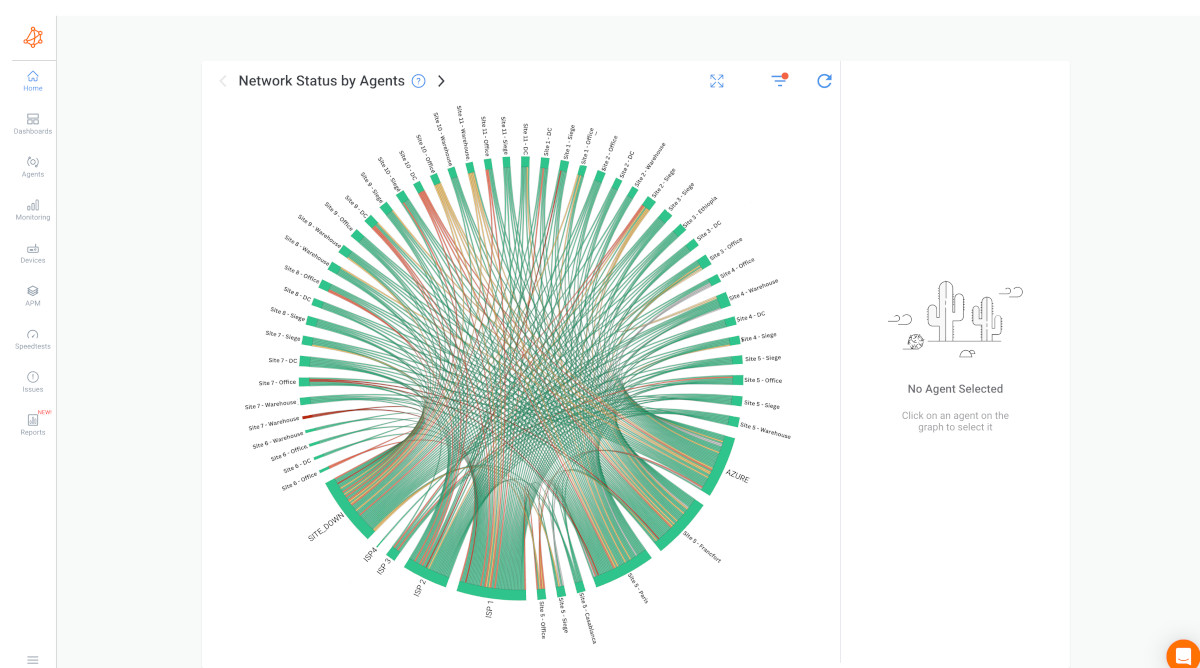
The implementation addressed Castel Afrique's specific complexity:
- SD-WAN visibility: Monitoring sessions tracked performance across all SD-WAN tunnels, identifying underperforming paths and tunnel instability
- Multi-circuit monitoring: Each site's multiple Internet connections monitored independently, revealing which circuits degraded and when
- Load balancing validation: Performance data showed whether traffic distribution across multiple small links actually improved performance or created bottlenecks
- MPLS and Internet comparison: Side-by-side metrics comparing private MPLS and public Internet paths for each location
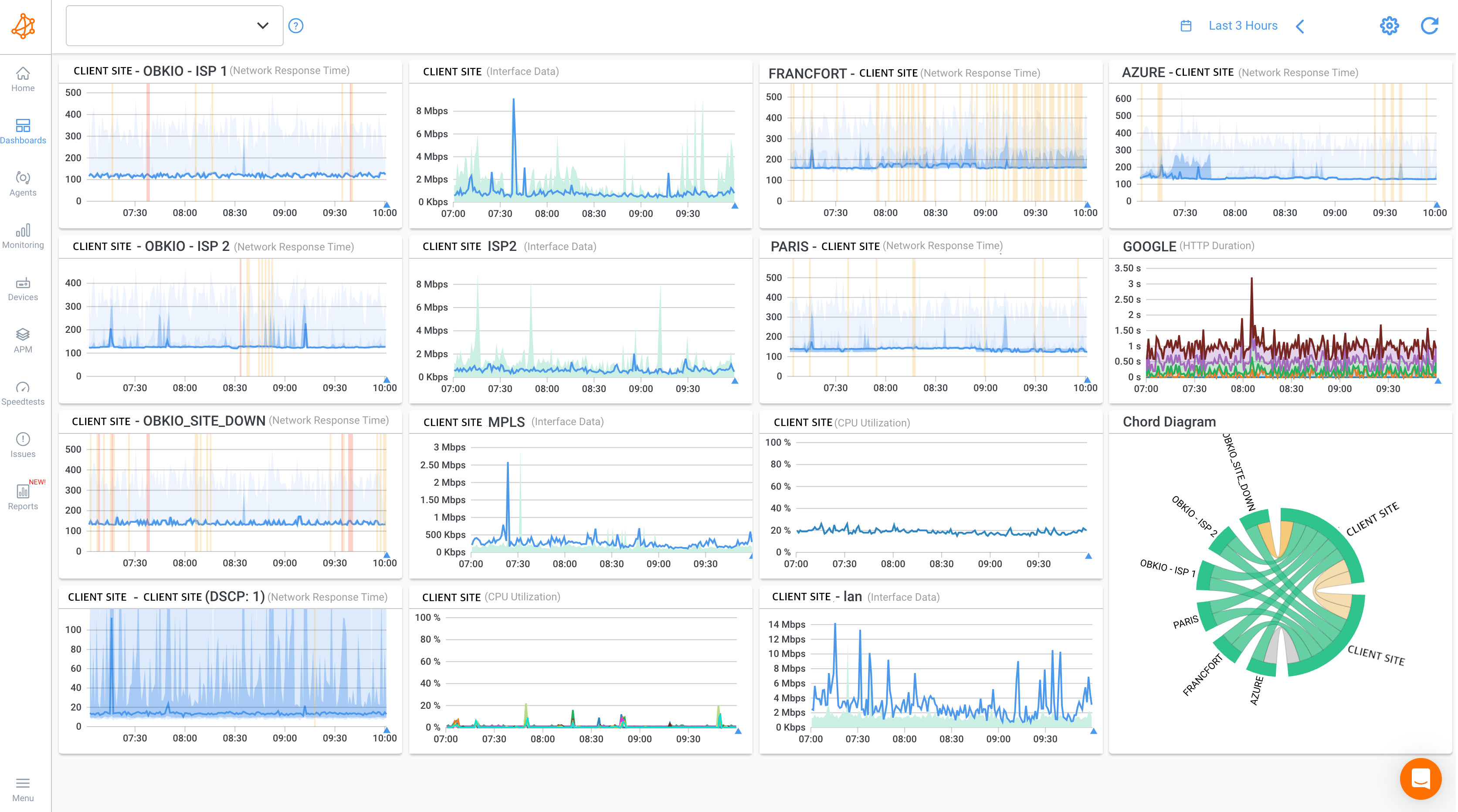
The Results:
Within weeks of deployment, SATLX identified network issues that had plagued Castel Afrique for months. Specific factories experiencing chronic connectivity problems revealed ISP-specific degradation invisible to traditional monitoring. SD-WAN tunnels that appeared "up" but performed poorly became immediately visible.
Why This Matters for Your Multi-Site Business:
Obkio's distributed architecture handles this complexity without requiring networking expertise at every location. Deploy agents, configure monitoring sessions, and get immediate visibility, regardless of how complex your multi-site network topology actually is.

Learn how SATLX Deploys Obkio’s NPM tools for Distributed Continent-Wide SD-WAN Monitoring. Discover how MSPs monitor & optimize customer SD-WAN performance.
Learn more

What Are the Best Practices for Multi-Site Business Network Monitoring?
1. Monitor the Complete Network Path
Don't just monitor your WAN, include last-mile ISP performance. Track performance from each location to critical applications. Monitor both internal site-to-site and external cloud connectivity.
The last mile often causes the most problems. Your WAN might be perfect, but if the ISP connection at a branch office is degraded, users still can't work.
Obkio's monitoring sessions track the complete network path from branch offices through ISP connections, WAN circuits, and all the way to application endpoints, identifying exactly where performance degrades.

2. Establish Location-Specific Baselines
Each site has unique normal performance characteristics. Peak usage times vary by location and time zone. ISP quality differs significantly between markets. Don't apply headquarters baseline to all locations.
A West Coast branch at 9 AM local time has different traffic patterns than an East Coast office at the same moment. Your monitoring needs to account for these differences.
3. Implement Graduated Alert Thresholds
- Warning level: Performance degradation detected, monitor closely
- Critical level: Business impact threshold reached, immediate response required
- Duration thresholds: Require issues to persist 5+ minutes before alerting (reduces false positives)
Not every spike deserves a page at 3 AM. Build intelligent alerting that distinguishes between transient blips and actual problems.
4. Create Location-Aware Reporting
- Per-site performance scorecards
- Comparative analysis across locations
- ISP performance comparison reports
- Capacity planning per location
- Trend analysis showing improvement/degradation over time
Reports should answer: "Which sites are performing well? Which need attention? Where should we invest in upgrades?"
5. Integrate Multi-Location Network Management with Change Management
Document network changes per location. Correlate performance shifts with infrastructure changes. Track improvement/degradation after upgrades. Maintain change log accessible from monitoring dashboard.
When performance suddenly changes at a site, your first question should be "What changed?" Having that information integrated with monitoring data saves hours of troubleshooting.
6. Plan for Scalability
Your monitoring solution must handle location growth. Agent deployment should be streamlined, not manual. Dashboard should support hundreds of sites without performance impact. Reporting must accommodate growing data volume.
If deploying monitoring to a new location takes a day of manual configuration, you'll never keep up with business growth.
7. Maintain Continuous Network Monitoring
- 24/7/365 monitoring for business-critical locations
- No gaps during maintenance windows
- Redundant monitoring paths where possible
- Automatic agent health checks
Networks don't stop having problems at 5 PM or on weekends. Your monitoring shouldn't either.
Key insight: Multi-site monitoring isn't "set and forget", it requires ongoing optimization as business locations, applications, and network architecture evolve.

How to Troubleshoot Multi-Site Network Issues
Even with solid monitoring in place, you'll face recurring challenges specific to multi-site environments. Here are the most common problems IT teams encounter and practical solutions for each.
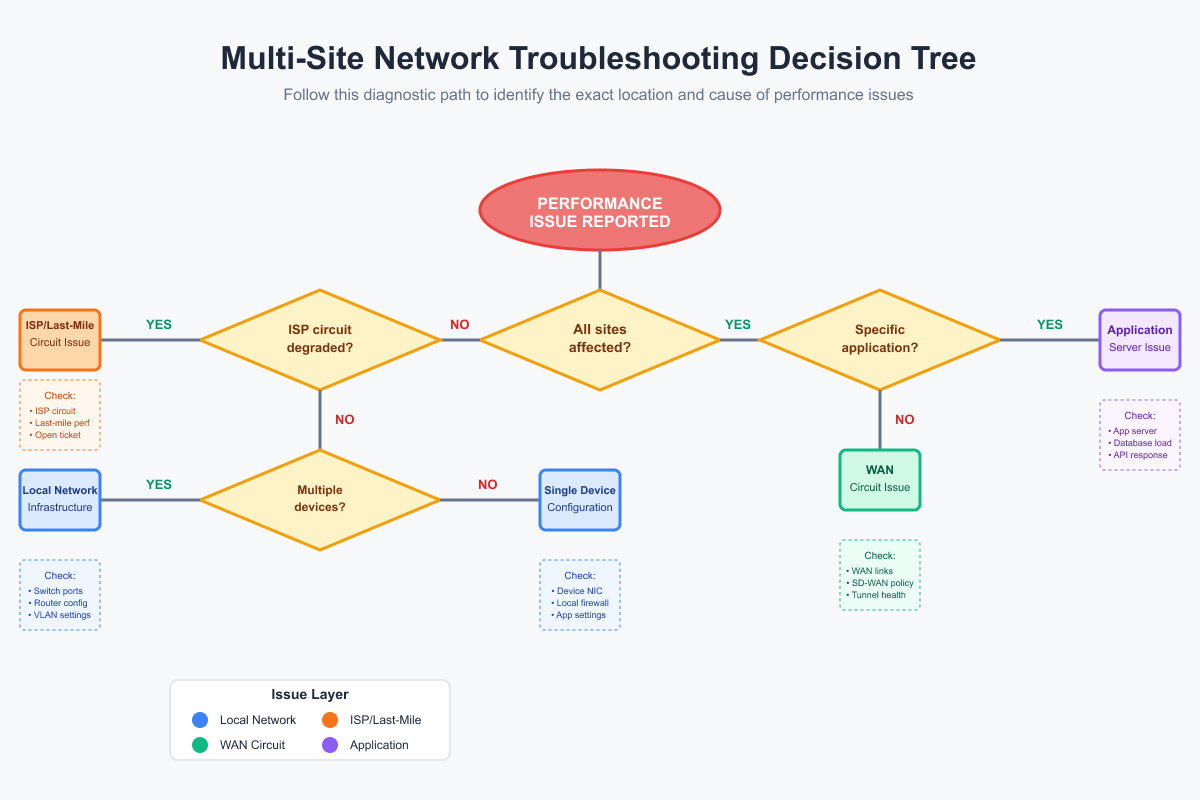
These aren't theoretical scenarios; these are the issues that show up in your ticket queue every week.
Challenge 1: Inconsistent Network Performance Across Locations
Symptoms: Some sites experience excellent performance while others struggle with providing consistent performance and experience issues that constantly affect user experience.
Root causes:
- ISP quality variations between markets
- Different circuit types/speeds per location
- Local network configuration issues
- Geographic distance from application servers
Solution: Location-specific troubleshooting using distributed monitoring data to pinpoint whether issues are local (last-mile), ISP, or application-related.
Start by comparing performance metrics across locations. If one site shows high latency to the application server while others don't, you've isolated the problem to that site's path. Obkio's comparative dashboards make this analysis instant: view all locations side-by-side, identify outliers immediately, and drill down into the specific location experiencing issues.
Challenge 2: Alert Fatigue from Multiple Sites
Symptoms: Excessive alerts make it difficult to identify critical issues.
Root causes:
- Thresholds too sensitive for normal variation
- Not accounting for scheduled maintenance
- Treating all locations with equal criticality
Solution:
- Graduated thresholds with duration requirements
- Location-specific criticality levels
- Maintenance window configuration
- Alert suppression for non-critical sites during known issues
If you're getting 50 alerts per day, you're not monitoring effectively, you're just creating noise. Good alerting is surgical, not shotgun.
Challenge 3: Difficulty Identifying Remote Site Issues
Symptoms: Users report problems but centralized monitoring shows no issues.
Root causes:
- Monitoring only from headquarters perspective
- Last-mile ISP issues invisible to central monitoring
- Local device/configuration problems
Solution: Deploy distributed monitoring agents at remote locations to measure actual user experience, not just headquarters visibility.
This is the classic multi-site problem: "Everything looks fine from here" while users three states away can't access anything. Distributed monitoring eliminates this blind spot.
Challenge 4: Bandwidth Capacity Planning Per Location
Symptoms: Some sites regularly exceed capacity while others are underutilized.
Root causes:
- Growth rates differ per location
- Application usage varies by site
- One-size-fits-all capacity allocation
Solution: Per-site utilization monitoring with trend analysis to predict capacity needs per location independently.
Don't upgrade all sites just because one is hitting capacity. Use actual data to make site-specific decisions about bandwidth investments.
Troubleshooting principle: Multi-site issues require location-specific diagnosis, aggregate data alone masks individual site problems.

Learn how to troubleshoot network issues by identifying where, what, why network problems occur with Network Troubleshooting tools.
Learn more
Frequently Asked Questions: Network Performance Monitoring Across Multiple Locations
Q: What is considered a multi-site business?
A: A multi-site business operates from multiple physical locations such as retail stores, branch offices, manufacturing facilities, or franchise locations. These organizations require network connectivity at each site to access centralized resources, cloud applications, and communicate between locations, making network performance monitoring essential for consistent operations.
Q: What is multi-site network monitoring?
A: Multi-site network monitoring uses distributed monitoring agents deployed at each business location to measure network performance from every site's perspective, providing centralized visibility into latency, packet loss, bandwidth utilization, and application performance across all locations.
Q: Why can't I monitor all sites from headquarters?
A: Centralized monitoring only measures network performance from headquarters' perspective, missing last-mile ISP issues, local network problems, and actual user experience at remote locations. Distributed agents at each site provide accurate, location-specific performance data.
Q: What are the most important metrics for multi-site monitoring?
A: Critical metrics include inter-site latency (less than 50ms same-region target), packet loss (less than 0.1% acceptable), jitter (less than 30ms for VoIP), bandwidth utilization per location, and ISP performance at each site. Each location requires independent baseline metrics.
Q: How long does multi-site monitoring implementation take?
A: Typical deployment spans 6-8 weeks: 1-2 weeks for assessment and planning, 2 weeks for tool selection and deployment, 2 weeks for baseline collection and alert configuration, and 2 weeks for validation and team training before full-scale rollout. However, modern distributed monitoring solutions like Obkio can dramatically reduce this timeline: agents deploy in minutes, baselines establish within days, and you can be fully operational within 2-3 weeks even for large multi-site deployments.
Q: How do I prevent alert fatigue with multiple locations?
A: Implement graduated thresholds (warning vs. critical), require minimum issue duration (5+ minutes) before alerting, set location-specific criticality levels, configure maintenance windows, and use intelligent alert suppression for non-critical sites during known issues.

Conclusion: Start Monitoring Network Performance Across Your Multi-Site Business
Multi-site businesses require a distributed monitoring architecture to achieve true visibility across all locations. Each location needs independent baseline metrics and monitoring; headquarters performance doesn't predict remote site experience.
- Start with pilot deployment at priority locations.
- Establish baselines for each site.
- Configure intelligent alerting with location-specific thresholds.
- Scale systematically to remaining locations using automated deployment.
Effective multi-site monitoring transforms network management from reactive firefighting to proactive performance optimization, reducing MTTR by 40-60% and detecting 80%+ of issues before user impact.
Get Expert Help with Your Multi-Site Network Monitoring Deployment
Implementing multi-site network monitoring can be challenging when infrastructure gets complicated: different network topologies, varying ISP quality, SD-WAN configurations, and complex hybrid environments all require strategic planning. To make your deployment smooth, try Obkio's Distributed Network Monitoring Tool.
Whether you need guidance on the best monitoring setup for your specific business, help with agent deployment across dozens of locations, or strategic advice on optimizing your multi-site architecture, our team works directly with you to ensure successful implementation.
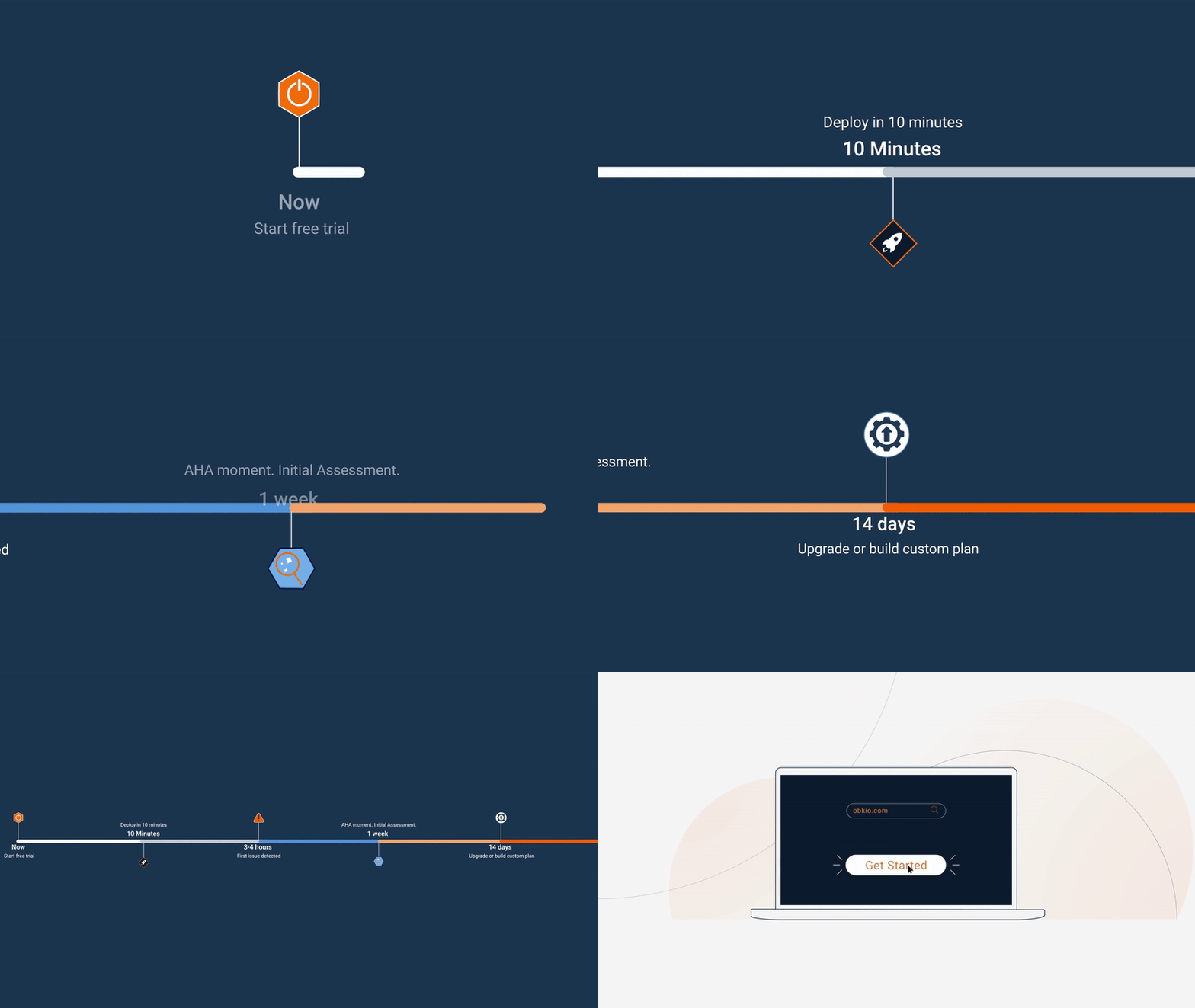
- 14-day free trial of all premium features
- Deploy in just 10 minutes
- Monitor performance in all key network locations
- Measure real-time network metrics
- Identify and troubleshoot live network problems
Ready to implement comprehensive multi-site network monitoring?
Book a meeting with our network experts → to discuss your multi-site deployment strategy and get hands-on help.
Start your free trial → and begin monitoring your multi-site network today with Obkio.