











 Obkio Blog


 Subscribe
Table of Contents
Table of Contents
Managing 50 client networks means 50 separate monitoring instances, 50 sets of credentials, and 50 different dashboards to check daily. Every morning starts with logging into multiple platforms, context switching between interfaces, and hoping you didn't miss a critical alert buried somewhere.
Traditional network monitoring tools weren't exactly built for MSPs. They're designed for single organizations monitoring their own infrastructure, which means every client you onboard adds exponential complexity. You're not just managing more networks, you're managing more tools, more logins, and more opportunities for things to fall through the cracks.
Multi-tenant network monitoring changes this. Instead of separate monitoring instances per client, you manage all customers from a single platform while maintaining complete data isolation. This article explains how multi-tenant architecture actually works, what it solves for MSPs, and how to deploy it across your client base.
What is Multi-Tenant Network Monitoring? 
Multi-tenant network monitoring enables MSPs to monitor multiple client networks from a single, centralized interface, while keeping each client's data completely isolated. Unlike single-tenant solutions, which require separate monitoring instances per customer, multi-tenant platforms leverage distributed monitoring agents across all client networks that report back to a unified monitoring platform.
Each client operates as an independent "tenant" with their own isolated data, users, configurations, and monitoring templates. You're not running 30 separate tools for 30 clients; you're running one platform that handles all 30 with proper segregation.
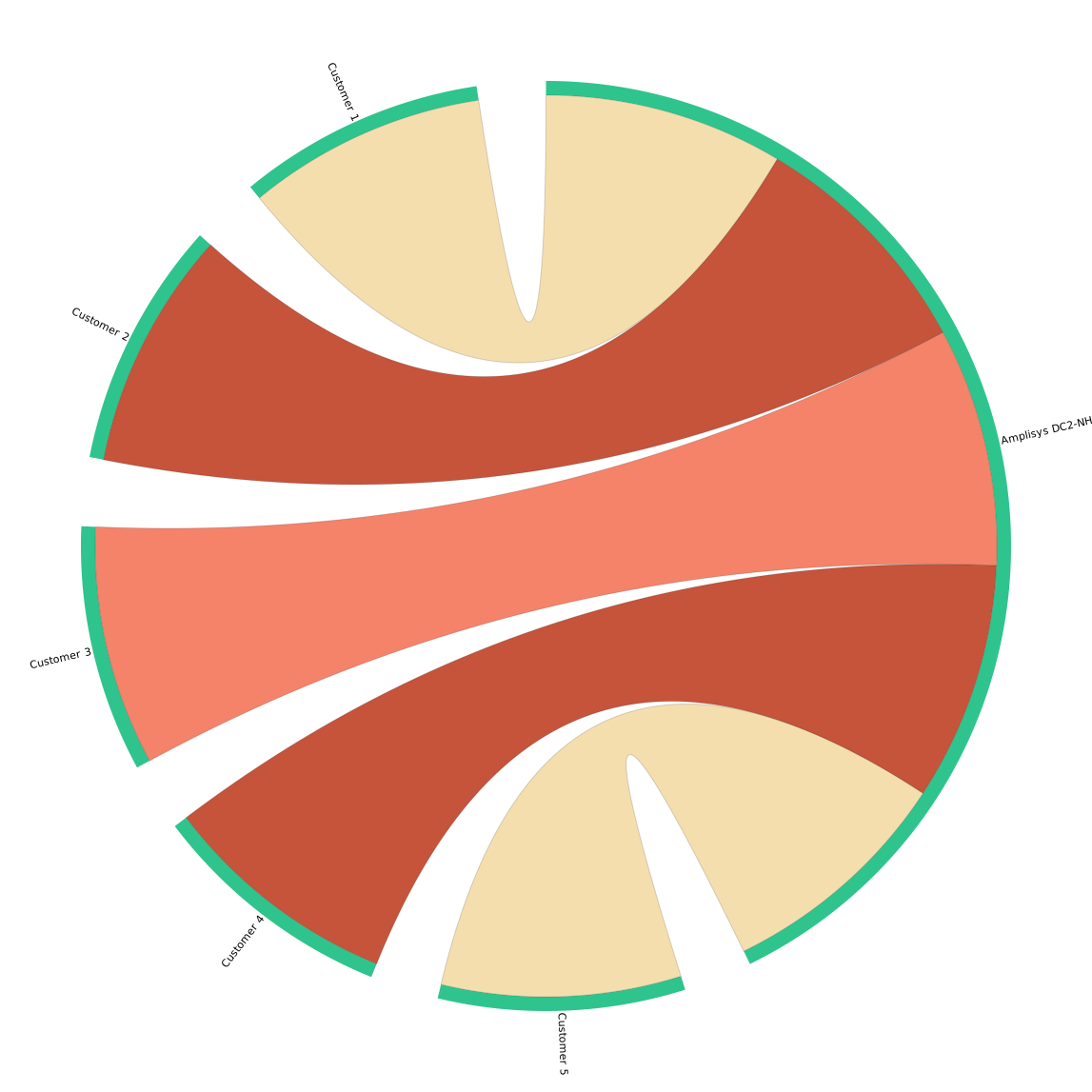
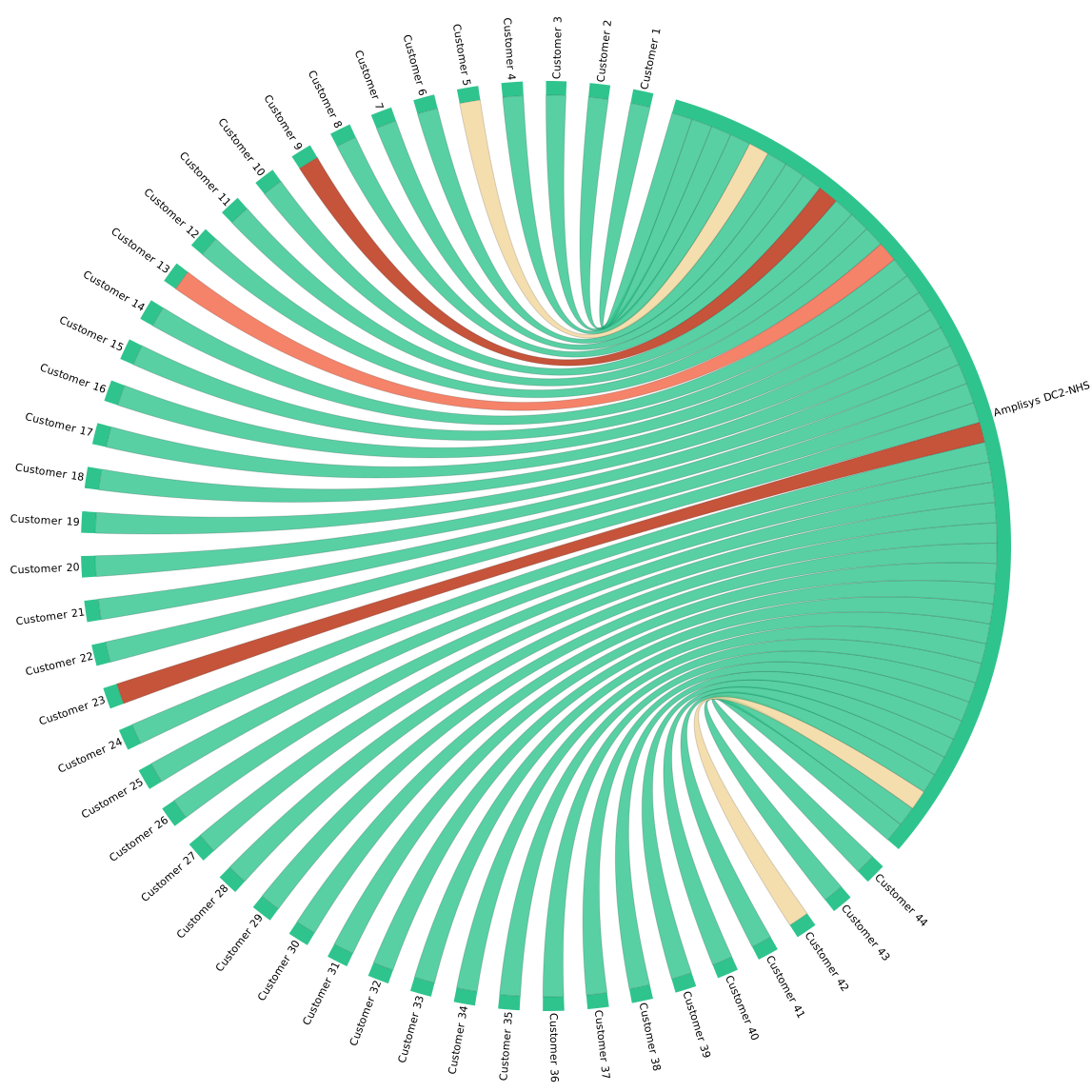 Obkio's Chord Diagram showing an MSP with Agents deployed in all their clients' sites
The Multi-Tenant Network Architecture: Distributed Collection, Centralized Management
The architecture combines two critical components. First, monitoring agents are distributed across your clients' networks, such as on-premises servers, cloud infrastructure, branch offices, and remote sites. These agents continuously collect network performance data (latency, jitter, packet loss, bandwidth) from wherever your clients actually operate.
Second, all this data flows back to your centralized MSP dashboard, where you switch between client networks instantly without separate logins.
Example of A Typical MSP Client:
Their headquarters are in Chicago, with three branch offices across the Midwest, AWS workloads in us-east-1, and 50 remote workers on VPN. If you're only monitoring from their HQ, you're blind to 80% of their infrastructure. Distributed network monitoring means agents monitoring from each location, measuring actual performance where users connect: branch to HQ, remote worker to VPN gateway, cloud to end user.
All that performance data comes back to your single dashboard. You see Client A's performance across all sites, switch to Client B with one click, compare trends across your entire portfolio, and manage everything from one interface.
What is Single-Tenant vs Multi-Tenant Network Monitoring for MSPs?
Single-tenant monitoring means deploying and maintaining separate infrastructure for each client. That's different databases, different configurations, different update schedules, different backup procedures. Client 1 needs an upgrade? You schedule it separately from Client 2. Client 3 wants a custom dashboard? You build it in a completely different system than Client 4's.
Multi-tenant monitoring eliminates this redundancy. One platform update benefits all clients simultaneously. One template configuration clones across 20 similar clients in minutes. One set of best practices applies across your entire customer base.
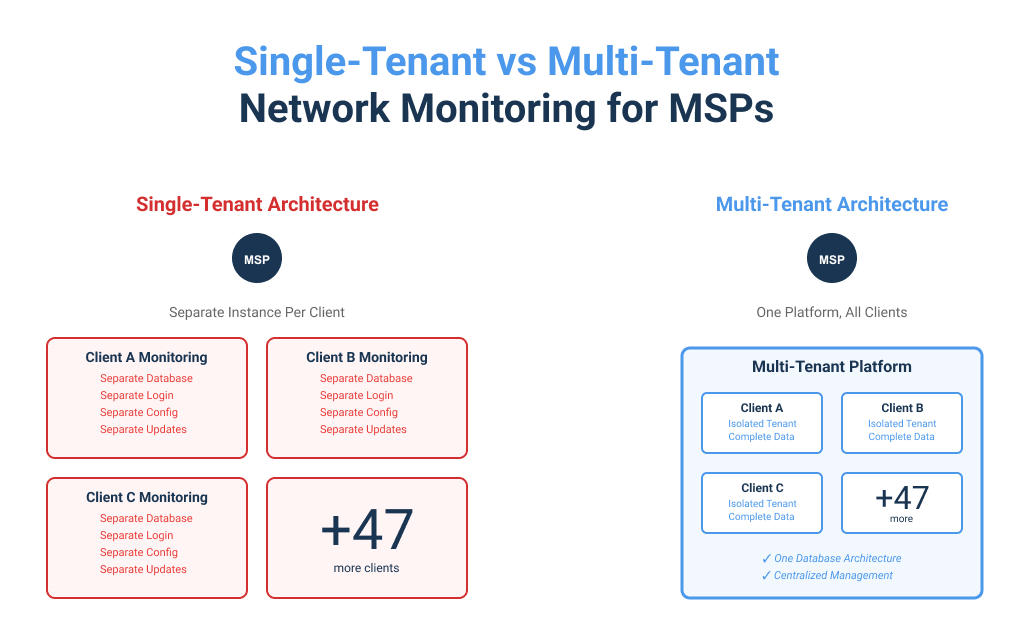
The math: Managing 50 clients with single-tenant monitoring means 50x the overhead. Managing 50 clients with a multi-tenant solution means approximately the same overhead as managing 10, because complexity doesn't multiply with every new customer.
What Are the Core Characteristics of Multi-Tenant MSP Network Monitoring?
1. Distributed data collection: Agents deployed across all client locations collect network metrics locally, measuring from actual network endpoints, not some theoretical central point three hops away from where problems occur.
2. Centralized management: One dashboard manages all clients and all their locations. Your team works from a single interface, whether troubleshooting Client A's VoIP issues or Client B's cloud connectivity.
3. Complete data isolation: Each client's monitoring data is completely separated. Client A cannot see Client B's performance under any circumstance. This is compliance-critical for most MSP contracts.
4. Role-based access control: Hierarchical permissions from MSP admin to individual client users. Your L1 tech sees only their assigned five clients. Senior engineers see everything. Client portal users see only their own metrics.
5. Scalable architecture: Add clients and locations without increasing management complexity. Client 51 onboards as easily as Client 5, and you're adding another tenant to the existing infrastructure, not deploying new systems.
6. Template-based deployments: Define gold/silver/bronze service tiers once, then apply across your client base with modifications only where specific requirements demand it.
7. Client portals: Read-only access for clients to view their own network performance. Clients stop calling to ask, "Is the network slow?" because they check the dashboard themselves.
Why MSPs Need Multi-Tenant Network Monitoring
If you're managing 20, 50, or 100+ client networks with separate monitoring tools for each one, you already know the problem: endless logins, scattered alerts, inconsistent configurations, and scaling complexity that multiplies with every new customer. Multi-tenant network monitoring solves this by giving you one platform that handles unlimited clients while keeping their data completely isolated. Here's why it's become essential for competitive MSPs.
1. Monitor Multiple Clients from One Platform
Here's your Monday morning with single-tenant monitoring:
- Log into Client A's system. Different credentials. Different interface. Different alert logic.
- Now Client B. Different login. Different dashboard.
- Now Client C, using a completely different vendor.
- By 10 AM, you've logged into 15 systems and you're halfway through your client list.
With multi-tenant monitoring, you log in once. Your dashboard shows all active alerts across all clients, colour-coded by severity, sorted by SLA priority.
For an MSP managing 30 clients, this eliminates 200+ unnecessary logins per week. That's 5-10 hours per technician saved on context switching, time spent solving problems instead of navigating platforms.
Centralized alerting means critical issues across your entire client base come to one place, one notification system, one workflow. No more monitoring multiple email inboxes, wondering if you missed something.
2. Scale Your MSP Without Scaling Complexity
With single-tenant monitoring, every new client means new infrastructure to deploy, new systems to configure, new backup procedures, and new update schedules. Your operational complexity grows linearly (or exponentially) with every customer.
Multi-tenant platforms break this pattern. Onboarding takes hours instead of days because you're not deploying new infrastructure. You create a new tenant in the existing infrastructure, clone a template from a similar client, deploy agents, and validate network data collection. The first client might take a few hours. Subsequent similar clients take minutes.
Whether managing 10 small businesses or 100 enterprise clients with distributed networks, you work from the same platform with the same workflows. Your monitoring infrastructure scales automatically.
The cost efficiency is straightforward. Single-tenant licensing multiplies with every customer: 50 clients means 50 licenses at full price. Multi-tenant platforms typically charge per monitoring agent. The more clients you add, the better your per-client economics become.
3. Keep Client Data Completely Isolated and Secure
Your clients trust you with network access, so that trust depends on absolute data security. Multi-tenant architecture ensures each client's monitoring data remains completely isolated, so that other clients cannot access it under any circumstances. This isn't just logical separation; it's enforced at the database, application, and access control levels.
This isn't just about security; it's about compliance. When clients ask about SOC 2, GDPR, or HIPAA, you demonstrate that their data exists in a completely segregated tenant with role-based access controls, audit logging, encryption at rest and in transit, and enterprise-grade security measures.
Monitor All Your Client Networks from One Multi-Tenant Network Monitoring Tool
Obkio's multi-tenant network monitoring platform lets MSPs manage unlimited clients with complete data isolation and distributed monitoring across all locations. Deploy your first client in minutes, scale effortlessly.

- 14-day free trial of all premium features
- Deploy in just 10 minutes
- Monitor performance in all key network locations
- Measure real-time network metrics
- Identify and troubleshoot live network problems


How Obkio's Multi-Tenant Monitoring Actually Works
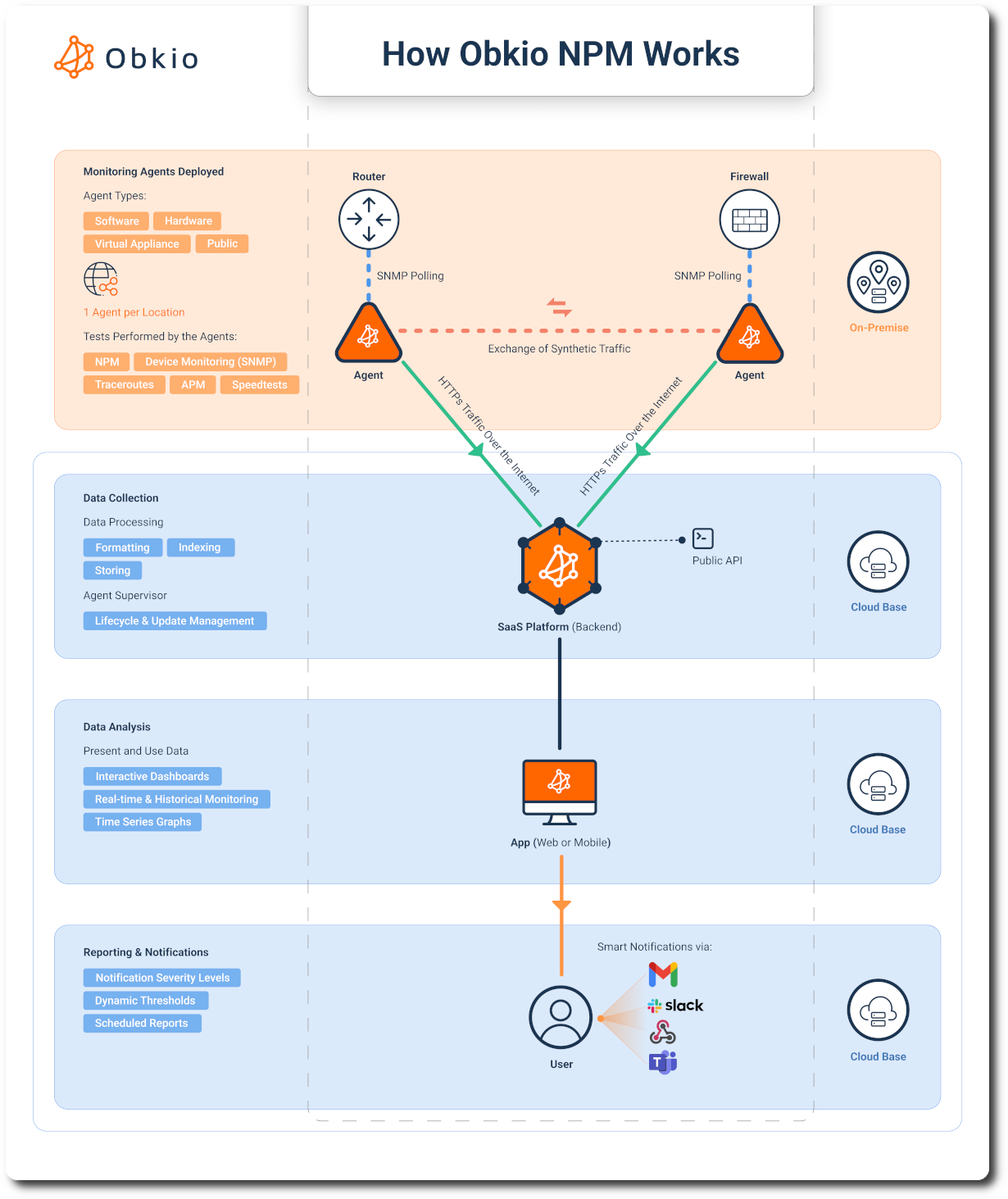
Understanding the technical approach behind Obkio helps MSPs see why it catches problems other monitoring tools miss. Unlike passive monitoring that only observes existing traffic or polling-based tools that check device status every few minutes, Obkio uses continuous synthetic monitoring with distributed agents to measure actual network performance in real-time.
Synthetic Monitoring with Distributed Agents
Obkio deploys lightweight monitoring agents at each client location requiring visibility: headquarters, branch offices, data centers, cloud environments, and remote worker endpoints. These agents continuously send synthetic test packets between each other at configured intervals, measuring latency, jitter, packet loss, and bandwidth utilization on every network path.

Real-Time Data, Centralized Visibility
Agents continuously measure network performance metrics, and transmit results to Obkio's cloud platform over encrypted HTTPS. Your centralized dashboard displays real-time performance across all clients and all their locations. When metrics breach configured thresholds, alerts trigger immediately and route to your team via email, Slack, Teams, PagerDuty, or webhooks.
End the MSP Blame Game With Obkio
In managed services, network issues often spark a blame game between MSPs, customers, and ISPs. Your client's users complain about slow performance. The client immediately assumes it's your fault, like it’s something that you configured wrong, your monitoring isn't working, or your support isn't responsive enough. You suspect it's their ISP's circuit degrading or their own LAN issues. The ISP insists their network is fine and points back at you or the customer's equipment.
Everyone's pointing fingers. Nobody has definitive proof. And you're stuck in the middle, defending your service while trying to actually solve the problem.
Here's the reality that every MSP knows but struggles to prove: 80% of network performance issues stem from problems on the customer's end: their LAN configuration, their wireless infrastructure, their local network devices, or their ISP's circuit. Not your MSP services. Not your monitoring setup. Not your configurations.
The challenge is proving it. Without clear visibility into every segment of the network path, you're troubleshooting blind. You can't definitively show whether the problem is the customer's switch, their ISP's last-mile connection, or something in between. So the blame game continues, tickets escalate, clients get frustrated, and your team wastes hours on conference calls trying to isolate issues instead of fixing them.
Obkio ends the blame game with objective data. Distributed monitoring agents deployed at the customer's location, in their ISP's network path, and at cloud destinations measure performance continuously across every network segment. When the client complains about slow cloud application performance, you don't argue, you show them the data.
MSP-Specific Pricing That Scales With Your Business
We understand MSP economics. You're not paying per-client licensing that multiplies with every customer you sign. Obkio offers special MSP pricing designed for profitability as you grow.

What Are the Key Features of Multi-Tenant Network Monitoring?
1. Centralized Dashboard with Instant Client Switching
Your dashboard provides a single pane of glass for all client networks. At 2 AM, when multiple clients have simultaneous issues, you're not logging into separate systems trying to triage. You're looking at one dashboard showing all active alerts, sorted by severity and SLA priority, with immediate access to switch between affected clients.
Real-time status overview across all clients means you identify patterns that wouldn't be visible in isolated systems. Four clients experiencing packet loss simultaneously? That's not four separate problems; that's potentially one upstream provider issue. You catch this immediately with centralized visibility, not hours later, after four separate tickets escalate.
2. Role-Based Access Control That Makes Sense
Your L1 technicians don't need access to all 50 clients. They need access to the 5-10 they actively support. Senior engineers need broader access for escalations. MSP administrators need full platform control. Client portal users need read-only access to their own data only.
This matters when onboarding new technicians or offboarding departing staff. You're not changing master passwords affecting all clients. You're adjusting individual user permissions. Former employees lose access immediately without disrupting your entire monitoring operation.
3. Distributed MSP Network Monitoring Across All Locations
This is the critical technical differentiator. Distributed network monitoring means deploying agents at every location where your clients' networks exist, not just monitoring from one central point, hoping that it represents the actual user experience.
Your client has their headquarters in Toronto with:
- 100 users
- Branch offices in Vancouver and Montreal with 20 users each
- AWS infrastructure in us-east-1
- Azure resources in westus2
- 50 remote workers on VPN.
There’s just a single agent at the Toronto HQ? You're measuring performance from one location to everywhere else. That tells you if Toronto can reach other sites, but not if Vancouver users can access AWS, if remote workers experience VPN latency, or if Azure-to-AWS connectivity is degraded.
Distributed monitoring means agents at each location, measuring actual performance where users connect. The Monitoring Agent in Toronto measures Toronto's perspective. The Monitoring Agent in Vancouver measures Vancouver's experience. Public agent in AWS measures cloud-to-cloud and cloud-to-branch performance. You get the complete picture across the entire distributed infrastructure.
This architecture reveals problems that centralized monitoring misses entirely. Vancouver branch experiencing high latency to AWS? You see it immediately because you have agents at both locations measuring that specific path. Toronto isn't affected. Montreal isn't affected. The problem is isolated to Vancouver-AWS connectivity. You've narrowed the troubleshooting scope in minutes instead of hours of user complaints.

Learn how SATLX Deploys Obkio’s NPM tools for Distributed Continent-Wide SD-WAN Monitoring. Discover how MSPs monitor & optimize customer SD-WAN performance.
Learn more

4. Automated Deployment and Template-Based Configuration
Onboarding new clients shouldn't require rebuilding configurations from scratch. When you sign a new client, clone the monitoring template. The platform automatically configures monitoring intervals, alert thresholds, notification channels, escalation procedures, and reporting schedules. You adjust client-specific details (site locations, IP addresses, contact info), but you're not reinventing the entire monitoring policy.
Bulk deployment lets you onboard multiple clients or sites simultaneously. New client with 10 branch offices? Deploy agents to all 10 locations, apply the template, and validate data collection. This takes hours or even minutes, not days.
5. Per-Client Reporting and SLA Tracking
Your clients pay for specific SLA commitments. You need documentation proving you met them. Multi-tenant monitoring provides automated reporting per client with historical performance data supporting SLA compliance claims.
Monthly and weekly reports automatically generate per client showing: average latency across all monitored paths, maximum latency spikes and when they occurred, packet loss percentages by location and time period, bandwidth utilization trends, availability/uptime metrics, and compliance against contracted SLA targets. These reports are white-labeled with your MSP branding.
This documentation matters when contracts renew. You're not guessing whether monitoring delivered value, you're showing specific incidents detected, average response times, SLA compliance percentages, and tangible improvements over the contract period.
How to Implement Multi-Tenant Network Monitoring
This setup guide walks through actual deployment using Obkio's platform as the concrete example.
Step 1: Assess Your MSP and Customer Networks
Before deploying anything, document what you're actually monitoring. This prevents deployment mistakes requiring backtracking later.
Inventory all client networks: List every client under contract. Note their locations (HQ, branch offices, data centers, cloud environments). Identify critical network architectures and paths (site-to-site, site-to-cloud, remote access VPN). Document existing monitoring tools needing replacement.
Define monitoring requirements per client tier: Your clients aren't identical, so don't treat them identically. Define service tiers based on contract value and SLA commitments.
Gold tier (high-value enterprise) might require agents at every site, aggressive thresholds, and 24/7 escalation. Silver tier (standard business) might use agents at primary sites, business-hours alerting. Bronze tier (basic monitoring) might get single-location monitoring and email-only notifications.
Establish baseline SLAs and alerting thresholds: What constitutes a problem? For most business applications, latency should stay under 50ms, jitter below 30ms for VoIP quality, and packet loss under 1% for reliable connectivity. These are starting baselines; adjust per client based on their specific applications.
Step 2: Deploy Your MSP Monitoring Account
Start with your own MSP infrastructure before touching client networks. This lets you validate the platform and understand how it works before explaining it to customers.
Start your MSP account: Sign up at obkio.com with your business email. The platform provisions your multi-tenant MSP account within minutes.
Follow the onboarding wizard: Configure your MSP organization details, set up primary admin users, and define notification channels (email, Slack, Teams, PagerDuty).
Deploy your first agents in your own office: Before deploying to clients, deploy agents in your own office to understand the process. Choose the appropriate agent type based on your infrastructure:
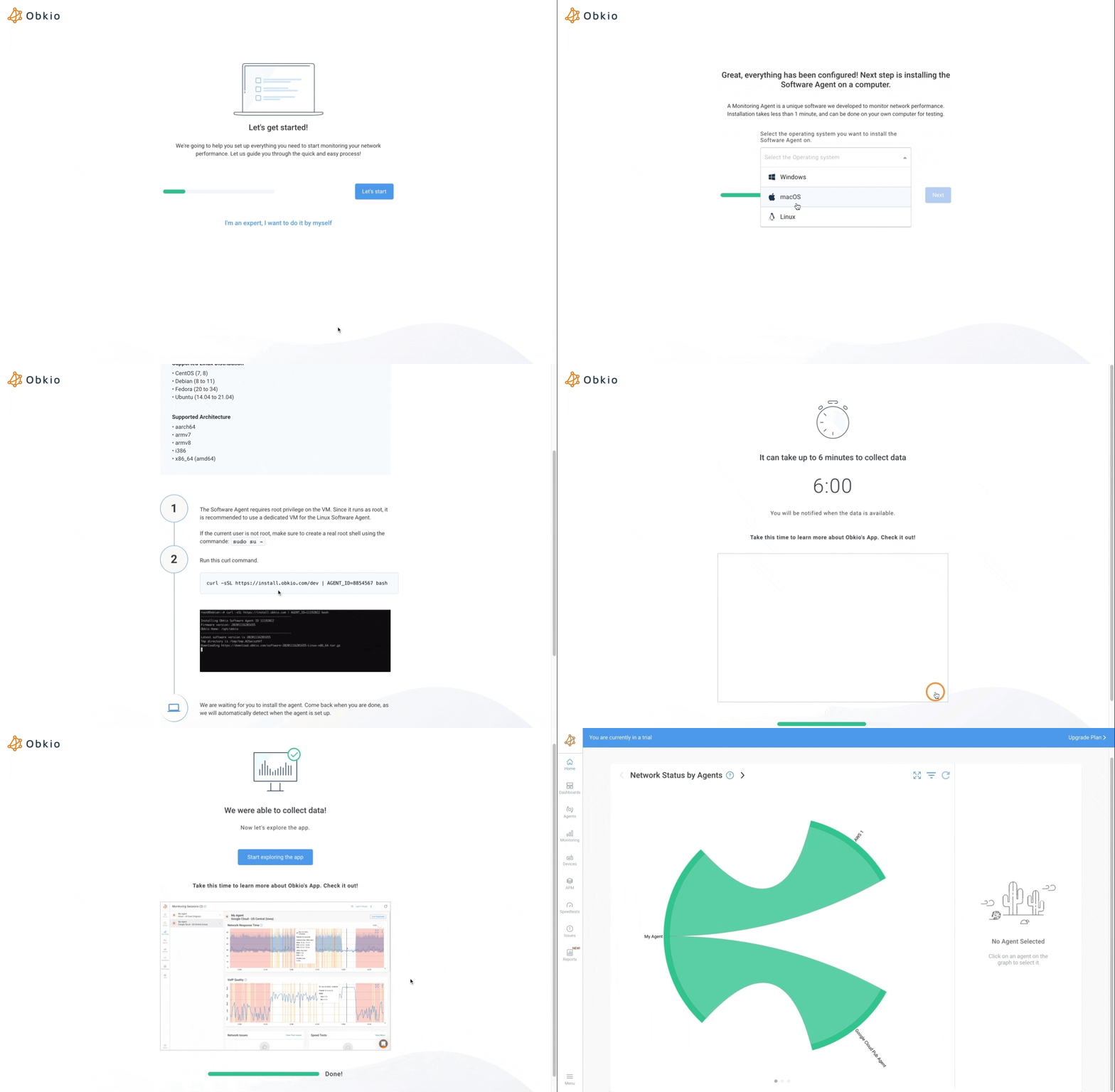
Software Agents (for servers and existing infrastructure):
- Linux Agent: Perfect for Linux servers (on-premises or cloud). Install with a single command line in terminal. Runs on any modern Linux distribution (CentOS 7+, Redhat, Debian, Ubuntu).
- Windows Agent: Install on Windows servers or desktops. Download the installer from the dashboard, run with provided Agent ID, agent appears online within 2-3 minutes.
- macOS Agent: For Mac computers (MacBook, iMac, Mac Studio). Simplified installation within minutes, perfect for remote worker monitoring.
- Docker Agent: Available as Dockerhub image. Perfect for container infrastructures (Kubernetes, Docker Swarm, AWS ECS). Works with or without permanent storage.
Hardware Appliances (for locations without servers):
- NUC11C4: Plug-and-play hardware appliance perfect for branch offices. Supports up to 25 monitoring sessions and speed tests up to 500 Mbps. Only two cables to plug: Power and Ethernet. No configuration needed on the appliance, everything done in the Obkio app. Association between hardware and agent is done with a serial number printed on device.
Virtual Appliances (for virtualized environments):
- VMware: For servers running VMware hypervisor. Deploy pre-configured OVA image.
- Hyper-V: For servers running Hyper-V hypervisor. Deploy pre-configured VHD image.
Validate agents are communicating: Check your dashboard. Deployed agents should appear with "online" status, showing location, version, and last communication timestamp. If offline or not appearing, troubleshoot network connectivity (agents require outbound HTTPS on port 443) and firewall rules.
Verify data collection: Within 5 minutes, you should see latency, jitter, and packet loss metrics appearing in dashboard graphs. If metrics aren't appearing despite agents showing online, validate that agents have network connectivity between each other. They measure performance between agent pairs using synthetic traffic, not just connectivity to the platform.
Step 3: Onboard & Monitor Your First Multi-Tenant Client Network
Choose a small, straightforward client for your first production deployment. You're learning the process: pick a client with 1-2 locations and simple requirements, not your most complex enterprise customer.
Create client tenant: From your dashboard, select "Add New Client" and enter details: organization name, primary contact, contracted service tier, and client-specific notes. The platform creates an isolated tenant for this client.
Deploy agents across client locations: Install monitoring agents at each location requiring visibility. Agent placement strategy matters significantly:
- Headquarters: Software agent on physical server or VM in server room, or hardware appliance if no servers are available
- Branch offices: Hardware appliances (NUC11C4) are perfect for distributed locations without IT infrastructure
- Cloud environments: Docker agents in AWS, Azure, or Google Cloud containers, or Linux agents on cloud VMs
- Remote workers: Windows or macOS agents on employee computers for work-from-home monitoring
Don't install everything at HQ and assume you're monitoring their distributed network. Branch office users complaining about slow performance? If you don't have an agent at that branch measuring local conditions, you're troubleshooting blind.
Configure monitoring sessions using templates: Instead of manually creating monitoring sessions between each agent pair, use Network Monitoring Templates. Templates automatically create monitoring sessions between specified lists of agents or agent groups.
Create your first template:
- Navigate to Monitoring page, click settings icon
- Click "Add" to create new template
- Name it descriptively (e.g., "Client A - All Sites to HQ")
- In first list, add all branch office agents or an agent group containing them
- In second list, add HQ agent
- Template automatically creates monitoring sessions between all branch offices and HQ
For example, if first list contains Agent-1 and Agent-2, and second list contains Agent-3 and Agent-4, template creates four sessions:
- Agent-1 ↔ Agent-3
- Agent-1 ↔ Agent-4
- Agent-2 ↔ Agent-3
- Agent-2 ↔ Agent-4
Use Agent Groups for scalability: Create agent groups for easier template management. Instead of adding individual agents to templates, add groups. When you add new agents to a group, templates automatically create appropriate monitoring sessions without template modifications.
Configure monitoring parameters: Each monitoring session defines: monitoring interval (1/5/15 minutes based on service tier), protocol (ICMP, UDP, or TCP), DSCP settings for QoS monitoring, and IP selection (public vs private for VPN monitoring scenarios).
Set alert thresholds per client SLA: Three threshold presets are available (Conservative, Moderate, Aggressive) that suit most use cases. For custom requirements, configure specific thresholds: latency exceeding 50ms sustained for 5+ minutes, jitter exceeding 30ms (impacts VoIP), packet loss exceeding 1% sustained, or any monitored path becoming completely unreachable.
Configure notification channels: Define how alerts reach your team. Options include: email to specific groups, Slack or Teams notifications, PagerDuty for after-hours escalation, webhook calls to your PSA for automatic ticket creation, and SMS for critical alerts. Configure different routing per severity; not every latency spike requires SMS at 3 AM.
Test and validate: Generate a test alert to verify notification routing works. Check that agents collect data properly, alerts are delivered to configured channels, client data appears in the correct isolated tenant, and you can switch between your MSP view and this client view seamlessly.
Step 4: Configure Monitoring Views, Alerting, and Reporting
Your first client is collecting data. Now configure how you consume that data operationally.
Create dashboards: Build your MSP overview dashboard showing all clients at a glance: active alerts across all clients colour-coded by severity, per-client summary status (green/yellow/red), and quick access to switch to individual client views.
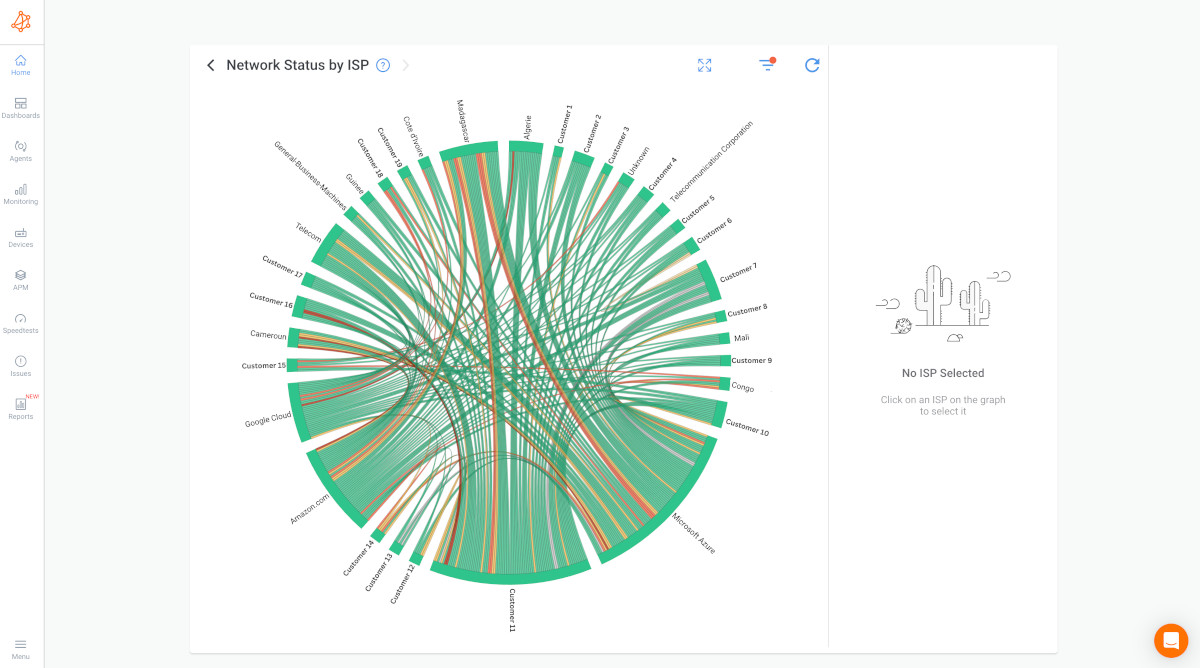
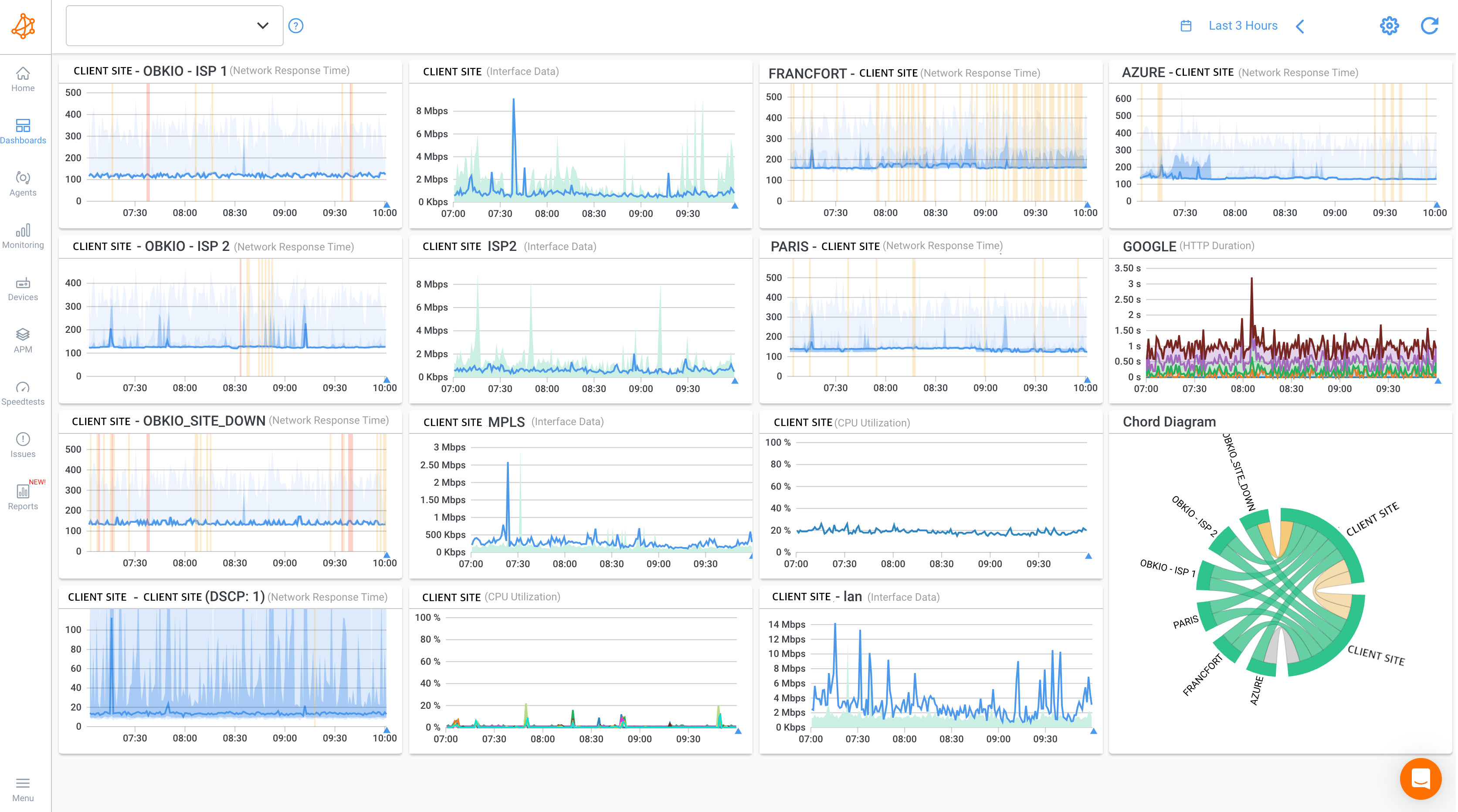 Obkio's dashboard showing an MSP collecting network performance data from all their clients' sites
Build per-client detailed dashboards showing: performance metrics for all monitored paths, real-time latency/jitter/packet loss graphs, historical trends over days/weeks/months, and bandwidth utilization.
Configure intelligent alerting: Set up alerting that reduces noise while catching real problems. Use threshold-based alerts (latency exceeds 50ms for 5+ consecutive minutes) not instantaneous spike alerts. Implement smart grouping where multiple alerts about the same incident consolidate into one notification. Configure maintenance windows for scheduled client downtime where alerting is automatically suppressed. Set up notification routing per client and per severity.
Set up automated reporting: Configure report generation per client: weekly performance summaries showing average metrics and significant incidents, monthly executive reports with SLA compliance documentation and trends, quarterly business review reports with long-term trend analysis. White-label these reports with your MSP branding.
Step 5: Scale to Additional Multi-Tenant Clients Efficiently
First client deployed successfully? Now scale the process across your remaining client base using Deployment Profiles and template cloning.
Use Deployment Profiles for mass agent installation: Deployment Profiles reverse the traditional agent deployment process. Instead of creating agents in the app first, you create a Deployment Profile that generates a Deployment Key. Agents installed with this key are automatically created in your app during installation with all settings from the profile.
Clone monitoring templates from similar clients: Don't rebuild configurations for every new client. Client 2 similar to Client 1 (both small businesses with single locations)? Clone Client 1's monitoring template. Adjust location-specific details (agent names, site identifiers) but keep monitoring intervals, alert thresholds, and reporting consistent. This cuts onboarding from hours to 30-60 minutes.
Multi-Tenant Monitoring Best Practices for MSPs
1. Standardize Monitoring Policies Across Similar Client Types
Create template monitoring configurations for common client profiles instead of custom-building every deployment. Define templates for: small single-location businesses, multi-site businesses, cloud-heavy clients, and enterprise clients. When new clients are onboarded, start with the appropriate template and adjust for client-specific requirements rather than building from a blank configuration.
2. Create Tiered Service Levels with Clear Definitions
Define gold, silver, and bronze monitoring tiers with specific capabilities documented in service contracts. Clearly communicate tier differences to clients during sales. Higher tiers cost more but provide earlier problem detection and faster response. Clients choose an appropriate tier based on business requirements and budget.
3. Automate Client Reporting and SLA Documentation
Configure automated report generation for every client, regardless of tier. Weekly reports show immediate issues. Monthly reports document SLA compliance for business reviews. Quarterly reports support strategic planning discussions. White-label all reports with your MSP branding. Include executive summaries for non-technical stakeholders and detailed metrics for technical staff.
4. Maintain Clear Escalation Procedures Per Client
Document escalation procedures for each client based on the contracted service level. Define: who receives initial alerts (L1 support), escalation timeframes if issues aren't resolved (escalate to L2 after 30 minutes for gold tier, 2 hours for silver), final escalation paths for major incidents (senior engineers, management, client notification), and after-hours coverage expectations (24/7 for gold, business hours only for bronze).
5. Regular Review and Optimization of Monitoring Coverage
Schedule quarterly reviews of monitoring configurations for each client. Verify agents are deployed at all critical locations, monitoring sessions cover all important network paths, alert thresholds remain appropriate, and reporting provides value during business reviews. Remove monitoring for decommissioned locations. Add monitoring for new locations or cloud migrations. Adjust thresholds based on historical patterns and actual incidents.

Learn to elevate MSP network monitoring with Obkio's versatile monitoring tool. Proactively optimize performance, troubleshoot efficiently, and exceed SLAs.
Learn more
Frequently Asked Questions About Multi-Tenant Network Monitoring
Q: What's the difference between multi-tenant and single-tenant network monitoring?
Multi-tenant monitoring allows MSPs to manage all client networks from one unified platform with isolated data per client, while single-tenant monitoring requires separate instances for each customer. With single-tenant, you'd maintain 30 separate monitoring tools for 30 clients. Multi-tenant gives you one login, one dashboard, with the ability to switch between clients instantly while maintaining complete data isolation.
Q: Can clients access their own network monitoring data?
Yes, most multi-tenant platforms include client portal functionality, giving customers read-only access to their own network performance data. You control exactly what each client sees (typically their real-time metrics, historical trends, and automated reports) without exposing your MSP management functions or other clients' data. You can white-label these portals with your MSP branding.
Q: What network performance metrics should MSPs monitor for clients?
MSPs should monitor core metrics, including: latency (round-trip time between locations, typically should stay under 50ms), jitter (variation in latency, should be under 30ms for VoIP quality), packet loss (should remain below 1% for acceptable performance), and bandwidth utilization (monitoring for congestion). Additionally, track availability/uptime for critical paths, monitor performance to cloud applications (Microsoft 365, Salesforce, AWS), and measure WAN/VPN tunnel performance between sites.
Q: Does multi-tenant monitoring support cloud and hybrid networks?
Yes, modern multi-tenant platforms support distributed monitoring across on-premises networks, cloud environments (AWS, Azure, Google Cloud), hybrid infrastructures, SD-WAN deployments, and remote/branch office locations. You deploy monitoring agents wherever your clients' networks exist: physical servers in data centers, virtual machines in the cloud, or branch office routers. The distributed architecture collects performance data from all these locations and aggregates it in your centralized MSP dashboard.
Q: How do MSPs maintain data security with multi-tenant monitoring?
Multi-tenant platforms maintain data security through complete tenant isolation; each client's data exists in a logically separated environment where other clients cannot access it under any circumstances. This includes separate databases or database schemas, isolated user authentication, and strict access controls enforced at application and data layers. RBAC ensures your MSP administrators have full access, your technicians see only assigned clients, and client portal users access only their own data. Leading platforms also provide audit logging, encryption at rest and in transit, and compliance certifications (SOC 2, ISO 27001).
Q: Can multi-tenant monitoring integrate with PSA and RMM tools?
Yes, multi-tenant platforms typically offer integrations with popular MSP tools, including PSA platforms like ConnectWise Manage and Autotask, RMM tools, and ticketing systems. These integrations allow you to automatically create tickets when network issues are detected, sync client and asset information between systems, include network performance data in billing workflows, and consolidate operational data in your existing MSP stack. Many platforms also provide webhooks and APIs for custom integrations.
Q: How does multi-tenant monitoring handle alerting across multiple clients?
Multi-tenant platforms provide centralized alerting with client-specific customization. You receive all alerts through one notification system, but each alert is tagged with client name, affected location, and severity level so you can prioritize responses appropriately. You can configure different alert thresholds per client based on their SLA requirements. Alert routing lets you assign specific technicians to specific clients, set up escalation procedures per customer, and define business hours and maintenance windows individually.
Ready to See How Multi-Tenant Monitoring Works for Your MSP?
Every MSP's client mix is different. Some manage 10 enterprise clients with complex distributed networks. Others handle 100+ small businesses with straightforward monitoring needs. Your specific requirements (agent counts, deployment strategies, integration needs, service tier structures) determine your optimal implementation approach.
Book a demo with our team to walk through your client portfolio, discuss deployment strategies for your specific use cases, and see exactly how multi-tenant monitoring scales across your operations. We'll show you real dashboards, demonstrate mass deployment workflows, and map out your implementation timeline.
- 14-day free trial of all premium features
- Deploy in just 10 minutes
- Monitor performance in all key network locations
- Measure real-time network metrics
- Identify and troubleshoot live network problems


