











 Obkio Blog


 Subscribe
Table of Contents
Table of Contents
The rise of hybrid work has fundamentally changed where IT problems occur. Five years ago, most network issues happened in your data center or office network (infrastructure you could access, control, and troubleshoot directly). Today, the majority of critical issues occur in home offices, coffee shops, and remote locations where you have zero infrastructure access and limited visibility.
IT teams are struggling to support remote workers effectively. You're fielding "my Internet is slow" tickets from users on residential ISPs you can't monitor. You're troubleshooting VPN issues without seeing the last-mile connection. You're guessing whether problems are the user's Wi-Fi, their ISP, or your infrastructure since traditional monitoring tools stop at your network edge.
That's where remote network monitoring comes in - the ability to monitor performance from the remote worker's workstations. And that's what we'll be covering in this article:
- What remote network monitoring is and how it differs from traditional approaches
- 10 benefits that solve real distributed workforce challenges
- How to implement effective remote network monitoring
- Why endpoint-based visibility is the only way to support modern remote work
Let's start with the fundamentals.
What is Remote Network Monitoring (RMON)? 
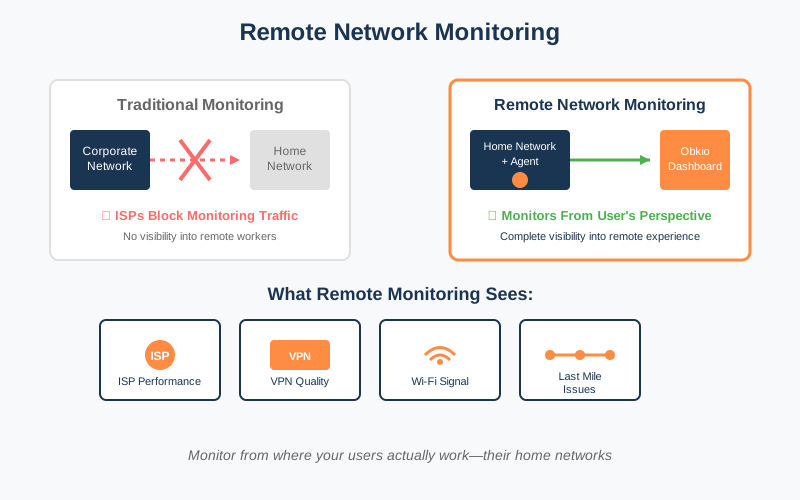
Remote network monitoring (RMON) tests network performance from the remote user’s endpoint perspective rather than a centralized or corporate network. It works by deploying monitoring agents directly on remote user devices (laptops, workstations) to continuously monitor connectivity, application performance, and network paths from where issues actually occur. ß Unlike traditional infrastructure monitoring that stops at your network edge, RMON sees the complete path: from the user's device through their home network and ISP to corporate resources. This matters because 80% of remote work issues happen in segments that traditional monitoring can't see. Segments like home Wi-Fi, residential ISP connections, and the "last mile" between corporate networks and user locations.
The fundamental shift is this: you're monitoring unmanaged networks (home ISPs, consumer routers) where you have zero infrastructure access, not the managed corporate equipment you control.
The Remote Network Monitoring Challenge
Traditional monitoring was built for on-premise infrastructure. Network engineers could walk the data center, access switches via SNMP, and run traceroutes to any device. That world is gone.
The visibility gap now exists between your corporate network edge and the remote worker's device. That's exactly where most problems occur. Your monitoring dashboard shows green, but users can't connect to VPN. Microsoft Teams calls drop mid-meeting. "The network is slow" tickets flood your help desk, but you're flying blind.
This matters because remote workers aren't a temporary exception anymore. They represent critical business operations. Sales teams closing deals. Support teams handling customer issues. Executives making strategic decisions. When their network fails, your business stops.
Monitor Your Remote Workforce with Obkio
Obkio is a synthetic, distributed network monitoring and observability platform that tests network performance from every location in your infrastructure, including remote worker endpoints. Unlike traditional monitoring tools that only see your corporate network, Obkio deploys lightweight agents to remote user devices and continuously tests connectivity, application performance, and network paths from where issues actually occur.
See What Your Remote Workers Experience Before They Call IT
What your Remote Team gets:
- Monitors from the user's perspective, not just corporate infrastructure
- Works with residential ISPs that block traditional monitoring approaches
- Scalable plans for 50, 100, 150, 200 or more remote users
- Lightweight monitoring agent with minimal performance impact
- Troubleshoot remotely without on-site visits
Obkio solves each remote monitoring challenge below. Deploy agents on remote worker devices, run continuous tests from their exact location, and see network performance the way they experience it.
Start Your Free Trial | View Remote Users Plan
Remote Network Monitoring Benefit #1: Support Remote Distributed Teams at Scale with Centralized Visibility
You can't monitor 50, 100, or 200+ remote locations one-by-one. It's impossible. Each remote user has different ISPs, home networks, and connection quality. So IT pros can’t monitor and manually troubleshoot each ticket, especially if they don’t have the visibility to do so because they don’t have any performance data from the remote user’s point of view. You can't identify whether issues are isolated incidents or widespread patterns affecting multiple regions.
Your current approach probably looks like this:
- User calls.
- You ask them to restart their router.
- Hope it works.
- Repeat 47 times today.
How Remote Network Monitoring Solves This
Remote Network Monitoring helps companies collect information remotely, so they can view the current status of their remote workers’ networks from a centralized dashboard, and troubleshoot remotely.
- Monitor From One Dashboard: View all remote workers from a single centralized interface instead of trying to track each location individually
- Compare Across Locations: Instantly compare network performance across different users, offices, cities, and regions to identify which areas need attention
- Spot Widespread vs. Isolated Issues: Quickly distinguish between one person having a problem and an entire region or ISP experiencing issues, so you know how to prioritize your response
- Scale Without Adding Headcount: Add new remote workers to your monitoring without needing additional IT staff or infrastructure—the system scales as your team grows
A single dashboard provides visibility across your entire remote workforce. Obkio Chord diagram shows every user's network performance with colour-coded status indicators. Green means healthy. Yellow means degrading. Red means critical issues requiring immediate attention.
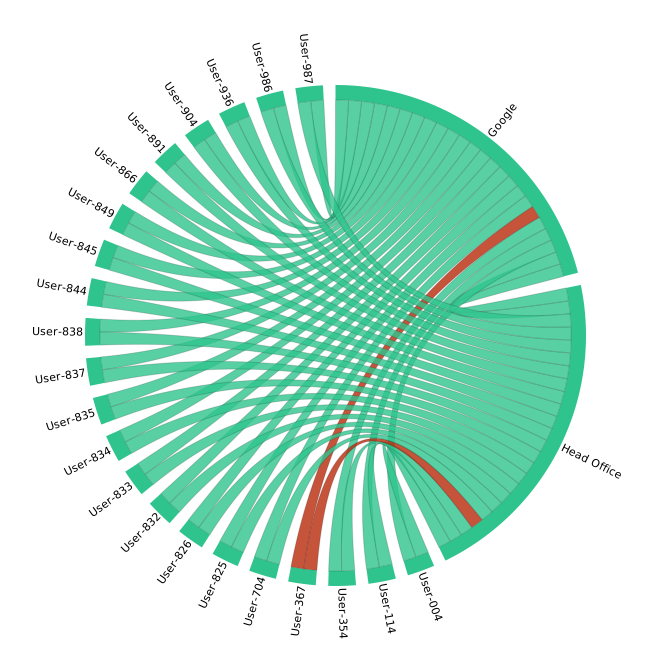
Compare performance across users, regions, and Internet service providers. Scale monitoring as your remote workforce grows without adding IT overhead. Deploy to 50 users or 500 using the same process. Centralized visibility means one dashboard, one interface, complete control.
Remote Network Monitoring Benefit #2: Overcome ISP Limitations That Block Traditional Network Monitoring
Most IT teams struggle with remote monitoring since they can't properly monitor remote workers. Not because they lack tools, but because residential ISPs block the traffic those tools need.
ISPs block 80% of ICMP traffic inbound to residential connections for security and bandwidth management. This isn't malicious. It's standard practice. But it kills traditional ping-based and SNMP monitoring completely.
Your monitoring dashboard shows everything is fine because it can't test what it can't reach. Meanwhile, your remote employee can't connect to VPN, can't access corporate resources, and is about to call IT.
How Remote Monitoring Solves This
Agent-based network monitoring runs from inside the home network, bypassing ISP ICMP blocks entirely. Obkio Agents deploy directly on remote worker devices so they can run tests run from where problems actually occur: the user's location.
- Bypass ISP Blocks Entirely: Deploy lightweight agents directly on user devices that monitor from inside the home * network, eliminating the ISP blocking problem that kills traditional monitoring
- Monitor From the User's Side: Run all tests from the user's location outward toward corporate resources, rather than trying to ping into their residential network from the outside
- See the Last Mile: Gain visibility into the network segment between the ISP and user's device—the exact area where traditional tools go blind because residential ISPs block inbound monitoring traffic

There are additional features such as Network Destinations, which send test traffic FROM the user's location, not TO it. This changes everything. You're no longer trying to ping through ISP firewalls. You're testing from inside the network where ISP blocks don't apply.
Monitor network performance from inside the home network where traditional tools fail. You finally get real visibility into the "last mile" segment that's been invisible until now.
Remote Network Monitoring Benefit #3: Troubleshoot Remote Network Issues Without Being On-Site
You can't physically access remote workers' networks. You're relying on non-technical users to describe network problems. "It's slow" tells you nothing. "Sometimes Teams freezes" doesn't narrow it down. "I think maybe the Wi-Fi?" is your starting point.
Your troubleshooting becomes guessing. "Try restarting your router." "Check your Wi-Fi." "Maybe restart your computer?" You're scheduling on-site visits or shipping equipment because you have no data.
This costs time and money. But worse, it tanks user productivity while you're troubleshooting blind.
How Remote Monitoring Solves This
Because Remote Network Monitoring monitor network performance from the remote users’ actually network, you see exactly what the user sees in real-time. Not their description. Not their interpretation. The actual network metrics from their device.
- Diagnose Issues Remotely: See exactly what's happening on each user's network connection in real-time from your desk, eliminating the need for on-site visits or shipping equipment
- Trace the Problem Path: Follow network performance hop-by-hop from the user's device through their router, ISP, VPN, and corporate network to pinpoint exactly where issues occur
- Run Tests From Remote User Locations: Execute speed tests, VPN checks, and connectivity diagnostics directly from the remote worker's location without requiring them to do anything
- Access Historical Data: Review past performance to diagnose intermittent issues even after they've occurred, identifying patterns the user might not have noticed
- Replace Guesswork With Data: Stop asking users to "restart their router" and instead provide specific fixes based on what the data shows is actually wrong
Network path analysis traces performance issues hop-by-hop without travelling. Obkio's Visual Traceroutes show the complete path from the user's device to corporate resources. Packet loss at hop 7? That's their ISP. Latency spike at hop 3? Home router problem.

Data-driven troubleshooting replaces guesswork. Run tests remotely: Speed tests validate bandwidth. VPN performance checks identify connection issues. Application connectivity tests confirm whether specific services are accessible.
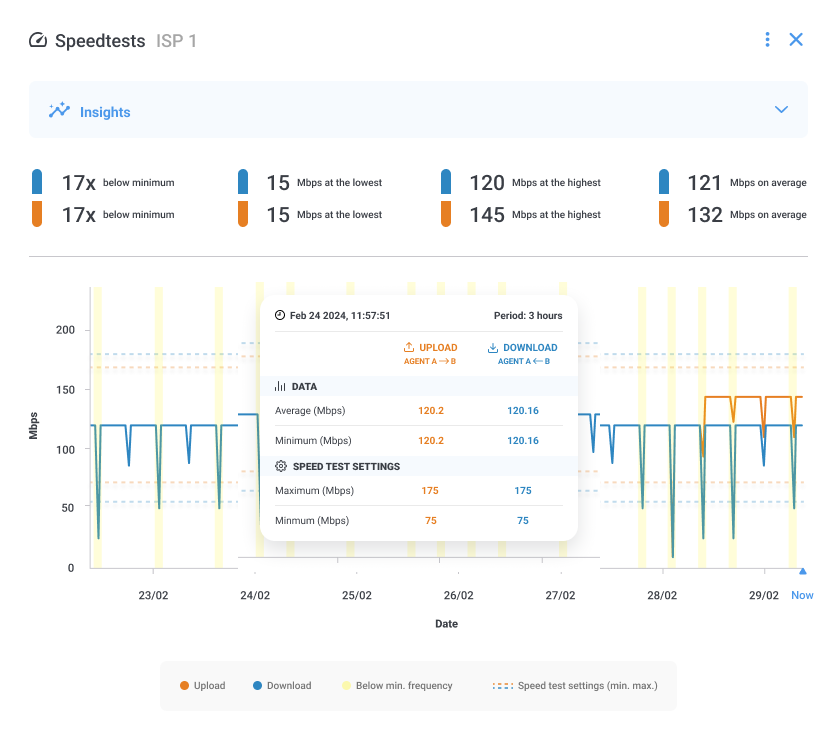
Obkio's On-demand Speed Test runs bandwidth tests from the user's location, not yours. Fix issues in minutes instead of days. No site visits. No shipped equipment. Just definitive answers.
Remote Network Monitoring Benefit #4: Solve Last Mile Network Problems
The "last mile" (the connection between your corporate network edge and the user's device) is where most remote network problems occur. This is IT's blind spot because traditional monitoring tools only monitor from the centralized corporate network, so they never reach the last mile.
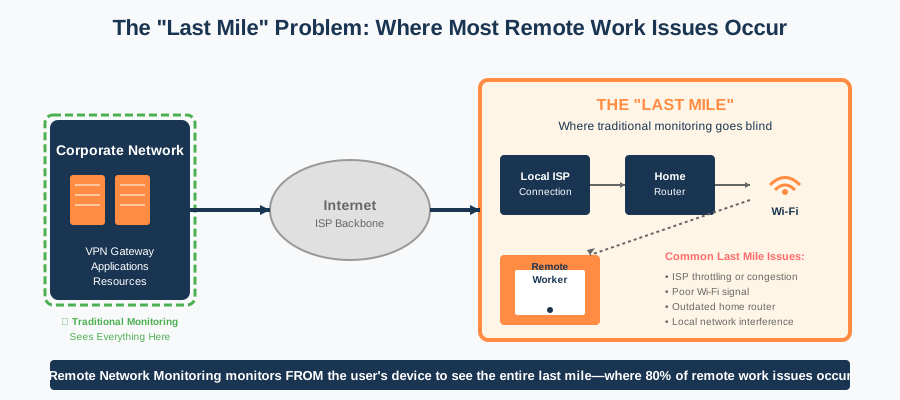
What Are Common Last Mile Issues (All Invisible to Traditional Monitoring)
- Poor Wi-Fi signal in home offices
- ISP bandwidth throttling or congestion during peak hours
- Residential router performance issues and firmware bugs
- Local network interference from neighbouring Wi-Fi networks
Traditional monitoring stops at your network edge. Everything beyond that? Invisible.
How Remote Monitoring Solves This
Agent-based remote network monitoring captures performance throughout the whole network path, up until the last mile. You're not trying to see through the ISP firewall. You're monitoring from the other side of it.
- Diagnose Issues Remotely: See exactly what's happening on each user's network connection in real-time from your desk, eliminating the need for on-site visits or shipping equipment
- Trace the Problem Path: Follow network performance hop-by-hop from the user's device through their router, ISP, VPN, and corporate network to pinpoint exactly where issues occur
- Run Tests From User Locations: Execute speed tests, VPN checks, and connectivity diagnostics directly from the remote worker's location without requiring them to do anything
- Access Historical Data: Review past performance to diagnose intermittent issues even after they've occurred, identifying patterns the user might not have noticed
- Replace Guesswork With Data: Stop asking users to "restart their router" and instead provide specific fixes based on what the data shows is actually wrong
You can monitor the entire network path, including segments you don't control, such as Home networks, the ISP connection, the Internet backbone, and the Corporate network. You see all of it.

It identifies whether issues are Wi-Fi (weak signal), ISP (congestion), or user-side equipment (outdated router). Stop guessing which component is failing.
It empowers users with data to take to their ISP when needed. "My Internet is slow" gets them nowhere. "Your infrastructure at hop 4 shows 18% packet loss between 2-4pm daily" gets action.
Network path analysis with Obkio's Visual Traceroutes separates last-mile issues from corporate network problems definitively. No more finger-pointing between teams.
Remote Network Monitoring Benefit #5: Proactively Identify Network Issues Before Remote Users Report Them
IT only learns about issues when users submit help desk tickets. By then, productivity is already lost. That sales call dropped. That customer support session failed. That executive presentation froze.
Your help desk gets overwhelmed with reactive support. Issues escalate before IT can respond. You're always playing catch-up.
How Remote Monitoring Solves This
Continuous testing catches performance degradation early. We specifically recommend continuous synthetic monitoring tools like Obkio that test network performance 24/7, even when users aren't actively working.
- Continuously Test in Background: Run synthetic monitoring tests 24/7 that check network performance even when users aren't actively noticing or reporting issues
- Alert IT Immediately: Receive automated notifications the moment performance drops below acceptable thresholds, catching problems in their early stages
- Detect Gradual Degradation: Spot slow performance declines over hours or days that users might adapt to without realizing they're working with degraded network quality
- Identify Emerging Patterns: Recognize trends like peak-hour slowdowns or capacity issues before they become widespread user complaints
- Fix Before Impact: Resolve network problems before they escalate to the point where users lose productivity and submit frustrated help desk tickets
- Reduce Ticket Volume: Dramatically cut down "slow network" and "can't connect" tickets by addressing issues proactively rather than reactively

This shifts you from reactive to proactive: fix issues before they impact work. User experiences degraded Teams quality? You see it before they open a ticket. ISP having problems? You're already investigating before the flood of complaints.
Customizable alerts notify IT when performance thresholds are breached. Set latency limits. Define packet loss tolerances. Configure jitter thresholds. When metrics cross those lines, you know immediately.
The result: reduced help desk volume and faster resolution times. Fewer tickets because you're preventing issues. Faster fixes because you have data before troubleshooting starts.
Remote Network Monitoring Benefit #6: Pinpoint Whether Remote Network Issues Are Network, ISP, or Application-Related
When issues arise with no data and no proof of the source of the problem, it causes a major back-and-forth between ISP, VPN provider, SaaS vendors, and IT as they try to identify the root cause, and place the blame.
Whether you're dealing with a vendor, an MSP or an ISP, they need support because they need to take action or be able to escalate your ticket to the right department to actually get your problem solved. Vendor support requires objective data before they'll take action. Users are caught in the middle, still unable to work.
Sound familiar? "Not our problem, contact your ISP." "Everything looks fine on our end." "Must be your VPN." Meanwhile, the user's still can't connect.

How Remote Monitoring Solves This
Remote Network Monitoring covers every network path, from your corporate network, remote locations, and over the Internet. Hop-by-hop network path analysis shows performance at each segment. You see exactly where latency spikes, where packet loss occurs, where jitter increases. Not guessing. Looking at data.
- Show Performance at Each Hop: Display network metrics at every point along the path to reveal exactly where latency, packet loss, or connection issues originate
- Determine the Responsible Party: Clearly identify whether the ISP, VPN provider, corporate network, cloud application provider, or home equipment is causing the problem
- Stop Vendor Finger-Pointing: Present objective performance data that eliminates debates between different vendors all claiming the problem is elsewhere
- Separate Network From Application: Monitor specific applications independently to determine if poor performance is a general network issue or application-specific problem
- Accelerate Vendor Support: Provide detailed performance reports when opening tickets with ISPs or SaaS providers, dramatically improving their response time and resolution
- Target Your Troubleshooting: Immediately focus your efforts on the actual problem source instead of wasting time investigating systems that are working fine
Objective data ends the blame game. With Obkio, you clearly identify whether latency/packet loss occurs at the ISP, VPN tunnel, corporate network, or application layer. Each hop is measured. Each segment is tested.
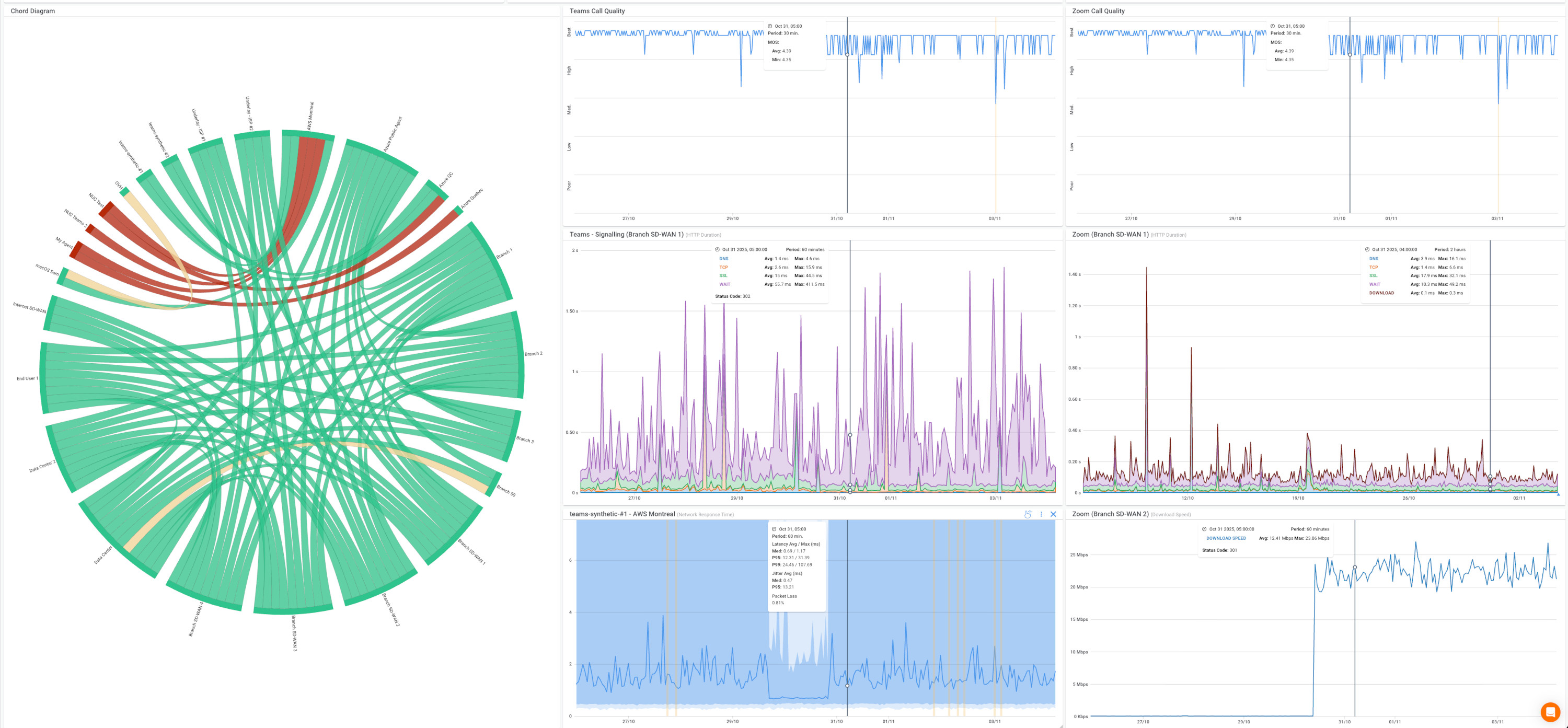
Microsoft Teams monitoring separates Teams-specific issues from general network problems. Is it Teams? Or is it the network? You know definitively.
Faster troubleshooting with clear evidence. Bring proof to vendor support calls: "Your infrastructure at hop X shows these metrics at these times." Skip the scripted troubleshooting. Get to resolution.
Remote Network Monitoring Benefit #7: Improve Productivity and Remote Worker Satisfaction
Network issues cause frustration and lost productivity. Remote workers feel unsupported when connectivity problems persist. "IT can't help because they can't see my network" becomes the recurring theme.
It's difficult to quantify the business impact of network performance. How much revenue did that dropped sales call cost? How many support tickets got delayed? What's the productivity loss when Teams calls freeze every afternoon?
How Remote Monitoring Solves This
Demonstrate IT's commitment to supporting remote work. When users see you identifying and fixing issues before they report them, perception changes. IT becomes proactive support, not reactive firefighting.
- Show You're Actively Supporting Remote Work: Demonstrate to employees that IT is monitoring their experience and committed to ensuring they can work effectively from home Prevent Frustrating Disruptions: Catch and fix issues before they cause the unexplained slowdowns, connection drops, and application timeouts that frustrate remote workers
- Minimize Lost Work Time: Reduce the amount of time employees spend dealing with network problems instead of doing their actual jobs
- Quantify the Impact: Measure and report on network uptime, issue resolution times, and performance improvements to show the business value of your remote monitoring
- Clarify It's Not Surveillance: Emphasize that monitoring focuses on network performance and connectivity quality, not tracking employee activity or productivity
- Build Trust in Remote Work: Create confidence that network issues will be rare and quickly resolved, making employees feel just as supported working remotely as they would in the office
Reduce frustration from unexplained connectivity issues. Users understand problems better when you can explain them: "Your ISP is having congestion issues between 2-4pm. Here's the data. We've opened a ticket with them."
Quantify downtime and productivity impact. Track when issues occur, how long they last, which users are affected. Build business cases for ISP upgrades or equipment improvements with real data.
Important clarification: This is network performance monitoring, not employee surveillance. You're tracking packets and latency, not keystrokes and screen time. Big difference.

Remote Network Monitoring Benefit #8: Identify Home & Remote Network Equipment Issues
Remote workers use consumer-grade routers, modems, and Wi-Fi equipment. You have no visibility into home network hardware quality or configuration. Users don't know if their equipment is causing problems.
Is it the ISP or their router? Users can't tell. You can't tell without data. Difficult to distinguish between external ISP problems and internal home equipment issues.
Users may need equipment upgrades, but don't know it. They're running 5-year-old routers that overheat under load. Their modem firmware hasn't been updated since 2019. Their Wi-Fi is on the same channel as 12 neighbours.
How Remote Monitoring Solves This
Remote Network Monitoring tracks network performance at the device level, showing local network quality. Track metrics from the endpoint itself. See what's happening at the device layer before traffic even leaves their home network.
- See Home Equipment Performance: Monitor how consumer-grade routers, modems, and Wi-Fi access points are actually performing in users' home environments
- Distinguish Equipment From ISP Problems: Separate issues caused by the user's aging router or poor Wi-Fi setup from problems originating with their internet provider
- Compare Wired vs. Wi-Fi: Identify when Wi-Fi signal strength, interference, or configuration is the root cause by comparing wireless performance to wired connection performance
- Recommend Targeted Upgrades: Provide evidence-based recommendations about when users need better routers, Wi-Fi extenders, or equipment replacements rather than guessing
- Confirm Upgrades Work: Verify that network performance actually improves after users invest in new equipment, proving the upgrade was worth it

Identifies when issues originate from home equipment versus external sources. Consistent packet loss starting at the first hop after the device? That's their equipment. Performance degrades three hops into the ISP network? That's external.
Provides data to help users make informed decisions about equipment upgrades. "Your router shows signs of overheating during peak usage. Consider upgrading to business-grade equipment with better cooling."
Separate Wi-Fi performance from wired connection performance. Test both. If wired is fine but Wi-Fi shows issues, you know exactly what needs fixing.
Remote Network Monitoring Benefit #9: Monitor VPN Performance Specifically
VPN is the critical lifeline for remote workers accessing corporate resources. But traditional monitoring can't see VPN tunnel performance from the user's perspective.
VPN issues manifest as "everything is slow" without clear diagnosis. Is it authentication? Tunnel performance? Gateway capacity? Split-tunnel configuration? User location? ISP? You're guessing.
How Remote Monitoring Solves This
Tests VPN performance from where users actually connect. Not from your data center to the VPN gateway. From the user's home network through their ISP to your VPN infrastructure.
- Test From Where Users Connect: Measure VPN performance from the user's home network where they actually establish connections, not just from the corporate side
- Track VPN-Specific Metrics: Monitor latency, packet loss, jitter, and throughput specifically through the VPN tunnel to see how the VPN affects user experience
- Measure VPN Overhead: Compare network performance with and without VPN active to quantify exactly how much the VPN connection impacts speed and responsiveness
- Catch Capacity Problems Early: Detect when your VPN gateway is approaching capacity by identifying when multiple users experience simultaneous performance degradation
- Spot Configuration Issues: Identify split-tunnel misconfigurations, authentication delays, routing problems, or connection drops that affect specific user groups
- Plan VPN Infrastructure: Use historical trends to predict when you'll need additional VPN capacity as your remote workforce grows
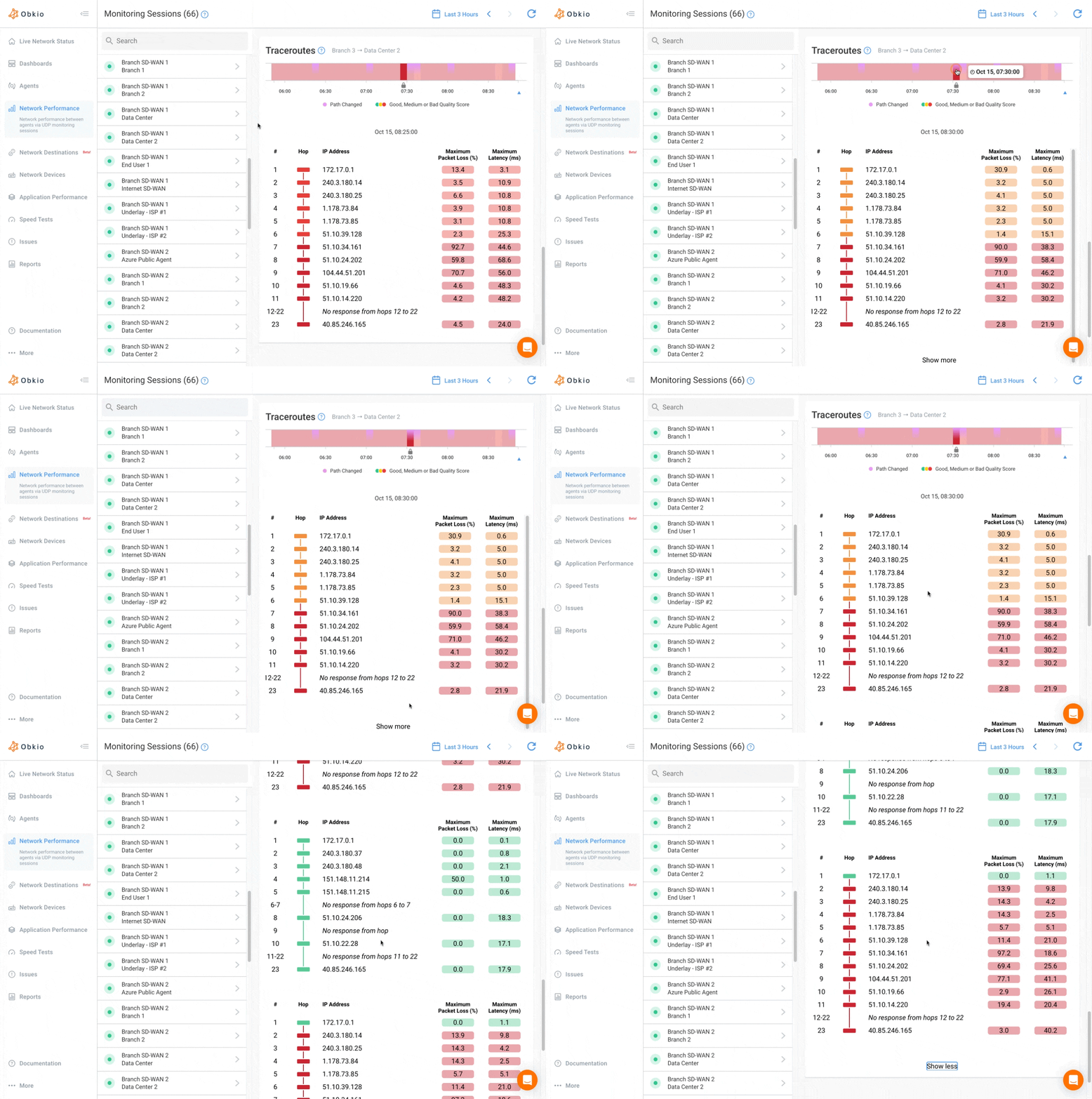
Identify VPN gateway overload before it impacts all users. You see capacity approaching limits before performance tanks. Scale proactively instead of reactively.
Detects split-tunnel misconfigurations affecting specific applications. Routing issues that send traffic through the tunnel when it should go direct, or vice versa.
Remote Network Monitoring Benefit #10: Compare ISP Performance Across Your Remote Workforce
Remote workers use dozens of different ISPs across various regions, so you have no way to know which ISPs provide reliable performance for work-from-home scenarios. You also don't know if the issue is coming from your remote workers' ISP or your company-wide ISP.
To make things even harder, you also have to identify whether problems are isolated incidents or ISP-wide patterns. One user complains about their ISP. Is it them? Or are all ISP’s users having issues?
Let’s say remote workers opt for ISP plans that don't deliver better performance. Then they upgrade to business-class Internet but see no improvement. Money was wasted because you couldn't measure actual performance and have historical data to prove to the ISP.
How Remote Monitoring Solves This
Dashboard aggregates and compares performance metrics across ISPs and regions. Filter by provider. Sort by location. Spot patterns immediately.
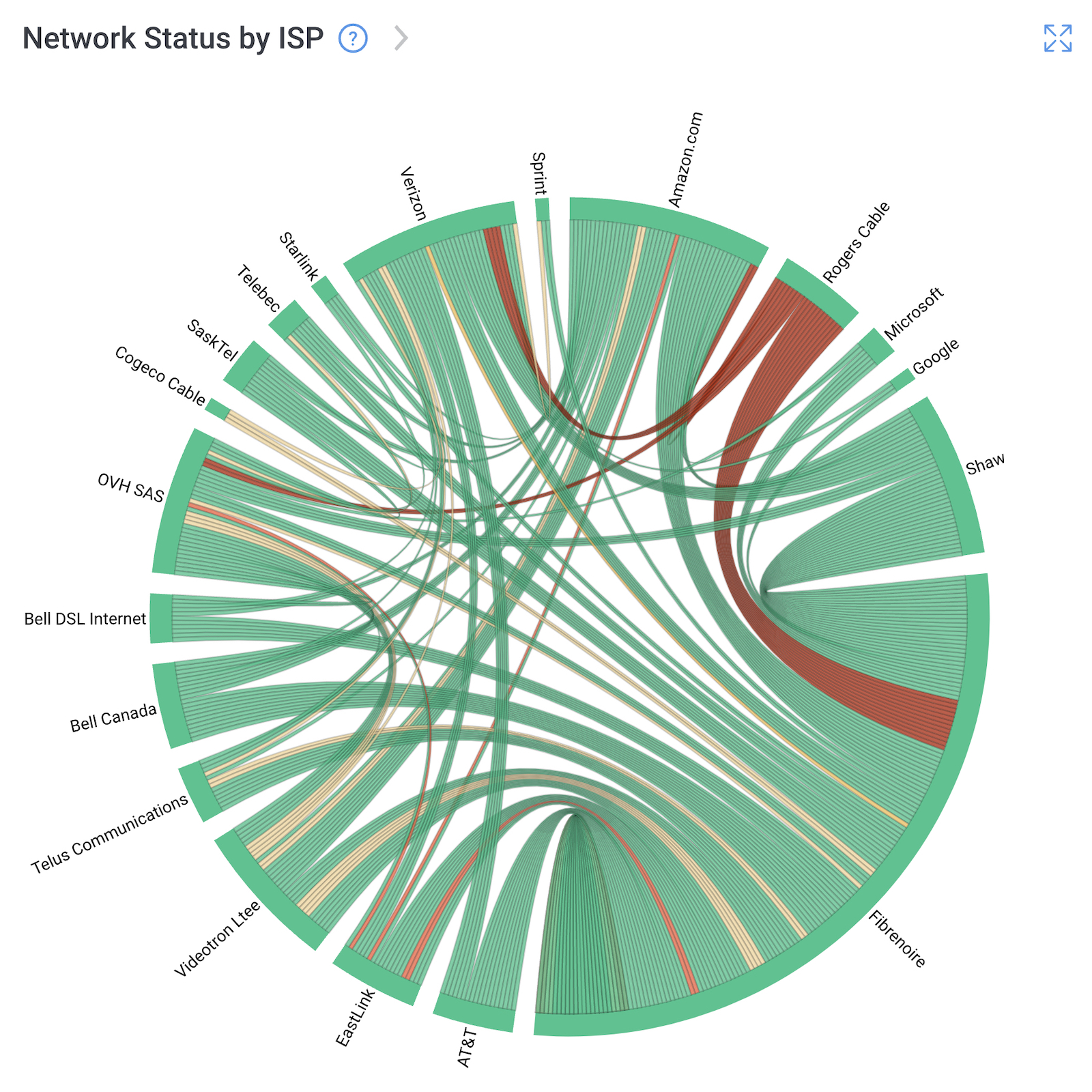
- Aggregate Performance by ISP: Collect and group network performance data by internet service provider to see which ones consistently deliver better results
- Compare Across Regions: Identify which ISPs perform best in specific geographic areas where you have remote workers concentrated
- Track Reliability Patterns: Monitor uptime, outage frequency, and time-of-day performance consistency across different providers, not just advertised speeds
- Benchmark Real-World Performance: See which ISPs actually deliver their promised speeds versus which ones throttle, have poor routing, or suffer frequent congestion
- Guide ISP Selection: Give confident, data-backed recommendations when employees ask which internet provider to choose or consider switching
- Evaluate Plan Tiers: Determine whether premium ISP plans actually deliver better performance or if standard plans work just as well, avoiding unnecessary costs
Historical data reveals which ISPs have frequent outages or throttling issues. Not one-time incidents. Patterns over weeks and months that show reliability trends.
How Remote Network Monitoring Works with Obkio
You've seen the benefits, now here's how remote network monitoring actually works in practice.
Obkio's approach to Remote Network Monitoring is straightforward: deploy lightweight agents to user devices, run continuous tests from their perspective, and monitor everything from a centralized dashboard.
The entire deployment process takes minutes per device, and you'll start seeing real-time performance data immediately.


Here's a quick breakdown.
Step 1: Deploy Remote Agents to Remote Worker Devices
Obkio's Monitoring Agent runs on Windows, macOS, and Linux. Install on laptops, desktops, or any endpoint device. The agent is coded in Golang for maximum efficiency and minimal performance impact.
Deploy individually for small teams or use Silent Deployment for mass rollout. Push agents to hundreds of remote workers using your existing deployment tools. No asking users to manually install software.
The agent runs transparently in the background. Users won't notice it's there. No performance impact, no intrusive popups, just quiet data collection.
Step 2: Continuously Test Performance from the Remote User's Perspective
Once deployed, agents continuously test network performance using synthetic traffic. This means tests run 24/7, even during periods of low actual user traffic. You catch issues proactively, not just when users are actively working.
- Network Destinations: ICMP monitoring to any IP address from each remote worker's location. Configure destinations for corporate resources, cloud services, SaaS applications. Monitor the complete path with continuous traceroutes showing hop-by-hop performance.
- Speed Tests: Run on-demand or scheduled bandwidth tests to validate ISP performance. Compare actual speeds against SLA promises. Set minimum thresholds based on user roles: support teams need solid upload for screen sharing, developers need fast downloads for builds.
- Application Monitoring: Test web applications and services. Track response times, availability, and performance from the user's exact location.
- Microsoft Teams/UC Monitoring: Assess call quality using synthetic tests. Monitor jitter, packet loss, and latency specifically for voice/video traffic.
- Device Monitoring: Track the remote worker's device health: CPU usage, memory, disk space, network card performance. Quickly identify when "the network is slow" is actually "they have 2% disk space left and 98% CPU usage."
Step 3: Organize and Analyze Your Data From a Centralized Dashboard
All performance data flows into Obkio's centralized dashboard. See every remote worker's status at a glance. Compare performance across users, regions, and ISPs. Drill down into specific users for detailed troubleshooting.
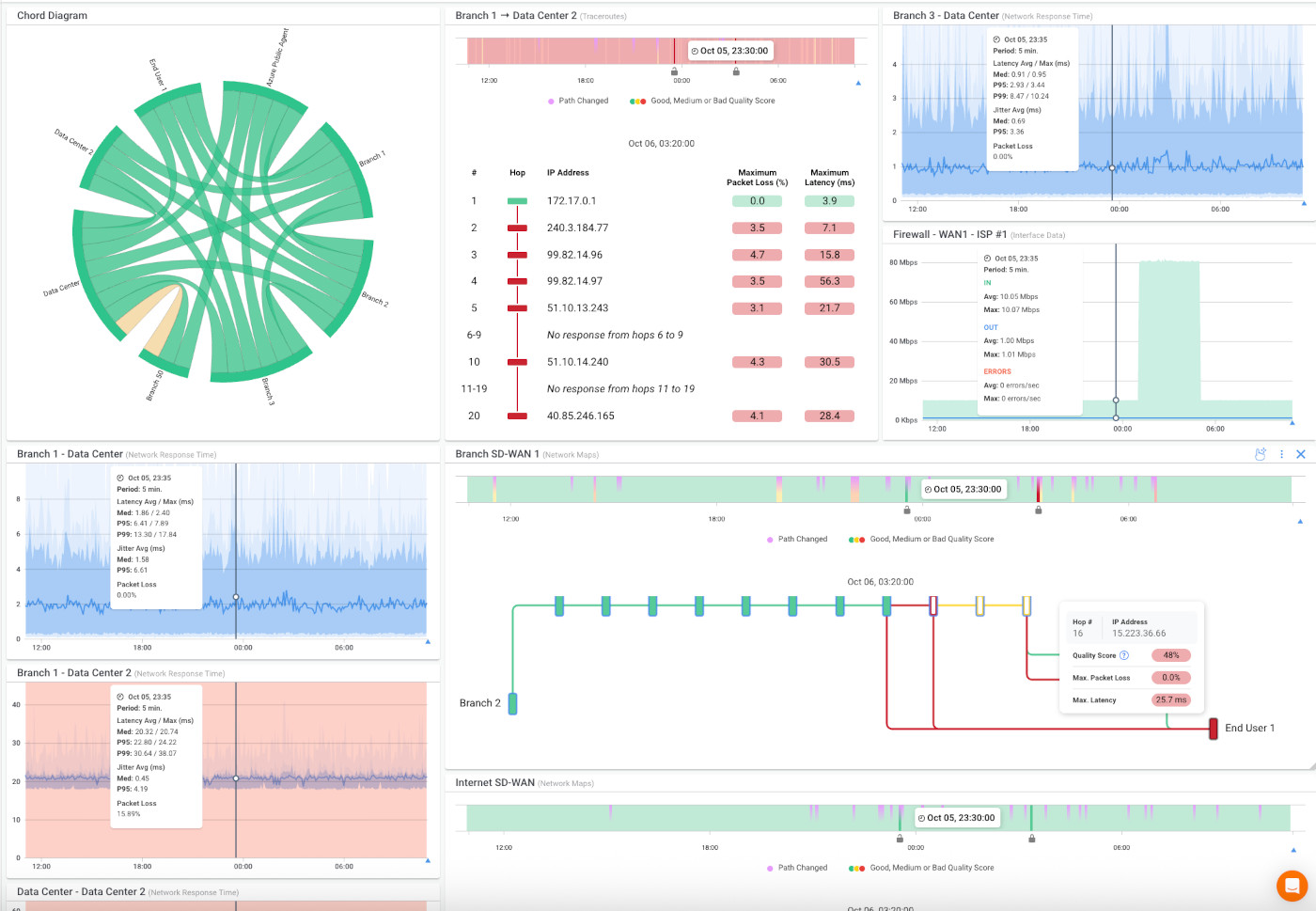
- Visual Traceroutes: See the complete network path with hop-by-hop diagnostics. Identify exactly where performance degrades: home router, ISP infrastructure, peering points, or corporate network.
- Custom Alerts: Configure performance thresholds and notification rules. Get alerts when latency exceeds acceptable levels, packet loss impacts quality, or connections drop.
- Historical Reporting: Track trends over time. Identify patterns. Build business cases for infrastructure improvements with concrete data. Included in the Remote Users Plan.
This approach gives you complete visibility into networks you don't control, from endpoints you can't physically access, with data that's actually actionable.
Conclusion: Remote Work Isn't Going Away so Your Network Monitoring Needs to Evolve
Traditional monitoring tools leave a critical gap for distributed workforces. They were built for data centers and corporate offices, not home networks and coffee shops. That gap costs your organization in lost productivity, frustrated users, and IT teams troubleshooting blind.
Remote network monitoring fills that gap. Monitor from the user's perspective. See the complete path. Identify issues proactively. Troubleshoot with actual data instead of user descriptions.
IT teams deserve visibility into the networks they're responsible for supporting, even when they don't control them. That's what remote network monitoring delivers.
Obkio's Remote Users Plan is built specifically for this challenge. Purpose-built for distributed workforces. Scalable from 50 to 200+ users. Deployed in minutes. Monitoring starts immediately.

- Continuous network performance monitoring from the user's perspective
- Centralized troubleshooting for all remote locations
- Microsoft Teams/Zoom/VoIP quality monitoring
- Visual traceroutes and network path analysis
- Device health monitoring (CPU, memory, disk space)
- Speed tests to validate ISP performance
- All Basic plan features plus Reporting


